

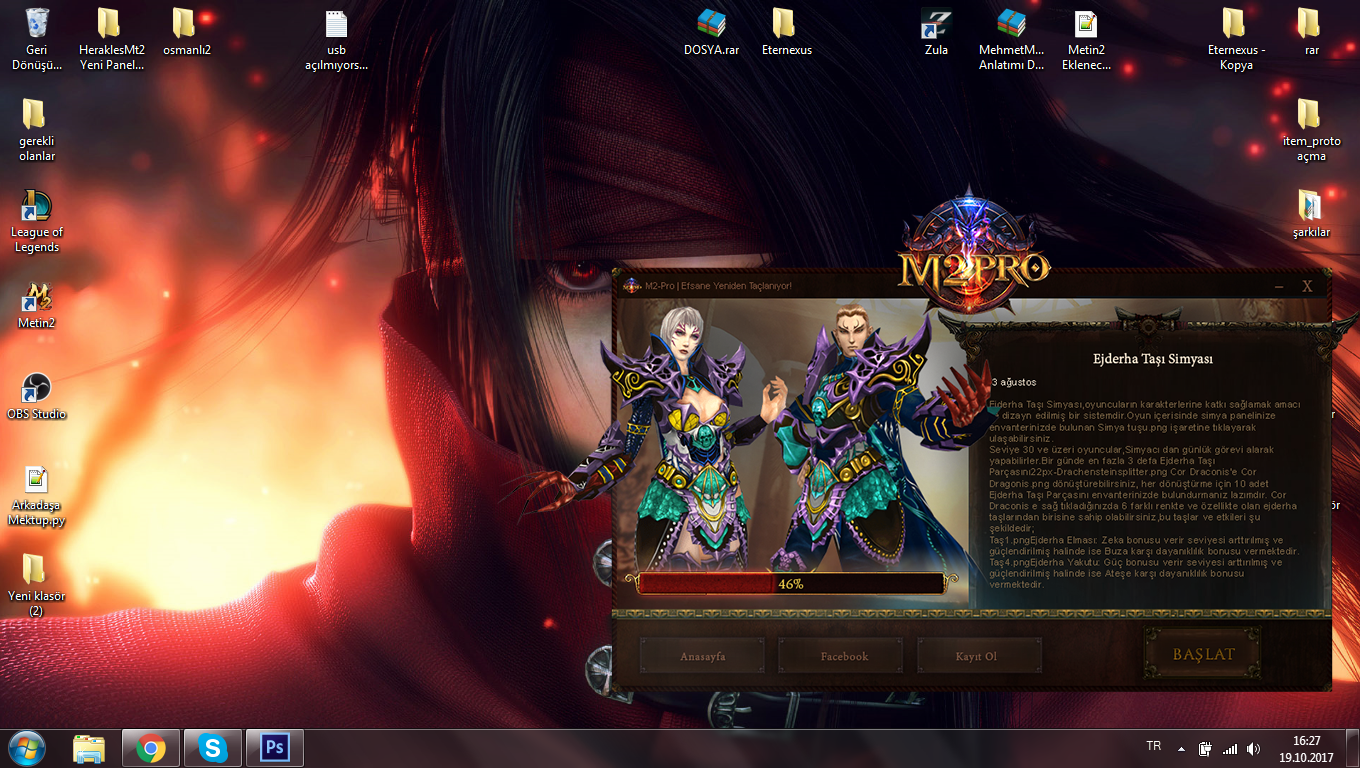
Merhaba Arkadaşlar Yeni Açılan M2-Pro serverindeki AutoPatcher sizlerle paylaşıyorum Sorunsuz Çalışmaktadır Dosyalarla Fazla Oynamadım Siz İstediğini gibi Düzenleye bilirsiniz
İNDİRME LİNKLERİ
Metin2 oyuncuları ve server sahipleri için en büyük zorluklardan biri, client dosyalarını güncel tutmaktır. Özellikle sık sık yapılan yamalar, güncellemeler ve özelleştirmeler nedeniyle manuel olarak her şeyi tek tek düzeltmek zaman alıcı ve hataya açık bir süreç haline gelir. İşte bu noktada devreye M2-Pro AutoPatcher + PSD giriyor!
M2-Pro AutoPatcher Nedir?
M2-Pro AutoPatcher, Metin2 client’larınızı otomatik olarak yama ve güncelleme işlemlerinden geçiren, kullanıcı dostu bir araçtır. Artık client’ınıza yeni bir özellik eklemek veya hata düzeltmeleri yapmak için binlerce dosyayı elle kontrol etmek zorunda değilsiniz. Bu yamalama aracı, özellikle PVP client'ları, özel client'lar ve custom texture paketleriyle çalışan sunucular için hayati öneme sahiptir.
PSD Dosyaları ile Özelleştirme Artık Çok Kolay!
M2-Pro AutoPatcher ile birlikte gelen PSD dosyaları, client arayüzünüzü (UI) tamamen kendi zevkinize göre şekillendirmenizi sağlar. Login ekranı, inventory tasarımı, skill bar’lar, minimap gibi tüm görsel elementler Adobe Photoshop formatında sunuluyor. Bu sayede grafik tasarımcılar veya amatörler bile kolayca client skin veya texture paketi oluşturabilir.
Neden M2-Pro AutoPatcher + PSD?
 Otomatik yama sistemi: Manuel dosya değişikliklerine gerek kalmadan client’ınız anında güncel kalır.
PSD ile tam kontrol: Arayüz tasarımınızı istediğiniz gibi özelleştirebilirsiniz.
Hızlı kurulum: Sadece birkaç tıklama ile client’ınıza yeni bir paket yükleyebilirsiniz.
PVP odaklı optimizasyon: Özellikle PVP severler için optimize edilmiş efektler ve performans ayarları.
Hata düzeltme modülü: Sıkça karşılaşılan client hatalarını otomatik olarak tespit eder ve düzeltir.
Nasıl Kullanılır?
1. metin2lobby.com adresinden M2-Pro AutoPatcher + PSD paketini indirin.
2. Paketi çalıştırın ve client klasörünüzü seçin.
3. Otomatik yama işlemi başlar; tüm güncellemeler tek bir tuşla uygulanır.
4. PSD dosyalarını Photoshop ile açarak arayüzünüzü özelleştirin.
5. Değişiklikleri kaydedip client’a entegre edin – işte bu kadar!
Güvenlik ve Uyumluluk
M2-Pro AutoPatcher, tüm Metin2 client türleriyle uyumludur: eterpack, custom client, dev client gibi. Ayrıca virüs taramasından geçmiş, tamamen güvenli bir yapıya sahiptir. Dikkat: Yalnızca güvenilir kaynaklardan indirdiğinizden emin olun. metin2lobby.com, bu tür içerikler için en güvenilir adrestir.
Sonuç
Metin2 client yönetimi artık eskisi kadar zor değil! M2-Pro AutoPatcher + PSD ile hem zaman kazanırsınız hem de client’ınızı profesyonel seviyede özelleştirebilirsiniz. Hem PVP hem de roleplay sunucuları için ideal bir çözümdür. Hemen indirip deneyin ve farkı görün!
One of the biggest challenges for Metin2 players and server owners is keeping client files up to date. Especially due to frequent patches, updates, and customizations, manually fixing everything one by one becomes a time-consuming and error-prone process. This is where M2-Pro AutoPatcher + PSD comes into play!
What Is M2-Pro AutoPatcher?
M2-Pro AutoPatcher is a user-friendly tool that automatically applies patches and updates to your Metin2 clients. You no longer need to manually check thousands of files to add new features or fix bugs. This patching tool is vital for servers working with PVP clients, custom clients, and custom texture packs.
Customization Made Easy with PSD Files!
The PSD files included with M2-Pro AutoPatcher allow you to fully customize your client interface (UI) according to your preferences. All visual elements—such as the login screen, inventory design, skill bars, and minimap—are provided in Adobe Photoshop format. This enables both professional graphic designers and amateurs to easily create client skins or texture packs.
Why Choose M2-Pro AutoPatcher + PSD?
Automatic patching system: Your client stays instantly updated without manual file edits.
Full control via PSD: Customize your interface design exactly as you wish.
Fast installation: Install new packs to your client with just a few clicks.
PVP-optimized performance: Effects and performance settings optimized specifically for PVP enthusiasts.
Error correction module: Automatically detects and fixes common client errors.
How to Use It?
1. Download the M2-Pro AutoPatcher + PSD package from metin2lobby.com.
2. Run the package and select your client folder.
3. The automatic patching process begins; all updates are applied with a single click.
4. Open the PSD files in Photoshop to customize your interface.
5. Save your changes and integrate them into the client – that's it!
Security and Compatibility
M2-Pro AutoPatcher is compatible with all Metin2 client types: eterpack, custom client, dev client, and more. It has also passed virus scans and is completely safe. Warning: Always ensure you download only from trusted sources. metin2lobby.com is the most reliable site for such content.
Conclusion
Managing Metin2 clients is no longer as difficult as before! With M2-Pro AutoPatcher + PSD, you save time and can professionally customize your client. It’s an ideal solution for both PVP and roleplay servers. Download and try it now to see the difference!
İNDİRME LİNKLERİ
Ziyaretçiler için gizlenmiş link,görmek için üye olmalısınız!
Giriş yap veya üye ol.
Ziyaretçiler için gizlenmiş link,görmek için üye olmalısınız!
Giriş yap veya üye ol.
Ziyaretçiler için gizlenmiş link,görmek için üye olmalısınız!
Giriş yap veya üye ol.
M2-Pro AutoPatcher + PSD ile Metin2 Client'ınızı Kolayca Güncelleyin!
Metin2 oyuncuları ve server sahipleri için en büyük zorluklardan biri, client dosyalarını güncel tutmaktır. Özellikle sık sık yapılan yamalar, güncellemeler ve özelleştirmeler nedeniyle manuel olarak her şeyi tek tek düzeltmek zaman alıcı ve hataya açık bir süreç haline gelir. İşte bu noktada devreye M2-Pro AutoPatcher + PSD giriyor!
M2-Pro AutoPatcher Nedir?
M2-Pro AutoPatcher, Metin2 client’larınızı otomatik olarak yama ve güncelleme işlemlerinden geçiren, kullanıcı dostu bir araçtır. Artık client’ınıza yeni bir özellik eklemek veya hata düzeltmeleri yapmak için binlerce dosyayı elle kontrol etmek zorunda değilsiniz. Bu yamalama aracı, özellikle PVP client'ları, özel client'lar ve custom texture paketleriyle çalışan sunucular için hayati öneme sahiptir.
PSD Dosyaları ile Özelleştirme Artık Çok Kolay!
M2-Pro AutoPatcher ile birlikte gelen PSD dosyaları, client arayüzünüzü (UI) tamamen kendi zevkinize göre şekillendirmenizi sağlar. Login ekranı, inventory tasarımı, skill bar’lar, minimap gibi tüm görsel elementler Adobe Photoshop formatında sunuluyor. Bu sayede grafik tasarımcılar veya amatörler bile kolayca client skin veya texture paketi oluşturabilir.
Neden M2-Pro AutoPatcher + PSD?
Otomatik yama sistemi: Manuel dosya değişikliklerine gerek kalmadan client’ınız anında güncel kalır. PSD ile tam kontrol: Arayüz tasarımınızı istediğiniz gibi özelleştirebilirsiniz. Hızlı kurulum: Sadece birkaç tıklama ile client’ınıza yeni bir paket yükleyebilirsiniz. PVP odaklı optimizasyon: Özellikle PVP severler için optimize edilmiş efektler ve performans ayarları. Hata düzeltme modülü: Sıkça karşılaşılan client hatalarını otomatik olarak tespit eder ve düzeltir.Nasıl Kullanılır?
1. metin2lobby.com adresinden M2-Pro AutoPatcher + PSD paketini indirin.
2. Paketi çalıştırın ve client klasörünüzü seçin.
3. Otomatik yama işlemi başlar; tüm güncellemeler tek bir tuşla uygulanır.
4. PSD dosyalarını Photoshop ile açarak arayüzünüzü özelleştirin.
5. Değişiklikleri kaydedip client’a entegre edin – işte bu kadar!
Güvenlik ve Uyumluluk
M2-Pro AutoPatcher, tüm Metin2 client türleriyle uyumludur: eterpack, custom client, dev client gibi. Ayrıca virüs taramasından geçmiş, tamamen güvenli bir yapıya sahiptir. Dikkat: Yalnızca güvenilir kaynaklardan indirdiğinizden emin olun. metin2lobby.com, bu tür içerikler için en güvenilir adrestir.
Sonuç
Metin2 client yönetimi artık eskisi kadar zor değil! M2-Pro AutoPatcher + PSD ile hem zaman kazanırsınız hem de client’ınızı profesyonel seviyede özelleştirebilirsiniz. Hem PVP hem de roleplay sunucuları için ideal bir çözümdür. Hemen indirip deneyin ve farkı görün!
Update Your Metin2 Client Easily with M2-Pro AutoPatcher + PSD!
One of the biggest challenges for Metin2 players and server owners is keeping client files up to date. Especially due to frequent patches, updates, and customizations, manually fixing everything one by one becomes a time-consuming and error-prone process. This is where M2-Pro AutoPatcher + PSD comes into play!
What Is M2-Pro AutoPatcher?
M2-Pro AutoPatcher is a user-friendly tool that automatically applies patches and updates to your Metin2 clients. You no longer need to manually check thousands of files to add new features or fix bugs. This patching tool is vital for servers working with PVP clients, custom clients, and custom texture packs.
Customization Made Easy with PSD Files!
The PSD files included with M2-Pro AutoPatcher allow you to fully customize your client interface (UI) according to your preferences. All visual elements—such as the login screen, inventory design, skill bars, and minimap—are provided in Adobe Photoshop format. This enables both professional graphic designers and amateurs to easily create client skins or texture packs.
Why Choose M2-Pro AutoPatcher + PSD?
Automatic patching system: Your client stays instantly updated without manual file edits. Full control via PSD: Customize your interface design exactly as you wish. Fast installation: Install new packs to your client with just a few clicks. PVP-optimized performance: Effects and performance settings optimized specifically for PVP enthusiasts. Error correction module: Automatically detects and fixes common client errors.How to Use It?
1. Download the M2-Pro AutoPatcher + PSD package from metin2lobby.com.
2. Run the package and select your client folder.
3. The automatic patching process begins; all updates are applied with a single click.
4. Open the PSD files in Photoshop to customize your interface.
5. Save your changes and integrate them into the client – that's it!
Security and Compatibility
M2-Pro AutoPatcher is compatible with all Metin2 client types: eterpack, custom client, dev client, and more. It has also passed virus scans and is completely safe. Warning: Always ensure you download only from trusted sources. metin2lobby.com is the most reliable site for such content.
Conclusion
Managing Metin2 clients is no longer as difficult as before! With M2-Pro AutoPatcher + PSD, you save time and can professionally customize your client. It’s an ideal solution for both PVP and roleplay servers. Download and try it now to see the difference!
