

Ziyaretçiler için gizlenmiş link,görmek için üye olmalısınız!
Giriş yap veya üye ol.
Ziyaretçiler için gizlenmiş link,görmek için üye olmalısınız!
Giriş yap veya üye ol.
Metin2 Lobby'da Mantar Kaya Bossu ile 3D Modelleme ve Oyun Deneyimi
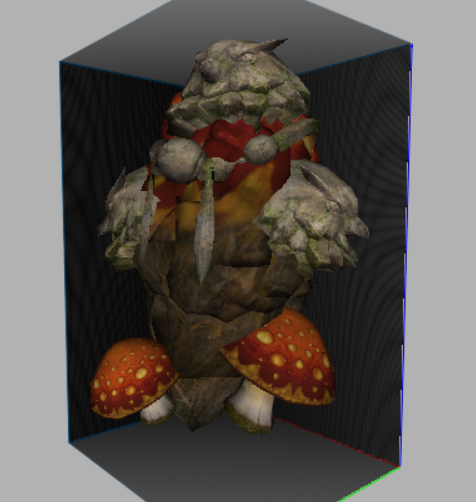
Metin2 oyununda Mantar Kaya Bossu, oyuncuların karşılaştığı zorlu düşmanlardan biridir. Bu boss karakteri, hem görsel açıdan dikkat çeker hem de oyun içinde stratejik önem taşır. Aynı zamanda Metin2 3D modelleme tutkunları için de özel bir yere sahiptir. Bu yazıda, Mantar Kaya Bossu'nun Metin2 NPC model olarak tasarımı, monster model kategorisindeki yeri, 3D modelleme süreci ve Metin2 3D model dünyasında nasıl kullanılabileceği üzerine odaklanacağız.
Mantar Kaya Bossu Nedir?
Mantar Kaya Bossu, Metin2 oyununun Mantar Vadisi gibi doğal ve gizemli bölgelerinde rastlanan güçlü bir canavar türüdür. Bu boss, genellikle yüksek hasar ve dayanıklılık ile bilinir. Oyuncuların seviye atlamaları ve güçlenmeleri için önemli bir referans noktasıdır. Metin2 monster model dünyasında da oldukça popülerdir çünkü karakter yapısı, görsel detaylar ve animasyonları açısından zengindir.
3D Modelleme Sürecinde Mantar Kaya Bossu
Metin2 3D modelleme süreçlerinde Mantar Kaya Bossu gibi karakterlerin modellenmesi, hem teknik hem de sanatsal beceriler gerektirir. Bu tür modeller genellikle 3ds Max veya Blender gibi yazılımlarla oluşturulur. Metin2 GR2 formatında dışa aktarma ve içe alma işlemleri, modelin oyun içi sistemlere entegre edilmesi için kritiktir.
UV Mapping ve Doku Tasarımı
Metin2 texture ve skin süreçleri, Mantar Kaya Bossu modeli için hayati öneme sahiptir. Doğru UV mapping sayesinde doku hataları önlenir ve görsel kalite artırılır. Metin2 UV map süreçleri, modelin detaylandırılmasında büyük rol oynar. Renk uyumu, gölgeleme ve dokular, boss karakterinin daha gerçekçi ve etkileyici görünmesini sağlar.
Rigging ve Animasyon
Metin2 bone ve rigging işlemleri, Mantar Kaya Bossu gibi karakterlerin hareket kabiliyetini kazanmasını sağlar. Bu işlem, animation süreçleri için temel teşkil eder. Metin2 animation dosyalarının doğru entegrasyonu ile boss karakteri, oyun içinde akıcı ve etkileyici hareketler sergiler. Bu da hem oyun deneyimini artırır hem de 3D modelleme meraklıları için bir öğrenme alanıdır.
Model Değiştirme ve Özelleştirme
Metin2 model replace ve custom model işlemlerinde Mantar Kaya Bossu sıklıkla tercih edilir. Dikkat: Bu tür işlemler sırasında GR2 ve Granny3D formatları dikkatle kullanılmalıdır. Gr2 export ve gr2 import süreçlerinde hata yapılmaması gerekir. Aksi takdirde oyun içinde model bozulabilir veya çalışmaz.
Metin2 Lobby'da Paylaşım ve Gelişim
Metin2 Lobby, Metin2 3D modelleme meraklıları için harika bir platformdur. Mantar Kaya Bossu gibi modellerin paylaşılması, geliştirilmesi ve topluluk tarafından değerlendirilmesi burada gerçekleşir. Metin2 visual mod, graphic mod ve effect model gibi konular da bu platformda aktif olarak tartışılır.
Sonuç
Mantar Kaya Bossu, hem oyun içinde hem de Metin2 3D model dünyasında önemli bir yere sahiptir. Monster model, texture, animation, rigging gibi pek çok alanda örnek alınabilecek bir yapıya sahiptir. Metin2 Lobby ile bu tür modeller üzerinde çalışan geliştiriciler, bilgi alışverişinde bulunabilir ve projelerini paylaşabilirler.
Mushroom Rock Boss in Metin2 Lobby with 3D Modeling and Game Experience
Metin2 game's Mushroom Rock Boss is one of the challenging enemies that players encounter. This boss character is visually striking and strategically important within the game. Additionally, it holds special significance for Metin2 3D modeling enthusiasts. In this article, we will focus on the design of Mushroom Rock Boss as a Metin2 NPC model, its place in the monster model category, its 3D modeling process, and how it can be utilized in the world of Metin2 3D models.
What is Mushroom Rock Boss?
Mushroom Rock Boss is a powerful monster type encountered in natural and mysterious areas like Mushroom Valley in Metin2. Known for high damage and durability, this boss serves as an important reference point for players looking to level up and grow stronger. Within Metin2 monster model communities, it is also popular due to its rich character structure, visual details, and animations.
Mushroom Rock Boss in the 3D Modeling Process
The modeling of characters like Mushroom Rock Boss during Metin2 3D modeling processes requires both technical and artistic skills. These types of models are generally created using software such as 3ds Max or Blender. Exporting and importing processes in Metin2 GR2 format are critical for integrating the model into in-game systems.
UV Mapping and Texture Design
Metin2 texture and skin processes are vital for the Mushroom Rock Boss model. Correct UV mapping prevents texture errors and increases visual quality. Metin2 UV map processes play a major role in detailing the model. Color harmony, shading, and textures make the boss character appear more realistic and impactful.
Rigging and Animation
Metin2 bone and rigging processes allow characters like Mushroom Rock Boss to gain movement capabilities. This step forms the basis for animation processes. With correct integration of Metin2 animation files, the boss character performs fluid and impressive movements within the game. This enhances the gaming experience and provides a learning opportunity for 3D modeling enthusiasts.
Model Replacement and Customization
Metin2 model replace and custom model operations often feature Mushroom Rock Boss. Attention: During such operations, GR2 and Granny3D formats must be used carefully. Errors in Gr2 export and gr2 import processes may cause the model to break or fail to function within the game.
Sharing and Development on Metin2 Lobby
Metin2 Lobby is an excellent platform for Metin2 3D modeling enthusiasts. Sharing, developing, and evaluating models like Mushroom Rock Boss happens here. Topics such as Metin2 visual mod, graphic mod, and effect model are actively discussed on this platform.
Conclusion
Mushroom Rock Boss holds significant importance both within the game and in the Metin2 3D model world. It features a structure that can serve as a reference in various fields like monster model, texture, animation, and rigging. On Metin2 Lobby, developers working on such models can exchange knowledge and share their projects.
