

Forumdaki Konuları Kontrol Ettim Hangi Konuya Bakarsam Bakayım
Hepsi İtem Koduna Göre Eklemeyi Anlatmış
Bu Anlattığım Şekilde Kod Algılamadan Direk Bütün İtemlere Eklenecektir.
Hepsi İtem Koduna Göre Eklemeyi Anlatmış
Bu Anlattığım Şekilde Kod Algılamadan Direk Bütün İtemlere Eklenecektir.
Ziyaretçiler için gizlenmiş link,görmek için üye olmalısınız!
Giriş yap veya üye ol.
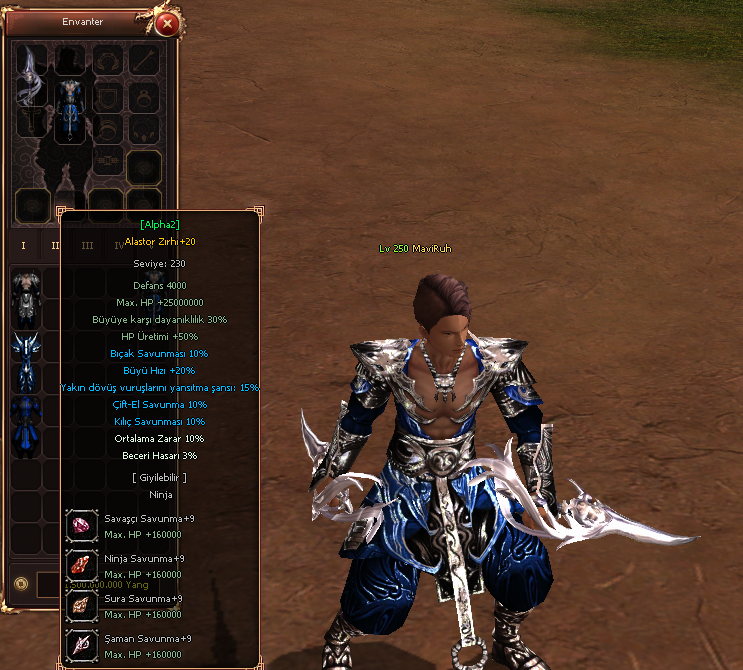
For
Ziyaretçiler için gizlenmiş link,görmek için üye olmalısınız!
Giriş yap veya üye ol.
,
Ziyaretçiler için gizlenmiş link,görmek için üye olmalısınız!
Giriş yap veya üye ol.
,
Ziyaretçiler için gizlenmiş link,görmek için üye olmalısınız!
Giriş yap veya üye ol.
,
Ziyaretçiler için gizlenmiş link,görmek için üye olmalısınız!
Giriş yap veya üye ol.
,
Ziyaretçiler için gizlenmiş link,görmek için üye olmalısınız!
Giriş yap veya üye ol.
Kanıt İçin Teşekkürler
Metin2 Lobby'da Mavi Ruh - Bütün İtemlere Server İsmini Yazma (Python)
Metin2 özel sunucularında geliştirme yaparken bazı estetik veya güvenlik amaçlı değişiklikler yapmak isteyebilirsiniz. Bunlardan birisi de oyuncuların envanterindeki eşyalara sunucu adının otomatik olarak eklenmesidir. Bu işlem özellikle Mavi Ruh gibi özel item setlerinde daha kolay tanınabilirlik sağlar. Bu makalede, Python tabanlı bir yöntemle tüm itemlere server isminin nasıl yazılacağını detaylıca ele alacağız.
Neden Server İsmi Eklemek İstersiniz?
Sunucu isminin itemlere eklenmesi birkaç fayda sağlar:
- Sunucunuzdaki itemlerin diğer sunuculardan ayrılmasını sağlar.
- Oyuncuların itemlerin nereden geldiğini kolayca anlayabilmesini sağlar.
- Sunucunuzun marka bilincini artırır.
Python Kullanımı ile Uygulama
Python, Metin2 geliştirme süreçlerinde sıklıkla kullanılan bir dildir. Özellikle GUI arayüzlerin oluşturulması, config dosyalarının düzenlenmesi ve item verilerinin işlenmesinde tercih edilir. Bu işlem için basit bir Python betiği yazarak, item_proto dosyasındaki her bir itemin adının sonuna server isminizi ekleyebilirsiniz.
Önemli Not: Bu işlemi yapmadan önce item_proto dosyanızın yedeğini almanız şiddetle önerilir. Aksi takdirde veri kaybı yaşayabilirsiniz.
Python Betiği Örneği
Aşağıda örnek bir Python betiği verilmiştir. Bu betik, mevcut item_proto dosyasını okur ve her bir item ismine (LobbyServer) gibi bir ek getirerek yeni bir dosya oluşturur:
with open('item_proto_original.txt', 'r', encoding='utf-8') as file:
content = file.read()
items = content.splitlines()
new_items = [*] for item in items:
parts = item.split('')
if len(parts) > 2:
parts[2] = parts[2] + ' (LobbyServer)'
new_line = ''.join(parts)
new_items.append(new_line)
else:
new_items.append(item)
with open('item_proto_modified.txt', 'w', encoding='utf-8') as output_file:
output_file.write(' '.join(new_items))
Not: Bu betik sadece örnek niteliğindedir. Gerçek item_proto dosyanızdaki yapıya göre düzenlemeniz gerekir.
Mavi Ruh İtemlerine Özel İşlem
Mavi Ruh gibi özel item setlerinde, bu işlemi daha kontrollü yapmak isteyebilirsiniz. Örneğin sadece Mavi Ruh itemlerine sunucu adı eklemek için betiğinize bir filtre koyabilirsiniz:
if 'Mavi Ruh' in parts[2]:
parts[2] = parts[2] + ' (LobbyServer)'
Bu şekilde, sadece belirli itemlere sunucu ismi eklenebilir.
Oyun İçinde Görüntü
Değişiklikleri yaptıktan sonra oyun içine baktığınızda, Mavi Ruh itemlerinin artık şu şekilde görüneceğini fark edeceksiniz:
'Mavi Ruh Kılıcı (LobbyServer)'
Yedek Almayı Unutmayın
Herhangi bir değişiklik yaparken, özellikle veritabanı veya item listesi gibi kritik dosyalarda yedek alınması büyük önem taşır. Bu sayede oluşabilecek hatalarda sisteminizi eski haline kolayca döndürebilirsiniz.
Sonuç
Python kullanarak Metin2 özel sunucularınızda item isimlerine server ismini eklemek oldukça kolaydır. Bu işlem hem marka bilinçliliğini artırır hem de sunucunuzu diğerlerinden ayırır. Geliştiriciler için basit bir scriptle sağlanabilen bu özellik, oyuncu deneyimini de olumlu yönde etkileyebilir. Dilerseniz Metin2Lobby üzerinden benzer gelişmiş sistemler hakkında daha fazla bilgiye ulaşabilirsiniz.
Metin2 Lobby - Adding Server Name to All Items (Python)
When developing private Metin2 servers, you may want to make some aesthetic or security-related modifications. One such modification is automatically adding your server name to the items in player inventories. This is especially useful for special item sets like Blue Soul, making them more recognizable. In this article, we will explain in detail how to add the server name to all items using a Python-based method.
Why Add a Server Name to Items?
Adding the server name to items offers several benefits:
- It helps distinguish your items from those on other servers.
- Players can easily identify where an item originated.
- It increases brand awareness for your server.
Using Python for Implementation
Python is frequently used in Metin2 development processes, especially for creating GUI interfaces, editing configuration files, and processing item data. With a simple Python script, you can append your server name to the end of each item's name in the item_proto file.
Important Note: Before performing this operation, it is highly recommended to create a backup of your item_proto file. Otherwise, you risk losing important data.
Sample Python Script
Below is an example Python script. This script reads the current item_proto file and adds a suffix like (LobbyServer) to each item name, then creates a new file:
with open('item_proto_original.txt', 'r', encoding='utf-8') as file:
content = file.read()
items = content.splitlines()
new_items = [*] for item in items:
parts = item.split('')
if len(parts) > 2:
parts[2] = parts[2] + ' (LobbyServer)'
new_line = ''.join(parts)
new_items.append(new_line)
else:
new_items.append(item)
with open('item_proto_modified.txt', 'w', encoding='utf-8') as output_file:
output_file.write(' '.join(new_items))
Note: This script is just an example. You must adjust it according to the actual structure of your item_proto file.
Custom Operation for Blue Soul Items
For special item sets like Blue Soul, you might prefer a more controlled approach. For example, you can add a filter to your script to only apply the server name to Blue Soul items:
if 'Blue Soul' in parts[2]:
parts[2] = parts[2] + ' (LobbyServer)'
This way, only certain items will receive the server name addition.
In-Game Appearance
After applying the changes, you'll notice that Blue Soul items now appear like so in-game:
'Blue Soul Sword (LobbyServer)'
Don't Forget to Backup
Whenever making changes, especially to critical files such as databases or item lists, backing up your files is of great importance. This allows you to easily revert your system in case of errors.
Conclusion
Adding a server name to item names in your private Metin2 server with Python is quite straightforward. This action not only enhances brand awareness but also distinguishes your server from others. This feature, which can be implemented easily with a simple script for developers, can positively affect the player experience. You can find more information about similar advanced systems via Metin2Lobby.
