

Bu Sorun Sadece Hançer Giyince Çıkıyordu
Sorunlu Hali
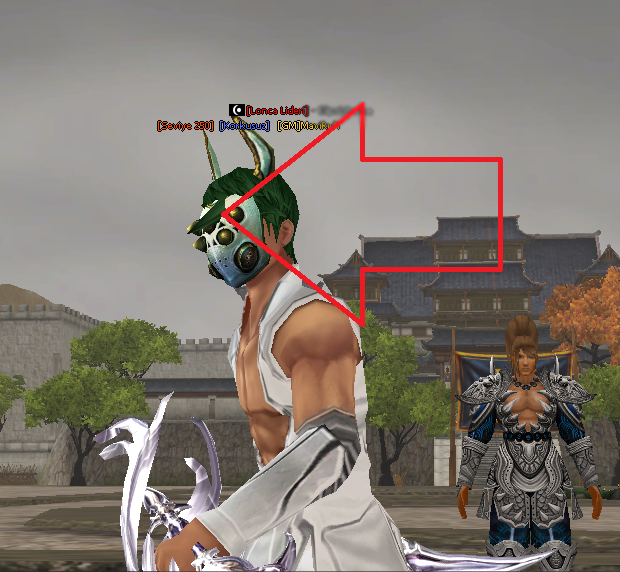
Sorunlu Hali
Sorunsuz Hali
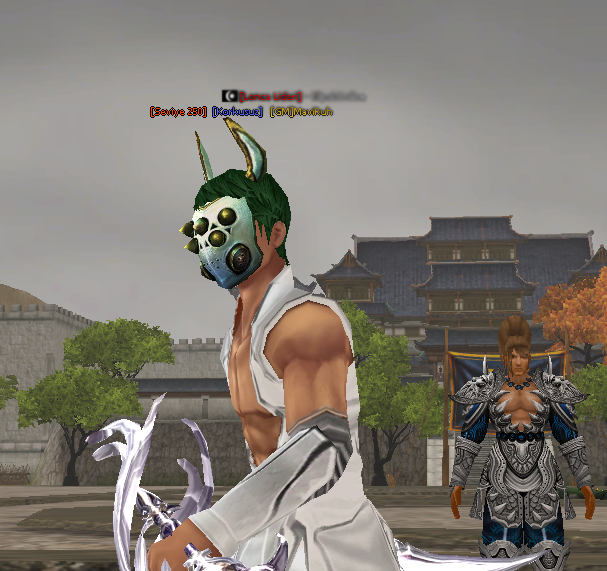
Ziyaretçiler için gizlenmiş link,görmek için üye olmalısınız!
Giriş yap veya üye ol.
Hayırlı Kullanımlar
Mavi Ruh - Ridack Kask Modeli Sorunu Fix
Metin2 Lobby olarak, Metin2 sunucularında yaygın olarak karşılaşılan Mavi Ruh ve Ridack kask modeli sorunlarını düzeltmek isteyen oyuncular için bu rehberi hazırladık. Bu sorun genellikle özel kask modelleri yüklendiğinde ortaya çıkar ve karakter görünümüne zarar verir. Bu yazıda, bu model hatalarının nasıl düzeltileceği konusunda detaylı bir rehber sunacağız.
Sorun Nedir?
Metin2 oyununda bazı özel kasklar, özellikle Mavi Ruh ve Ridack gibi modellenmiş mod kasklar, karakterin baş kısmında yer alan mesh veya UV haritası ile uyumlu çalışmadığı zaman kask modeli bozulabilir. Bu durumda, kask doğru konumda durmayabilir, eksik görünebilir veya karakterin başından tamamen ayrılmış gibi gözükebilir. Oyuncuların yaşadığı en büyük sorunlardan birisi de budur.
Sorunun Neden Kaynağı?
Bu sorun genellikle model dosyasının doğru bone yapısına sahip olmamasından kaynaklanır. Metin2’de karakterlerin kasklar gibi ekipmanları belirli kemiklere (bone) bağlanır. Eğer bu bone yapısı doğru değilse ya da kask modeli bu yapıya göre ayarlanmamışsa, kask karakterin kafasına doğru şekilde takılmaz. Ayrıca gr2 ya da granny3d formatında olan model dosyalarının, Metin2 motoruna uygun olarak dışa aktarılması gerekir.
Fix Nasıl Yapılır?
1. 3DS Max veya Blender gibi modelleme programlarında kask modelini açın.
2. Modelin UV haritasının doğru şekilde ayarlandığından emin olun.
3. Kask modelinin doğru bone yapısına sahip olduğundan emin olun. Bu genellikle 'Head' veya 'Bip01 Head' adlı bone'a bağlanmalıdır.
4. Modeli gr2 formatında dışa aktarırken Metin2'ye uyumlu bir dışa aktarma (export) eklentisi kullanın.
5. Oyun içine entegre edildiğinde modelin doğru konumda durup durmadığını kontrol edin.
Model Edit Araçları
Metin2 için model düzenleme işlemi yaparken Martysama, Metin2Dev veya diğer custom model araçlarını kullanabilirsiniz. Bu araçlar sayesinde gr2 dosyalarını kolayca düzenleyebilir, mesh ve texture hatalarını düzeltebilirsiniz. EterPack gibi sistemler de model yerleştirme işlemlerinde yardımcı olabilir.
Önemli Notlar
Her kask modeli farklı bir rigging yapısına sahip olabilir. Bu yüzden her model için test etmek önemlidir. Aynı zamanda animation uyumu da göz ardı edilmemelidir. Kask modeli hareket sırasında karakterin kafasından ayrılmıyorsa, bone bağlantısı doğrudur.
Sonuç
Mavi Ruh ve Ridack gibi özel kask modellerini düzgün şekilde kullanabilmek için modelin doğru bone ve mesh yapısına sahip olması şarttır. Bu rehber sayesinde karşılaştığınız model hatalarını kolayca düzeltebilirsiniz. Daha fazla Metin2 3D model ve visual mod içeriği için Metin2Lobby sitesini takip etmeyi unutmayın!
Blue Soul - Ridack Helmet Model Issue Fix
Metin2 Lobby presents this guide for players who encounter common issues with Blue Soul and Ridack helmet models on Metin2 servers. These problems often occur when custom helmet models are installed, affecting the character's appearance. In this article, we will provide a detailed guide on how to fix these model errors.
What Is The Problem?
In Metin2, certain custom helmets like Blue Soul and Ridack may not align properly with the character's head due to incorrect mesh or UV mapping. As a result, the helmet might appear misplaced, incomplete, or detached from the character’s head. This is one of the most common visual issues experienced by players.
What Causes The Issue?
The problem usually stems from the model file lacking the correct bone structure. In Metin2, equipment like helmets must be attached to specific bones, such as 'Head' or 'Bip01 Head'. If the bone structure is incorrect or the helmet model isn't adjusted accordingly, the helmet won’t attach properly to the character's head. Additionally, the gr2 or granny3d model files must be exported in accordance with the Metin2 engine standards.
How To Fix It?
1. Open the helmet model in modeling software like 3DS Max or Blender.
2. Ensure that the model’s UV mapping is set up correctly.
3. Verify that the helmet model has the correct bone structure, typically connected to 'Head' or 'Bip01 Head'.
4. When exporting the model in gr2 format, use an exporter plugin compatible with Metin2.
5. Test the model within the game to ensure it appears in the correct position.
Model Editing Tools
When editing Metin2 models, you can use tools such as Martysama, Metin2Dev, or other custom model utilities. These tools allow you to easily modify gr2 files and fix mesh and texture errors. Systems like EterPack can also assist with model integration processes.
Important Notes
Each helmet model may have different rigging structures, so testing each model individually is crucial. Also, animation compatibility should not be overlooked. If the helmet does not detach from the head during movement, the bone connection is correct.
Conclusion
To properly use custom helmets like Blue Soul and Ridack, it is essential that the model has the correct bone and mesh structure. With this guide, you can easily fix any model-related errors you encounter. For more Metin2 3D models and visual mods, don’t forget to follow Metin2Lobby.
