

Paylaşırken elim titredi  çok emeğim var iyi kullanımlar ,eksik objeleri Dcden (HyperX#6666) ulaşırsanız tamamlarız
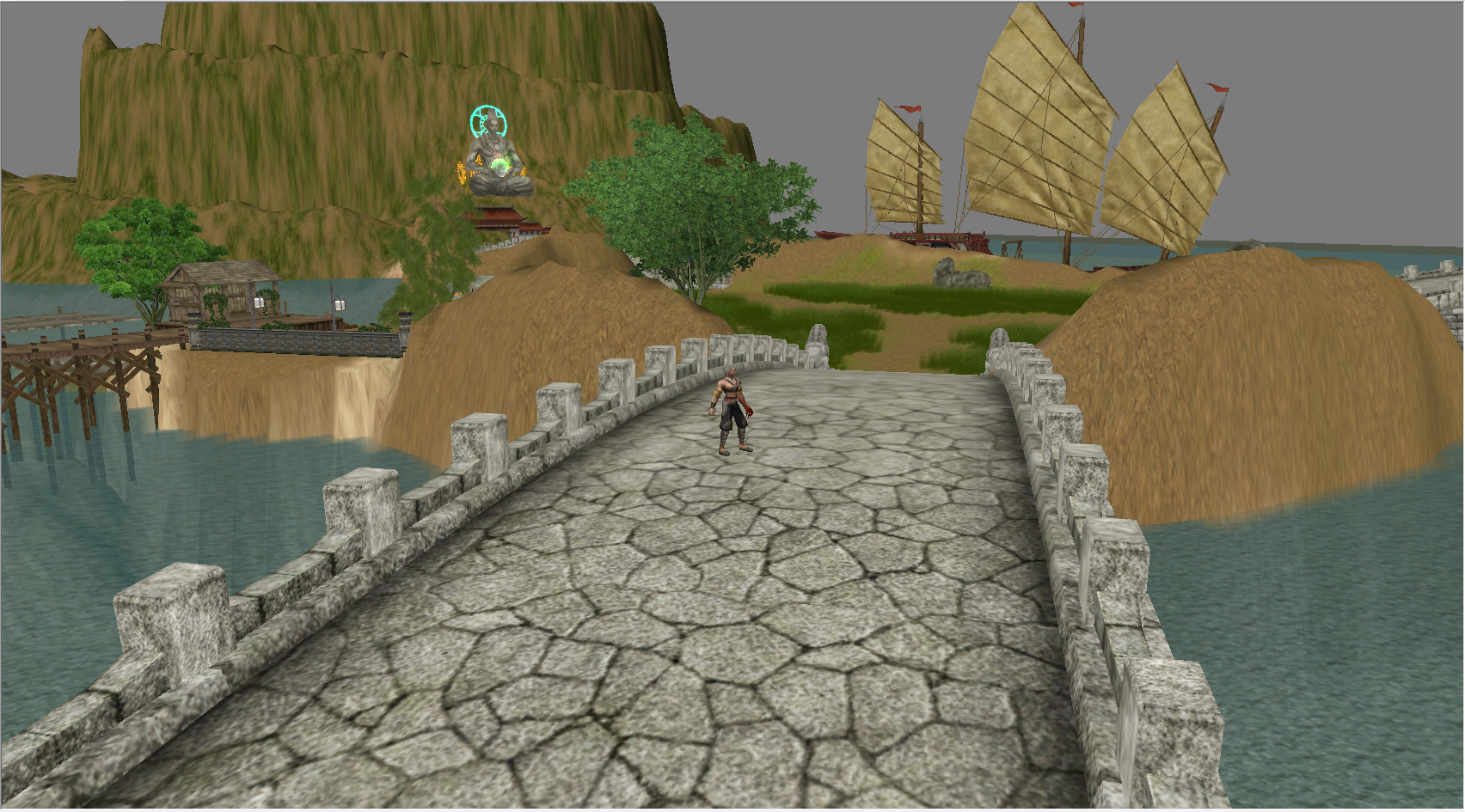
Metin Dağı: Metin2 3D Modelleme ve Görsel Geliştirme Rehberi
Metin2 Lobby olarak, Metin2 dünyasında 3D modelleme, görsel modlama ve özel içerik geliştirme konularında en kapsamlı kaynaklardan biri olmayı hedefliyoruz. Bu yazıda özellikle Metin Dağı gibi popüler sunuculara özel 3D modelleme tekniklerinden bahsedeceğiz. Metin2 oyununda karakter, NPC, canavar, eşya, harita nesneleri, efekt modelleri gibi pek çok öğe özel olarak yeniden tasarlanabilir. Bu yenilikler oyun deneyimini ciddi anlamda zenginleştirir.
Metin2 3D Modelleme Araçları
Metin2 için 3D modelleme yaparken en çok tercih edilen yazılımlar Blender ve 3ds Max'tır. Blender, ücretsiz olması ve güçlü eklentileriyle Metin2 geliştiricileri arasında oldukça popülerdir. 3ds Max ise profesyonel düzeyde daha kararlı bir platform sunar. Her iki yazılımda da GR2 formatını dışa aktarma veya içe alma işlemleri için uygun eklentiler mevcuttur. Granny3D (ya da kısaca GR2) formatı, Metin2’in eski ama hâlâ geçerli olan model formatıdır.
GR2 İçe/Çıkarma ve Format Dönüştürme
Metin2 model dosyaları genellikle .gr2 uzantılıdır. Bu dosyalar, modelin mesh, bone, animasyon ve UV haritalarını içerir. Bu formatla çalışabilmek için GR2 Exporter/Importer eklentileri kullanılır. Bu eklentiler Blender ve 3ds Max üzerinde çalışır. Eski model dosyalarını düzenlemek ya da yeni modeller oluşturmak için bu araçlar vazgeçilmezdir. Ayrıca, Martysama gibi gelişmiş model editörleri sayesinde doğrudan oyun içi dosyalar üzerinde değişiklik yapmak da mümkündür.
UV Mapping ve Doku (Texture) Uygulama
Her 3D modelin temel unsurlarından birisi de doku (texture) ve UV mapping’dir. Metin2’de karakterlerin, NPC’lerin, canavarların ve eşyaların görünümleri bu dokularla şekillenir. UV haritası doğru çizilmiş bir model, hem görsel açıdan daha estetiktir hem de animasyon sırasında bozulmaz. Metin2 texture ve skin dosyaları genellikle .dds formatındadır. Bu dosyaları doğru şekilde yerleştirmek ve optimize etmek, modelin oyun içi performansını da etkiler.
Animasyon ve Rigging
Metin2 modellerinin can alması için doğru bir şekilde rigging (iskeletleme) yapılması gerekir. Karakterlerin, canavarların ve NPC’lerin hareket edebilmesi için kemik yapıları (bone) tanımlanmalı ve animasyonlara uygun şekilde ayarlanmalıdır. Blender ve 3ds Max üzerinde bu işlem özel eklentilerle desteklenir. Metin2 animation dosyaları genellikle GR2 formatında gelir ve bu dosyalar üzerinde oynama yaparak özel animasyonlar yaratılabilir.
Harita ve Ortam Modelleri
Metin2 haritalarında bulunan binalar, zindanlar, çalılar, ağaçlar gibi nesnelerin hepsi özel olarak değiştirilebilir. Metin2 map model, building model, dungeon model gibi içerikler sunucu sahipleri tarafından özelleştirilerek oyun atmosferi farklılaştırılabilir. Terrain (zemin) modellemesi sayesinde harita yüzeyleri de daha gerçekçi hale getirilebilir. Bu modeller, hem estetik hem de oynanış açısından fark yaratır.
Model Değiştirme ve Görsel Modlar
Birçok Metin2 sunucusu, oyuncuları cezbetmek adına özel visual mod ve graphic mod sistemleri kullanır. Bu modlar, karakter, NPC, canavar, eşya gibi modellerin tamamını değiştirebilir. Metin2 model replace işlemleri, oyunun tamamına yayılmış özel içeriklerle daha modern bir görünüm kazandırabilir. Bunun için EterPack ve Metin2Dev gibi geliştirici toplulukları önemli referanslardır.
Sonuç
Metin2’de 3D modelleme, hem sanatsal hem de teknik bir beceridir. Doğru araçlar, bilgi ve yaratıcılıkla Metin Dağı gibi sunucular için özgün ve kaliteli içerikler üretmek mümkündür. Metin2 Lobby olarak bizler, bu alanda geliştirme yapmak isteyen herkese rehberlik etmeye devam edeceğiz.
Metin Forest: A Guide to Metin2 3D Modeling and Visual Enhancement
Metin2 Lobby aims to be one of the most comprehensive resources for 3D modeling, visual modding, and custom content development within the Metin2 universe. In this article, we will specifically discuss 3D modeling techniques tailored for popular servers like Metin Forest. Many elements in Metin2 such as characters, NPCs, monsters, items, map objects, and effect models can be redesigned individually. These innovations significantly enrich the gaming experience.
Metin2 3D Modeling Tools
The most commonly used software for 3D modeling in Metin2 are Blender and 3ds Max. Blender is popular among Metin2 developers due to its free nature and powerful add-ons. Meanwhile, 3ds Max offers a more stable platform at a professional level. Both softwares support add-ons for importing or exporting GR2 formats. The Granny3D (or shortly GR2) format is an older but still valid model format for Metin2.
GR2 Import/Export and Format Conversion
Metin2 model files typically have a .gr2 extension. These files contain mesh, bones, animations, and UV maps of the model. To work with this format, GR2 Exporter/Importer add-ons are used. These add-ons function on both Blender and 3ds Max. These tools are indispensable for editing old model files or creating new ones. Moreover, advanced model editors like Martysama allow direct modifications on in-game files.
UV Mapping and Texture Application
One of the core components of every 3D model is textures and UV mapping. The appearances of characters, NPCs, monsters, and items in Metin2 are shaped by these textures. A well-drawn UV map ensures that the model is both aesthetically pleasing and free from distortions during animations. Metin2 texture and skin files are generally in .dds format. Proper placement and optimization of these files also affect the performance of the model in-game.
Animation and Rigging
To bring Metin2 models to life, they must be properly rigged. For characters, monsters, and NPCs to move, their bone structures must be defined and adjusted according to animations. This process is supported by special add-ons in Blender and 3ds Max. Metin2 animation files usually come in GR2 format, and by modifying these files, custom animations can be created.
Map and Environment Models
Objects found in Metin2 maps such as buildings, dungeons, bushes, trees, etc., can all be customized. Metin2 map model, building model, dungeon model, and similar contents can be personalized by server owners to alter the game atmosphere. With terrain modeling, map surfaces can also become more realistic. These models make a difference both aesthetically and gameplay-wise.
Model Replacement and Visual Mods
Many Metin2 servers use custom visual mods and graphic mods to attract players. These mods can replace models of characters, NPCs, monsters, items, and more. Through Metin2 model replace operations, the entire game can gain a more modern look with unique content. For this purpose, developer communities like EterPack and Metin2Dev serve as important references.
Conclusion
3D modeling in Metin2 is both an artistic and technical skill. With the right tools, knowledge, and creativity, it is possible to produce original and high-quality content for servers like Metin Forest. As Metin2 Lobby, we will continue to guide everyone looking to develop in this area.
çok emeğim var iyi kullanımlar ,eksik objeleri Dcden (HyperX#6666) ulaşırsanız tamamlarızMetin Dağı: Metin2 3D Modelleme ve Görsel Geliştirme Rehberi
Metin2 Lobby olarak, Metin2 dünyasında 3D modelleme, görsel modlama ve özel içerik geliştirme konularında en kapsamlı kaynaklardan biri olmayı hedefliyoruz. Bu yazıda özellikle Metin Dağı gibi popüler sunuculara özel 3D modelleme tekniklerinden bahsedeceğiz. Metin2 oyununda karakter, NPC, canavar, eşya, harita nesneleri, efekt modelleri gibi pek çok öğe özel olarak yeniden tasarlanabilir. Bu yenilikler oyun deneyimini ciddi anlamda zenginleştirir.
Metin2 3D Modelleme Araçları
Metin2 için 3D modelleme yaparken en çok tercih edilen yazılımlar Blender ve 3ds Max'tır. Blender, ücretsiz olması ve güçlü eklentileriyle Metin2 geliştiricileri arasında oldukça popülerdir. 3ds Max ise profesyonel düzeyde daha kararlı bir platform sunar. Her iki yazılımda da GR2 formatını dışa aktarma veya içe alma işlemleri için uygun eklentiler mevcuttur. Granny3D (ya da kısaca GR2) formatı, Metin2’in eski ama hâlâ geçerli olan model formatıdır.
GR2 İçe/Çıkarma ve Format Dönüştürme
Metin2 model dosyaları genellikle .gr2 uzantılıdır. Bu dosyalar, modelin mesh, bone, animasyon ve UV haritalarını içerir. Bu formatla çalışabilmek için GR2 Exporter/Importer eklentileri kullanılır. Bu eklentiler Blender ve 3ds Max üzerinde çalışır. Eski model dosyalarını düzenlemek ya da yeni modeller oluşturmak için bu araçlar vazgeçilmezdir. Ayrıca, Martysama gibi gelişmiş model editörleri sayesinde doğrudan oyun içi dosyalar üzerinde değişiklik yapmak da mümkündür.
UV Mapping ve Doku (Texture) Uygulama
Her 3D modelin temel unsurlarından birisi de doku (texture) ve UV mapping’dir. Metin2’de karakterlerin, NPC’lerin, canavarların ve eşyaların görünümleri bu dokularla şekillenir. UV haritası doğru çizilmiş bir model, hem görsel açıdan daha estetiktir hem de animasyon sırasında bozulmaz. Metin2 texture ve skin dosyaları genellikle .dds formatındadır. Bu dosyaları doğru şekilde yerleştirmek ve optimize etmek, modelin oyun içi performansını da etkiler.
Animasyon ve Rigging
Metin2 modellerinin can alması için doğru bir şekilde rigging (iskeletleme) yapılması gerekir. Karakterlerin, canavarların ve NPC’lerin hareket edebilmesi için kemik yapıları (bone) tanımlanmalı ve animasyonlara uygun şekilde ayarlanmalıdır. Blender ve 3ds Max üzerinde bu işlem özel eklentilerle desteklenir. Metin2 animation dosyaları genellikle GR2 formatında gelir ve bu dosyalar üzerinde oynama yaparak özel animasyonlar yaratılabilir.
Harita ve Ortam Modelleri
Metin2 haritalarında bulunan binalar, zindanlar, çalılar, ağaçlar gibi nesnelerin hepsi özel olarak değiştirilebilir. Metin2 map model, building model, dungeon model gibi içerikler sunucu sahipleri tarafından özelleştirilerek oyun atmosferi farklılaştırılabilir. Terrain (zemin) modellemesi sayesinde harita yüzeyleri de daha gerçekçi hale getirilebilir. Bu modeller, hem estetik hem de oynanış açısından fark yaratır.
Model Değiştirme ve Görsel Modlar
Birçok Metin2 sunucusu, oyuncuları cezbetmek adına özel visual mod ve graphic mod sistemleri kullanır. Bu modlar, karakter, NPC, canavar, eşya gibi modellerin tamamını değiştirebilir. Metin2 model replace işlemleri, oyunun tamamına yayılmış özel içeriklerle daha modern bir görünüm kazandırabilir. Bunun için EterPack ve Metin2Dev gibi geliştirici toplulukları önemli referanslardır.
Sonuç
Metin2’de 3D modelleme, hem sanatsal hem de teknik bir beceridir. Doğru araçlar, bilgi ve yaratıcılıkla Metin Dağı gibi sunucular için özgün ve kaliteli içerikler üretmek mümkündür. Metin2 Lobby olarak bizler, bu alanda geliştirme yapmak isteyen herkese rehberlik etmeye devam edeceğiz.
Metin Forest: A Guide to Metin2 3D Modeling and Visual Enhancement
Metin2 Lobby aims to be one of the most comprehensive resources for 3D modeling, visual modding, and custom content development within the Metin2 universe. In this article, we will specifically discuss 3D modeling techniques tailored for popular servers like Metin Forest. Many elements in Metin2 such as characters, NPCs, monsters, items, map objects, and effect models can be redesigned individually. These innovations significantly enrich the gaming experience.
Metin2 3D Modeling Tools
The most commonly used software for 3D modeling in Metin2 are Blender and 3ds Max. Blender is popular among Metin2 developers due to its free nature and powerful add-ons. Meanwhile, 3ds Max offers a more stable platform at a professional level. Both softwares support add-ons for importing or exporting GR2 formats. The Granny3D (or shortly GR2) format is an older but still valid model format for Metin2.
GR2 Import/Export and Format Conversion
Metin2 model files typically have a .gr2 extension. These files contain mesh, bones, animations, and UV maps of the model. To work with this format, GR2 Exporter/Importer add-ons are used. These add-ons function on both Blender and 3ds Max. These tools are indispensable for editing old model files or creating new ones. Moreover, advanced model editors like Martysama allow direct modifications on in-game files.
UV Mapping and Texture Application
One of the core components of every 3D model is textures and UV mapping. The appearances of characters, NPCs, monsters, and items in Metin2 are shaped by these textures. A well-drawn UV map ensures that the model is both aesthetically pleasing and free from distortions during animations. Metin2 texture and skin files are generally in .dds format. Proper placement and optimization of these files also affect the performance of the model in-game.
Animation and Rigging
To bring Metin2 models to life, they must be properly rigged. For characters, monsters, and NPCs to move, their bone structures must be defined and adjusted according to animations. This process is supported by special add-ons in Blender and 3ds Max. Metin2 animation files usually come in GR2 format, and by modifying these files, custom animations can be created.
Map and Environment Models
Objects found in Metin2 maps such as buildings, dungeons, bushes, trees, etc., can all be customized. Metin2 map model, building model, dungeon model, and similar contents can be personalized by server owners to alter the game atmosphere. With terrain modeling, map surfaces can also become more realistic. These models make a difference both aesthetically and gameplay-wise.
Model Replacement and Visual Mods
Many Metin2 servers use custom visual mods and graphic mods to attract players. These mods can replace models of characters, NPCs, monsters, items, and more. Through Metin2 model replace operations, the entire game can gain a more modern look with unique content. For this purpose, developer communities like EterPack and Metin2Dev serve as important references.
Conclusion
3D modeling in Metin2 is both an artistic and technical skill. With the right tools, knowledge, and creativity, it is possible to produce original and high-quality content for servers like Metin Forest. As Metin2 Lobby, we will continue to guide everyone looking to develop in this area.
