

Merhaba Arkadaslar Yabancı Bi Forumda Gördüm Skill Efektini Sizlerle Paylasmak istedim Hosunuza Gider Diye Düsündüm Yabancılardan Bizim Neyimiz Eksik Dedim.
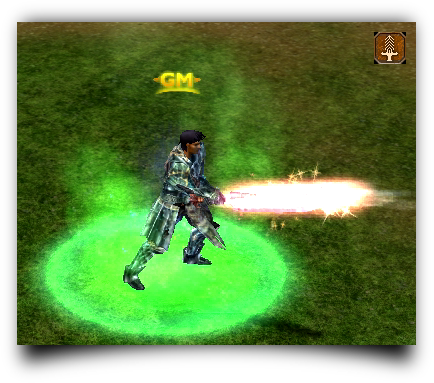
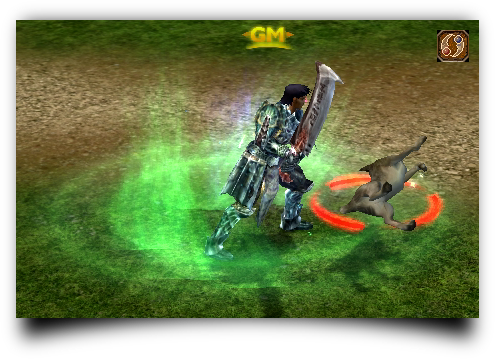
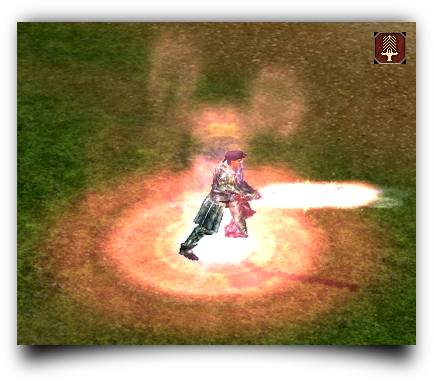
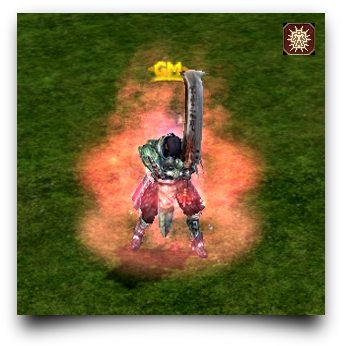
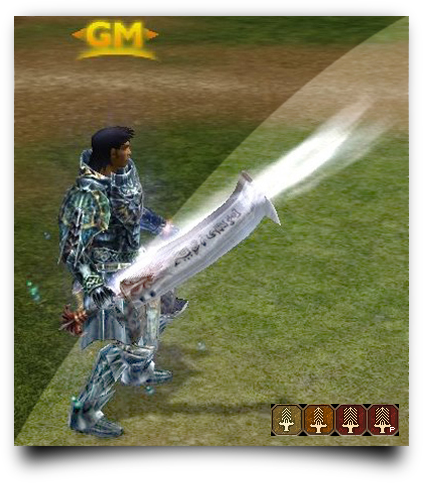
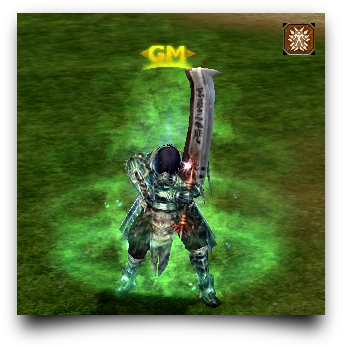
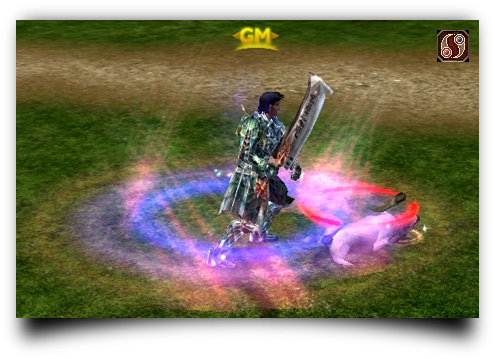
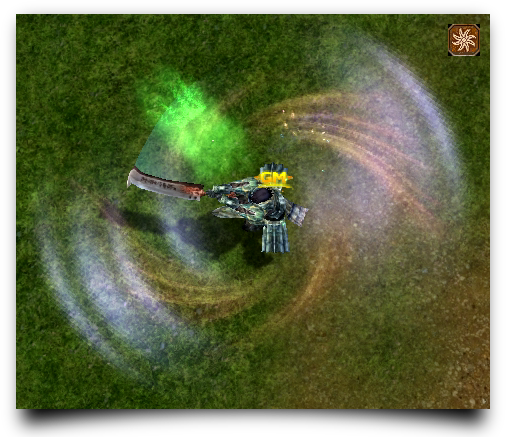
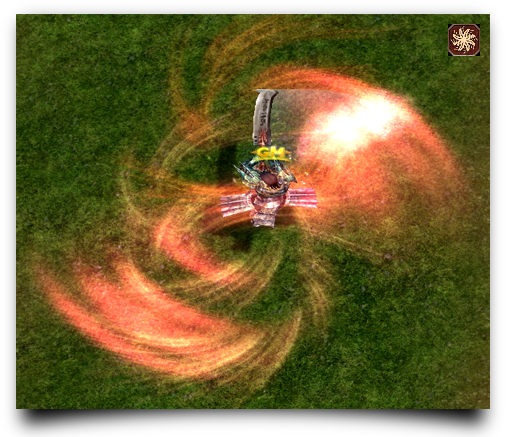
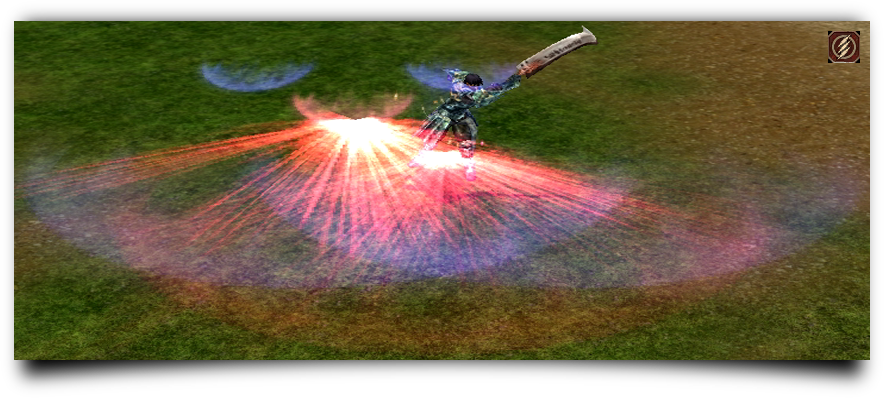

Surala Daha güzel Bence
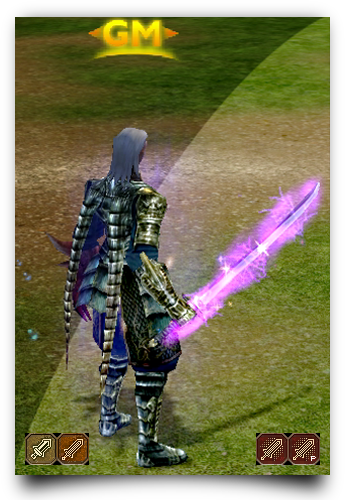
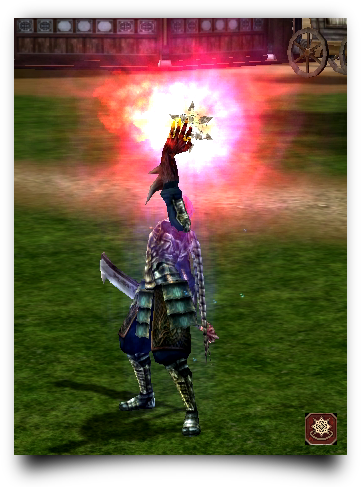
Şamanlar Klasman
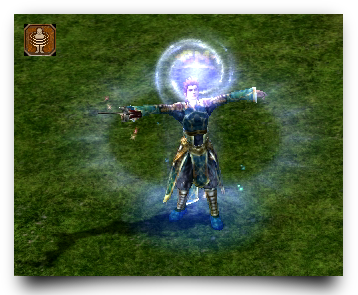
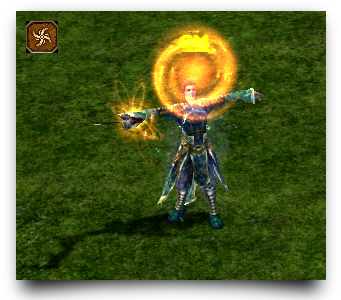
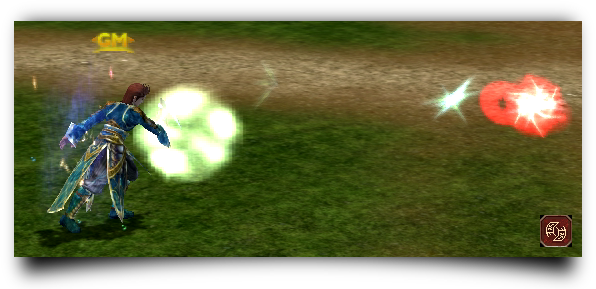
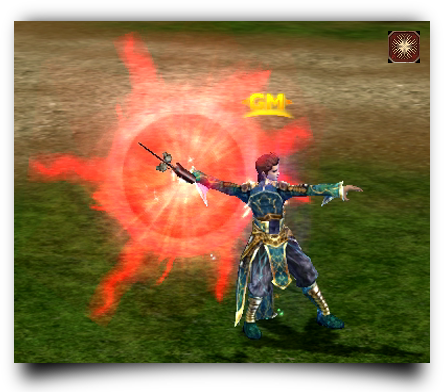
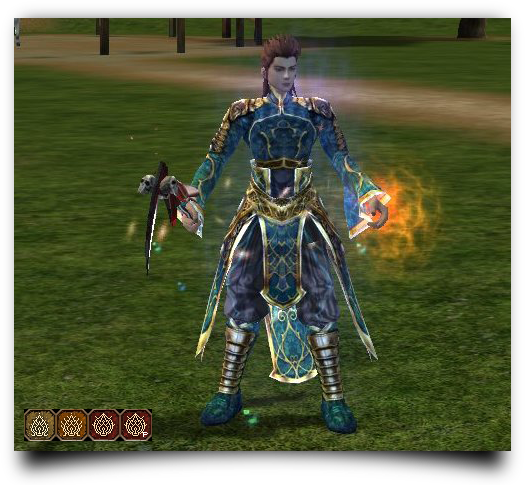
Anlatım.txt icindedir. iyi Calısmalar iyi Forumlar MaTEQ
Ziyaretçiler için gizlenmiş link,görmek için üye olmalısınız!
Giriş yap veya üye ol.
Ziyaretçiler için gizlenmiş link,görmek için üye olmalısınız!
Giriş yap veya üye ol.
Metin2 Eski Skill Efekleri MaTEQ Den Yeni Bir Deneyim
Metin2 oyuncularının kalbinde ebediyen yer edinen eski skill efektleri, artık MaTEQ ile tamamen yeni bir boyut kazanıyor.
Uzun yıllardır nostaljiyle anılan bu görsel ve mekanik özellikler, modern tekniklerle yeniden tasarlanarak hem görsel açıdan daha etkileyici hem de performans açısından optimize edilmiş şekilde karşınıza çıkıyor.
Bu yenilik, sadece görsel bir değişiklik değil; aynı zamanda oyun deneyiminizi derinleştiren, stratejik avantajlar sunan ve topluluk tarafından büyük ilgi gören bir geri dönüşü temsil ediyor.
Uzun yıllardır nostaljiyle anılan bu görsel ve mekanik özellikler, modern tekniklerle yeniden tasarlanarak hem görsel açıdan daha etkileyici hem de performans açısından optimize edilmiş şekilde karşınıza çıkıyor.
Bu yenilik, sadece görsel bir değişiklik değil; aynı zamanda oyun deneyiminizi derinleştiren, stratejik avantajlar sunan ve topluluk tarafından büyük ilgi gören bir geri dönüşü temsil ediyor.
Neden Eski Skill Efektleri Önemli?
Metin2’nin altın çağında, skill efektleri sadece hasar göstergesi değil, aynı zamanda oyuncuların karakterlerine özgü kimlik kazandıran unsurlardı.
Kılıç ustalarının keskin ışıltıları, büyücülerin dans eden elementallerle dolu büyüleri ya da ninjaların gölgeyle bütünleşen hareketleri… Hepsi bir bütün olarak oyunun atmosferini zenginleştiriyordu.
Ancak zamanla bazı efektler güncellenirken, diğerleri unutulmaya yüz tutmuştu.
MaTEQ, bu boşluğu doldurarak hem klasikleri canlandırıyor hem de onları bugünün donanımına ve oyuncu beklentilerine uygun hale getiriyor.
Kılıç ustalarının keskin ışıltıları, büyücülerin dans eden elementallerle dolu büyüleri ya da ninjaların gölgeyle bütünleşen hareketleri… Hepsi bir bütün olarak oyunun atmosferini zenginleştiriyordu.
Ancak zamanla bazı efektler güncellenirken, diğerleri unutulmaya yüz tutmuştu.
MaTEQ, bu boşluğu doldurarak hem klasikleri canlandırıyor hem de onları bugünün donanımına ve oyuncu beklentilerine uygun hale getiriyor.
MaTEQ ile Yenilenen Efektler Nelerdir?
MaTEQ tarafından geliştirilen Metin2 client pack, özellikle PvP odaklı içeriklerde kullanılan skill efektlerini ön plana çıkarıyor.
Örneğin:
- Büyü Kılıfı (Spell Blade): Artık sadece bir ışık parlaması değil, hareket halindeyken iz bırakan dinamik bir enerji iziyle donatılmış.
- Gölge Adımları (Shadow Step): Karakterin hareketini takip eden mor-tonlu bir iz efekti ile desteklenmiş, görsel olarak daha akıc ve tehditkâr hale getirilmiş.
- Ateş Topu (Fireball): Eski versiyonuna kıyasla daha yüksek çözünürlükte dokular ve patlama anında oluşan parçacık sistemleriyle gerçekçi bir yanma efekti sunuyor.
Bu efektler sadece görsel değil, aynı zamanda ses düzeyinde de optimize edilmiş durumda.
Özellikle Metin2 PvP client kullanan oyuncular, rakip hareketlerini daha net görebilir ve tepki sürelerini kısaltabilir hale geliyor.
Örneğin:
- Büyü Kılıfı (Spell Blade): Artık sadece bir ışık parlaması değil, hareket halindeyken iz bırakan dinamik bir enerji iziyle donatılmış.
- Gölge Adımları (Shadow Step): Karakterin hareketini takip eden mor-tonlu bir iz efekti ile desteklenmiş, görsel olarak daha akıc ve tehditkâr hale getirilmiş.
- Ateş Topu (Fireball): Eski versiyonuna kıyasla daha yüksek çözünürlükte dokular ve patlama anında oluşan parçacık sistemleriyle gerçekçi bir yanma efekti sunuyor.
Bu efektler sadece görsel değil, aynı zamanda ses düzeyinde de optimize edilmiş durumda.
Özellikle Metin2 PvP client kullanan oyuncular, rakip hareketlerini daha net görebilir ve tepki sürelerini kısaltabilir hale geliyor.
Teknik Geliştirmeler ve Performans Optimizasyonu
MaTEQ’nun sunduğu Metin2 pack, sadece estetik değil, teknik altyapısıyla da dikkat çekiyor.
Eski efektler, orijinal dosyalarının çıkarılması (Metin2 pack extract) ve modern shader’larla yeniden render edilmesiyle oluşturulmuş.
Bu sayede:
- Düşük donanımlı sistemlerde bile sorunsuz çalışma sağlanıyor,
- GPU kullanımı optimize edilmiş,
- Aşırı bellek tüketimi engellenmiş.
Ayrıca, Metin2 client edit sürecinde oyuncuların kendi efektlerini özelleştirebilmesi için açık kaynaklı araçlar da sunuluyor.
Bu, topluluk odaklı bir gelişim modelini destekliyor ve herkesin kendi ‘’özel client’’ini oluşturmasına olanak tanıyor.
Eski efektler, orijinal dosyalarının çıkarılması (Metin2 pack extract) ve modern shader’larla yeniden render edilmesiyle oluşturulmuş.
Bu sayede:
- Düşük donanımlı sistemlerde bile sorunsuz çalışma sağlanıyor,
- GPU kullanımı optimize edilmiş,
- Aşırı bellek tüketimi engellenmiş.
Ayrıca, Metin2 client edit sürecinde oyuncuların kendi efektlerini özelleştirebilmesi için açık kaynaklı araçlar da sunuluyor.
Bu, topluluk odaklı bir gelişim modelini destekliyor ve herkesin kendi ‘’özel client’’ini oluşturmasına olanak tanıyor.
Dikkat: Hile Kullanımı Değil, Geliştirme!
MaTEQ’nun vurguladığı en önemli noktalardan biri, bu efektlerin sadece görsel ve mekanik iyileştirmeler olduğudur.
Hiçbir şekilde oyun dengesini bozmayan, avantaj sağlamayan ya da hile kapsamına giren bir değişiklik bulunmuyor.
Tüm içerikler, resmi Metin2 kurallarına ve websitemizin etik standartlarına uygun şekilde test edilmiş ve onaylanmıştır.
Hiçbir şekilde oyun dengesini bozmayan, avantaj sağlamayan ya da hile kapsamına giren bir değişiklik bulunmuyor.
Tüm içerikler, resmi Metin2 kurallarına ve websitemizin etik standartlarına uygun şekilde test edilmiş ve onaylanmıştır.
Nasıl Kurulur ve Kullanılır?
MaTEQ’nun Metin2 client indir sayfasından en son sürümü edinebilir, ardından adım adım kurulum rehberimizi takip edebilirsiniz.
Süreç şu şekilde işliyor:
1. Orijinal clientinizin yedeğini alın (Metin2 client yama öncesi zorunludur),
2. MaTEQ paketini indirin ve çıkarın (Metin2 pack aç),
3. Verilen yama dosyalarını ilgili klasörlere kopyalayın (Metin2 client patch),
4. Oyunu başlatın ve yeni efektleri deneyimleyin!
Sorun yaşamanız durumunda, destek ekibimiz her zaman hazır duruyor.
Süreç şu şekilde işliyor:
1. Orijinal clientinizin yedeğini alın (Metin2 client yama öncesi zorunludur),
2. MaTEQ paketini indirin ve çıkarın (Metin2 pack aç),
3. Verilen yama dosyalarını ilgili klasörlere kopyalayın (Metin2 client patch),
4. Oyunu başlatın ve yeni efektleri deneyimleyin!
Sorun yaşamanız durumunda, destek ekibimiz her zaman hazır duruyor.
Sonuç
MaTEQ ile birlikte Metin2, hem geçmişin nostaljisini hem de geleceğin teknik imkanlarını bir araya getiriyor.
Eski skill efektlerinin bu kadar güçlü bir şekilde yeniden canlandırılması, sadece görsel bir geri dönüş değil; oyuncu topluluğuna saygı duyan, kaliteli içerik üreten bir taahhüttür.
Metin2 özel client dünyasında fark yaratan bu çalışma, siz değerli oyuncularımızın beklediği bir yenilikti.
Hazırsanız, eskiyi yeniden keşfedin — ama bu sefer daha net, daha güçlü ve daha özgün!
Eski skill efektlerinin bu kadar güçlü bir şekilde yeniden canlandırılması, sadece görsel bir geri dönüş değil; oyuncu topluluğuna saygı duyan, kaliteli içerik üreten bir taahhüttür.
Metin2 özel client dünyasında fark yaratan bu çalışma, siz değerli oyuncularımızın beklediği bir yenilikti.
Hazırsanız, eskiyi yeniden keşfedin — ama bu sefer daha net, daha güçlü ve daha özgün!
Metin2 Old Skill Effects: A New Experience from MaTEQ
The old skill effects that have held a permanent place in the hearts of Metin2 players are now gaining an entirely new dimension with MaTEQ.
These visual and mechanical features, long remembered with nostalgia, have been redesigned using modern techniques to become both more visually impressive and performance-optimized.
This innovation is not just a visual change; it also represents a return that deepens your gaming experience, offers strategic advantages, and has garnered significant interest from the community.
These visual and mechanical features, long remembered with nostalgia, have been redesigned using modern techniques to become both more visually impressive and performance-optimized.
This innovation is not just a visual change; it also represents a return that deepens your gaming experience, offers strategic advantages, and has garnered significant interest from the community.
Why Are Old Skill Effects Important?
During Metin2’s golden era, skill effects were not merely indicators of damage—they were elements that gave each character a unique identity.
The sharp glimmers of swordmasters, the dancing elemental spells of mages, or the seamless integration of ninjas with shadows… All of these enriched the game’s atmosphere as a whole.
However, over time, while some effects were updated, others were gradually forgotten.
MaTEQ fills this gap by reviving these classics and adapting them to today’s hardware and player expectations.
The sharp glimmers of swordmasters, the dancing elemental spells of mages, or the seamless integration of ninjas with shadows… All of these enriched the game’s atmosphere as a whole.
However, over time, while some effects were updated, others were gradually forgotten.
MaTEQ fills this gap by reviving these classics and adapting them to today’s hardware and player expectations.
What Renewed Effects Does MaTEQ Offer?
The Metin2 client pack developed by MaTEQ particularly highlights skill effects used in PvP-focused content.
For example:
- Spell Blade: Now features dynamic energy trails that follow movement, rather than just a simple light sparkle.
- Shadow Step: Enhanced with purple-toned trailing effects that make movement smoother and more menacing visually.
- Fireball: Rendered with higher-resolution textures and particle systems that create realistic burning effects upon explosion.
These effects are also optimized on the audio level.
Especially for users of the Metin2 PvP client, opponent movements become clearer, allowing for faster reaction times.
For example:
- Spell Blade: Now features dynamic energy trails that follow movement, rather than just a simple light sparkle.
- Shadow Step: Enhanced with purple-toned trailing effects that make movement smoother and more menacing visually.
- Fireball: Rendered with higher-resolution textures and particle systems that create realistic burning effects upon explosion.
These effects are also optimized on the audio level.
Especially for users of the Metin2 PvP client, opponent movements become clearer, allowing for faster reaction times.
Technical Improvements and Performance Optimization
MaTEQ’s Metin2 pack stands out not only aesthetically but also through its technical infrastructure.
Old effects are recreated by extracting original files (Metin2 pack extract) and rendering them with modern shaders.
This ensures:
- Smooth operation even on low-end systems,
- Optimized GPU usage,
- Prevention of excessive memory consumption.
Additionally, open-source tools are provided during the Metin2 client edit process, enabling players to customize their own effects.
This supports a community-driven development model and allows everyone to create their own ‘custom client.’
Old effects are recreated by extracting original files (Metin2 pack extract) and rendering them with modern shaders.
This ensures:
- Smooth operation even on low-end systems,
- Optimized GPU usage,
- Prevention of excessive memory consumption.
Additionally, open-source tools are provided during the Metin2 client edit process, enabling players to customize their own effects.
This supports a community-driven development model and allows everyone to create their own ‘custom client.’
Attention: Not Cheating—Just Enhancement!
One of MaTEQ’s most emphasized points is that these effects are purely visual and mechanical improvements.
They do not unbalance the game, provide unfair advantages, or fall under the category of cheating.
All content has been tested and approved in accordance with official Metin2 rules and the ethical standards of our website .
They do not unbalance the game, provide unfair advantages, or fall under the category of cheating.
All content has been tested and approved in accordance with official Metin2 rules and the ethical standards of our website .
How to Install and Use?
You can download the latest version from MaTEQ’s Metin2 client download page and follow our step-by-step installation guide.
The process works as follows:
1. Create a backup of your original client (mandatory before Metin2 client patch),
2. Download and extract the MaTEQ package (Metin2 pack extract),
3. Copy the provided patch files into the relevant folders (Metin2 client patch),
4. Launch the game and experience the new effects!
If you encounter any issues, our support team is always ready to assist.
The process works as follows:
1. Create a backup of your original client (mandatory before Metin2 client patch),
2. Download and extract the MaTEQ package (Metin2 pack extract),
3. Copy the provided patch files into the relevant folders (Metin2 client patch),
4. Launch the game and experience the new effects!
If you encounter any issues, our support team is always ready to assist.
Conclusion
With MaTEQ, Metin2 brings together both the nostalgia of the past and the technical capabilities of the future.
The powerful revival of old skill effects is not just a visual comeback—it is a commitment to respecting the player community and delivering high-quality content.
This project, which makes a difference in the world of Metin2 custom clients, is exactly what our valued players have been waiting for.
Ready? Rediscover the old—but this time, clearer, stronger, and more unique than ever!
The powerful revival of old skill effects is not just a visual comeback—it is a commitment to respecting the player community and delivering high-quality content.
This project, which makes a difference in the world of Metin2 custom clients, is exactly what our valued players have been waiting for.
Ready? Rediscover the old—but this time, clearer, stronger, and more unique than ever!
[URL=https://metin2lobby.com/]Meet MaTEQ Now!

