

Ziyaretçiler için gizlenmiş link,görmek için üye olmalısınız!
Giriş yap veya üye ol.
Ziyaretçiler için gizlenmiş link,görmek için üye olmalısınız!
Giriş yap veya üye ol.
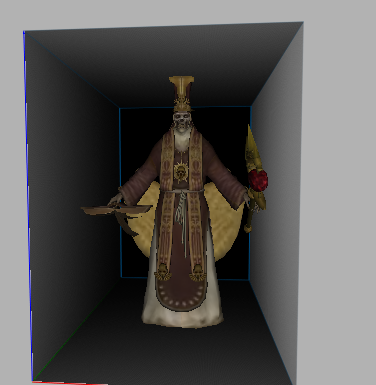
Metin2 Keşiş İskelet Modeli ve 3D Oyun Geliştirme Süreci
Metin2 oyununda karakter modelleme, özellikle Keşiş sınıfının iskelet yapısı gibi özel modeller üzerinde çalışmak, hem teknik hem de yaratıcı açıdan büyük bir dikkat ister. Bu yazıda Metin2Lobby olarak Metin2 3D modelleme sürecinde Keşiş iskelet (skeleton) yapısına odaklanacağız. Bu yapı, hem karakter animasyonları hem de ekipman uyumu açısından oldukça kritiktir.
Metin2 Keşiş Sınıfı ve Model Yapısı
Metin2'de Keşiş sınıfı, hem yakın hem de uzak menzilli saldırılarla etkili olan, dini temelli güçlü bir karakterdir. Bu karakterin 3D modeli, iskelet yapısı, kemik (bone) düzeni, UV haritası ve dokular (texture) gibi birçok unsurla birlikte tasarlanmalıdır. Keşiş modeli için kullanılan iskelet yapısı, diğer sınıflarla benzerlik göstersede bazı özel pozlama ve animasyon ihtiyaçları dolayısıyla farklılıklar barındırır.
Iskelet (Skeleton) ve Rigging İşlemi
Keşiş modelinin doğru bir şekilde hareket edebilmesi için öncelikle uygun bir iskelet yapısı oluşturulmalıdır. Bu yapı, genellikle 3ds Max veya Blender gibi yazılımlarda GR2 formatında dışa aktarılır. Bu işlem sırasında Metin2 GR2 formatına özel dikkat edilmelidir. Rigging işlemi, modelin kemiklere bağlanmasıdır ve animasyonun doğru çalışması için kritik öneme sahiptir. Keşiş karakteri için yapılan rigging, el hareketleri, silah kullanma ve büyü animasyonlarını desteklemelidir.
Metin2 Keşiş İskelet ve Animasyon Uyumluğu
Animasyonlar, karakterin gerçekçi hareket etmesini sağlar. Keşiş sınıfı için özel olarak hazırlanmış animasyonlar, karakterin büyü yaparkenki duruşu, silah kullanırkenki pozlaması gibi detayları içerir. Bu animasyonlar genellikle Metin2 Granny formatında saklanır. Keşiş iskeleti, bu animasyonlarla uyumlu olacak şekilde hazırlanmalıdır. Aksi takdirde karakter modelinde deformasyonlar ya da yanlış pozlamalar görülebilir.
Keşiş Modelini Değiştirmek (Custom Model Replace)
Oyuncuların Metin2 oyununda kendi karakterlerini özelleştirmesi için Keşiş modelini değiştirmek istemesi oldukça yaygındır. Bu işlem için doğru iskelet yapısıyla uyumlu özgün bir model hazırlanmalıdır. Metin2 model replace işlemleri sırasında modelin GR2 formatında olması, iskeletle uyumlu olması ve doğru UV mapping yapılması gerekir. Bu sayede karakterin ekipmanları doğru şekilde oturur ve animasyonlar sorunsuz çalışır.
Blender ve 3ds Max Kullanımı ile Metin2 Keşiş İskeleti
Keşiş modeli oluşturmak için Blender veya 3ds Max gibi yazılımlar kullanılabilir. Bu yazılımlar sayesinde hem modelleme hem de rigging işlemleri yapılabilir. Blender Metin2 projelerinde genellikle özel eklentiler kullanılır. Bu eklentiler, GR2 formatını doğrudan destekler ve dışa aktarma işlemlerini kolaylaştırır. 3ds Max ile yapılan modellemelerde ise Granny 3D formatı için özel ayarlamalar yapılmalıdır.
Metin2 Keşiş İskeleti İçin Gerekli Araçlar
Metin2 Keşiş iskelet modeli oluşturma sürecinde bazı araçlar hayati önem taşır. Bunlar arasında;
- GR2 Import / Export eklentileri
- UV Mapping araçları
- Texture (doku) hazırlama yazılımları
- Rigging ve animasyon düzenleme araçları yer alır.
Sonuç
Metin2 Keşiş iskelet modeli, hem teknik hem de estetik olarak dikkatle hazırlanmalıdır. Bu modelleme süreci, doğru iskelet yapısı, uyumlu animasyonlar ve eksiksiz dokularla bir araya gelerek karakterin oyun içinde doğal hareket etmesini sağlar. Metin2Lobby olarak bu tür özgün içeriklerle Metin2 topluluğuna katkı sunmaya devam ediyoruz.
Metin2 Priest Skeleton Model and 3D Game Development Process
Working on character modeling in Metin2, especially on specific models like the skeleton structure of the Priest class, requires great attention both technically and creatively. In this article, as Metin2Lobby, we will focus on the skeleton structure of the Priest in the Metin2 3D modeling process. This structure is critical for both character animations and equipment compatibility.
Metin2 Priest Class and Model Structure
In Metin2, the Priest class is a powerful religious-themed character effective in both close and long-range combat. The 3D model of this character must be designed with many components such as its skeleton structure, bone arrangement, UV maps, and textures. While the skeleton structure of the Priest model shares similarities with other classes, it also includes unique aspects due to specific posing and animation requirements.
Skeleton and Rigging Process
To ensure the correct movement of the Priest model, an appropriate skeleton structure must first be created. This process typically involves exporting in GR2 format using software like 3ds Max or Blender. Special attention must be paid to Metin2 GR2 format specifications during this stage. Rigging refers to binding the model to bones and is crucial for proper animation performance. Rigging for the Priest character must support actions such as hand movements, weapon usage, and spell casting animations.
Metin2 Priest Skeleton and Animation Compatibility
Animations allow characters to move realistically. For the Priest class, specially prepared animations include poses related to casting spells, wielding weapons, and more. These animations are usually stored in Metin2 Granny format. The skeleton for the Priest must be prepared to be compatible with these animations; otherwise, deformations or incorrect poses may occur in the character model.
Replacing the Priest Model (Custom Model Replace)
It is common for players to wish to customize their characters by replacing the Priest model in the Metin2 game. To do this, an original model compatible with the correct skeleton structure must be prepared. During Metin2 model replace processes, the model must be in GR2 format, compatible with the skeleton, and have proper UV mapping. This ensures that character equipment fits correctly and animations run smoothly.
Using Blender and 3ds Max for Metin2 Priest Skeleton
Software such as Blender or 3ds Max can be used to create the Priest model. These tools allow for both modeling and rigging operations. In Blender Metin2 projects, special add-ons are often used which directly support the GR2 format and simplify export procedures. When working in 3ds Max, specific adjustments must be made for the Granny 3D format.
Tools Required for Metin2 Priest Skeleton Model
Certain tools are essential during the creation of the Metin2 Priest skeleton model. These include:
- GR2 Import / Export plugins
- UV Mapping tools
- Texture preparation software
- Rigging and animation editing tools
Conclusion
The Metin2 Priest skeleton model must be carefully crafted both technically and aesthetically. This modeling process combines the correct skeleton structure, compatible animations, and complete textures to ensure natural character movement within the game. As Metin2Lobby, we continue to contribute to the Metin2 community with such original content.


