

Merhaba arkadaşlar mob_proto.xml'yi mob_proto.sql'ye çevirmeye yarıyan programı sizlerle paylaşmak istedim.
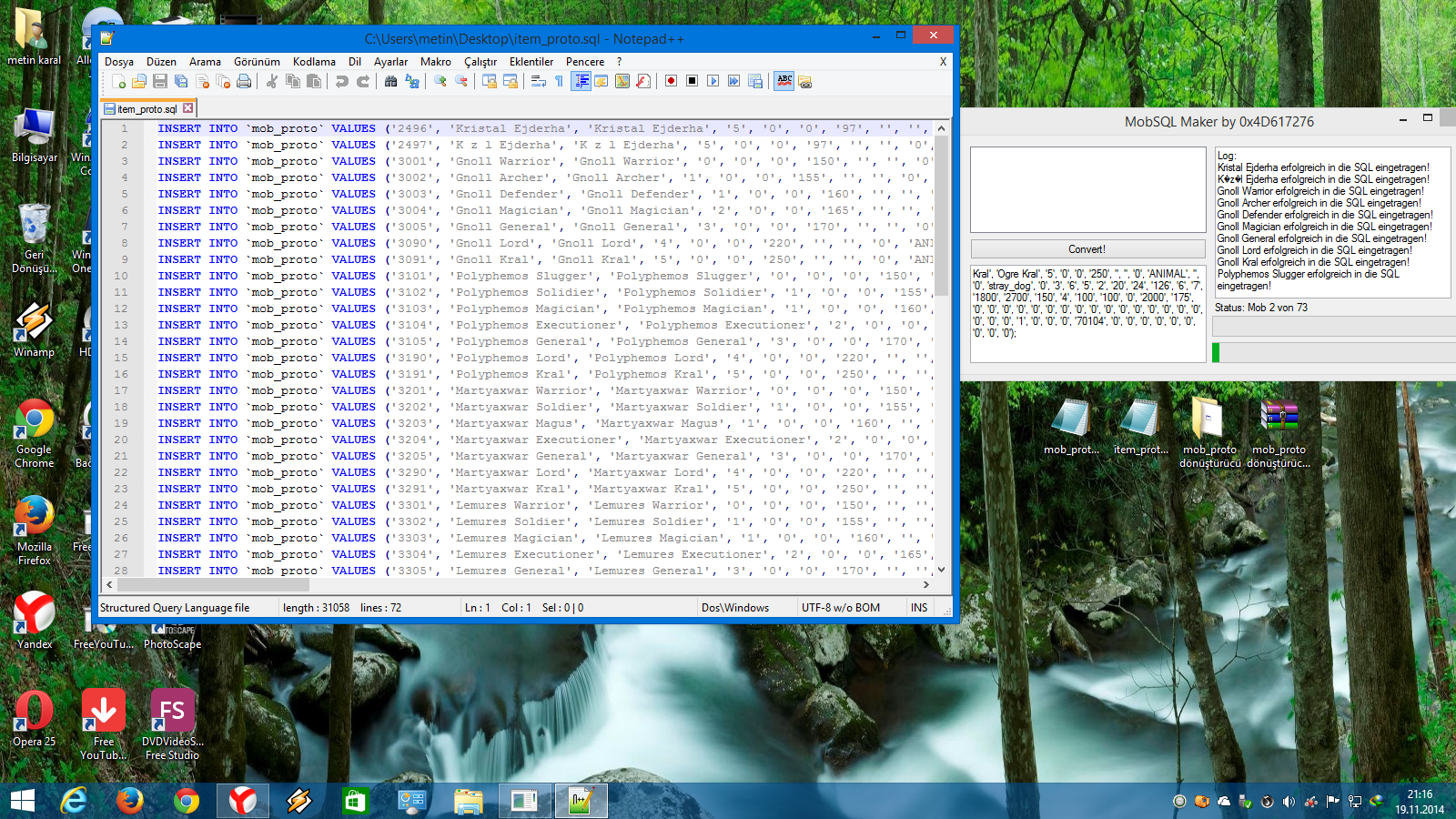
Çalıştığına dair kanıt;
Metin2 oyuncuları ve server sahipleri arasında en sık karşılaşılan teknik zorluklardan biri, mob_proto.xml ve mob_proto.sql dosyaları arasında veri aktarımını yapmaktır. Bu iki format, NPC’lerin, canavarların ve diğer yaratıkların özelliklerini tanımlamak için kullanılır; ancak farklı sistemler farklı formatları tercih eder. Metin2Lobby.com, bu soruna pratik ve hızlı bir çözüm sunarak, kullanıcıların XML formatındaki mob verilerini SQL’e veya tam tersini kolayca dönüştürmesine olanak tanır.
Neden Dönüştürmeye İhtiyaç Duyulur?
Metin2 client paketlerinde (pack) genellikle mob_proto.xml dosyası kullanılır. Bu dosya, client tarafında yaratıkların görsel ve davranışsal özelliklerini belirler. Ancak server tarafında ise veritabanı yönetimi için mob_proto.sql gibi SQL formatları tercih edilir. Özellikle özel Metin2 client veya PVP client projelerinde, bu iki sistemin uyumlu çalışabilmesi için veri dönüşümü şarttır. Aksi takdirde, manuel veri girimi hem zaman kaybına hem de hata riskine yol açar.
Metin2Lobby.com Dönüştürücüsünün Avantajları
Metin2Lobby.com’da sunulan dönüştürücü, sadece hızlı değil, aynı zamanda tam otomatik veri eşleme özelliğine sahiptir. Kullanıcı, XML dosyasını yükler ve anında SQL çıktısı alır — veya tam tersi. Bu özellik, özellikle acil güncelleme veya hata düzeltme gerektiren durumlarda büyük kolaylık sağlar. Ayrıca, dönüştürücü, Metin2’nin standart veri yapısına tam uyumlu çalışır; bu da client kurulumu, client yama veya client patch süreçlerinde tutarlılık sağlar.
Nasıl Kullanılır?
1. Metin2Lobby.com adresine gidin.
2. 'Metin2 Dönüştürücü' bölümüne tıklayın.
3. Dönüştürmek istediğiniz dosyayı (XML veya SQL) seçin.
4. Dosyayı yükleyin ve 'Dönüştür' butonuna basın.
5. Sonuç olarak elde edilen dosyayı indirip, client veya server klasörlerinize ekleyebilirsiniz.
Ekstra Özellikler ve Uyumluluk
Dönüştürücü, Metin2Dev client, Martysama client ve diğer popüler custom client’lar ile tam uyumludur. Ayrıca, eksik veya hatalı veri satırlarını otomatik olarak tespit ederek kullanıcıya uyarı verir. Bu sayede, client hata veya client fix ihtiyacını minimize edersiniz. Özellikle Metin2 pack açma veya Metin2 pack extract sonrası veri düzenlemesi yapan kullanıcılar için vazgeçilmez bir araç haline gelmiştir.
Güvenlik ve Performans
Tüm dönüşümler, tarayıcınızda yerel olarak gerçekleşir. Yani verileriniz asla sunuculara yüklenmez. Bu, gizlilik ve güvenlik açısından büyük bir avantajdır. Ayrıca, aracın hızı sayesinde büyük dosyalar bile saniyeler içinde işlenir.
Sonuç
Metin2 ekosisteminde çalışan her geliştirici, pack editörü veya server yöneticisi için mob_proto.xml ile mob_proto.sql arasındaki dönüşüm, artık zahmetsiz hale geldi. Metin2Lobby.com, bu süreci hem basitleştirip hem de profesyonelleştirerek, Metin2 client indir, Metin2 pack paylaşım ve Metin2 özel client projelerinizde size maksimum verim sunar.
Aşağıda, dönüştürücünün nasıl kullanıldığını gösteren bir video rehber ve örnek ekran görüntüsü bulacaksınız:

Bu araç, Metin2 client dosyaları, Metin2 pack dosyaları ve Metin2 client texture/effect düzenlemeleriyle uğraşan herkes için tasarlanmıştır. Hemen deneyin ve zaman kazanın!
One of the most common technical challenges faced by Metin2 players and server owners is transferring data between mob_proto.xml and mob_proto.sql files. These two formats are used to define the properties of NPCs, monsters, and other creatures; however, different systems prefer different formats. Metin2Lobby.com offers a practical and fast solution to this problem, allowing users to easily convert mob data from XML to SQL or vice versa.
Why Is Conversion Necessary?
In Metin2 client packs, the mob_proto.xml file is typically used. This file defines the visual and behavioral characteristics of creatures on the client side. However, on the server side, database management often relies on SQL formats like mob_proto.sql. Especially in custom Metin2 client or PVP client projects, data conversion is essential for compatibility between these two systems. Otherwise, manual data entry leads to both time loss and increased risk of errors.
Advantages of the Metin2Lobby.com Converter
The converter available on Metin2Lobby.com is not only fast but also features fully automatic data mapping. Users upload an XML file and instantly receive an SQL output — or the reverse. This feature provides significant convenience, particularly in situations requiring urgent updates or bug fixes. Moreover, the converter operates in full compliance with Metin2’s standard data structure, ensuring consistency during client installation, client patching, or client updates.
How to Use It?
1. Visit Metin2Lobby.com.
2. Click on the 'Metin2 Converter' section.
3. Select the file you want to convert (XML or SQL).
4. Upload the file and click the 'Convert' button.
5. Download the resulting file and add it to your client or server folders.
Additional Features and Compatibility
The converter is fully compatible with popular custom clients such as Metin2Dev client and Martysama client. It also automatically detects missing or erroneous data rows and alerts the user, minimizing the need for client error fixes. This makes it an indispensable tool for users who perform data editing after opening Metin2 packs or extracting Metin2 packs.
Security and Performance
All conversions occur locally in your browser. Your data is never uploaded to any server, which provides a major advantage in terms of privacy and security. Additionally, due to the tool’s speed, even large files are processed within seconds.
Conclusion
For every developer, pack editor, or server administrator working within the Metin2 ecosystem, converting between mob_proto.xml and mob_proto.sql is now effortless. Metin2Lobby.com simplifies and professionalizes this process, delivering maximum efficiency for your Metin2 client downloads, Metin2 pack sharing, and custom Metin2 client projects.
Below, you’ll find a video guide demonstrating how to use the converter, along with a sample screenshot:
This tool is designed for anyone working with Metin2 client files, Metin2 pack files, or Metin2 client textures/effects. Try it now and save time!
Çalıştığına dair kanıt;
Ziyaretçiler için gizlenmiş link,görmek için üye olmalısınız!
Giriş yap veya üye ol.
Ziyaretçiler için gizlenmiş link,görmek için üye olmalısınız!
Giriş yap veya üye ol.
Metin2 mob_proto.xml ve mob_proto.sql Dönüştürücü Aracı
Metin2 oyuncuları ve server sahipleri arasında en sık karşılaşılan teknik zorluklardan biri, mob_proto.xml ve mob_proto.sql dosyaları arasında veri aktarımını yapmaktır. Bu iki format, NPC’lerin, canavarların ve diğer yaratıkların özelliklerini tanımlamak için kullanılır; ancak farklı sistemler farklı formatları tercih eder. Metin2Lobby.com, bu soruna pratik ve hızlı bir çözüm sunarak, kullanıcıların XML formatındaki mob verilerini SQL’e veya tam tersini kolayca dönüştürmesine olanak tanır.
Neden Dönüştürmeye İhtiyaç Duyulur?
Metin2 client paketlerinde (pack) genellikle mob_proto.xml dosyası kullanılır. Bu dosya, client tarafında yaratıkların görsel ve davranışsal özelliklerini belirler. Ancak server tarafında ise veritabanı yönetimi için mob_proto.sql gibi SQL formatları tercih edilir. Özellikle özel Metin2 client veya PVP client projelerinde, bu iki sistemin uyumlu çalışabilmesi için veri dönüşümü şarttır. Aksi takdirde, manuel veri girimi hem zaman kaybına hem de hata riskine yol açar.
Metin2Lobby.com Dönüştürücüsünün Avantajları
Metin2Lobby.com’da sunulan dönüştürücü, sadece hızlı değil, aynı zamanda tam otomatik veri eşleme özelliğine sahiptir. Kullanıcı, XML dosyasını yükler ve anında SQL çıktısı alır — veya tam tersi. Bu özellik, özellikle acil güncelleme veya hata düzeltme gerektiren durumlarda büyük kolaylık sağlar. Ayrıca, dönüştürücü, Metin2’nin standart veri yapısına tam uyumlu çalışır; bu da client kurulumu, client yama veya client patch süreçlerinde tutarlılık sağlar.
Nasıl Kullanılır?
1. Metin2Lobby.com adresine gidin.
2. 'Metin2 Dönüştürücü' bölümüne tıklayın.
3. Dönüştürmek istediğiniz dosyayı (XML veya SQL) seçin.
4. Dosyayı yükleyin ve 'Dönüştür' butonuna basın.
5. Sonuç olarak elde edilen dosyayı indirip, client veya server klasörlerinize ekleyebilirsiniz.
Ekstra Özellikler ve Uyumluluk
Dönüştürücü, Metin2Dev client, Martysama client ve diğer popüler custom client’lar ile tam uyumludur. Ayrıca, eksik veya hatalı veri satırlarını otomatik olarak tespit ederek kullanıcıya uyarı verir. Bu sayede, client hata veya client fix ihtiyacını minimize edersiniz. Özellikle Metin2 pack açma veya Metin2 pack extract sonrası veri düzenlemesi yapan kullanıcılar için vazgeçilmez bir araç haline gelmiştir.
Güvenlik ve Performans
Tüm dönüşümler, tarayıcınızda yerel olarak gerçekleşir. Yani verileriniz asla sunuculara yüklenmez. Bu, gizlilik ve güvenlik açısından büyük bir avantajdır. Ayrıca, aracın hızı sayesinde büyük dosyalar bile saniyeler içinde işlenir.
Sonuç
Metin2 ekosisteminde çalışan her geliştirici, pack editörü veya server yöneticisi için mob_proto.xml ile mob_proto.sql arasındaki dönüşüm, artık zahmetsiz hale geldi. Metin2Lobby.com, bu süreci hem basitleştirip hem de profesyonelleştirerek, Metin2 client indir, Metin2 pack paylaşım ve Metin2 özel client projelerinizde size maksimum verim sunar.
Video Rehber ve Ekran Görüntüsü Ekleme
Aşağıda, dönüştürücünün nasıl kullanıldığını gösteren bir video rehber ve örnek ekran görüntüsü bulacaksınız:
Ziyaretçiler için gizlenmiş link,görmek için üye olmalısınız!
Giriş yap veya üye ol.
Bu araç, Metin2 client dosyaları, Metin2 pack dosyaları ve Metin2 client texture/effect düzenlemeleriyle uğraşan herkes için tasarlanmıştır. Hemen deneyin ve zaman kazanın!
Metin2 mob_proto.xml and mob_proto.sql Converter Tool
One of the most common technical challenges faced by Metin2 players and server owners is transferring data between mob_proto.xml and mob_proto.sql files. These two formats are used to define the properties of NPCs, monsters, and other creatures; however, different systems prefer different formats. Metin2Lobby.com offers a practical and fast solution to this problem, allowing users to easily convert mob data from XML to SQL or vice versa.
Why Is Conversion Necessary?
In Metin2 client packs, the mob_proto.xml file is typically used. This file defines the visual and behavioral characteristics of creatures on the client side. However, on the server side, database management often relies on SQL formats like mob_proto.sql. Especially in custom Metin2 client or PVP client projects, data conversion is essential for compatibility between these two systems. Otherwise, manual data entry leads to both time loss and increased risk of errors.
Advantages of the Metin2Lobby.com Converter
The converter available on Metin2Lobby.com is not only fast but also features fully automatic data mapping. Users upload an XML file and instantly receive an SQL output — or the reverse. This feature provides significant convenience, particularly in situations requiring urgent updates or bug fixes. Moreover, the converter operates in full compliance with Metin2’s standard data structure, ensuring consistency during client installation, client patching, or client updates.
How to Use It?
1. Visit Metin2Lobby.com.
2. Click on the 'Metin2 Converter' section.
3. Select the file you want to convert (XML or SQL).
4. Upload the file and click the 'Convert' button.
5. Download the resulting file and add it to your client or server folders.
Additional Features and Compatibility
The converter is fully compatible with popular custom clients such as Metin2Dev client and Martysama client. It also automatically detects missing or erroneous data rows and alerts the user, minimizing the need for client error fixes. This makes it an indispensable tool for users who perform data editing after opening Metin2 packs or extracting Metin2 packs.
Security and Performance
All conversions occur locally in your browser. Your data is never uploaded to any server, which provides a major advantage in terms of privacy and security. Additionally, due to the tool’s speed, even large files are processed within seconds.
Conclusion
For every developer, pack editor, or server administrator working within the Metin2 ecosystem, converting between mob_proto.xml and mob_proto.sql is now effortless. Metin2Lobby.com simplifies and professionalizes this process, delivering maximum efficiency for your Metin2 client downloads, Metin2 pack sharing, and custom Metin2 client projects.
Video Guide and Screenshot Integration
Below, you’ll find a video guide demonstrating how to use the converter, along with a sample screenshot:
Ziyaretçiler için gizlenmiş link,görmek için üye olmalısınız!
Giriş yap veya üye ol.
This tool is designed for anyone working with Metin2 client files, Metin2 pack files, or Metin2 client textures/effects. Try it now and save time!


