

Ziyaretçiler için gizlenmiş link,görmek için üye olmalısınız!
Giriş yap veya üye ol.
serverinizda rakibin Canını görmek için yapılmış birşey [ALINTIDIR]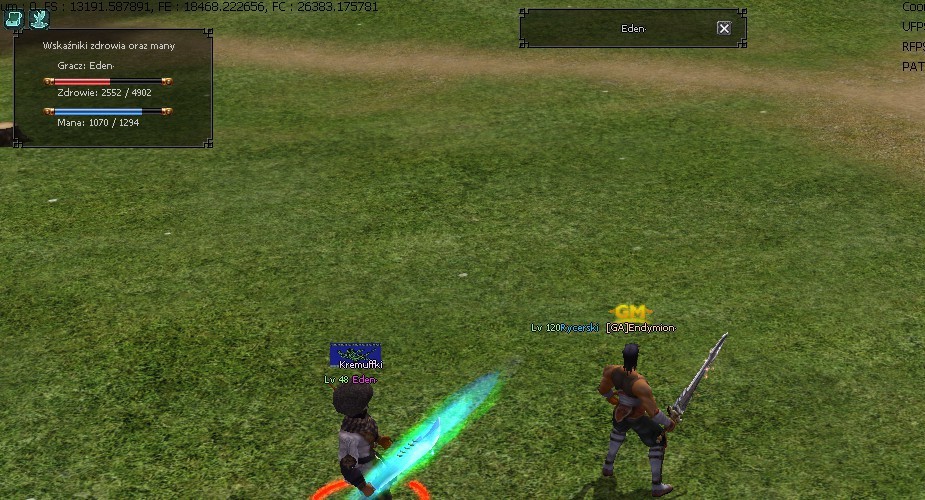
Root.eix Epk Açılır içindeki costinfo.py
Kod:
INPUT_IGNORE = 0 VID = 0 STHX = 0 HPXD = 0 PLAYER_HP = 0 PLAYER_MAX_HP = 0 PLAYER_SP = 0 PLAYER_MAX_SP = 0 PLAYER_NAME = ""Root.eix Epk Açılır içindeki game.py
Kod:
import uiHealth #wskaznikiHP "super_quest": self.Tabulejtor, "pvp_zdruwko": self.Mozart, #inputpowerdziwko "get_input_value": self.GetInputValue, "get_input_start": self.GetInputOn, "get_input_end": self.GetInputOff, def Mozart(self, data): dane = data.split("|") constInfo.PLAYER_NAME = str(dane[0]) constInfo.PLAYER_HP = int(dane[1]) constInfo.PLAYER_MAX_HP = int(dane[2]) constInfo.PLAYER_SP = int(dane[3]) constInfo.PLAYER_MAX_SP = int(dane[4]) def Tabulejtor(self, id): constInfo.STHX = int(id) def GetInputOn(self): constInfo.INPUT_IGNORE = 1 def GetInputOff(self): constInfo.INPUT_IGNORE = 0 def GetInputValue(self): net.SendQuestInputStringPacket(str(constInfo.VID)) def OpenQuestWindow(self, skin, idx): if constInfo.INPUT_IGNORE == 1: return else: self.interface.OpenQuestWindow(skin, idx)Root.eix Epk Açılır içindeki uitarget.py
Kod:
import uiHealth import constInfo def OnUpdate(self): if player.IsPVPInstance(self.vid): constInfo.VID = self.vid event.QuestButtonClick(constInfo.STHX) if not self.healthBoard.IsShow() and self.vid != 0: self.healthBoard.Show() else: self.healthBoard.Hide() if self.isShowButton: exchangeButton = self.buttonDict[locale.TARGET_BUTTON_EXCHANGE] distance = player.GetCharacterDistance(self.vid) if distance < 0: return if exchangeButton.IsShow(): if distance > self.EXCHANGE_LIMIT_RANGE: self.RefreshButton() else: if distance < self.EXCHANGE_LIMIT_RANGE: self.RefreshButton()
Kod:
In def __init__(self)
Kod:
self.healthBoard = uiHealth.HealthBoard()
Kod:
In def Close()
Kod:
self.healthBoard.Hide()
Kod:
def Close(self): self.__Initialize() self.healthBoard.Hide() self.Hide()Son olarak uihealth.py Yazıp rootun içine atıcaz
Kod:
#Krzywy import ui import constInfo def GetInfoFrom(id): table = { 1:constInfo.PLAYER_NAME, 2:constInfo.PLAYER_HP, 3:constInfo.PLAYER_MAX_HP, 4:constInfo.PLAYER_SP, 5:constInfo.PLAYER_MAX_SP} if table.has_key(id): return table[id] class HealthBoard(ui.ThinBoard): def __init__(self): ui.ThinBoard.__init__(self) self.Config() def __del__(self): ui.ThinBoard.__del__(self) def Config(self): self.SetSize(200, 120) self.SetPosition(0, 20) self.hp_bar = ui.Gauge() self.hp_bar.SetParent(self) self.hp_bar.SetPosition(30, 30+20) self.hp_bar.MakeGauge(130, "red") self.hp_bar.Show() self.sp_bar = ui.Gauge() self.sp_bar.SetParent(self) self.sp_bar.SetPosition(30, 60+20) self.sp_bar.MakeGauge(130, "blue") self.sp_bar.Show() self.name = ui.TextLine() self.name.SetParent(self) self.name.SetDefaultFontName() self.name.SetPosition(45, 30) self.name.SetText("") self.name.Show() self.hp_show = ui.TextLine() self.hp_show.SetParent(self) self.hp_show.SetDefaultFontName() self.hp_show.SetPosition(60-15, 57) self.hp_show.SetText("") self.hp_show.Show() self.sp_show = ui.TextLine() self.sp_show.SetParent(self) self.sp_show.SetDefaultFontName() self.sp_show.SetPosition(60-15, 80+7) self.sp_show.SetText("") self.sp_show.Show() def OnUpdate(self): if (GetInfoFrom(2)+GetInfoFrom(3)+GetInfoFrom(4)+GetInfoFrom(5)) == 0: self.Hide() self.hp_bar.SetPercentage(GetInfoFrom(2), GetInfoFrom(3)) self.sp_bar.SetPercentage(GetInfoFrom(4), GetInfoFrom(5)) self.name.SetText(GetInfoFrom(1)) self.hp_show.SetText("Health Points: %s / %s" % (GetInfoFrom(2), GetInfoFrom(3))) self.sp_show.SetText("Mana Points: %s / %s" % (GetInfoFrom(4), GetInfoFrom(5))) self.name.SetText("Character: %s" % (GetInfoFrom(1)))
Kod:
-- Quest Opponents HP and MP during pvp -- Made by: Endymion_ -- Server: Ascarial.pl quest wskaznikHpWroga begin state start begin when login begin cmdchat("super_quest "..q.getcurrentquestindex()) end when info or button begin cmdchat("get_input_start") local vid = input(cmdchat("get_input_value")) cmdchat("get_input_end") local old_pc = pc.select(vid) local name = pc.get_name() local hp = pc.get_hp() local max_hp = pc.get_max_hp() local mp = pc.get_sp() local max_mp = pc.get_max_sp() pc.select(old_pc) cmdchat("pvp_zdruwko "..name.."|"..hp.."|"..max_hp.."|"..mp.."|"..max_mp) end end endMetin2 Pvp Rakip Can Görme [YENİ PAYLAŞIM]
Metin2 özel sunucularında PVP sistemlerini geliştirmek, oyuncuların daha etkileşimli ve stratejik bir savaş deneyimi yaşamasını sağlar. Bu bağlamda, rakibin can değerini görebilmek büyük avantaj sağlar. Özellikle PVP sistem üzerine çalışan geliştiriciler için bu özellik kritik öneme sahiptir. Bu yazıda, Metin2 PVP sırasında rakip karakterin can değerini nasıl görebileceğinizi anlatacağız. Ayrıca bu özelliğin nasıl entegre edileceği ve hangi C++ kaynak kodları ile geliştirilebileceği hakkında bilgi vereceğiz.
Rakip Can Değerinin Gösterilmesi Nedir?
Metin2 PVP esnasında rakibin ne kadar canı kaldığını bilmek, oyuncunun taktiksel kararlar almasına olanak tanır. Can değeri sayesinde, öldürme veya kaçma gibi seçimler daha bilinçli yapılır. Bu sistem genellikle özel sunucularda kullanılır ve standart Metin2 oyununda doğrudan bulunmaz.
Nasıl Uygulanır?
Metin2 client tarafında yapılan küçük değişikliklerle, rakibin can değerini bir UI üzerinden göstermek mümkündür. Bu işlem genellikle Python GUI sistemleri ile yapılır. Py Root ve UIscript dosyaları üzerinde çalışarak, karakterin can çubuğunu takip eden bir sistem geliştirilebilir. Aynı zamanda, game server[/CORD] tarafında gerekli veri aktarımı sağlanmalıdır.
C++ Kaynak Kodu Entegrasyonu
Can değerini sunucudan istemciye aktarmak için C++ dilinde yazılmış özel sistemler kullanılmalıdır. Game Core ve DB Core arasında doğru veri aktarımı yapılmalıdır. Bu sistem, Martysama tarzı gelişmiş source edit projelerinde yer alabilir. Auth ve game sunucuları arasında senkronizasyon sağlanarak, gerçek zamanlı can verisi alınabilir.
Python GUI ile Can Arayüzü Oluşturmak
Py GUI ile kullanıcı arayüzünde dinamik bir can göstergesi oluşturulabilir. Bu arayüz, rakip karakterin adının yanına konabilir veya özel bir pencere olarak tasarlanabilir. UIscript dosyası ile bu gösterge, can miktarına göre güncellenir. Oyuncu, rakibin can seviyesini grafiksel olarak takip edebilir.
Metin2 Compile ve Paketleme
Geliştirilen sistemlerin test edilebilmesi için Metin2 compile işlemi yapılmalıdır. Pack dosyaları güncellenerek istemciye aktarılır. Sunucu tarafında source düzenlenir ve derlenir. Bu süreçte Metin2 Development araçları büyük kolaylık sağlar.
Sonuç
Metin2 PVP sistemlerinde rakip can görmenin sağladığı faydalar çok yönlüdür. Geliştiriciler, bu sistemi Metin2Dev çerçevesinde özelleştirerek, oyunculara daha keyifli bir deneyim sunabilirler. Game Core ve DB sistemleriyle entegre çalışan bu sistemler, özel sunucuların rekabet gücünü artırır. Daha fazla bilgi ve kaynak kod için Metin2Lobby sitesini ziyaret edebilirsiniz.
Metin2 PVP Enemy HP Display [NEW SHARED]
Developing PVP systems in Metin2 private servers allows players to experience a more interactive and strategic combat environment. In this context, being able to see the enemy's HP value provides a significant advantage. This feature is particularly critical for developers working on PVP systems. In this article, we will explain how you can view the enemy character's HP during Metin2 PVP. Additionally, we will provide information about how this feature can be integrated and which C++ source codes can be used for development.
What Is Enemy HP Display?
Knowing how much HP your opponent has left during Metin2 PVP enables more tactical decision-making. With the HP value visible, choices such as whether to kill or retreat can be made more consciously. This system is generally used in private servers and is not directly available in the standard Metin2 game.
How to Implement It?
By making small modifications on the Metin2 client side, it is possible to display the enemy's HP through a UI. This process is usually done with Python GUI systems. By working on Py Root and UIscript files, a system that tracks the character's HP bar can be developed. Meanwhile, necessary data transmission must also be ensured on the game server side.
Integration with C++ Source Code
To transfer the HP value from the server to the client, special systems written in C++ must be used. Proper data transmission between Game Core and DB Core must be established. Such systems can be included in advanced source edit projects like Martysama. Synchronization between auth and game servers allows real-time HP data to be obtained.
Creating HP Interface with Python GUI
With Py GUI, a dynamic HP indicator can be created in the user interface. This interface can be placed next to the enemy character's name or designed as a separate window. The UIscript file updates this indicator according to the HP amount, allowing the player to visually track the enemy's health level.
Metin2 Compilation and Packaging
To test the developed systems, a Metin2 compile operation must be performed. Updated pack files are transferred to the client. On the server side, the source is modified and compiled. During this process, Metin2 Development tools provide great convenience.
Conclusion
The benefits of seeing enemy HP in Metin2 PVP systems are multifaceted. Developers can customize this system within the Metin2Dev framework to offer players a more enjoyable experience. Systems integrated with Game Core and DB enhance the competitiveness of private servers. For more information and source code, visit Metin2Lobby.
