

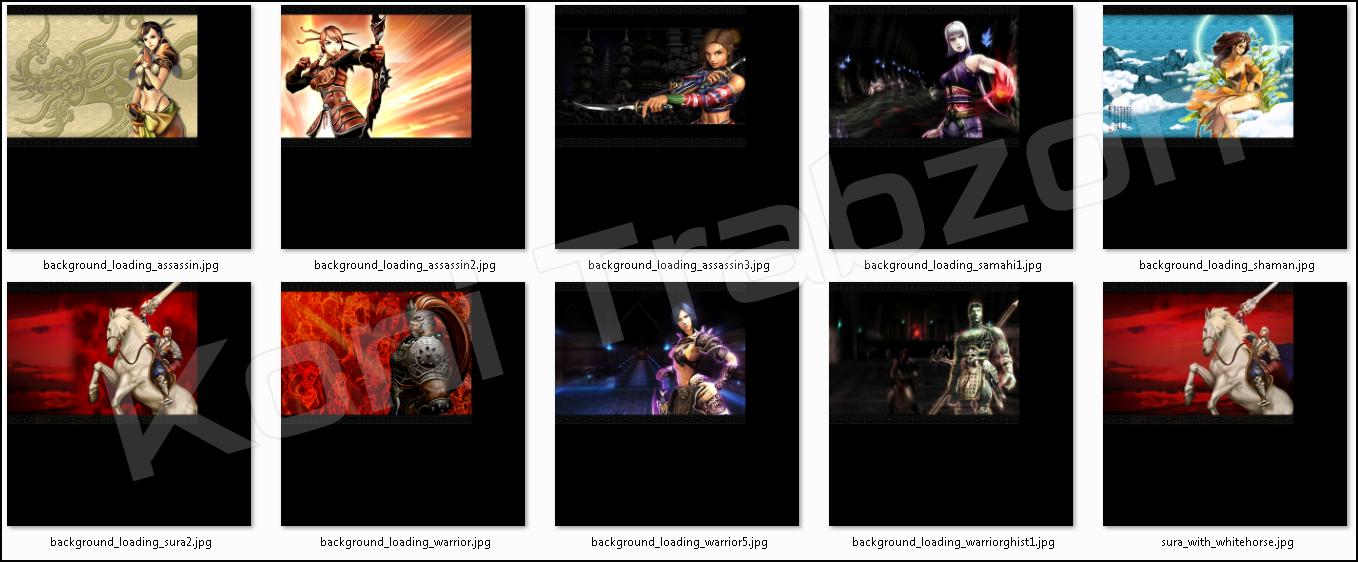
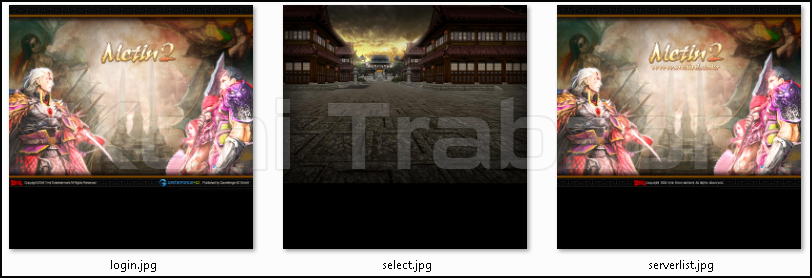
Metin2 TR 2010 Client'e ait "Loading,Login,Select,Serverlist" Ekranlarını istek üzerine paylaşıyorum.
Ziyaretçiler için gizlenmiş link,görmek için üye olmalısınız!
Giriş yap veya üye ol.
Ziyaretçiler için gizlenmiş link,görmek için üye olmalısınız!
Giriş yap veya üye ol.
Metin2 TR 2010 Client [Loading, Login, Select, Serverlist Background]
Metin2 TR 2010 Client, Türk Metin2 topluluğunun en çok tercih ettiği ve nostaljik değeri yüksek olan client sürümlerinden biridir.
Bu client özellikle loading ekranları, login arayüzü, karakter seçim ekranı ve server listesi arka planları gibi görsel unsurlarıyla dikkat çeker.
Özellikle 2010 yılına ait olan bu sürüm, oyuncuların ilk zamanlarda yaşadığı klasiği canlandırmak için sıkça aranır ve kullanılır.
Client’in Temel Özellikleri
Metin2 TR 2010 Client, orijinal Metin2 motoruna sadık kalarak minimalist bir yapı sunar.
Loading ekranlarında eski animasyonlar ve ses efektleriyle birlikte, login ekranında basit ama etkili bir arayüz bulunur.
Karakter seçim ekranında ise klasik kostümler ve karakter modelleriyle oyunculara tanıdık bir deneyim yaşatır.
Server listesi arka planı ise genellikle karanlık temalı, mavi tonlarda olup oyunun atmosferine uyum sağlar.
Neden Metin2 TR 2010 Client?
Bu client, özellikle PVP odaklı sunucular ve özel eventlerde kullanılmak üzere optimize edilmiştir.
Hafif yapısı sayesinde düşük sistem gereksinimlere sahip bilgisayarlarda bile sorunsuz çalışır.
Ayrıca client edit işlemleri için oldukça uygun olup, texture, effect ve skin değişiklikleri kolayca yapılabilir.
Teknik açıdan esnek yapısı, modifiye edilmiş pack’lerle uyumlu çalışmasını sağlar.
Dikkat: Client Kurulumu ve Güvenlik
Metin2 TR 2010 Client’i indirmeden önce, dosyanın güvenilir bir kaynaktan temin edildiğinden emin olunmalıdır.
Metin2 Lobby adresi, güncel ve güvenli client paketlerini sunan güvenilir bir platformdur.
Kurulum sırasında antivirüs yazılımı uyarılarına dikkat edilmelidir; bazı eski client’ler antivirüs tarafından yanlış pozitif olarak işaretlenebilir.
Ancak bu durum genellikle client içindeki eski yama dosyalarından kaynaklanır ve zararsızdır.
Client Dosyaları ve Yapısı
Client içeriği genellikle şu klasörlerden oluşur:
- data: Texture, model ve efekt dosyalarını içerir.
- locale: Dil dosyaları ve arayüz metinleri.
- sound: Login ve loading seslerini barındırır.
- ui: Arayüz görselleri (login, select, serverlist arka planları vs.).
Bu dosyalar pack formatında sıkıştırılmış olabilir.
Pack dosyalarını açmak için Metin2 Pack Editor veya benzeri araçlar kullanılmalıdır.
EterPack gibi özel pack formatları da bu client’le uyumlu çalışabilir.
Güncelleme ve Yama Süreci
Metin2 TR 2010 Client, orijinal sürüm olduğu için resmi güncellemeler almaz.
Ancak topluluk tarafından yapılan patch dosyaları ile güvenlik açıkları kapatılabilir ve performans iyileştirmeleri yapılabilir.
Bu tür güncellemeler genellikle Metin2 Lobby gibi platformlarda paylaşılır.
Sık Karşılaşılan Hatalar ve Çözümleri
1. 'Client failed to initialize' hatası: Genellikle eksik DirectX veya Visual C++ kütüphanelerinden kaynaklanır. Yeniden yüklenmelidir.
2. Loading ekranında takılma: data klasöründeki texture dosyaları bozuk olabilir. Orijinal pack’lerle değiştirilmelidir.
3. Server listesi boş geliyor: Login server adresi yanlış yapılandırılmış olabilir. Config dosyası kontrol edilmelidir.
Sonuç
Metin2 TR 2010 Client, hem nostalji sevenler hem de PVP odaklı oyuncular için ideal bir seçenektir.
Görsel tutarlılığı, hafif yapısı ve kolay özelleştirilebilirliğiyle dikkat çeker.
Metin2 Lobby üzerinden güvenli şekilde indirip, kendi sunucunuzda veya özel oyun deneyiminizde kullanabilirsiniz.
Mutlu avlar ve keyifli oyunlar!
Metin2 TR 2010 Client [Loading, Login, Select, Serverlist Background]
The Metin2 TR 2010 Client is one of the most preferred and nostalgically valuable client versions within the Turkish Metin2 community.
This client stands out particularly for its visual elements such as loading screens, login interface, character selection screen, and server list backgrounds.
Specifically tied to the year 2010, this version is frequently sought after and used by players aiming to relive the classic era of the game.
Key Features of the Client
The Metin2 TR 2010 Client offers a minimalist structure while staying faithful to the original Metin2 engine.
It includes classic animations and sound effects during loading screens, along with a simple yet effective login interface.
The character selection screen features traditional costumes and character models, providing players with a familiar experience.
The server list background typically adopts a dark theme with blue tones, harmonizing well with the game’s atmosphere.
Why Choose Metin2 TR 2010 Client?
This client is optimized especially for PVP-focused servers and special events.
Thanks to its lightweight architecture, it runs smoothly even on computers with low system requirements.
Additionally, it is highly suitable for client editing, allowing easy modifications to textures, effects, and skins.
Its technically flexible structure ensures compatibility with modified packs.
Caution: Installation and Security
Before downloading the Metin2 TR 2010 Client, ensure that the file comes from a trustworthy source.
The website Metin2 Lobby is a reliable platform offering updated and secure client packages.
During installation, pay attention to antivirus software alerts; some older clients may be flagged as false positives by antivirus programs.
However, this is usually due to outdated patch files within the client and poses no real threat.
Client Files and Structure
The client content typically consists of the following folders:
- data: Contains textures, models, and effect files.
- locale: Holds language files and interface texts.
- sound: Stores login and loading sounds.
- ui: Includes interface graphics (login, select, serverlist backgrounds, etc.).
These files may be compressed in pack format.
To extract pack files, tools like Metin2 Pack Editor or similar utilities should be used.
Special pack formats such as EterPack are also compatible with this client.
[B>Update and Patching Process
Since the Metin2 TR 2010 Client is an original version, it does not receive official updates.
However, community-made patch files can be applied to fix security vulnerabilities and improve performance.
Such updates are commonly shared on platforms like Metin2 Lobby.
Common Errors and Solutions
1. 'Client failed to initialize' error: Usually caused by missing DirectX or Visual C++ libraries. Reinstall them.
2. Freezing during loading screen: Texture files in the data folder may be corrupted. Replace them with original pack files.
3. Empty server list: The login server address might be misconfigured. Check the config file.
Conclusion
The Metin2 TR 2010 Client is an ideal choice both for nostalgia enthusiasts and PVP-oriented players.
It attracts attention with its visual consistency, lightweight design, and ease of customization.
You can safely download and use it on your own server or for private gameplay via Metin2 Lobby.
Happy hunting and enjoy your gameplay!
