

Merhaba arkadaşlar Daha önceden forumda paylaşılan bir sistemdir
Fakat linkleri kırık ve güncellenmedi bende paylaşmak istedim
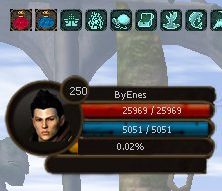
Fakat linkleri kırık ve güncellenmedi bende paylaşmak istedim
Ziyaretçiler için gizlenmiş link,görmek için üye olmalısınız!
Giriş yap veya üye ol.
Ziyaretçiler için gizlenmiş link,görmek için üye olmalısınız!
Giriş yap veya üye ol.
ANLATIM
constInfo.py aç
#-----------------
arayuz_cur = 0
arayuz_max = 0
arayuz_hp_cur = 0
arayuz_hp_max = 0
arayuz_mp_cur = 0
arayuz_mp_max = 0
ekle
#------------------------------------------------
game.py aç
#-------------
testAlignment = 0
BPisLodaded = 0
arat
FACE_IMAGE_DICT = {
playerSettingModule.RACE_WARRIOR_M : "arayuz/savasci_e.tga",
playerSettingModule.RACE_WARRIOR_W : "arayuz/savasci_k.tga",
playerSettingModule.RACE_ASSASSIN_M : "arayuz/ninja_e.tga",
playerSettingModule.RACE_ASSASSIN_W : "arayuz/ninja_k.tga",
playerSettingModule.RACE_SURA_M : "arayuz/sura_e.tga",
playerSettingModule.RACE_SURA_W : "arayuz/sura_k.tga",
playerSettingModule.RACE_SHAMAN_M : "arayuz/saman_e.tga",
playerSettingModule.RACE_SHAMAN_W : "arayuz/saman_k.tga",
}
altına ekle
#--------------------------------------------------
self.enableXMasBoom = False
arat
arayuz = ui.AniImageBox()
arayuz.AppendImage("arayuz/yeni_arayuz.tga")
self.arayuz = arayuz
self.arayuz.SetPosition(0,75)
self.arayuz.SetSize(275, 104)
self.arayuz.Show()
self.level_yazi = ui.TextLine()
self.level_yazi.SetParent(self.arayuz)
self.level_yazi.SetFontName("Tahoma:13")
if int(player.GetStatus(player.LEVEL)) < 10:
self.level_yazi.SetPosition(73,9)
else:
self.level_yazi.SetPosition(70,9)
self.level_yazi.SetText(str(player.GetStatus(player.LEVEL)))
self.level_yazi.Show()
self.isim_yazi = ui.TextLine()
self.isim_yazi.SetParent(self.arayuz)
self.isim_yazi.SetFontName("Tahoma:11")
self.isim_yazi.SetText(str(player.GetName()))
kacharfvarki = len(str(player.GetName()))
if kacharfvarki < 10:
self.isim_yazi.SetPosition(115,14)
else:
self.isim_yazi.SetPosition(97,14)
self.isim_yazi.Show()
karakter_resim = ui.AniImageBox()
race = net.GetMainActorRace()
karakter_resim.AppendImage(FACE_IMAGE_DICT[race])
self.karakter_resim = karakter_resim
self.karakter_resim.SetParent(self.arayuz)
self.karakter_resim.SetPosition(22,15)
self.karakter_resim.Show()
exp_bar = ui.AniImageBox()
exp_bar.AddFlag("not_pick")
# exp_bar.SetDelay(25)
exp_bar.AppendImage("arayuz/exp1.tga")
# exp_bar.AppendImage("arayuz/exp2.tga")
self.exp_bar = exp_bar
self.exp_bar.SetParent(self.arayuz)
self.exp_bar.SetPosition(77, 65)
self.exp_bar.SetPercentage(0,100)
self.exp_bar.Show()
self.exp_yazi = ui.TextLine()
self.exp_yazi.SetParent(exp_bar)
self.exp_yazi.SetFontName("Tahoma:11")
self.exp_yazi.SetText("%.2f%%" % (float(constInfo.arayuz_cur) / max(1, float(constInfo.arayuz_max)) * 100))
self.exp_yazi.SetPosition(40,1)
self.exp_yazi.Show()
self.exp_bar.SetPercentage((float(constInfo.arayuz_cur) / max(1, float(constInfo.arayuz_max)) * 100),100)
hp_bar = ui.AniImageBox()
hp_bar.AddFlag("not_pick")
hp_bar.AppendImage("arayuz/hp1.tga")
hp_bar.AppendImage("arayuz/hp2.tga")
self.hp_bar = hp_bar
self.hp_bar.SetParent(self.arayuz)
self.hp_bar.SetPosition(83, 28)
self.hp_bar.SetPercentage(0,100)
self.hp_bar.Show()
self.hp_yazi = ui.TextLine()
self.hp_yazi.SetParent(hp_bar)
self.hp_yazi.SetFontName("Tahoma:11")
self.hp_yazi.SetText("%d / %d" % (constInfo.arayuz_hp_cur, constInfo.arayuz_hp_max))
self.hp_yazi.SetPosition(40,2)
self.hp_yazi.Show()
self.hp_bar.SetPercentage((float(constInfo.arayuz_hp_cur) / max(1, float(constInfo.arayuz_hp_max)) * 100),100)
sp_bar = ui.AniImageBox()
sp_bar.AddFlag("not_pick")
hp_bar.SetDelay(25)
sp_bar.SetDelay(25)
sp_bar.AppendImage("arayuz/sp1.tga")
sp_bar.AppendImage("arayuz/sp2.tga")
self.sp_bar = sp_bar
self.sp_bar.SetParent(self.arayuz)
self.sp_bar.SetPosition(83, 47)
self.sp_bar.SetPercentage(0,100)
self.sp_bar.Show()
self.sp_yazi = ui.TextLine()
self.sp_yazi.SetParent(sp_bar)
self.sp_yazi.SetFontName("Tahoma:11")
self.sp_yazi.SetText("%d / %d" % (constInfo.arayuz_mp_cur, constInfo.arayuz_mp_max))
self.sp_yazi.SetPosition(40,2)
self.sp_yazi.Show()
self.sp_bar.SetPercentage((float(constInfo.arayuz_mp_cur) / max(1, float(constInfo.arayuz_mp_max)) * 100),100)
self.online_yazi = ui.TextLine()
self.online_yazi.SetParent(self.arayuz)
self.online_yazi.SetFontName("Tahoma:11")
self.online_yazi.SetText("")
self.online_yazi.SetPosition(55,84)
self.online_yazi.Show()
üstüne ekle
#------------------------------------------------
if self.mapNameShower.IsShow():
self.mapNameShower.Update()
arat
if int(player.GetStatus(player.LEVEL)) < 10:
self.level_yazi.SetPosition(73,9)
else:
self.level_yazi.SetPosition(70,9)
self.level_yazi.SetText(str(player.GetStatus(player.LEVEL)))
self.exp_bar.SetPercentage((float(constInfo.arayuz_cur) / max(1, float(constInfo.arayuz_max)) * 100),100)
self.exp_yazi.SetText("%.2f%%" % (float(constInfo.arayuz_cur) / max(1, float(constInfo.arayuz_max)) * 100))
self.hp_bar.SetPercentage((float(constInfo.arayuz_hp_cur) / max(1, float(constInfo.arayuz_hp_max)) * 100),100)
self.hp_yazi.SetText("%d / %d" % (constInfo.arayuz_hp_cur, constInfo.arayuz_hp_max))
self.sp_bar.SetPercentage((float(constInfo.arayuz_mp_cur) / max(1, float(constInfo.arayuz_mp_max)) * 100),100)
self.sp_yazi.SetText("%d / %d" % (constInfo.arayuz_mp_cur, constInfo.arayuz_mp_max))
online_ver = str(self.KillBlauReich.GetText())
self.online_yazi.SetText(online_ver)
altına ekle.
#------------------------------------------------
uiparty.py aç
#---------------
class PartyWindow(ui.Window):
#arat
self.part
Ziyaretçiler için gizlenmiş link,görmek için üye olmalısınız!
Giriş yap veya üye ol.
erInfoBoardList = [*]#arat
üstünedek
Ziyaretçiler için gizlenmiş link,görmek için üye olmalısınız!
Giriş yap veya üye ol.
rdinatıself.SetPosition(10, 187)
değiştir
#--------------------------------------------------
uitaskbar.py aç
#-----------------
def SetHP(self, curPoint, recoveryPoint, maxPoint):
curPoint = min(curPoint, maxPoint)
if maxPoint > 0:
arat
import constInfo
constInfo.arayuz_hp_cur = curPoint
constInfo.arayuz_hp_max = maxPoint
altına ekle.
#-------------------------------------------------
def SetSP(self, curPoint, recoveryPoint, maxPoint):
curPoint = min(curPoint, maxPoint)
if maxPoint > 0:
arat
import constInfo
constInfo.arayuz_mp_cur = curPoint
constInfo.arayuz_mp_max = maxPoint
altına ekle
#----------------------------------------------
self.tooltipEXP.SetText("%s : %.2f%%" % (localeInfo.TASKBAR_EXP, float(curPoint) / max(1, float(maxPoint)) * 100))
arat
import constInfo
constInfo.arayuz_cur = curPoint
constInfo.arayuz_max = maxPoint
üstüne ekle
#-------------------------------------------------
klaösörü roota ve uiarayuz.py dosyasını root'un içine at.
Metin2 - Yan Ekran Sistemi
MERT POLAT
Metin2 özel sunucularında oyun deneyimini artırmak ve oyuncuların daha fazla etkileşim kurmasını sağlamak amacıyla geliştirilen Yan Ekran Sistemi, son derece kullanışlı ve özelleştirilebilir bir özelliktir. Bu sistem sayesinde oyuncular, ana oyun penceresinin yanında farklı menüleri veya ekrankartlarını açabilir, PvP savaşları sırasında bile hızlıca bilgi alabilir veya aksiyon alabilirler. Bu yazıda, Metin2Lobby olarak bu sistemin ne olduğunu, nasıl çalıştığını ve gelişmiş sunucularda nasıl uygulanabileceğini detaylıca ele alacağız.
Yan Ekran Sistemi Nedir?
Yan Ekran Sistemi, Metin2 özel sunucularında geliştirici tarafından eklenen, oyuncuya ana oyun arayüzü dışında bir ek pencere sunan bir özelliktir. Bu pencere genellikle sağ ya da sol köşede konumlanır ve oyuncunun belirli eylemleri kolayca gerçekleştirmesini sağlar. Örneğin, bir oyuncu savaş sırasında kendi can ve mana durumunu, takım arkadaşlarının konumlarını, düşman seviye ve isimlerini, hatta özel PvP strateji araçlarını bu yan ekrandan takip edebilir.
Sistem Nasıl Çalışır?
Bu sistem genellikle Python GUI (Py Root) ve UI Script dosyaları üzerinden geliştirilir. Oyuncu, belirli bir tuşa bastığında veya bir komut girdiğinde bu yan ekran açılır. Geliştiriciler, C++ Source Edit kısmında oyun çekirdeğine entegre ederek bu arayüzün veri almasını sağlar. Ayrıca, bu veriler DB Core üzerinden de güncellenebilir. Bu sayede hem gerçek zamanlı hem de kullanıcı dostu bir arayüz elde edilir.
Nasıl Uygulanır?
Öncelikle, Py Root klasöründe yeni bir GUI dosyası oluşturulur. Bu dosya, UIScript formatında hazırlanır ve sistemdeki mevcut yapıya uygun şekilde düzenlenir. Ardından, C++ kaynak kodlar üzerinde gerekli fonksiyonlar yazılır. Bu fonksiyonlar, oyuncunun o anki verilerini çeker ve Python tarafına aktarır. Böylece, yan ekran her açıldığında doğru ve güncel veriler yansıtılır. Martysama gibi deneyimli geliştiricilerin önerdiği yöntemler kullanılarak, bu sistem hem stabil hem de performanslı çalışır.
Faydaları Nelerdir?
Bu sistem özellikle PvP odaklı sunucularda büyük avantaj sağlar. Oyuncular, savaş esnasında hızlıca strateji geliştirebilir, rakiplerini takip edebilir, item kullanımını optimize edebilir. Aynı zamanda, pack sistemiyle entegre edildiğinde, ekonomik ve oyun içi pazarlamayı da kolaylaştırır. Sunucu sahipleri, bu sistemle oyuncu sadakatini artırabilir ve daha fazla etkileşim elde edebilirler.
Sonuç
Metin2 Lobby olarak, Metin2 özel sunucu dünyasında gelişmeleri yakından takip ediyor ve geliştiricilere destek oluyoruz. Yan Ekran Sistemi gibi gelişmiş modüller, hem oyuncu deneyimini artırıyor hem de sunucu sahiplerinin rekabet gücünü yükseltiyor. Bu tür sistemlerin uygulanmasında deneyimli bir ekip olan Metin2Dev topluluğuyla birlikte, Metin2 özel sunucularında yeni nesil gelişmeleri yakalamak artık çok daha kolay.
Metin2 - Side Screen System
MERT POLAT
The Side Screen System, developed to enhance the gaming experience in Metin2 private servers and allow players to interact more effectively, is an extremely useful and customizable feature. This system enables players to open additional menus or screen cards beside the main game window, allowing them to quickly access information or take action even during PvP battles. In this article, we will discuss what this system is, how it works, and how it can be implemented in advanced servers in detail at Metin2Lobby.
What Is The Side Screen System?
The Side Screen System is a feature added by developers in Metin2 private servers that provides an extra window beside the main game interface. This window usually appears on the left or right corner and allows players to easily perform certain actions. For example, during combat, a player can monitor their own health and mana status, teammates' locations, enemy levels and names, or even special PvP strategy tools through this side screen.
How Does It Work?
This system is generally developed through Python GUI (Py Root) and UI Script files. When a player presses a specific key or enters a command, the side screen opens. Developers integrate necessary functions into the game core using C++ Source Edit to enable data retrieval for this interface. Additionally, these data can also be updated via the DB Core. Thus, a real-time and user-friendly interface is achieved.
How To Implement It?
Firstly, a new GUI file is created in the Py Root folder. This file is prepared in UIScript format and adjusted to fit the existing structure in the system. Then, necessary functions are written in the C++ source codes. These functions retrieve the player's current data and pass it to the Python side. As a result, the most accurate and up-to-date data is displayed every time the side screen is opened. Using methods recommended by experienced developers like Martysama, this system runs both stable and performant.
What Are Its Benefits?
This system provides significant advantages especially in PvP-oriented servers. Players can develop quick strategies during battle, track opponents, and optimize item usage. Moreover, when integrated with the pack system, it facilitates in-game economy and marketing. Server owners can increase player loyalty and achieve more interaction using such systems.
Conclusion
As Metin2 Lobby, we closely follow developments in the Metin2 private server world and provide support to developers. Advanced modules like the Side Screen System not only improve player experience but also boost server owners' competitive edge. With experienced teams like the Metin2Dev community, achieving next-generation advancements in Metin2 private servers has become easier than ever.
