

Ziyaretçiler için gizlenmiş link,görmek için üye olmalısınız!
Giriş yap veya üye ol.
Ziyaretçiler için gizlenmiş link,görmek için üye olmalısınız!
Giriş yap veya üye ol.
+Bonus ^Mark Zuckerberg^
Dowload=
V.T =
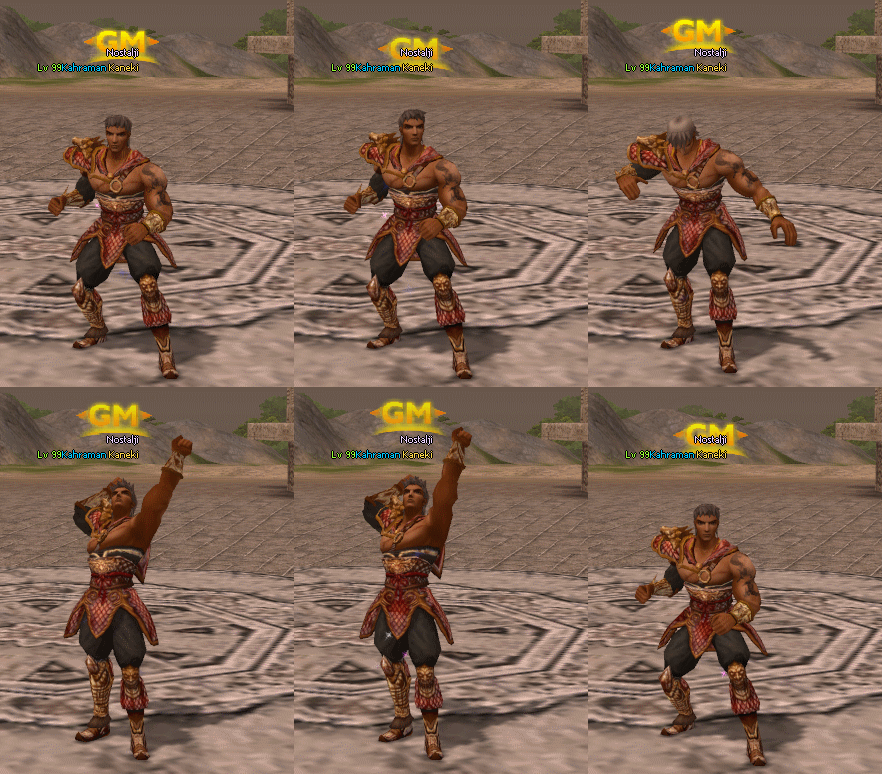
Metin2 Yeni Oturma Animasyonları ve Esneme Hareketleri: 3D Modelleme ile Oyun Deneyimini Zenginleştirme
Metin2 oyununda 3D modelleme ve animasyon çalışmaları, oyuncuların deneyimini ciddi anlamda zenginleştirmektedir. Özellikle karakter animasyonlarında yapılan geliştirmeler, oyuna daha gerçekçi ve estetik bir hava katar. Bu yazıda, Metin2 oyununda yeni oturma animasyonları ve esneme gibi küçük hareketlerin nasıl entegre edilebileceğini inceleyeceğiz. Bu süreçte 3ds Max, Blender, GR2 formatları, Granny3D ve diğer Metin2 özel modelleme araçları büyük rol oynar.
Metin2 Animasyon Sistemi ve GR2 Formatı
Metin2 oyunu, animasyonları GR2 adı verilen özel bir formatta kullanır. Bu format, 3D model animasyonlarını oyun içine aktarmak için gerekli olan yapıya sahiptir. Blender veya 3ds Max gibi yazılımlarda oluşturulan animasyonlar, doğru GR2 dışa aktarma eklentileriyle dönüştürüldüğünde Metin2 ortamına kolayca entegre edilebilir. Oturma ve esneme gibi basit ama görsel açıdan etkileyici animasyonlar da bu sistem üzerinden geliştirilebilir.
Yeni Oturma Animasyonlarının Geliştirilmesi
Oturma animasyonları, oyuncuların karakterlerini dinlenmek veya sohbet etmek amacıyla kullandığı saniyelerde devreye girer. Mevcut standart animasyonlara kıyasla daha doğal ve akıcı bir hareket döngüsü oluşturmak, oyuncuların daha fazla içselleşmesini sağlar. Bu animasyonlar, Blender veya 3ds Max[/CID] üzerinde oluşturulduktan sonra rigging işlemiyle kemik sistemiyle bağlanır. Ardından GR2 formatına dönüştürülerek Metin2 oyun dosyalarına aktarılır. Bu sayede karakter, belirlenen pozisyona oturur ve doğal görünümlü bir şekilde hareket eder.
Esneme ve Dinlenme Animasyonları
Esneme hareketi gibi küçük ama dikkat çekici animasyonlar, karakterin günlük yaşam hissi verebilir. Bu tür mikro animasyonlar, oyuncunun karakteriyle kurduğu duygusal bağın güçlenmesini sağlar. Metin2 geliştiricileri, bu tarz animasyonları eklemek için granny3D ve GR2 dışa aktarma araçlarını kullanabilir. Esneme animasyonu, kısa sürelidir ancak karakterin gözle görülür şekilde 'canlandığını' hissettirir. Bu tür animasyonlar, custom model çalışmalarıyla birlikte oyun içi karakterin daha etkileyici hale gelmesini sağlar.
Model Edit ve Animasyon Paketleri
Metin2 toplulukları arasında model edit ve animasyon paketleri oldukça popülerdir. Bu paketler, karakter, NPC, canavar ve eşya modellerinde değişiklik yapmayı sağlar. Aynı zamanda yeni animasyonlar da bu paketler aracılığıyla oyuna entegre edilebilir. EterPack veya Martysama gibi mod koleksiyonları, yeni oturma ve esneme animasyonlarını içerebilir. Bu tür paketler, oyunun görsel kalitesini artırmak ve oyuncuların daha fazla ilgisini çekmek için ideal çözümler sunar.
Metin2 Geliştiricileri İçin İpuçları
Metin2 üzerinde animasyon geliştirmek isteyen geliştiricilerin dikkat etmesi gereken bazı önemli konular vardır. Öncelikle, UV mapping ve texture uyumu sağlanmalıdır. Animasyonun karakterin dokuları ile uyumlu çalışması gerekir. Ayrıca bone yapısı doğru ayarlanmalıdır ki animasyonlar sorunsuz çalışsın. Metin2Dev gibi platformlarda yer alan geliştirici kılavuzları, yeni animasyonlar hazırlamak isteyenler için faydalı olabilir.
Sonuç
Yeni oturma animasyonları ve esneme hareketleri gibi küçük ama etkili detaylar, Metin2 oyununun görsel ve duygusal derinliğini artırır. 3D modelleme araçlarıyla hazırlanan bu animasyonlar, oyuncuların karakterlerine daha fazla bağlanmalarını sağlar. Custom model, animation ve visual mod çalışmalarıyla Metin2 deneyimi daha da zenginleştirilebilir. Metin2 Lobby olarak bu alandaki tüm yenilikleri takip ediyor ve kullanıcılarımız için en iyi kaynakları sunuyoruz.
Metin2 New Sitting Animations and Stretching Motions: Enhancing Gameplay Experience with 3D Modeling
Metin2 game, 3D modeling and animation works significantly enrich the player experience. Especially improvements made in character animations add a more realistic and aesthetic feel to the game. In this article, we will examine how new sitting animations and small motions like stretching can be integrated into Metin2. During this process, tools such as 3ds Max, Blender, GR2 formats, Granny3D, and other Metin2 specific modeling tools play a major role.
Metin2 Animation System and the GR2 Format
Metin2 uses a special format called GR2[/CR] for its animations. This format has the structure needed to import 3D model animations into the game. Animations created in software like Blender or 3ds Max can be easily integrated into Metin2[/CR] after being converted into GR2[/CR] using correct export plugins. Simple but visually impressive animations like sitting and stretching can also be developed through this system.
Developing New Sitting Animations
Sitting animations are triggered when players use their characters to rest or chat. Creating a more natural and fluid motion cycle compared to standard animations helps players engage more deeply with the game. These animations are created in Blender[/CR] or 3ds Max[/CR], then linked with a bone system through rigging[/CR]. After conversion to the GR2[/CR] format, they are imported into the Metin2[/CR] game files. This allows the character to assume a seated position with a naturally appearing movement.
Stretching and Rest Animations
Small but noticeable animations like stretching can give the character a sense of daily life. Such micro-animations help strengthen the emotional connection between the player and the character. Developers can use granny3D[/CR] and GR2[/CR] export tools to add these types of animations. The stretch motion is short in duration but noticeably brings the character to life. Combined with custom model[/CR] work, such animations enhance the character's appeal within the game.
Model Editing and Animation Packages
Model edit[/CR] and animation packages are quite popular among Metin2[/CR] communities. These packages allow modifications to character, NPC, monster, and item models. At the same time, new animations can be integrated into the game through these packages. Mod collections such as EterPack[/CR] or Martysama[/CR] may include new sitting and stretching animations. Such packages offer ideal solutions for enhancing the game’s visual quality and attracting more players.
Tips for Metin2 Developers
There are important points developers should consider when working on animations for Metin2[/CR]. First, UV mapping[/CR] and texture[/CR] compatibility must be ensured. The animation must work smoothly with the character’s textures. Additionally, the bone[/CR] structure must be properly configured to ensure animations run without issues. Developer guides found on platforms like Metin2Dev[/CR] can be helpful for those looking to create new animations.
Conclusion
Small but impactful details like new sitting animations and stretching motions increase the visual and emotional depth of Metin2[/CR]. Animations prepared using 3D modeling tools help players connect more strongly with their characters. Through custom model[/CR], animation[/CR], and visual mod[/CR] work, the Metin2[/CR] experience can be further enriched. As Metin2 Lobby, we follow all updates in this area and provide our users with the best resources.
Dowload=
Ziyaretçiler için gizlenmiş link,görmek için üye olmalısınız!
Giriş yap veya üye ol.
V.T =
Ziyaretçiler için gizlenmiş link,görmek için üye olmalısınız!
Giriş yap veya üye ol.
Metin2 Yeni Oturma Animasyonları ve Esneme Hareketleri: 3D Modelleme ile Oyun Deneyimini Zenginleştirme
Metin2 oyununda 3D modelleme ve animasyon çalışmaları, oyuncuların deneyimini ciddi anlamda zenginleştirmektedir. Özellikle karakter animasyonlarında yapılan geliştirmeler, oyuna daha gerçekçi ve estetik bir hava katar. Bu yazıda, Metin2 oyununda yeni oturma animasyonları ve esneme gibi küçük hareketlerin nasıl entegre edilebileceğini inceleyeceğiz. Bu süreçte 3ds Max, Blender, GR2 formatları, Granny3D ve diğer Metin2 özel modelleme araçları büyük rol oynar.
Metin2 Animasyon Sistemi ve GR2 Formatı
Metin2 oyunu, animasyonları GR2 adı verilen özel bir formatta kullanır. Bu format, 3D model animasyonlarını oyun içine aktarmak için gerekli olan yapıya sahiptir. Blender veya 3ds Max gibi yazılımlarda oluşturulan animasyonlar, doğru GR2 dışa aktarma eklentileriyle dönüştürüldüğünde Metin2 ortamına kolayca entegre edilebilir. Oturma ve esneme gibi basit ama görsel açıdan etkileyici animasyonlar da bu sistem üzerinden geliştirilebilir.
Yeni Oturma Animasyonlarının Geliştirilmesi
Oturma animasyonları, oyuncuların karakterlerini dinlenmek veya sohbet etmek amacıyla kullandığı saniyelerde devreye girer. Mevcut standart animasyonlara kıyasla daha doğal ve akıcı bir hareket döngüsü oluşturmak, oyuncuların daha fazla içselleşmesini sağlar. Bu animasyonlar, Blender veya 3ds Max[/CID] üzerinde oluşturulduktan sonra rigging işlemiyle kemik sistemiyle bağlanır. Ardından GR2 formatına dönüştürülerek Metin2 oyun dosyalarına aktarılır. Bu sayede karakter, belirlenen pozisyona oturur ve doğal görünümlü bir şekilde hareket eder.
Esneme ve Dinlenme Animasyonları
Esneme hareketi gibi küçük ama dikkat çekici animasyonlar, karakterin günlük yaşam hissi verebilir. Bu tür mikro animasyonlar, oyuncunun karakteriyle kurduğu duygusal bağın güçlenmesini sağlar. Metin2 geliştiricileri, bu tarz animasyonları eklemek için granny3D ve GR2 dışa aktarma araçlarını kullanabilir. Esneme animasyonu, kısa sürelidir ancak karakterin gözle görülür şekilde 'canlandığını' hissettirir. Bu tür animasyonlar, custom model çalışmalarıyla birlikte oyun içi karakterin daha etkileyici hale gelmesini sağlar.
Model Edit ve Animasyon Paketleri
Metin2 toplulukları arasında model edit ve animasyon paketleri oldukça popülerdir. Bu paketler, karakter, NPC, canavar ve eşya modellerinde değişiklik yapmayı sağlar. Aynı zamanda yeni animasyonlar da bu paketler aracılığıyla oyuna entegre edilebilir. EterPack veya Martysama gibi mod koleksiyonları, yeni oturma ve esneme animasyonlarını içerebilir. Bu tür paketler, oyunun görsel kalitesini artırmak ve oyuncuların daha fazla ilgisini çekmek için ideal çözümler sunar.
Metin2 Geliştiricileri İçin İpuçları
Metin2 üzerinde animasyon geliştirmek isteyen geliştiricilerin dikkat etmesi gereken bazı önemli konular vardır. Öncelikle, UV mapping ve texture uyumu sağlanmalıdır. Animasyonun karakterin dokuları ile uyumlu çalışması gerekir. Ayrıca bone yapısı doğru ayarlanmalıdır ki animasyonlar sorunsuz çalışsın. Metin2Dev gibi platformlarda yer alan geliştirici kılavuzları, yeni animasyonlar hazırlamak isteyenler için faydalı olabilir.
Sonuç
Yeni oturma animasyonları ve esneme hareketleri gibi küçük ama etkili detaylar, Metin2 oyununun görsel ve duygusal derinliğini artırır. 3D modelleme araçlarıyla hazırlanan bu animasyonlar, oyuncuların karakterlerine daha fazla bağlanmalarını sağlar. Custom model, animation ve visual mod çalışmalarıyla Metin2 deneyimi daha da zenginleştirilebilir. Metin2 Lobby olarak bu alandaki tüm yenilikleri takip ediyor ve kullanıcılarımız için en iyi kaynakları sunuyoruz.
Metin2 New Sitting Animations and Stretching Motions: Enhancing Gameplay Experience with 3D Modeling
Metin2 game, 3D modeling and animation works significantly enrich the player experience. Especially improvements made in character animations add a more realistic and aesthetic feel to the game. In this article, we will examine how new sitting animations and small motions like stretching can be integrated into Metin2. During this process, tools such as 3ds Max, Blender, GR2 formats, Granny3D, and other Metin2 specific modeling tools play a major role.
Metin2 Animation System and the GR2 Format
Metin2 uses a special format called GR2[/CR] for its animations. This format has the structure needed to import 3D model animations into the game. Animations created in software like Blender or 3ds Max can be easily integrated into Metin2[/CR] after being converted into GR2[/CR] using correct export plugins. Simple but visually impressive animations like sitting and stretching can also be developed through this system.
Developing New Sitting Animations
Sitting animations are triggered when players use their characters to rest or chat. Creating a more natural and fluid motion cycle compared to standard animations helps players engage more deeply with the game. These animations are created in Blender[/CR] or 3ds Max[/CR], then linked with a bone system through rigging[/CR]. After conversion to the GR2[/CR] format, they are imported into the Metin2[/CR] game files. This allows the character to assume a seated position with a naturally appearing movement.
Stretching and Rest Animations
Small but noticeable animations like stretching can give the character a sense of daily life. Such micro-animations help strengthen the emotional connection between the player and the character. Developers can use granny3D[/CR] and GR2[/CR] export tools to add these types of animations. The stretch motion is short in duration but noticeably brings the character to life. Combined with custom model[/CR] work, such animations enhance the character's appeal within the game.
Model Editing and Animation Packages
Model edit[/CR] and animation packages are quite popular among Metin2[/CR] communities. These packages allow modifications to character, NPC, monster, and item models. At the same time, new animations can be integrated into the game through these packages. Mod collections such as EterPack[/CR] or Martysama[/CR] may include new sitting and stretching animations. Such packages offer ideal solutions for enhancing the game’s visual quality and attracting more players.
Tips for Metin2 Developers
There are important points developers should consider when working on animations for Metin2[/CR]. First, UV mapping[/CR] and texture[/CR] compatibility must be ensured. The animation must work smoothly with the character’s textures. Additionally, the bone[/CR] structure must be properly configured to ensure animations run without issues. Developer guides found on platforms like Metin2Dev[/CR] can be helpful for those looking to create new animations.
Conclusion
Small but impactful details like new sitting animations and stretching motions increase the visual and emotional depth of Metin2[/CR]. Animations prepared using 3D modeling tools help players connect more strongly with their characters. Through custom model[/CR], animation[/CR], and visual mod[/CR] work, the Metin2[/CR] experience can be further enriched. As Metin2 Lobby, we follow all updates in this area and provide our users with the best resources.
