

Önizleme
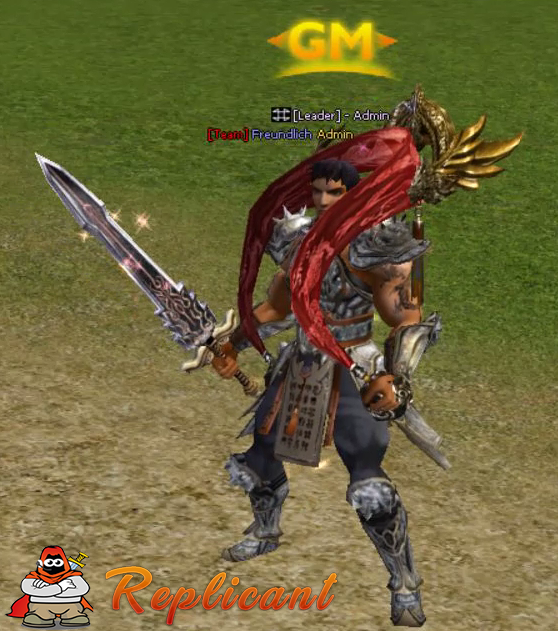
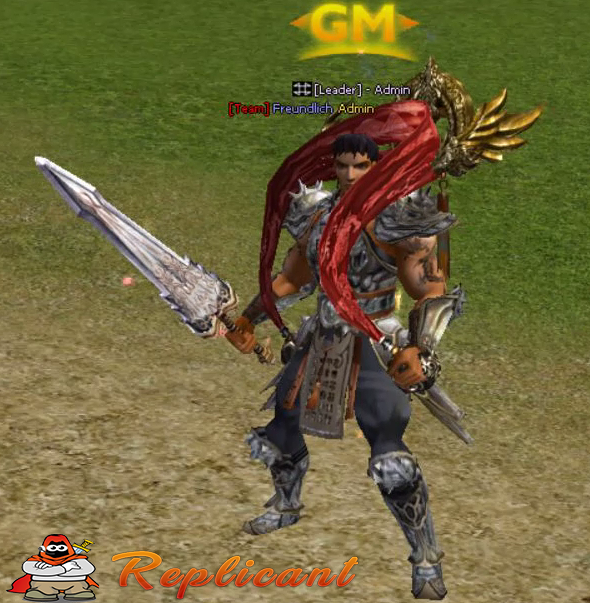
Ziyaretçiler için gizlenmiş link,görmek için üye olmalısınız!
Giriş yap veya üye ol.
Ziyaretçiler için gizlenmiş link,görmek için üye olmalısınız!
Giriş yap veya üye ol.
Ziyaretçiler için gizlenmiş link,görmek için üye olmalısınız!
Giriş yap veya üye ol.
Muharebe Kılıcı v2: Metin2 3D Modelleme ve Görsel Geliştirme İçin En Etkili Araçlar
Metin2 oyununda 3D modelleme, karakter geliştirme, silah ve efekt tasarımları gibi konularla ilgilenen oyuncular ve geliştiriciler için Muharebe Kılıcı v2, önemli bir araçtır. Bu kılıcın ikinci versiyonu, hem görsel açıdan dikkat çekici hem de teknik olarak optimize edilmiş bir yapıya sahiptir. Bu yazıda, Muharebe Kılıcı v2'nin Metin2 özelinde nasıl kullanıldığını, 3D modelleme süreçlerindeki rolünü ve bu modelin nasıl daha etkileyici hale getirilebileceğini inceleyeceğiz.
Metin2'de 3D Silah Modelleri ve Önemi
Silah modelleri, karakterlerin savaşta kullandığı en temel öğelerden biridir. Özellikle Metin2 gibi MMORPG oyunlarında, karakterlerin taşıdığı silahlar hem oyun içi performansı etkiler hem de görsel kimliği belirler. Muharebe Kılıcı v2, bu bağlamda hem estetik hem de işlevsel bir yapı sunar. Bu model, GR2 formatında optimize edilmiş olup, 3ds Max ya da Blender gibi programlarda kolayca düzenlenebilir.
Metin2 3D Model Formatları ve Uyum
Metin2 oyun motoruna entegre edilecek 3D modeller, GR2 veya Granny formatında olmalıdır. Bu formatlar, oyunun rendering sistemine uyum sağlar ve animasyonlarla sorunsuz çalışır. Muharebe Kılıcı v2 modeli de bu standartlara uygun şekilde tasarlanmıştır. Bu sayede, geliştiriciler tarafından kolayca içe aktarılıp, özelleştirilebilir ve oyun içi paketlerde kullanılabilir.
Model Editörü ile Muharebe Kılıcı v2 Nasıl Değiştirilir?
Model editörleri, Metin2'de özel efekt ve silah modelleri oluşturmak için kritik öneme sahiptir. Blender ya da 3ds Max kullanarak, Muharebe Kılıcı v2 modeli üzerinde değişiklikler yapabilir, UV mapping uygulayabilir ve dokular (texture) yenileyebilirsiniz. Bu işlemler sırasında gr2 export ve gr2 import işlemleri önemlidir. Metin2 texture ve skin dosyaları, modelin son görünümünü büyük ölçüde etkiler.
3D Max ve Blender ile Muharebe Kılıcı v2 Tasarımı
Blender ve 3ds Max, Metin2 modelleme için en yaygın kullanılan yazılımlardır. Bu platformlarda Muharebe Kılıcı v2 modeli, mesh, bone, animation gibi teknik yapılarla desteklenerek geliştirilebilir. Özellikle Metin2 animation ile silahın karakterle uyumlu hareket etmesi sağlanır. Ayrıca, Metin2 rigging işlemleri sayesinde silah modeli, karakterin elinde doğal hareketler sergiler.
Özel Efekt ve Görsel Geliştirmeler
Görsel modlar ve efekt sistemleri, silah modellerinin etkileyiciliğini artırır. Muharebe Kılıcı v2, özel efekt modelleriyle birleştirildiğinde, savaş anında daha dramatik ve etkileyici yansımalar, parlama efektleri ve ışık oyunları yaratılabilir. Bu tür geliştirmeler, Metin2 visual mod veya graphic mod adı altında sunulabilir.
Sonuç
Muharebe Kılıcı v2, Metin2 dünyasında hem estetik hem de teknik olarak güçlü bir 3D modeldir. Bu modelin doğru şekilde özelleştirilmesi, geliştiricilerin ve oyuncuların oyun deneyimini ciddi anlamda artırabilir. 3D modelleme, animasyon ve görsel efektlerle birleşen bu silah modeli, Metin2 geliştirme ortamında önemli bir yere sahiptir.
Battle Sword v2: The Most Effective Tools for 3D Modeling and Visual Enhancement in Metin2
For players and developers interested in 3D modeling, character development, weapon and effect designs in Metin2, Battle Sword v2 is an important tool. This second version of the sword features both visually striking and technically optimized structure. In this article, we will examine how Battle Sword v2 is used within Metin2, its role in 3D modeling processes, and how this model can be made more appealing.
Weapon Models in Metin2 and Their Importance
Weapon models are among the most fundamental elements used by characters in combat. Especially in MMORPG games like Metin2, the weapons carried by characters affect both in-game performance and visual identity. Battle Sword v2 offers both aesthetic and functional structures. This model is optimized in GR2 format and can easily be edited in programs such as 3ds Max or Blender.
Metin2 3D Model Formats and Compatibility
3D models integrated into the Metin2 game engine must be in GR2 or Granny format. These formats support the game's rendering system and work seamlessly with animations. The Battle Sword v2 model has been designed accordingly to allow easy import, customization, and usage in in-game packages by developers.
How to Modify Battle Sword v2 with Model Editor?
Model editors are critical for creating special effects and weapon models in Metin2. Using Blender or 3ds Max, you can modify the Battle Sword v2 model, apply UV mapping, and refresh textures. During these processes, gr2 export and gr2 import operations are crucial. Metin2 texture and skin files significantly influence the final appearance of the model.
Designing Battle Sword v2 with 3D Max and Blender
Blender and 3ds Max are the most commonly used software for Metin2 modeling. Within these platforms, the Battle Sword v2 model can be developed with technical structures such as mesh, bone, and animation. Especially with Metin2 animation, the weapon moves naturally with the character. Additionally, Metin2 rigging ensures that the sword model behaves naturally in the character's hand.
Special Effects and Visual Enhancements
Visual mods and effect systems enhance the impact of weapon models. Combined with special effect models, Battle Sword v2 can create dramatic reflections, glowing effects, and light plays during battle scenes. Such enhancements can be offered under Metin2 visual mod or graphic mod.
Conclusion
Battle Sword v2 is a powerful 3D model both aesthetically and technically in the world of Metin2. Properly customizing this model can significantly enhance the gaming experience for developers and players alike. Combined with 3D modeling, animation, and visual effects, this weapon model holds an important place in the Metin2 development environment.
