

Önizleme
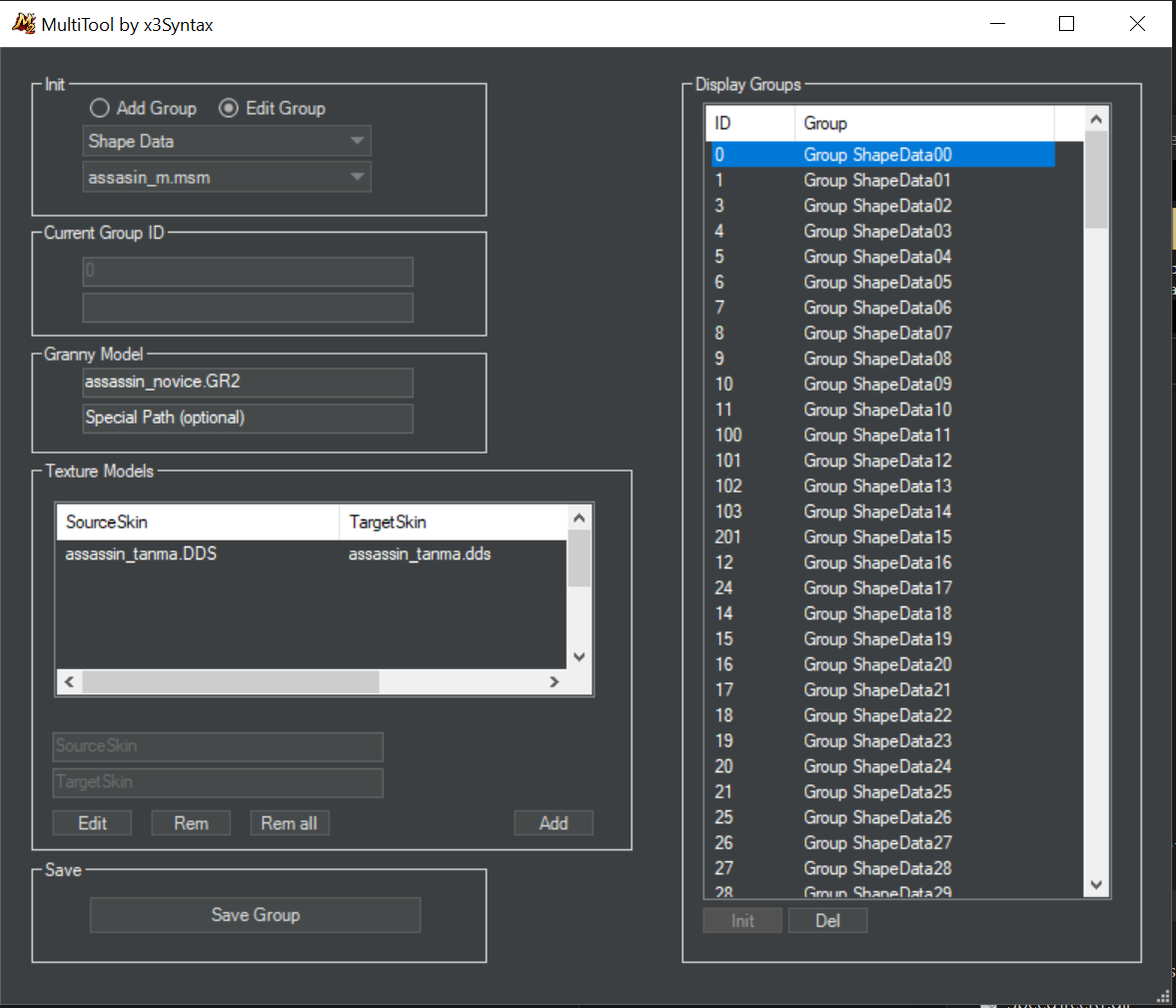
Ziyaretçiler için gizlenmiş link,görmek için üye olmalısınız!
Giriş yap veya üye ol.
Ziyaretçiler için gizlenmiş link,görmek için üye olmalısınız!
Giriş yap veya üye ol.
Ziyaretçiler için gizlenmiş link,görmek için üye olmalısınız!
Giriş yap veya üye ol.
Multitool MSM Creator MSM Oluşturma Aracı Nedir?
Metin2 geliştiricileri için önemli bir araç olan Multitool MSM Creator, 3D modelleme sürecini kolaylaştırmak ve oyun içinde kullanılacak MSM (Metin2 Static Model) dosyalarını üretmek için geliştirilmiş özel bir yazılımdır. Bu araç sayesinde, 3D model editörü olarak bilinen Blender ya da 3DS Max gibi programlardan dışa aktarılan objeler doğrudan Metin2 formatında olan MSM dosyasına dönüştürülebilir. Bu sayede modelleme süreci hızlanır ve geliştiriciler daha hızlı sonuçlar elde edebilir.
MSM Dosyası Nedir?
MSM, yani Metin2 Static Model, oyun içinde sabit nesneleri temsil eden dosya türleridir. Bu dosyalar genellikle binalar, harita objeleri, efekt modelleri veya bazı özel item modelleri gibi statik yapılar için kullanılır. MSM dosyaları, Metin2 motoru tarafından tanınan özel bir formattır ve doğru yapılandırılmaları gerekir ki oyun içinde hatasız bir şekilde yüklensinler.
Multitool MSM Creator Kullanımı
Multitool MSM Creator, kullanıcı dostu arayüzü sayesinde hem profesyonel geliştiriciler hem de yeni başlayanlar için oldukça faydalıdır. Program, Blender veya 3DS Max üzerinde hazırlanan modelin dışa aktarılmasıyla oluşan GR2 veya Granny formatındaki dosyaları alarak onları doğrudan MSM formatına dönüştürür. Bu işlem sırasında UV Mapping, texture uyumu ve mesh doğruluğu gibi önemli detaylar da dikkate alınır.
Multitool MSM Creator Özellikleri
1. Doğrudan GR2 ve Granny3D formatlarını destekler.
2. Otomatik UV haritalama ve texture atama özelliği.
3. Modelin mesh yapısını kontrol eder ve eksik varsa uyarır.
4. Oyun içi uyumluluk için optimize edilmiş çıktı sağlar.
5. Metin2 geliştirme ortamına entegre kolay kullanım sunar.
MSM Oluşturma Süreci
1. Blender veya 3DS Max üzerinde modelinizi oluşturun.
2. Modelinizi dışa GR2 veya Granny formatında aktarın.
3. Multitool MSM Creator üzerinden dosyayı seçin.
4. Gerekli ayarlamaları yapın (UV, texture, mesh).
5. MSM dosyasını dışa aktarın ve Metin2 sunucunuza ekleyin.
Neden Multitool MSM Creator Kullanmalısınız?
Metin2 özel sunucularında modelleme yapmayı düşünen geliştiriciler için Multitool MSM Creator, zaman kazandıran ve hata riskini azaltan güçlü bir araçtır. Özellikle custom model, visual mod veya graphic mod geliştirmek isteyenler için bu araç vazgeçilmezdir. Ayrıca map obje veya dungeon model ekleme gibi işlemler için de oldukça kullanışlıdır. Metin2 Lobby olarak bu aracı desteklememiz, topluluk üyelerimizin daha kaliteli içerikler üretmesine yardımcı olmaktadır.
Sonuç
Multitool MSM Creator, Metin2 3D modelleme dünyasında önemli bir yere sahiptir. Model edit, character model, monster model, NPC model gibi birçok alanda kullanılabilecek bu araç, Metin2 geliştiricileri için güçlü bir destek sağlar. Doğru kullanıldığında, sunuculara özel içerikler eklemek artık çok daha kolay hale gelir.
What is Multitool MSM Creator?
Multitool MSM Creator is a specialized software developed to facilitate the 3D modeling process for Metin2 developers and create MSM (Metin2 Static Model) files that can be used within the game. This tool allows objects exported from 3D modeling programs like Blender or 3DS Max to be converted directly into the MSM file format used by Metin2. As a result, the modeling process speeds up, allowing developers to achieve faster outcomes.
What is an MSM File?
MSM, short for Metin2 Static Model, represents static objects within the game. These files are generally used for structures such as buildings, map objects, effect models, or specific custom item models. MSM files are a special format recognized by the Metin2 engine, and they must be configured correctly so they load without errors inside the game.
Using Multitool MSM Creator
Multitool MSM Creator is highly beneficial for both professional developers and newcomers due to its user-friendly interface. The program takes files exported from Blender or 3DS Max in GR2 or Granny formats and converts them directly into MSM format. During this process, important details such as UV mapping, texture compatibility, and mesh accuracy are also considered.
Features of Multitool MSM Creator
1. Supports GR2 and Granny3D formats directly.
2. Automatic UV mapping and texture assignment features.
3. Checks the model's mesh structure and warns about any missing components.
4. Provides optimized output for in-game compatibility.
5. Offers easy integration into the Metin2 development environment.
The MSM Creation Process
1. Create your model in Blender or 3DS Max.
2. Export your model in GR2 or Granny format.
3. Select the file via Multitool MSM Creator.
4. Adjust settings as needed (UV, texture, mesh).
5. Export the MSM file and add it to your Metin2 server.
Why Should You Use Multitool MSM Creator?
For developers looking to engage in 3D modeling for Metin2 private servers, Multitool MSM Creator is a time-saving and error-reducing powerful tool. It is especially useful for creating custom models, visual mods, or graphic mods. It is also highly practical for adding map objects or dungeon models. At Metin2 Lobby, supporting this tool helps our community members produce higher-quality content.
Conclusion
Multitool MSM Creator holds a significant place in the world of Metin2 3D modeling. This tool, which can be used across many areas such as model editing, character models, monster models, and NPC models, provides strong support for Metin2 developers. When used correctly, adding custom content to servers becomes much easier.
