

Virüs Total:
Ziyaretçiler için gizlenmiş link,görmek için üye olmalısınız!
Giriş yap veya üye ol.
İndir:
Ziyaretçiler için gizlenmiş link,görmek için üye olmalısınız!
Giriş yap veya üye ol.
New Binek - Vector: Metin2 Oyununda Yeni Binek Sistemi ve Client Paketleriyle Nasıl Kullanılır?
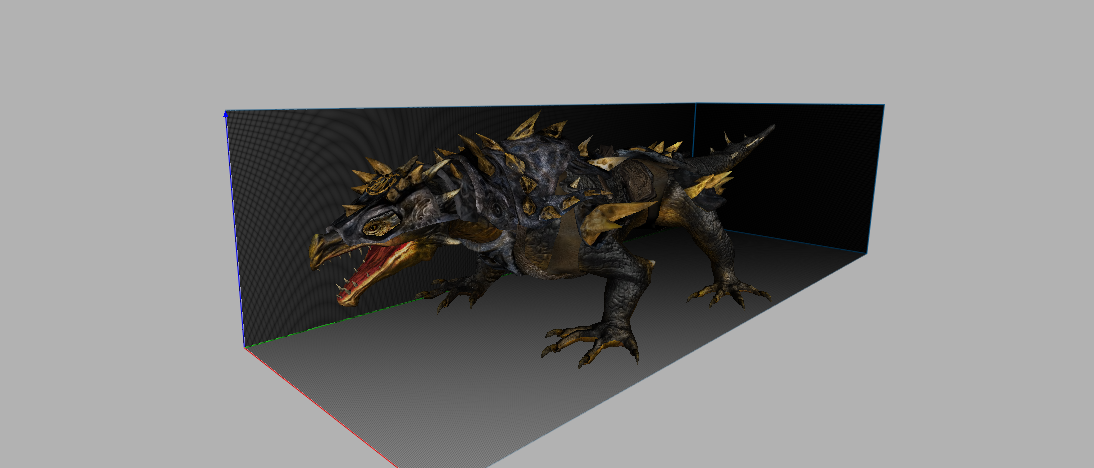
Metin2 Lobby olarak sunmaya devam ettiğimiz özel Metin2 client ve pack içerikleri arasında New Binek - Vector sistemi de dikkat çeken konulardan biri. Bu yazıda, Metin2 oyununda binek sistemine getirilen yenilikleri, Vector adlı yeni bineğin özelliklerini, nasıl daha iyi bir deneyim için client veya pack kullanacağınızı ve bu tür özelleştirmelerin Metin2 dünyasında ne kadar popüler olduğunu ele alacağız.
Metin2 oyunu yıllardır severek oynanan MMORPG türünün öncülerinden biridir. Özellikle PvP ve guild savaşları ile tanınan bu oyunda, kullanıcılar kendi karakterlerini özelleştirme, güçlendirme ve estetik olarak farklılaştırmak gibi pek çok imkan bulurlar. Bu imkanlardan birisi de binek sistemidir. New Binek - Vector, bu sistemde yeni nesil bir deneyim sunmayı hedefler. Vector bineği, hem görsel hem de işlevsel olarak oyun içinde fark yaratır. Client üzerinde yapılan düzenlemelerle bu binek sistemini daha kolay kullanabilmek mümkündür.
Metin2 Client dünyasında Vector bineği ile tanışmak istiyorsanız, doğru pack veya client seçimi yapmanız gerekir. Metin2 Lobby üzerinden sunduğumuz Metin2 client ve pack sistemleri, bu yeni binek sistemini desteklemektedir. Client kurulumundan sonra, Vector bineğini oyun içi menüden veya komut yardımıyla aktif edebilirsiniz. Ayrıca client üzerinde yapılan efekt düzenlemeleri sayesinde bineğinizin hareketleri, ışık efektleri ve animasyonları çok daha etkileyici hale getirilebilir.
Metin2 pack sistemleri içinde Vector bineği özel olarak tanımlanmışsa, pack açma işlemi sırasında binek verileri otomatik olarak yüklenebilir. Bu sayede kullanıcılar ekstra ayarlamaya gerek kalmadan doğrudan Vector bineğini kullanabilir. Pack dosyalarında yer alan texture ve effect dosyaları, bineğin daha gerçekçi ve etkileyici görünmesini sağlar. Metin2 pack sistemlerinde extract işlemi yapılarak bu dosyalar ayrı ayrı incelenebilir ve gerekirse düzenlenip tekrar entegre edilebilir.
Metin2 dünyasında custom client kullanmak isteyen oyuncular için Vector bineği, sadece bir taşıt değil aynı zamanda karakterinize özel bir simge haline gelir. Client üzerinde yapılan skin ve texture değişiklikleriyle binek daha da özelleştirilebilir. Client edit işlemleri sırasında dikkat edilmesi gereken bazı teknik detaylar vardır. Metin2 client fix veya update işlemleri, Vector bineğinin sorunsuz çalışmasını sağlayabilir. Hatalar yaşanması durumunda client dosyalarının kontrol edilmesi ve eksik dosyaların yeniden yüklenmesi gerekir.
Metin2 Lobby, Metin2 client indir ve pack indir konularında kullanıcı dostu bir platformdur. New Binek - Vector sistemi ile birlikte sunulan özel client paketleri, oyun deneyiminizi yükseltmek için tasarlanmıştır. PvP odaklı sistemlerde Vector bineği ile birlikte gelişmiş effect ve texture kombinasyonları kullanmak mümkündür. Client dosyaları üzerinde yapılan küçük değişikliklerle, bineğin hızı, efektleri ve görünümü optimize edilebilir. Metin2Dev client gibi sistemlerle daha teknik düzeyde müdahaleler yapmak da mümkündür.
Metin2 oyununda Vector bineği, sadece estetik bir değer sunmakla kalmaz, aynı zamanda karakterinize avantaj sağlar. Client veya pack ile entegre edildiğinde, bu binek sistemi daha stabil ve performanslı çalışır. Metin2 lobby üzerinden erişebileceğiniz pack sistemleri sayesinde, Vector bineğini güvenli ve hızlı bir şekilde oyununuza entegre edebilirsiniz. Eterpack gibi sistemlerle birlikte çalışırken dikkat edilmesi gereken detaylar olabilir, ancak doğru client desteği ile bu sorunlar kolayca çözülür.
Sonuç olarak, New Binek - Vector sistemi, Metin2 oyununda yeni nesil bir binek deneyimi sunar. Metin2 Lobby aracılığıyla sunulan client ve pack sistemleriyle birlikte bu bineği kullanmak, oyun içi deneyiminizi zenginletir. Hem estetik hem de işlevsel olarak güçlü olan Vector, özellikle PvP oynayan oyuncular için ideal bir tercihtir. Client dosyalarını düzenlemek, efektleri güncellemek ve bineği özelleştirmek, Metin2 oyununu daha keyifli hale getirir.
New Mount - Vector: How to Use the New Mount System in Metin2 with Client Packs?
Metin2 Lobby continues to offer special Metin2 client and pack content, including the New Mount - Vector system which has drawn attention. In this article, we will examine the innovations introduced to the mount system in Metin2, the features of the new mount named Vector, how to use client or pack for a better experience, and why such customizations are so popular in the Metin2 world.
Metin2 is one of the pioneering games in the MMORPG genre, loved by players for years. Known especially for its PvP and guild battles, the game offers many opportunities for players to customize, strengthen, and aesthetically differentiate their characters. One of these features is the mount system. The New Mount - Vector aims to provide a next-generation experience within this system. The Vector mount stands out both visually and functionally in-game. With customizations made on the client, it becomes possible to use this mount system more effectively.
To encounter the Vector mount in the Metin2 client world, you need to choose the right pack or client. The Metin2 client and pack systems provided through Metin2 Lobby support this new mount system. After installing the client, you can activate the Vector mount from in-game menus or via commands. Additionally, effect adjustments made on the client enhance the movement, light effects, and animations of your mount, making them more impressive.
If the Vector mount is specially defined within Metin2 pack systems, mount data can be loaded automatically during the pack installation process. This allows users to start using the Vector mount directly without any additional setup. The texture and effect files within the pack make the mount appear more realistic and visually striking. These files can be individually reviewed and modified by extracting the pack files and then re-integrated if needed.
For players wanting to use a custom client in Metin2, the Vector mount is not just a vehicle but also becomes a unique symbol of your character. The mount can be further customized with skin and texture changes made on the client. There are some technical details to consider when editing client files. Client fix or update procedures can ensure smooth operation of the Vector mount. If errors occur, checking the client files and reinstalling missing ones may be necessary.
Metin2 Lobby is a user-friendly platform for downloading Metin2 clients and packs. Together with the special client packages offered alongside the New Mount - Vector system, they are designed to enhance your gaming experience. Within PvP-focused systems, advanced effect and texture combinations can be used with the Vector mount. Small modifications to client files allow you to optimize the mount's speed, effects, and appearance. More technical interventions are also possible using systems like Metin2Dev client.
In Metin2, the Vector mount provides not only aesthetic value but also advantages to your character. When integrated with a client or pack, this mount system operates more stably and efficiently. Thanks to the pack systems available through Metin2 Lobby, you can safely and quickly integrate the Vector mount into your gameplay. While there may be details to watch out for when working with systems like Eterpack, these issues can easily be resolved with proper client support.
In conclusion, the New Mount - Vector system brings a next-gen mount experience to Metin2. By using the client and pack systems provided through Metin2 Lobby, you can enrich your in-game experience. The Vector mount, both aesthetically and functionally powerful, is an ideal choice especially for PvP players. Editing client files, updating effects, and customizing mounts makes the Metin2 game even more enjoyable.

