

Resim
Ziyaretçiler için gizlenmiş link,görmek için üye olmalısınız!
Giriş yap veya üye ol.
Ziyaretçiler için gizlenmiş link,görmek için üye olmalısınız!
Giriş yap veya üye ol.
Not;Bir Filesden Çekilmiştir.
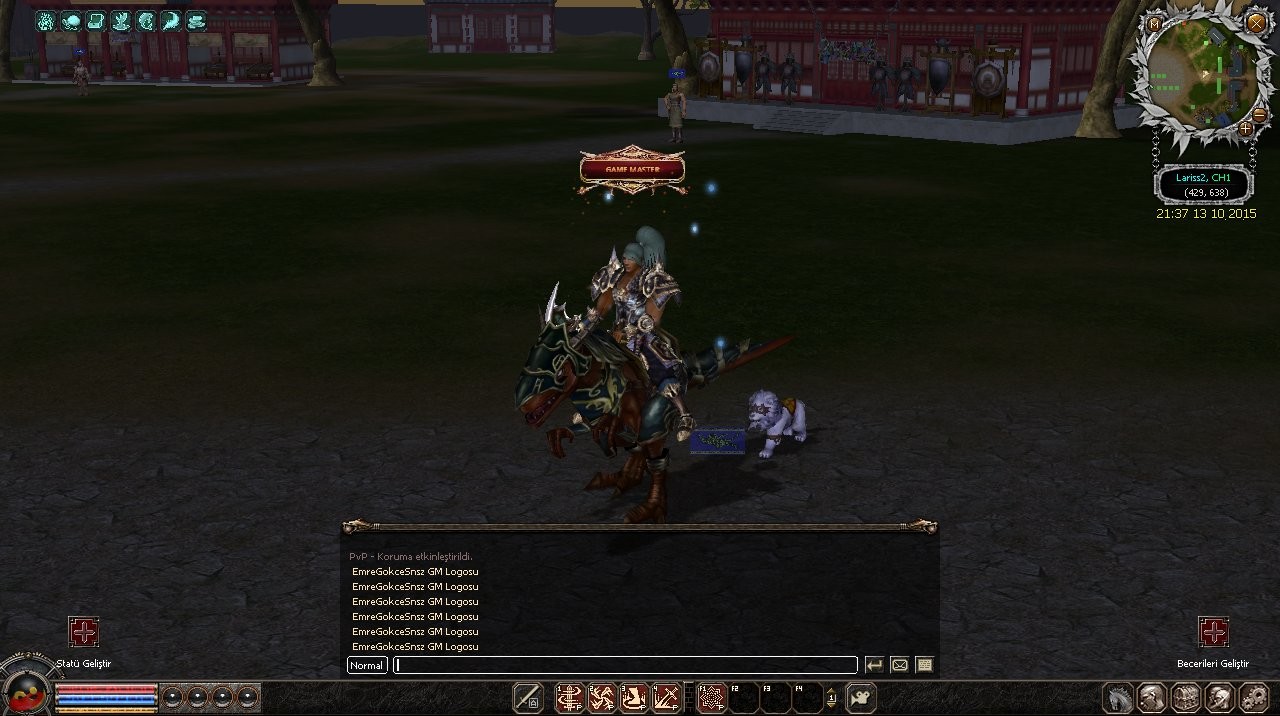
Yeni Game Master Logosu ve Efektiyle Metin2 Client Deneyiminizi Zenginleştirin
Metin2 lobby olarak, oyuncuların server deneyimini zenginleştirmeye devam ediyoruz. Bu yazıda, yeni Game Master (GM) logosu ve efektlerinin nasıl entegre edileceği, ne gibi avantajlar sağladığı ve Metin2 client sistemlerinde nasıl kullanılabileceği hakkında detaylı bilgi vereceğiz. Özellikle Metin2 client, Metin2 pack, Metin2 client pack, Metin2 PvP client gibi nişlerde çalışan geliştiriciler veya sunucu sahipleri için önemli bir güncelleme bu.
Game Master Nedir?
Metin2 oyununda Game Master (GM), oyun yöneticileridir. GM'ler, oyun içi olayları yönetir, kurallara aykırılıkları takip eder ve oyunun sağlıklı işlemesini sağlar. Bu nedenle, GM'lerin tanınması ve diğer oyunculardan ayrılması önemlidir. Bu bağlamda, GM logoları ve efektler, hem oyun içindeki yetki durumunu belirtir hem de estetik açıdan sunucuya değer katar.
Yeni GM Logosu ve Efekti Özellikleri
Yeni GM logosu, daha modern ve görsel olarak dikkat çekici bir yapıya sahiptir. Oyuncuların ekranında belirgin şekilde görünen bu logo, GM'nin konumunu ve durumunu belirtmektedir. Aynı zamanda özel bir efekt ile birlikte kullanıldığında, GM karakteri diğer karakterlerden daha öne çıkar. Bu efektler genellikle karakterin etrafında hareket eden parıltılar, renkli ışıklar ya da özel animasyonlardır.
Metin2 Client ve Pack Entegrasyonu
Yeni GM logosu ve efekti, Metin2 client dosyalarına kolayca entegre edilebilir. Bunun için gerekli dosyaları paketinizin uygun dizinlerine yerleştirmeniz yeterlidir. Eğer Metin2 pack kullanıyorsanız, bu logoyu ve efekti pack dosyalarına ekleyerek tüm oyuncuların görmesini sağlayabilirsiniz. Ancak dikkatli olunmalıdır: bazı client versiyonlarında farklı yapılandırma gerektirebilir. Metin2 client hata durumlarında, logonun görünmemesi gibi sorunlar yaşanabilir. Bu gibi durumlarda Metin2 client fix işlemleri yapılmalıdır.
PvP Sunucularında GM Logosu Kullanımı
Metin2 PvP client sistemlerinde, GM logoları ve efektleri ekstra önem taşır. Oyuncuların dikkatini çekecek ve GM'nin oyun içi varlığını hissettirecek bu unsurlar, hem güvenlik hem de oyun deneyimi açısından kritiktir. Özellikle Metin2 client edit yapan geliştiriciler, bu efektleri özel PvP sistemlerine entegre ederek daha etkileyici sunucular yaratabilirler.
Nasıl Kurulur?
1. GM logosu ve efekt dosyalarını indirin.
2. Metin2 client dosyaları arasında doğru dizinleri bulun.
3. Dosyaları uygun yerlere kopyalayın.
4. Gerekirse Metin2 client patch işlemlerini yapın.
5. Test edin ve aktif edin.
Sonuç
Yeni Game Master logosu ve efekti, Metin2 sunucularınızda profesyonel bir görünüm sağlamak ve oyun içi güvenliği artırmak için ideal bir çözümdür. Hem estetik hem de fonksiyonel olarak katkı sunan bu özellik, Metin2 client dünyasında fark yaratmanıza yardımcı olacaktır. Daha fazla bilgi ve destek için Metin2 Lobby'yi ziyaret edin.
Enhance Your Metin2 Client Experience with New Game Master Logo & Effects
Metin2 lobby, continues to enrich the player experience on servers. In this article, we will provide detailed information about how to integrate the new Game Master (GM) logo and effects, what advantages they offer, and how they can be used within Metin2 client systems. This update is particularly important for developers or server owners working in niches such as Metin2 client, Metin2 pack, Metin2 client pack, Metin2 PvP client.
What is a Game Master?
In the game Metin2, Game Masters (GMs) are the administrators who manage in-game events, monitor rule violations, and ensure the game runs smoothly. Therefore, it is crucial for GMs to be recognizable and distinguishable from other players. In this context, GM logos and effects indicate their authority level and add aesthetic value to the server.
Features of the New GM Logo and Effects
The new GM logo has a more modern and visually appealing design. Clearly visible on players' screens, this logo indicates the location and status of the GM. When combined with special effects, the GM character stands out more than others. These effects usually consist of glowing animations, colorful lights, or unique visual elements surrounding the character.
Integration with Metin2 Client and Packs
The new GM logo and effects can easily be integrated into Metin2 client files. You simply need to place the required files in the appropriate directories within your pack. If you are using a Metin2 pack, you can embed these logos and effects directly into the pack files so all players see them. However, be cautious: certain client versions may require different configurations. In case of Metin2 client errors, issues like the logo not appearing might occur. In such cases, Metin2 client fixes should be applied.
Using GM Logos on PvP Servers
On Metin2 PvP client systems, GM logos and effects carry additional significance. These elements grab players' attention and emphasize the presence of a GM in the game, which is critical both for security and gameplay. Developers who perform Metin2 client edits can create more impressive servers by integrating these effects into custom PvP systems.
How to Install?
1. Download the GM logo and effect files.
2. Locate the correct directories among the Metin2 client files.
3. Copy the files to the appropriate locations.
4. Apply Metin2 client patches if needed.
5. Test and activate.
Conclusion
The new Game Master logo and effects provide a professional look for your Metin2 servers and enhance in-game security. Offering both aesthetic and functional benefits, this feature helps you stand out in the world of Metin2 client. Visit Metin2 Lobby for more information and support.
