

Ziyaretçiler için gizlenmiş link,görmek için üye olmalısınız!
Giriş yap veya üye ol.
Ziyaretçiler için gizlenmiş link,görmek için üye olmalısınız!
Giriş yap veya üye ol.
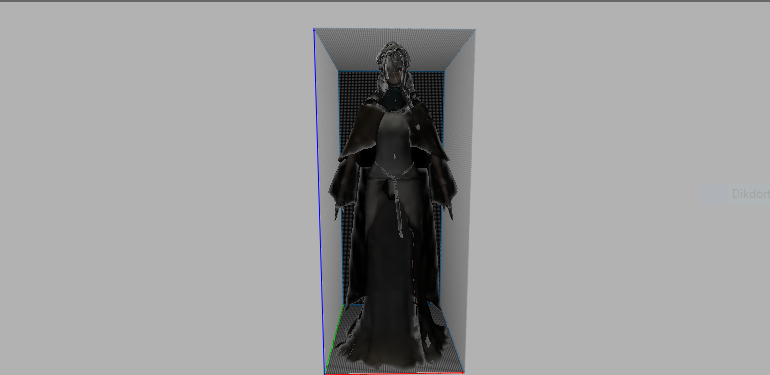
Metin2'de Yeni NPC Modellemesi: Geliştiriciler İçin Rehber
Metin2, tarihimmoğu ve oyun içi deneyimi artırabilecek yüksek kaliteli 3D modellerle zenginleştirilebilir. Özellikle NPC (Non-Player Character) modelleri, sunucuların görsel açıdan daha özgün ve ilgi çekici hale gelmesinde kilit rol oynar. Bu yazıda, Metin2 için yeni bir NPC modeli oluşturma sürecinden bahsedeceğiz.
Metin2 NPC Modellerine Genel Bakış
Metin2 NPC modelleri genellikle Granny 3D (GR2) formatında sunulur. Bu format, Metin2’in kullandığı temel model formatıdır. GR2 dosyaları hem animasyon hem de mesh verilerini barındırabilir. NPC modelleri, karakterin kabiliyetleri, hareketleri, UV haritaları ve doku ayrıntıları gibi birçok unsuru içerir.
Model Oluşturma Araçları
Blender ve 3DS Max, Metin2 için 3D model oluşturmakta en sık tercih edilen yazılımlardır. Blender açık kaynak kodlu olması nedeniyle birçok geliştirici tarafından kullanılır. 3DS Max ise profesyonel düzeyde modelleme için tercih edilir. Her iki araçta da GR2 formatına dönüştürme eklentileri mevcuttur. Bu sayede modeli doğrudan Metin2 sistemine aktarmak mümkündür.
Yeni NPC Modelinin Hazırlanması
NPC modeli oluştururken dikkat edilmesi gereken bazı önemli noktalar vardır:
- UV Mapping: Dokuların doğru şekilde uygulanabilmesi için modelin yüzeyi düzgün bir şekilde haritalanmalıdır.
- Rigging: NPC’nin doğru şekilde hareket edebilmesi için kemik sistemi (bone) doğru yerleştirilmelidir.
- Mesh Topolojisi: Modelin polygone sayısı performansı etkileyebileceğinden optimize edilmiş bir mesh yapısı önemlidir.
Texturing ve Doku Tasarımı
Metin2 NPC modelleri genellikle 512x512 veya 1024x1024 çözünürlüğünde dokularla çalışır. Texture dosyaları genellikle .dds formatında olur. Bu dokular, karakterin görünümünü tamamen değiştirir. Doğru bir skin tasarımı, NPC’nin oyun içinde daha gerçekçi ve estetik görünmesini sağlar.
Import ve Export Süreci
Metin2 sistemine yeni bir NPC modeli eklemek için öncelikle modelin doğru GR2 formatına dönüştürülmesi gerekir. Blender ya da 3DS Max üzerinden export işlemi yapılırken Metin2 için özel ayarlar kullanılmalıdır. Export sonrası model, oyunun model klasörüne yerleştirilir ve client tarafında gösterim için yapılandırılır.
Özel NPC Modellerinin Kullanımı
Geliştiriciler, Metin2 sunucularında özgün NPC modelleri kullanarak oyun içi atmosferi değiştirebilir. Bu modeller, custom model olarak tanımlanır ve sunucuya özel içerikler olarak kullanılır. EterPack ve benzeri sistemlerle modeller topluca yönetilebilir.
Sonuç
Metin2 için yeni bir NPC modeli oluşturmak, hem teknik hem de yaratıcı yönlerle zengin bir süreçtir. Doğru araçlar ve bilgi ile özgün modeller oluşturmak mümkündür. Metin2 geliştiricileri için bu süreç, oyun deneyimini geliştirmenin en etkili yollarından biridir.
Creating New NPC Models in Metin2: A Developer's Guide
Metin2 can be enriched with high-quality 3D models that enhance its historical atmosphere and in-game experience. Especially NPC (Non-Player Character) models play a key role in making servers more visually unique and appealing. In this article, we will discuss the process of creating a new NPC model for Metin2.
Overview of Metin2 NPC Models
Metin2 NPC models are typically provided in Granny 3D (GR2) format. This is the primary model format used by Metin2. GR2 files can contain both animation and mesh data. NPC models include many elements such as the character's abilities, movements, UV maps, and texture details.
Modeling Tools
Blender and 3DS Max are the most commonly preferred software tools for creating 3D models for Metin2. Blender is favored by many developers due to being open-source. 3DS Max is chosen for professional-level modeling. Both tools have plugins available for converting to GR2 format, allowing direct import into the Metin2 system.
Preparing the New NPC Model
When creating an NPC model, there are several important points to consider:
- UV Mapping: The surface of the model must be properly mapped for textures to apply correctly.
- Rigging: For the NPC to move properly, the bone structure (bone) must be placed correctly.
- Mesh Topology: Since the model's polygon count can affect performance, an optimized mesh structure is crucial.
Texturing and Skin Design
Metin2 NPC models usually work with textures at resolutions of 512x512 or 1024x1024. Texture files are typically in .dds format. These textures completely change the appearance of the character. Proper skin design makes the NPC appear more realistic and aesthetic within the game.
Import and Export Process
To add a new NPC model to the Metin2 system, the model must first be converted into the correct GR2 format. When exporting from Blender or 3DS Max, specific settings for Metin2 must be used. After export, the model is placed in the game's model folder and configured for display on the client side.
Using Custom NPC Models
Developers can change the in-game atmosphere by using custom NPC models on their Metin2 servers. These models are defined as custom models and used as server-specific content. Systems like EterPack allow for managing these models in bulk.
Conclusion
Creating a new NPC model for Metin2 is a process rich in both technical and creative aspects. With the right tools and knowledge, it is possible to create original models. For Metin2 developers, this process is one of the most effective ways to enhance the gaming experience.
