

Elitepvpers xxDemonenxx adlı kişiye aittir.
SS ve dosyayı yükleme işlemi bana ait.
Anlatım; indirdiğiniz winrar içindeki (old_mall_effect.eix) ve (old_mall_effect.epk) dosyalarını pack dosyasına atınız ardından indexe
*
old_mall_effect
*
Şeklinde ekleyiniz hayırlı olsun.
Link ;
Scan ;
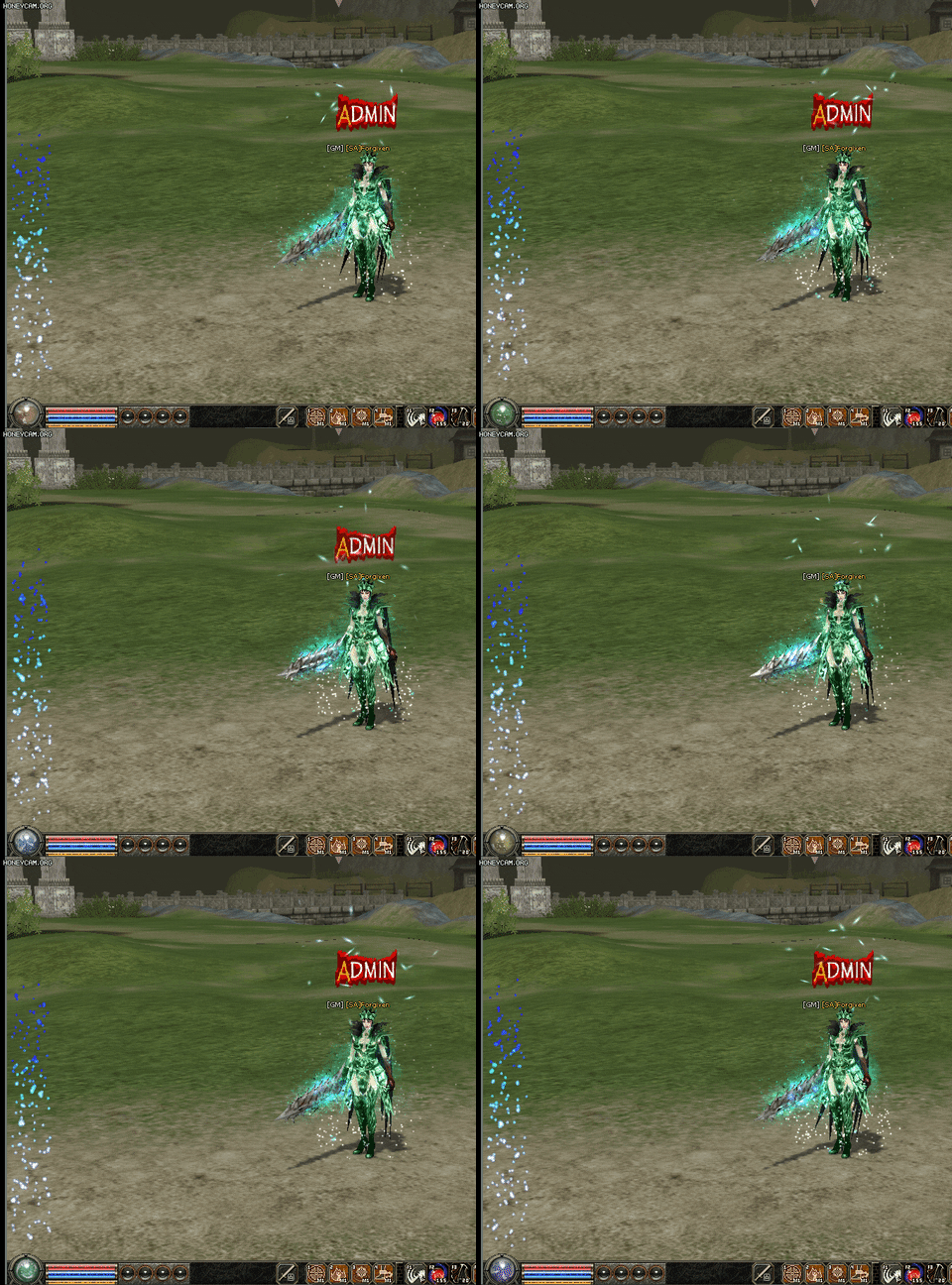
Kanıt;
Metin2 topluluğunda görsel özelleştirmeler, oyun deneyimini büyük ölçüde zenginleştiren unsurlardan biridir.
Özellikle client paketleriyle birlikte gelen efektler, karakterlerin ve dünyanın görünümünü tamamen değiştirebilir.
Bu makalede, xxDemonenxx tarafından geliştirilen popüler 'Old Mall Effect' adlı efekt paketini detaylıca inceleyecek, nasıl kurulacağını, hangi client türleriyle uyumlu olduğunu ve neden Metin2Lobby üzerinden indirilmesi gerektiğini açıklayacağız.
Old Mall Effect Nedir?
Old Mall Effect, Metin2 client’ın görsel atmosferini retro bir alışveriş merkezine (mall) andıran hafif bulanıklık, sıcak renk tonları ve yumuşak ışık geçişleriyle zenginleştiren bir shader/efekt paketidir.
Bu efekt, özellikle PvP odalarında veya şehir bölgelerinde oyunculara nostaljik ve rahatlatıcı bir görsel deneyim sunar.
Etkisi, orijinal oyun grafiklerini bozmadan üzerine binen bir filtre gibi çalışır; bu da performans kaybı olmadan estetik bir katkı sağlar.
Neden Old Mall Effect Kullanmalısınız?
• Görsel yorgunluğu azaltır: Parlak renkler yerine yumuşak geçişler kullanır.
• Özel client’larda fark yaratır: Standart efektlere kıyasla dikkat çekicidir.
• Hafif ve optimize edilmiştir: FPS düşüşü yaşatmaz.
• Tüm Metin2 client türleriyle uyumludur: Hem standart hem de özel paketlerde çalışır.
Kurulum Adımları
Old Mall Effect’i kurmak oldukça basittir:
1. Metin2Lobby sitesine giriş yapın.
2. Arama çubuğuna 'Old Mall Effect xxDemonenxx' yazın.
3. Paketi indirin (genellikle .zip formatındadır).
4. İndirilen dosyayı metin2client.exe dosyanızın bulunduğu ana klasöre çıkarın.
5. Dikkat: Eğer farklı bir client kullanıyorsanız (örneğin MartySama veya Metin2Dev), efekt dosyalarını texture veya effect klasörlerine manuel olarak yerleştirmeniz gerekir.
6. Oyunu başlatın ve görsel değişiklikleri gözlemleyin!
Uyumlu Client Türleri
Bu efekt aşağıdaki client türleriyle tam uyumludur:
• Standart Metin2 client
• Metin2 PvP client’ları
• Özel skin/texture içeren custom client’lar
• EterPack tabanlı paketler
• Metin2Dev ve MartySama modifikasyonları
Sıkça Karşılaşılan Hatalar ve Çözümleri
• Efekt görünmüyor: DirectX sürümünüzün 9.0c olduğundan emin olun. Güncellemek için
• Renkler bozuk görünüyor: Graphics Settings’ten 'High Dynamic Range' seçeneğini kapatın.
• Oyun çöküyor: Efekt dosyalarının orijinal client dosyalarını değiştirmediğinden emin olun. Sadece ekstra klasörlere yerleştirilmelidir.
Video ve Görsel Örnekler
Old Mall Effect’in gerçek zamanlı görüntüsünü izlemek için bu bağlantıyı ziyaret edebilirsiniz.
Ayrıca sitemizde yer alan Metin2 Client Edit bölümünden benzer efektleri keşfedebilir, kendi kreatif dokunuşlarınızı ekleyebilirsiniz.
Eğer Metin2 deneyiminizi bir üst seviyeye taşımak istiyorsanız, Metin2Lobby sizin için en güvenilir adres.
Binlerce client paketi, efekt dosyası, texture ve skin ile dolu kütüphanemizde 'Old Mall Effect' gibi eşsiz içerikleri keşfedebilir,
hem yeni başlayanlar hem de deneyimli editörler için ideal kaynaklara ulaşabilirsiniz.
Visual customizations play a major role in enhancing the Metin2 gaming experience within the community.
Especially effects included with client packs can completely transform the appearance of characters and the world.
In this article, we will examine in detail the popular 'Old Mall Effect' pack developed by xxDemonenxx, explain how to install it, which client types it is compatible with, and why it should be downloaded from Metin2Lobby.
What Is Old Mall Effect?
Old Mall Effect is a shader/effects pack that enriches the visual atmosphere of the Metin2 client with a slight blur, warm color tones, and soft light transitions reminiscent of a retro shopping mall (mall).
This effect offers players a nostalgic and soothing visual experience, especially in PvP rooms or city areas.
It works like an overlay filter without altering the original game graphics, thus providing aesthetic enhancement without performance loss.
Why Should You Use Old Mall Effect?
• Reduces visual fatigue: Uses soft transitions instead of bright colors.
• Creates distinction in custom clients: More eye-catching than standard effects.
• Lightweight and optimized: Does not cause FPS drops.
• Compatible with all Metin2 client types: Works on both standard and custom packs.
Installation Steps
Installing Old Mall Effect is quite simple:
1. Log in to Metin2Lobby.
2. Type 'Old Mall Effect xxDemonenxx' in the search bar.
3. Download the pack (usually in .zip format).
4. Extract the downloaded file into the main folder where your metin2client.exe is located.
5. Warning: If you use a different client (e.g., MartySama or Metin2Dev), manually place the effect files into the texture or effect folders.
6. Launch the game and observe the visual changes!
Compatible Client Types
This effect is fully compatible with the following client types:
• Standard Metin2 client
• Metin2 PvP clients
• Custom clients with special skins/textures
• EterPack-based packs
• Metin2Dev and MartySama modifications
Common Errors and Solutions
• Effect not visible: Ensure your DirectX version is 9.0c. Update via
• Colors appear distorted: Disable the 'High Dynamic Range' option in Graphics Settings.
• Game crashes: Make sure the effect files do not overwrite original client files. They should only be placed in additional folders.
Video and Visual Examples
To see the real-time appearance of Old Mall Effect, visit this link.
You can also explore similar effects in our Metin2 Client Edit section and add your own creative touches.
If you want to take your Metin2 experience to the next level, Metin2Lobby is your most trusted destination.
With our library containing thousands of client packs, effect files, textures, and skins, you can discover unique content like 'Old Mall Effect' and access ideal resources for both beginners and experienced editors.
SS ve dosyayı yükleme işlemi bana ait.
Anlatım; indirdiğiniz winrar içindeki (old_mall_effect.eix) ve (old_mall_effect.epk) dosyalarını pack dosyasına atınız ardından indexe
*
old_mall_effect
*
Şeklinde ekleyiniz hayırlı olsun.
Link ;
Ziyaretçiler için gizlenmiş link,görmek için üye olmalısınız!
Giriş yap veya üye ol.
Scan ;
Ziyaretçiler için gizlenmiş link,görmek için üye olmalısınız!
Giriş yap veya üye ol.
Kanıt;
Old Mall Effect by xxDemonenxx – Metin2 Client Görsel Efekt Rehberi
Metin2 topluluğunda görsel özelleştirmeler, oyun deneyimini büyük ölçüde zenginleştiren unsurlardan biridir.
Özellikle client paketleriyle birlikte gelen efektler, karakterlerin ve dünyanın görünümünü tamamen değiştirebilir.
Bu makalede, xxDemonenxx tarafından geliştirilen popüler 'Old Mall Effect' adlı efekt paketini detaylıca inceleyecek, nasıl kurulacağını, hangi client türleriyle uyumlu olduğunu ve neden Metin2Lobby üzerinden indirilmesi gerektiğini açıklayacağız.
Old Mall Effect Nedir?
Old Mall Effect, Metin2 client’ın görsel atmosferini retro bir alışveriş merkezine (mall) andıran hafif bulanıklık, sıcak renk tonları ve yumuşak ışık geçişleriyle zenginleştiren bir shader/efekt paketidir.
Bu efekt, özellikle PvP odalarında veya şehir bölgelerinde oyunculara nostaljik ve rahatlatıcı bir görsel deneyim sunar.
Etkisi, orijinal oyun grafiklerini bozmadan üzerine binen bir filtre gibi çalışır; bu da performans kaybı olmadan estetik bir katkı sağlar.
Neden Old Mall Effect Kullanmalısınız?
• Görsel yorgunluğu azaltır: Parlak renkler yerine yumuşak geçişler kullanır.
• Özel client’larda fark yaratır: Standart efektlere kıyasla dikkat çekicidir.
• Hafif ve optimize edilmiştir: FPS düşüşü yaşatmaz.
• Tüm Metin2 client türleriyle uyumludur: Hem standart hem de özel paketlerde çalışır.
Kurulum Adımları
Old Mall Effect’i kurmak oldukça basittir:
1. Metin2Lobby sitesine giriş yapın.
2. Arama çubuğuna 'Old Mall Effect xxDemonenxx' yazın.
3. Paketi indirin (genellikle .zip formatındadır).
4. İndirilen dosyayı metin2client.exe dosyanızın bulunduğu ana klasöre çıkarın.
5. Dikkat: Eğer farklı bir client kullanıyorsanız (örneğin MartySama veya Metin2Dev), efekt dosyalarını texture veya effect klasörlerine manuel olarak yerleştirmeniz gerekir.
6. Oyunu başlatın ve görsel değişiklikleri gözlemleyin!
Uyumlu Client Türleri
Bu efekt aşağıdaki client türleriyle tam uyumludur:
• Standart Metin2 client
• Metin2 PvP client’ları
• Özel skin/texture içeren custom client’lar
• EterPack tabanlı paketler
• Metin2Dev ve MartySama modifikasyonları
Sıkça Karşılaşılan Hatalar ve Çözümleri
• Efekt görünmüyor: DirectX sürümünüzün 9.0c olduğundan emin olun. Güncellemek için
Ziyaretçiler için gizlenmiş link,görmek için üye olmalısınız!
Giriş yap veya üye ol.
tıklayın.• Renkler bozuk görünüyor: Graphics Settings’ten 'High Dynamic Range' seçeneğini kapatın.
• Oyun çöküyor: Efekt dosyalarının orijinal client dosyalarını değiştirmediğinden emin olun. Sadece ekstra klasörlere yerleştirilmelidir.
Video ve Görsel Örnekler
Old Mall Effect’in gerçek zamanlı görüntüsünü izlemek için bu bağlantıyı ziyaret edebilirsiniz.
Ayrıca sitemizde yer alan Metin2 Client Edit bölümünden benzer efektleri keşfedebilir, kendi kreatif dokunuşlarınızı ekleyebilirsiniz.
Metin2Lobby ile Görsel Özelleştirmenin Kapıları Açılıyor!
Eğer Metin2 deneyiminizi bir üst seviyeye taşımak istiyorsanız, Metin2Lobby sizin için en güvenilir adres.
Binlerce client paketi, efekt dosyası, texture ve skin ile dolu kütüphanemizde 'Old Mall Effect' gibi eşsiz içerikleri keşfedebilir,
hem yeni başlayanlar hem de deneyimli editörler için ideal kaynaklara ulaşabilirsiniz.
Hazırlayan: Metin2Lobby Takımı
Old Mall Effect by xxDemonenxx – Metin2 Client Visual Effects Guide
Visual customizations play a major role in enhancing the Metin2 gaming experience within the community.
Especially effects included with client packs can completely transform the appearance of characters and the world.
In this article, we will examine in detail the popular 'Old Mall Effect' pack developed by xxDemonenxx, explain how to install it, which client types it is compatible with, and why it should be downloaded from Metin2Lobby.
What Is Old Mall Effect?
Old Mall Effect is a shader/effects pack that enriches the visual atmosphere of the Metin2 client with a slight blur, warm color tones, and soft light transitions reminiscent of a retro shopping mall (mall).
This effect offers players a nostalgic and soothing visual experience, especially in PvP rooms or city areas.
It works like an overlay filter without altering the original game graphics, thus providing aesthetic enhancement without performance loss.
Why Should You Use Old Mall Effect?
• Reduces visual fatigue: Uses soft transitions instead of bright colors.
• Creates distinction in custom clients: More eye-catching than standard effects.
• Lightweight and optimized: Does not cause FPS drops.
• Compatible with all Metin2 client types: Works on both standard and custom packs.
Installation Steps
Installing Old Mall Effect is quite simple:
1. Log in to Metin2Lobby.
2. Type 'Old Mall Effect xxDemonenxx' in the search bar.
3. Download the pack (usually in .zip format).
4. Extract the downloaded file into the main folder where your metin2client.exe is located.
5. Warning: If you use a different client (e.g., MartySama or Metin2Dev), manually place the effect files into the texture or effect folders.
6. Launch the game and observe the visual changes!
Compatible Client Types
This effect is fully compatible with the following client types:
• Standard Metin2 client
• Metin2 PvP clients
• Custom clients with special skins/textures
• EterPack-based packs
• Metin2Dev and MartySama modifications
Common Errors and Solutions
• Effect not visible: Ensure your DirectX version is 9.0c. Update via
Ziyaretçiler için gizlenmiş link,görmek için üye olmalısınız!
Giriş yap veya üye ol.
.• Colors appear distorted: Disable the 'High Dynamic Range' option in Graphics Settings.
• Game crashes: Make sure the effect files do not overwrite original client files. They should only be placed in additional folders.
Video and Visual Examples
To see the real-time appearance of Old Mall Effect, visit this link.
You can also explore similar effects in our Metin2 Client Edit section and add your own creative touches.
Unlock the Doors to Visual Customization with Metin2Lobby!
If you want to take your Metin2 experience to the next level, Metin2Lobby is your most trusted destination.
With our library containing thousands of client packs, effect files, textures, and skins, you can discover unique content like 'Old Mall Effect' and access ideal resources for both beginners and experienced editors.
Prepared by: Metin2Lobby Team
