

Merhaba arkadaşlar,
Oto kırmızı ve oto mavi pot ile düellolar da açıp kapatarak efektlerden dolayı lag oluşturuyorlar. Buna karşılık bir fix yaptım sizlerle paylaşmak istiyorum.
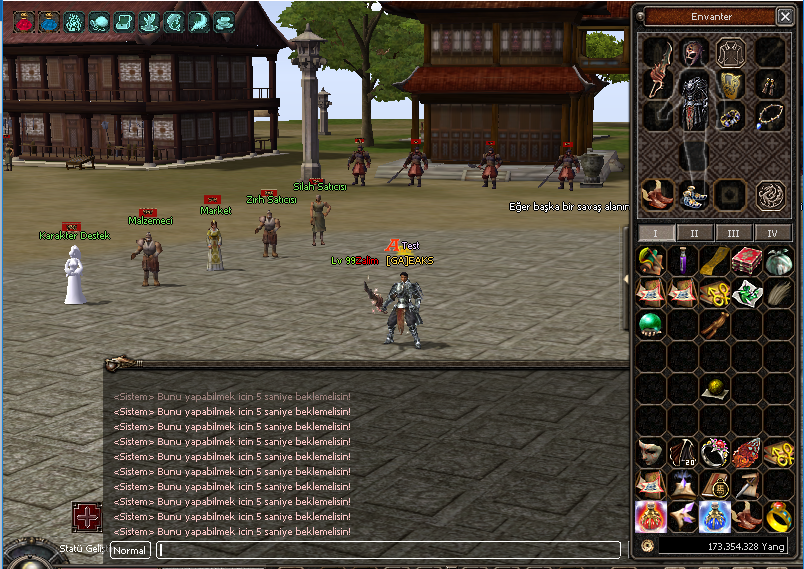
Oto kırmızı ve oto mavi pot ile düellolar da açıp kapatarak efektlerden dolayı lag oluşturuyorlar. Buna karşılık bir fix yaptım sizlerle paylaşmak istiyorum.
Sistem işleyişi;
Oto kırmızı ve oto mavi potu açıp kapatırken 5 saniye süre içinde açıp kapatabilirler oyuncular. Yani oto kırmızı potu aktif ettiğiniz de 5 saniye sonra kapatabilirsiniz, aynısı oto mavi pot içinde geçerli.
affect.h açılır ve aratılır
Kod:
AFFECT_HOLLY_STONE_POWER = 303,altına eklenir
Kod:
AFFECT_ITEM_BLOCK = 603,char_item.cpp açılır ve aratılır
Kod:
case FUCKING_BRAZIL_ITEM_AUTO_HP_RECOVERY_S:altına eklenir (if'in altına)
Kod:
if (FindAffect(AFFECT_ITEM_BLOCK)) { ChatPacket(CHAT_TYPE_INFO, LC_TEXT("<Sistem> Bunu yapabilmek için 5 saniye beklemelisin!")); return false; }aratılır
Kod:
AutoRecoveryItemProcess( type );altına eklenir
Kod:
AddAffect(AFFECT_ITEM_BLOCK, POINT_NONE, 0, 0, 5, 0, true, false);aratılır
Kod:
AutoRecoveryItemProcess( type );altına eklenir
Kod:
AddAffect(AFFECT_ITEM_BLOCK, POINT_NONE, 0, 0, 5, 0, true, false);locale_string.txt'ye
"<Sistem> Bunu yapabilmek için 5 saniye beklemelisin!";
eklenir.
Not;5 saniye süresini azaltmak isteyen kişiler char_item.cpp'de eklediğimiz kodlarda 5 yazan yerleri düzeltebilirler.
Konuyu başka forumlarda paylaşacak kişiler alıntı yaptıklarını söylerlerse iyi olur.
Oto Kırmızı ve Oto Mavi Pot Bugları Hakkında Detaylı Bilgi
Metin2 özel sunucularında karşılaşılan yaygın hatalardan birisi oto kırmızı ve oto mavi pot buglarıdır. Bu hata, oyuncuların karakterlerinde otomatik olarak kırmızı ya da mavi pot (potion) aktif konumda kalmasıyla oluşur. Bu durum, hem oyun deneyimini olumsuz etkiler hem de sunucu tarafında hata ayıklamalar yapılmasını gerektirir.
Bug Nedir?
Oto kırmızı pot bugu, oyuncunun karakteri otomatik olarak kırmızı pot (can yenileyici) kullanmaya devam etmesidir. Aynı şekilde oto mavi pot bugu da mavi pot (mana yenileyici) sürekli kullanımını içerir. Bu hata genellikle C++ sistem dosyalarında yapılan değişikliklerden sonra meydana gelir. Özellikle pot aktivasyon mantığının yanlış tanımlandığı durumlarda bu sorunlar ortaya çıkar.
Neden Oluşur?
Bu bug genellikle oyun client'ı ve game server arasında yanlış veri aktarımı nedeniyle meydana gelir. Pot kullanım komutları, client tarafından gönderildiği halde, server doğru şekilde yanıt vermediğinde pot slotu kilitlenir ve sürekli aktif konuma geçer. Bunun sebebi genellikle uiscript veya py root kısmında yapılan yanlış düzenlemelerdir.
Hatanın Kaynağı
Bu hatanın temel kaynağı, item_slot_core.py dosyasındaki pot kontrol mekanizmasının eksik veya yanlış uygulanmasıdır. Sunucu tarafında pot kullanımının doğrulaması yapılmadığında, kullanıcı arayüzünde pot simgesi sürekli aktif kalır. Bu da kullanıcıya sürekli pot kullandığını gösterir ve gerçek pot bitene kadar bu durum devam eder.
Fix Yöntemleri
1. Py Root Dosyasında Kontrol Yapısı:
Pot kullanım komutunu alan fonksiyonda, pot kullanımının tamamlandığını belirten bir flag kontrolü yapılmalıdır. Bu flag, pot kullanıldıktan sonra sıfırlanmalıdır.
2. Client Tarafında Slot Update:
Client tarafında pot slotu güncellenmeden tekrar kullanım komutu gönderilmemelidir. Bu, uiscript dosyasında kontrol edilebilir.
3. Sunucu Tepki Süresi Ayarı:
Sunucu yanıt süresi uzun olduğunda pot komutları yığılabilir. Bu da pot slotunun kilitlenmesine yol açabilir. Bu nedenle game server üzerinde optimize edilmiş bir veri akışı sağlanmalıdır.
Kaynak Kod Düzenlemesi
Eğer server src üzerinde değişiklik yapabiliyorsanız, char_item.cpp dosyasında pot kullanımına dair kontrolleri gözden geçirin. Özellikle AutoUseItem fonksiyonunun pot kontrolünü sağladığından emin olun. Eğer bu fonksiyon pot türüne göre farklı tepki vermiyorsa, bu hatalara neden olabilir.
Test ve Onaylama
Fix uygulandıktan sonra, hem auth hem de game sunucularında test yapılmalıdır. Pot kullanımı sonrasında slotun doğru şekilde boşaldığından ve tekrar aktif olmadan durduğundan emin olun. Ayrıca, db core üzerinden item_usage logları kontrol edilmelidir.
Sonuç
Oto kırmızı ve oto mavi pot bugları, Metin2 özel sunucularında sıkça karşılaşılan ve kullanıcı deneyimini bozan hatalardır. Ancak doğru source edit işlemleri ile bu hatalar kolayca çözülebilir. Özellikle Python ve C++ tabanlı sistemlerde dikkatli kodlama yapmak, bu gibi hataların önüne geçmek için yeterlidir.
Detailed Information About Auto Red and Auto Blue Pot Bugs
One of the common errors encountered in Metin2 private servers is auto red and auto blue pot bugs. This error occurs when players characters automatically keep red or blue potions in active position. This situation negatively affects the gameplay experience and requires debugging on the server side.
What is the Bug?
The auto red pot bug refers to the player character continuously using red potions (health recovery). Similarly, the auto blue pot bug involves continuous use of blue potions (mana recovery). This issue generally arises after modifications in C++ system files. Especially, this problem occurs when potion activation logic is defined incorrectly.
Why Does It Occur?
This bug typically occurs due to incorrect data transfer between the game client and the game server. When potion usage commands are sent by the client but the server does not respond correctly, the potion slot gets locked and remains in an active state. The cause often lies in incorrect edits made in uiscript or py root sections.
Root Cause of the Error
The main cause of this error is the incomplete or incorrect implementation of the potion control mechanism in the item_slot_core.py file. When the server does not properly validate potion usage, the potion icon remains active in the user interface, continuously showing that a potion is being used until the actual potion runs out.
Fix Methods
1. Check Structure in Py Root File:
In the function that receives the potion usage command, a flag check indicating that the potion usage has completed must be implemented. This flag should be reset after the potion is used.
2. Slot Update on Client Side:
Before sending another usage command, the potion slot should not be updated on the client side. This can be checked in the uiscript file.
3. Server Response Time Setting:
If the server response time is too long, potion commands may accumulate, causing the potion slot to lock. Therefore, an optimized data flow must be established on the game server.
Source Code Modifications
If you are able to make changes to the server src, review the potion usage checks in the char_item.cpp file. Ensure specifically that the AutoUseItem function handles different potion types properly. If this function does not react differently based on the potion type, it could cause such errors.
Testing and Validation
After applying the fix, tests must be conducted on both auth and game servers. Ensure that the slot is correctly emptied after potion usage and does not become active again. Additionally, item_usage logs should be reviewed through the db core.
Conclusion
Auto red and auto blue pot bugs are frequently encountered issues in Metin2 private servers that negatively impact the user experience. However, these bugs can be easily resolved with correct source edit procedures. Careful coding in Python and C++ based systems is sufficient to prevent such errors.
