

Merhaba arkadaşlar  KONUYU Bulamadım açmak istedim varsa konu kapanabilir. ( KONU ALINTIDIR )
root/constinfo.py açılır ve şu kod eklenir;
root/uigameoption.py açılır ve aratılır;
En alta şu kod eklenir:
Tekrar aratılır;
Altına şu kodlar eklenir:
Tekrar aratılır;
Altına şu kodlar eklenir:
Tekrar aratılır;
Altına şu kodlar eklenir:
Tekrar aratılır;
ve root bölümüde bitti
sıra uiscript'e geldi
uiscript/gameoption.py açılır ve şu kodlar en alta eklenir;
ÇALIŞTIĞINA DAİR KANIT
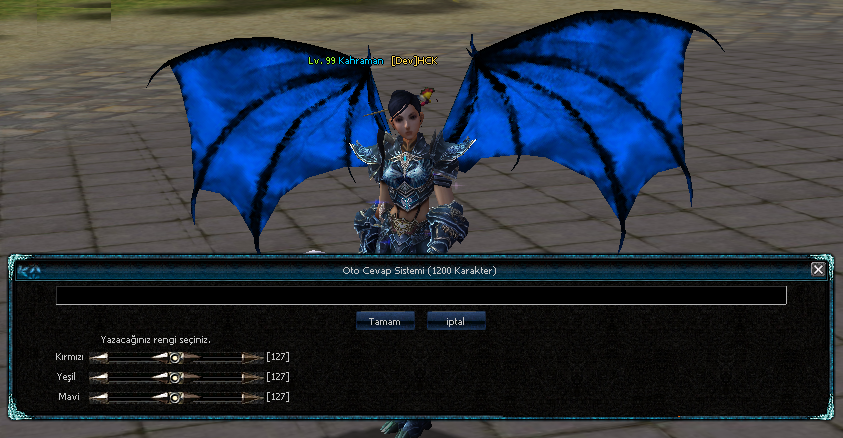
Oyun Seçeneklerine Oto Mesaj Ekleme [Python]
Metin2 özel sunucularında geliştirme yaparken kullanıcı deneyimini artırmak adına birçok sistem entegre edilebilir. Bunlardan birisi de oyun içi otomatik mesaj sistemidir. Bu sistem sayesinde oyunculara belirli aralıklarla özel mesajlar veya duyurular gönderebilirsiniz. Özellikle PvP odaklı sunucularda bu tür sistemler, oyuncu etkileşimini artırır. Bu yazıda, Python dili kullanarak oyun seçeneklerine nasıl otomatik mesaj ekleneceğini detaylı olarak inceleyeceğiz.
Python ve Metin2 Entegrasyonu
Python, özellikle GUI uygulamaları ve backend işlemlerinde güçlü bir dil olarak karşımıza çıkar. Metin2 özel sunucularında Py Root ve UIscript yapıları sayesinde Python ile script geliştirmek mümkündür. Oto mesaj sistemi gibi küçük ama etkili sistemler, Python ile kolayca entegre edilebilir. Bu sayede hem sunucu tarafında hem de istemci tarafında dinamik mesajlaşma imkanı sağlanabilir.
Otomatik Mesaj Sistemi Nasıl Çalışır?
Otomatik mesaj sistemi, belirlenen zaman aralıklarında önceden tanımlanmış metinleri oyunculara gösterir. Bu metinler, oyun içi chat sistemine veya özel bir pencere üzerinden yansıtılabilir. Python ile yazılmış bir script dosyası, belirli aralıklarla bir fonksiyonu çalıştırarak bu işlemi yapabilir. Örneğin, her 5 dakikada bir 'Bugünkü etkinlik saat 20:00 da başlıyor!' gibi bir mesaj gönderebilirsiniz.
Neden Python Kullanmalısınız?
Python, okunabilirliği yüksek ve hızlı geliştirme sunan bir programlama dilidir. Özellikle küçük sistemlerin entegrasyonu için idealdir. Metin2 geliştiricileri, Python ile hem sunucu tarafında hem de istemci tarafında script yazabilir. Ayrıca, Py GUI kütüphaneleri sayesinde kullanıcı dostu arayüzler de oluşturulabilir. Bu sayede hem geliştirici hem de oyuncu açısından esneklik sağlanır.
Uygulama Adımları
1. Py Root dizinine yeni bir Python dosyası ekleyin. Örneğin: auto_message.py.
2. Bu dosya içinde bir zamanlayıcı (timer) fonksiyonu oluşturun. threading veya schedule modüllerini kullanabilirsiniz.
3. Zamanlayıcı tetiklendiğinde, oyuncuya mesaj gönderen bir fonksiyon çağrısı gerçekleştirin.
4. Gerekirse, mesajın ne zaman biteceğini veya kaç kez tekrarlanacağını ayarlayın.
Güvenlik ve Performans Notu
Oto mesaj sistemi geliştirilirken performans düşüşlerine dikkat edilmelidir. Çok sık mesaj gönderilmesi, sunucu yükünü artırabilir. Ayrıca, oyuncular için rahatsız edici olmaması adına mesajların içerik ve sıklığı dikkatlice planlanmalıdır. Güvenlik açısından, mesaj gönderme yetkisinin sadece sunucu sahibine veya yetkililere verilmesi önemlidir.
Sonuç
Python ile Metin2 özel sunucularında otomatik mesaj sistemi oluşturmak oldukça kolaydır. Basit bir zamanlayıcı sistemiyle, oyunculara düzenli duyurular yapabilir ve etkileşimi artırabilirsiniz. Bu tür küçük ama etkili sistemler, sunucunuzun daha aktif ve organizeli görünmesini sağlar. Geliştiriciler için pratik bir yöntemdir ve Metin2 geliştirme sürecine değer katacaktır.
Adding Auto Messages to Game Options [Python]
When developing private Metin2 servers, various systems can be integrated to enhance the user experience. One such system is the in-game auto message feature. This allows you to send custom messages or announcements to players at specific intervals. Especially on PvP-focused servers, such systems increase player engagement. In this article, we will examine in detail how to add automatic messages to game options using the Python language.
Python and Metin2 Integration
Python emerges as a powerful language, especially for GUI applications and backend processes. Thanks to Py Root and UIscript structures, it is possible to develop scripts with Python in private Metin2 servers. Small but effective systems like auto-message systems can easily be integrated with Python. Thus, dynamic messaging capabilities are provided both on the server-side and client-side.
How Does the Auto Message System Work?
The auto message system displays predefined texts to players at specified intervals. These texts can be shown via the in-game chat system or through a special window. A Python-written script file can execute a function at certain intervals to carry out this task. For instance, every 5 minutes, it could send a message like 'Today’s event starts at 20:00!'.
Why Should You Use Python?
Python is a programming language known for its high readability and rapid development capabilities. It is ideal for integrating small-scale systems. Metin2 developers can write scripts in Python for both server-side and client-side operations. Additionally, thanks to Py GUI libraries, user-friendly interfaces can also be created, offering flexibility from both developer and player perspectives.
Implementation Steps
1. Add a new Python file to your Py Root directory. Example: auto_message.py.
2. Create a timer function within this file. You can use modules like threading or schedule.
3. When the timer is triggered, call a function that sends a message to the player.
4. If needed, configure how many times the message should repeat or when it should stop.
Security and Performance Note
When developing an auto-message system, care must be taken not to cause performance drops. Sending too frequent messages may increase server load. Additionally, to avoid being intrusive to players, message content and frequency should be planned carefully. From a security standpoint, it's important that only the server owner or authorized personnel have permission to send messages.
Conclusion
Creating an auto-message system on private Metin2 servers using Python is quite simple. With a basic timer system, you can regularly announce updates to players and increase engagement. Such small but effective systems help make your server appear more active and organized. It's a practical method for developers and adds value to the Metin2 development process.
KONUYU Bulamadım açmak istedim varsa konu kapanabilir. ( KONU ALINTIDIR )root/constinfo.py açılır ve şu kod eklenir;
Kod:
WHISPER_OTO_MESAJ = 0 WHISPER_OTO_MESAJ_TEXT = ""root/uigameoption.py açılır ve aratılır;
Kod:
def __Initialize(self):En alta şu kod eklenir:
Kod:
self.showotoTextButtonList = [*]Tekrar aratılır;
Kod:
self.showDamageButtonList.append(GetObject("show_d amage_off_button"))Altına şu kodlar eklenir:
Kod:
self.showotoTextButtonList.append(GetObject("ototext_on_button2")) self.showotoTextButtonList.append(GetObject("ototext_off_button2"))Tekrar aratılır;
Kod:
self.showDamageButtonList[1].SAFE_SetEvent(self.__OnClickShowDamageOffButton)Altına şu kodlar eklenir:
Kod:
self.showotoTextButtonList[0].SAFE_SetEvent(self.__OnClickOtoTextOnButton2) self.showotoTextButtonList[1].SAFE_SetEvent(self.__OnClickOtoTextOffButton2)Tekrar aratılır;
Kod:
def OnUpdate(self):Altına şu kodlar eklenir:
Kod:
if constInfo.bildirimler == 0: if tek == 0: self.showotoTextButtonList[0].Down() self.showotoTextButtonList[1].SetUp() tek = 1 #self.showotoTextButtonList[0].SetUpVisual("d:/ymir work/ui/public/middle_button_03.sub") else: if tek == 0: self.showotoTextButtonList[0].SetUp() self.showotoTextButtonList[1].Down() tek = 1 #self.showotoTextButtonList[1].SetUpVisual("d:/ymir work/ui/public/middle_button_03.sub") #self.showotoTextButtonList[0].SetUp() #self.showotoTextButtonList[1].Down()Tekrar aratılır;
Kod:
def __IsSpecialMap(self): Altına şu kodlar eklenir: Kod: def __OnClickOtoTextOnButton2(self): global tek tek = 0 self.showotoTextButtonList[0].Down() self.showotoTextButtonList[1].SetUp() def __OnClickOtoTextOffButton2(self): global tek tek = 0 self.showotoTextButtonList[0].SetUp() self.showotoTextButtonList[1].Down()ve root bölümüde bitti
sıra uiscript'e geldi
uiscript/gameoption.py açılır ve şu kodlar en alta eklenir;
Kod:
{ "name" : "ototext_on_button2", "type" : "radio_button", "x" : LINE_DATA_X, "y" : 240 + EK_Y + 25, "text" : uiScriptLocale.OPTION_SALESTEXT_VIEW_ON, "default_image" : ROOT_PATH + "middle_button_01.sub", "over_image" : ROOT_PATH + "middle_button_02.sub", "down_image" : ROOT_PATH + "middle_button_03.sub", }, { "name" : "ototext_off_button2", "type" : "radio_button", "x" : LINE_DATA_X+MIDDLE_BUTTON_WIDTH, "y" : 240 + EK_Y + 25, "text" : uiScriptLocale.OPTION_SALESTEXT_VIEW_OFF, "default_image" : ROOT_PATH + "middle_button_01.sub", "over_image" : ROOT_PATH + "middle_button_02.sub", "down_image" : ROOT_PATH + "middle_button_03.sub", },ÇALIŞTIĞINA DAİR KANIT
Oyun Seçeneklerine Oto Mesaj Ekleme [Python]
Metin2 özel sunucularında geliştirme yaparken kullanıcı deneyimini artırmak adına birçok sistem entegre edilebilir. Bunlardan birisi de oyun içi otomatik mesaj sistemidir. Bu sistem sayesinde oyunculara belirli aralıklarla özel mesajlar veya duyurular gönderebilirsiniz. Özellikle PvP odaklı sunucularda bu tür sistemler, oyuncu etkileşimini artırır. Bu yazıda, Python dili kullanarak oyun seçeneklerine nasıl otomatik mesaj ekleneceğini detaylı olarak inceleyeceğiz.
Python ve Metin2 Entegrasyonu
Python, özellikle GUI uygulamaları ve backend işlemlerinde güçlü bir dil olarak karşımıza çıkar. Metin2 özel sunucularında Py Root ve UIscript yapıları sayesinde Python ile script geliştirmek mümkündür. Oto mesaj sistemi gibi küçük ama etkili sistemler, Python ile kolayca entegre edilebilir. Bu sayede hem sunucu tarafında hem de istemci tarafında dinamik mesajlaşma imkanı sağlanabilir.
Otomatik Mesaj Sistemi Nasıl Çalışır?
Otomatik mesaj sistemi, belirlenen zaman aralıklarında önceden tanımlanmış metinleri oyunculara gösterir. Bu metinler, oyun içi chat sistemine veya özel bir pencere üzerinden yansıtılabilir. Python ile yazılmış bir script dosyası, belirli aralıklarla bir fonksiyonu çalıştırarak bu işlemi yapabilir. Örneğin, her 5 dakikada bir 'Bugünkü etkinlik saat 20:00 da başlıyor!' gibi bir mesaj gönderebilirsiniz.
Neden Python Kullanmalısınız?
Python, okunabilirliği yüksek ve hızlı geliştirme sunan bir programlama dilidir. Özellikle küçük sistemlerin entegrasyonu için idealdir. Metin2 geliştiricileri, Python ile hem sunucu tarafında hem de istemci tarafında script yazabilir. Ayrıca, Py GUI kütüphaneleri sayesinde kullanıcı dostu arayüzler de oluşturulabilir. Bu sayede hem geliştirici hem de oyuncu açısından esneklik sağlanır.
Uygulama Adımları
1. Py Root dizinine yeni bir Python dosyası ekleyin. Örneğin: auto_message.py.
2. Bu dosya içinde bir zamanlayıcı (timer) fonksiyonu oluşturun. threading veya schedule modüllerini kullanabilirsiniz.
3. Zamanlayıcı tetiklendiğinde, oyuncuya mesaj gönderen bir fonksiyon çağrısı gerçekleştirin.
4. Gerekirse, mesajın ne zaman biteceğini veya kaç kez tekrarlanacağını ayarlayın.
Güvenlik ve Performans Notu
Oto mesaj sistemi geliştirilirken performans düşüşlerine dikkat edilmelidir. Çok sık mesaj gönderilmesi, sunucu yükünü artırabilir. Ayrıca, oyuncular için rahatsız edici olmaması adına mesajların içerik ve sıklığı dikkatlice planlanmalıdır. Güvenlik açısından, mesaj gönderme yetkisinin sadece sunucu sahibine veya yetkililere verilmesi önemlidir.
Sonuç
Python ile Metin2 özel sunucularında otomatik mesaj sistemi oluşturmak oldukça kolaydır. Basit bir zamanlayıcı sistemiyle, oyunculara düzenli duyurular yapabilir ve etkileşimi artırabilirsiniz. Bu tür küçük ama etkili sistemler, sunucunuzun daha aktif ve organizeli görünmesini sağlar. Geliştiriciler için pratik bir yöntemdir ve Metin2 geliştirme sürecine değer katacaktır.
Adding Auto Messages to Game Options [Python]
When developing private Metin2 servers, various systems can be integrated to enhance the user experience. One such system is the in-game auto message feature. This allows you to send custom messages or announcements to players at specific intervals. Especially on PvP-focused servers, such systems increase player engagement. In this article, we will examine in detail how to add automatic messages to game options using the Python language.
Python and Metin2 Integration
Python emerges as a powerful language, especially for GUI applications and backend processes. Thanks to Py Root and UIscript structures, it is possible to develop scripts with Python in private Metin2 servers. Small but effective systems like auto-message systems can easily be integrated with Python. Thus, dynamic messaging capabilities are provided both on the server-side and client-side.
How Does the Auto Message System Work?
The auto message system displays predefined texts to players at specified intervals. These texts can be shown via the in-game chat system or through a special window. A Python-written script file can execute a function at certain intervals to carry out this task. For instance, every 5 minutes, it could send a message like 'Today’s event starts at 20:00!'.
Why Should You Use Python?
Python is a programming language known for its high readability and rapid development capabilities. It is ideal for integrating small-scale systems. Metin2 developers can write scripts in Python for both server-side and client-side operations. Additionally, thanks to Py GUI libraries, user-friendly interfaces can also be created, offering flexibility from both developer and player perspectives.
Implementation Steps
1. Add a new Python file to your Py Root directory. Example: auto_message.py.
2. Create a timer function within this file. You can use modules like threading or schedule.
3. When the timer is triggered, call a function that sends a message to the player.
4. If needed, configure how many times the message should repeat or when it should stop.
Security and Performance Note
When developing an auto-message system, care must be taken not to cause performance drops. Sending too frequent messages may increase server load. Additionally, to avoid being intrusive to players, message content and frequency should be planned carefully. From a security standpoint, it's important that only the server owner or authorized personnel have permission to send messages.
Conclusion
Creating an auto-message system on private Metin2 servers using Python is quite simple. With a basic timer system, you can regularly announce updates to players and increase engagement. Such small but effective systems help make your server appear more active and organized. It's a practical method for developers and adds value to the Metin2 development process.

