

Merhaba Arkadaşlar bugün size oyuna oyuncu bilgilendirme ve duyuru panosu eklemeyi göstericem.
Elbet bilenler vardır ama bilmeyenler faydalansın.
İlk Olarak duyurum.lua diye metin belgesi açalım.
içine>
yazın. Kelime sayısını azaltmak için say("KENDINIZE GORE EDITLEYIN") Silin, Arttırmak için say("KENDINIZE GORE EDITLEYIN") ekleyin kendiniz bilirsiniz artık onu.
şimdi kaydedip cıkalım bunu
/usr/game/share/locale/turkey/quest içine atıyoruz.
Sonra putty'den serverimize bağlanıyoruz.
şimdi ise /usr/game/share/locale/turkey/quest enter;
./qc duyurum.lua yazıyoruz.
oyuna girip /reload q Veya Reboot atıyoruz.
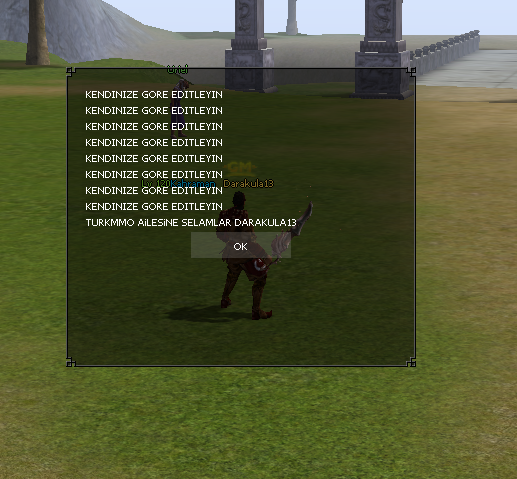
OYUNCU BİLGİLENDİRME VE DUYURU PANOSU EKLEME
Metin2 sunucularında oyuncu deneyimini artırmak için birçok geliştirici, kullanıcı dostu arayüz ve bilgilendirme sistemleri entegre eder. Bu sistemlerden birisi de 'oyuncu bilgilendirme ve duyuru panosu'dur. Özellikle Metin2 sunucularında aktif olarak kullanılan quest sistemleriyle entegre edilebilen bu panolar, hem günlük görevler hem de özel duyurular için kullanılır. Bu yazıda, Metin2 üzerinde nasıl bir duyuru panosu eklenebileceği ve bu panonun.quest sistemine entegrasyonu konusunda detaylı bilgiler sunacağız.
Oyuncu Bilgilendirme Panosu Nedir?
Oyuncu bilgilendirme panosu, oyunculara anlık olarak önemli duyurular, güncellemeler, görevler veya sistemsel bilgiler sunan bir arayüz elemanıdır. Genellikle oyun içi GUI üzerinden açılır ve oyuncunun dikkatini çekecek şekilde tasarlanır. Bu panel, Lua tabanlı scriptlerle kolayca geliştirilebilir ve Metin2'in mevcut quest sistemine entegre edilebilir.
Quest Sistemiyle Entegrasyon
Metin2 quest sistemleri, Lua dilinde yazılmış komutlarla çalışır. Bir duyuru panosu oluşturmak için öncelikle bir GUI penceresi tasarlanmalı ve bu pencereye metin, resim veya buton gibi bileşenler eklenebilir. Quest dosyasında belirli bir komutla (örneğin /duyuru) bu pencerenin açılması sağlanabilir. Ayrıca, panoda gösterilecek içerikler sunucudan dinamik olarak alınabilir. Örneğin, daily quest bilgileri, özel görevler veya seviye atlamaları gibi olaylar burada listelenebilir.
Duyuru Paneli İçin Gerekli Script Yapısı
Öncelikle bir quest dosyası (.lua) oluşturulur. Bu dosya, Metin2 sunucusuna yüklenir ve quest engine tarafından okunur. Duyuru panosunu açmak için basit bir komut tanımlanabilir:
Bu örnek, oyuncu girişi sırasında basit bir duyuru mesajı gösterir. Daha gelişmiş sistemlerde, gerçek zamanlı duyuru listesi çekilebilir ve butonlarla etkileşim sağlanabilir.
Gelişmiş Özellikler
Bazı Metin2 geliştiricileri, duyuru panosunu daha da geliştirmiş ve quest sistemiyle entegre hale getirmiştir. Örneğin, daily quest tamamlandığında otomatik olarak bir bildirim paneli açılabilir. Veya özel bir NPC ile panodan görev alınıp tamamlanabilir. Bu tür sistemler, oyuncuların motivasyonunu artırır ve sunucunun aktif kalmasını sağlar.
Hata Ayıklama ve Debug
Quest scriptleri geliştirilirken hatalar oluşabilir. Özellikle GUI ile entegre çalışan scriptlerde debug işlemleri önemlidir. Metin2 geliştiricileri, quest debug araçlarını kullanarak script akışını izleyebilir ve hataları düzeltebilir. Duyuru panosu gibi görsel arayüz içeren sistemlerde, script hataları grafiksel olarak da takip edilmelidir.
Sonuç
Oyuncu bilgilendirme ve duyuru panosu, Metin2 sunucularında kullanıcı deneyimini ciddi anlamda artırır. Quest sistemleriyle entegre çalışarak, oyunculara anlık ve kişiselleştirilmiş bilgiler sunulabilir. Doğru şekilde yapılandırılmış bir duyuru panosu, oyuncuların daha aktif kalmasını ve sunucuya olan bağlılığını artırmayı başarabilir. Geliştiricilerin dikkat etmesi gereken en önemli konulardan biri ise script güvenliği ve hata yönetimidir.
ADDING PLAYER INFORMATION AND ANNOUNCEMENT BOARD
To enhance the player experience on Metin2 servers, many developers integrate user-friendly interfaces and notification systems. One such system is the 'player information and announcement board'. Especially on Metin2 servers, these boards can be integrated with active quest systems and used for daily quests as well as special announcements. In this article, we will provide detailed information on how to add an announcement board onto Metin2 and its integration with the quest system.
What is a Player Information Board?
The player information board is an interface element that provides important announcements, updates, quests, or system-related information to players instantly. Usually opened via the in-game GUI, it is designed to catch the player's attention. This panel can easily be developed with Lua-based scripts and integrated into Metin2's existing quest system.
Integration with the Quest System
Metin2 quest systems operate through commands written in Lua. To create an announcement board, first, a GUI window must be designed, and components like text, images, or buttons should be added. A simple command within the quest file (e.g., /announcement) can trigger the opening of this window. Additionally, content displayed on the board can be dynamically retrieved from the server. For instance, daily quest details, special missions, or level-up events can be listed here.
Script Structure for the Announcement Panel
Firstly, a quest file (.lua) is created. This file is uploaded to the Metin2 server and read by the quest engine. A basic command can be defined to open the announcement board:
This example displays a simple announcement message upon player login. In more advanced systems, real-time announcement lists can be fetched, and interactions can occur via buttons.
Advanced Features
Some Metin2 developers have further enhanced the announcement board and integrated it with the quest system. For example, upon completing a daily quest, a notification panel could automatically appear. Alternatively, special NPCs could allow players to take and complete quests directly from the board. Such systems increase player motivation and help maintain server activity.
Debugging and Error Handling
While developing quest scripts, errors may occur. Particularly with scripts involving visual interfaces like GUIs, debugging becomes critical. Metin2 developers can use quest debugging tools to monitor script flow and fix issues. Visual interface systems like the announcement board require careful monitoring for graphical errors as well.
Conclusion
The player information and announcement board significantly enhances the gaming experience on Metin2 servers. Integrated with quest systems, personalized and timely information can be delivered to players. A well-configured announcement board can keep players engaged and strengthen their loyalty to the server. An important aspect developers must pay attention to is script security and error handling.
Elbet bilenler vardır ama bilmeyenler faydalansın.
İlk Olarak duyurum.lua diye metin belgesi açalım.
içine>
yazın. Kelime sayısını azaltmak için say("KENDINIZE GORE EDITLEYIN") Silin, Arttırmak için say("KENDINIZE GORE EDITLEYIN") ekleyin kendiniz bilirsiniz artık onu.
şimdi kaydedip cıkalım bunu
/usr/game/share/locale/turkey/quest içine atıyoruz.
Sonra putty'den serverimize bağlanıyoruz.
şimdi ise /usr/game/share/locale/turkey/quest enter;
./qc duyurum.lua yazıyoruz.
oyuna girip /reload q Veya Reboot atıyoruz.
OYUNCU BİLGİLENDİRME VE DUYURU PANOSU EKLEME
Metin2 sunucularında oyuncu deneyimini artırmak için birçok geliştirici, kullanıcı dostu arayüz ve bilgilendirme sistemleri entegre eder. Bu sistemlerden birisi de 'oyuncu bilgilendirme ve duyuru panosu'dur. Özellikle Metin2 sunucularında aktif olarak kullanılan quest sistemleriyle entegre edilebilen bu panolar, hem günlük görevler hem de özel duyurular için kullanılır. Bu yazıda, Metin2 üzerinde nasıl bir duyuru panosu eklenebileceği ve bu panonun.quest sistemine entegrasyonu konusunda detaylı bilgiler sunacağız.
Oyuncu Bilgilendirme Panosu Nedir?
Oyuncu bilgilendirme panosu, oyunculara anlık olarak önemli duyurular, güncellemeler, görevler veya sistemsel bilgiler sunan bir arayüz elemanıdır. Genellikle oyun içi GUI üzerinden açılır ve oyuncunun dikkatini çekecek şekilde tasarlanır. Bu panel, Lua tabanlı scriptlerle kolayca geliştirilebilir ve Metin2'in mevcut quest sistemine entegre edilebilir.
Quest Sistemiyle Entegrasyon
Metin2 quest sistemleri, Lua dilinde yazılmış komutlarla çalışır. Bir duyuru panosu oluşturmak için öncelikle bir GUI penceresi tasarlanmalı ve bu pencereye metin, resim veya buton gibi bileşenler eklenebilir. Quest dosyasında belirli bir komutla (örneğin /duyuru) bu pencerenin açılması sağlanabilir. Ayrıca, panoda gösterilecek içerikler sunucudan dinamik olarak alınabilir. Örneğin, daily quest bilgileri, özel görevler veya seviye atlamaları gibi olaylar burada listelenebilir.
Duyuru Paneli İçin Gerekli Script Yapısı
Öncelikle bir quest dosyası (.lua) oluşturulur. Bu dosya, Metin2 sunucusuna yüklenir ve quest engine tarafından okunur. Duyuru panosunu açmak için basit bir komut tanımlanabilir:
Kod:
[B]quest duyuru_panel begin[/B][BR][/BR][B]state start begin[/B][BR][/BR][B]when login or levelup or enter_game begin[/B][BR][/BR][B]say_title('Duyurular')[/B][BR][/BR][B]say('Yeni görevler eklendi!')[/B][BR][/BR][B]end[/B][BR][/BR][B]end[/B][BR][/BR][B]end[/B]Bu örnek, oyuncu girişi sırasında basit bir duyuru mesajı gösterir. Daha gelişmiş sistemlerde, gerçek zamanlı duyuru listesi çekilebilir ve butonlarla etkileşim sağlanabilir.
Gelişmiş Özellikler
Bazı Metin2 geliştiricileri, duyuru panosunu daha da geliştirmiş ve quest sistemiyle entegre hale getirmiştir. Örneğin, daily quest tamamlandığında otomatik olarak bir bildirim paneli açılabilir. Veya özel bir NPC ile panodan görev alınıp tamamlanabilir. Bu tür sistemler, oyuncuların motivasyonunu artırır ve sunucunun aktif kalmasını sağlar.
Hata Ayıklama ve Debug
Quest scriptleri geliştirilirken hatalar oluşabilir. Özellikle GUI ile entegre çalışan scriptlerde debug işlemleri önemlidir. Metin2 geliştiricileri, quest debug araçlarını kullanarak script akışını izleyebilir ve hataları düzeltebilir. Duyuru panosu gibi görsel arayüz içeren sistemlerde, script hataları grafiksel olarak da takip edilmelidir.
Sonuç
Oyuncu bilgilendirme ve duyuru panosu, Metin2 sunucularında kullanıcı deneyimini ciddi anlamda artırır. Quest sistemleriyle entegre çalışarak, oyunculara anlık ve kişiselleştirilmiş bilgiler sunulabilir. Doğru şekilde yapılandırılmış bir duyuru panosu, oyuncuların daha aktif kalmasını ve sunucuya olan bağlılığını artırmayı başarabilir. Geliştiricilerin dikkat etmesi gereken en önemli konulardan biri ise script güvenliği ve hata yönetimidir.
ADDING PLAYER INFORMATION AND ANNOUNCEMENT BOARD
To enhance the player experience on Metin2 servers, many developers integrate user-friendly interfaces and notification systems. One such system is the 'player information and announcement board'. Especially on Metin2 servers, these boards can be integrated with active quest systems and used for daily quests as well as special announcements. In this article, we will provide detailed information on how to add an announcement board onto Metin2 and its integration with the quest system.
What is a Player Information Board?
The player information board is an interface element that provides important announcements, updates, quests, or system-related information to players instantly. Usually opened via the in-game GUI, it is designed to catch the player's attention. This panel can easily be developed with Lua-based scripts and integrated into Metin2's existing quest system.
Integration with the Quest System
Metin2 quest systems operate through commands written in Lua. To create an announcement board, first, a GUI window must be designed, and components like text, images, or buttons should be added. A simple command within the quest file (e.g., /announcement) can trigger the opening of this window. Additionally, content displayed on the board can be dynamically retrieved from the server. For instance, daily quest details, special missions, or level-up events can be listed here.
Script Structure for the Announcement Panel
Firstly, a quest file (.lua) is created. This file is uploaded to the Metin2 server and read by the quest engine. A basic command can be defined to open the announcement board:
Kod:
[B]quest announcement_board begin[/B][BR][/BR][B]state start begin[/B][BR][/BR][B]when login or levelup or enter_game begin[/B][BR][/BR][B]say_title('Announcements')[/B][BR][/BR][B]say('New quests have been added!')[/B][BR][/BR][B]end[/B][BR][/BR][B]end[/B][BR][/BR][B]end[/B]This example displays a simple announcement message upon player login. In more advanced systems, real-time announcement lists can be fetched, and interactions can occur via buttons.
Advanced Features
Some Metin2 developers have further enhanced the announcement board and integrated it with the quest system. For example, upon completing a daily quest, a notification panel could automatically appear. Alternatively, special NPCs could allow players to take and complete quests directly from the board. Such systems increase player motivation and help maintain server activity.
Debugging and Error Handling
While developing quest scripts, errors may occur. Particularly with scripts involving visual interfaces like GUIs, debugging becomes critical. Metin2 developers can use quest debugging tools to monitor script flow and fix issues. Visual interface systems like the announcement board require careful monitoring for graphical errors as well.
Conclusion
The player information and announcement board significantly enhances the gaming experience on Metin2 servers. Integrated with quest systems, personalized and timely information can be delivered to players. A well-configured announcement board can keep players engaged and strengthen their loyalty to the server. An important aspect developers must pay attention to is script security and error handling.
