

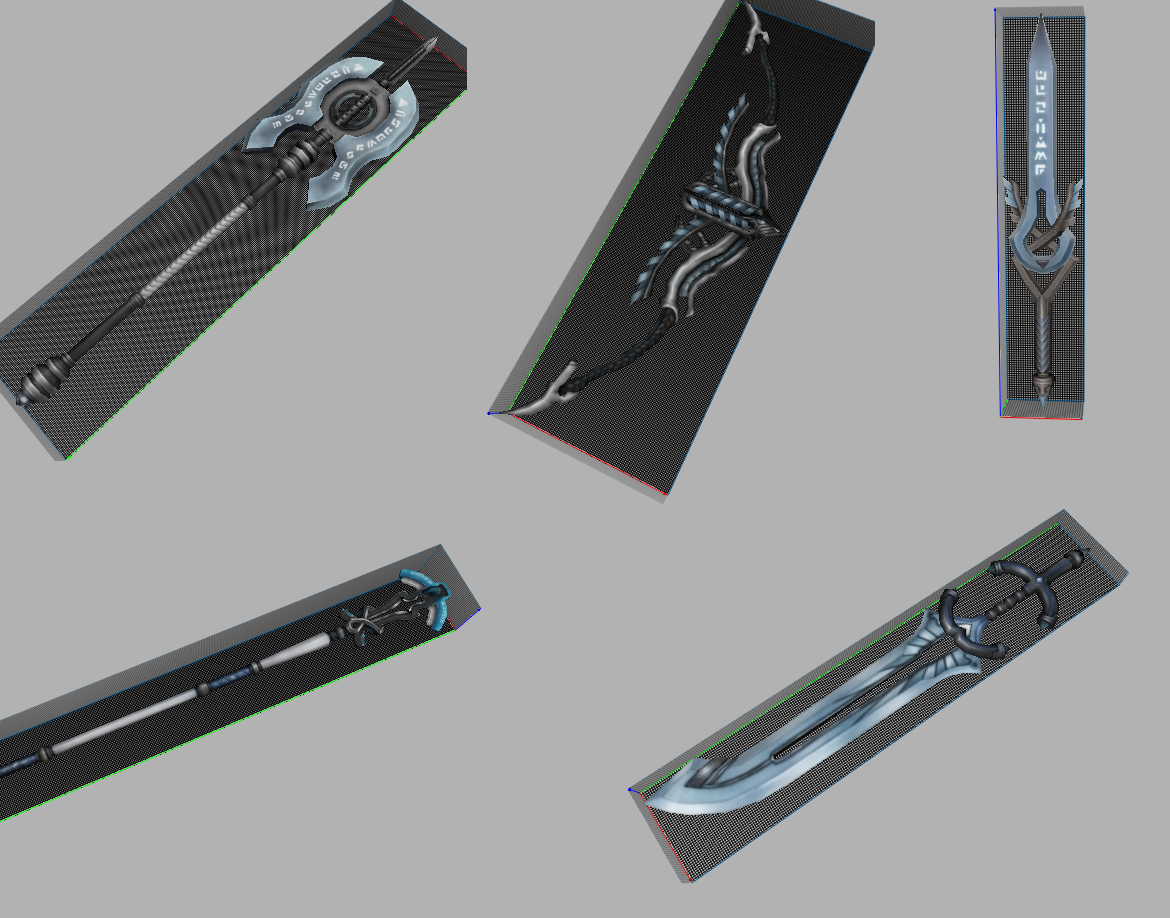
Silah nasıl eklenir? Örnek;
İtem list örneği
2120 WEAPON icon/item/02120.tga d:/ymir work/item/weapon/02120.gr2
2120 itemin kodu
icon/item iconun bulundugu klasörün dizini.
02120 icon tgasının sayısı
d:/ymir work/item/weapon silah gr2sinin bulundugu dizin
02120.gr2 gr2nin ismi
item proto nasıl yaparım sorularına cevap sıfırdan yapmanıza gerek yok örnek veriyorum.
item proto.sql dosyasını açıp içinden 19 kodlu kılıcı alıyorum
Kod:
INSERT INTO `item_proto` VALUES ('19', 0xB5B52B39, 0x4BFD6CFDE72B39, '1', '0', '0', '2', '32', '1', '16', '', '1000', '0', '0', '0', '0', '15', '1', '0', '0', '0', '7', '22', '0', '0', '0', '0', '0', '15', '19', '13', '15', '63', '-1', '-1', '-1', '-1', '-1', '-1', '0', '1', '0');[/FONT]
Kod:
INSERT INTO `item_proto` VALUES ('2120', 0xB5B52B39, 0x4BFD6CFDE72B39, '1', '0', '0', '2', '32', '1', '16', '', '1000', '0', '0', '0', '0', '15', '1', '0', '0', '0', '7', '22', '0', '0', '0', '0', '0', '15', '19', '13', '15', '63', '-1', '-1', '-1', '-1', '-1', '-1', '0', '1', '0');silah eklemeyi bilmeyenlere umarım biraz yardımım dokunmuştur.
Eğer item proto ile ugraşmak istemiyosanız google item proto yapıcı yazın
turkmmo'da paylaşıldı.
Virüs Total:
Ziyaretçiler için gizlenmiş link,görmek için üye olmalısınız!
Giriş yap veya üye ol.
İndir:
Ziyaretçiler için gizlenmiş link,görmek için üye olmalısınız!
Giriş yap veya üye ol.
Metin2 Lobby'da Özel Yapım Set Silah: Vector
Metin2 oyununda görsellik ve performansın artırılması için özel yapım set silahlar büyük önem taşır. Bu bağlamda Vector adlı özel yapım set silah modeli, özellikle Metin2 3D modelleme ve custom model tutkunları tarafından oldukça ilgi görüyor. Bu yazıda, Vector silahının Metin2 dünyasındaki yeri, nasıl üretildiği ve hangi teknik detayların dikkate alındığı hakkında kapsamlı bilgiler sunulacaktır.
Vector Silahının Özellikleri
Vector, Metin2 oyununda özellikle 3ds Max veya Blender gibi yazılımlarla geliştirilen custom weapon kategorisinde yer alır. Bu silah modeli, gerçekçi dokular, detaylı mesh yapısı ve uyumlu bone sistemine sahiptir. Ayrıca GR2 formatında dışa aktarılmıştır, bu da onun Metin2 motoruyla tam uyumlu olduğunu gösterir. Texture ve UV map yapıları optimize edilerek hem görsel kalite hem de performans dengesi sağlanmıştır.
Vector Nasıl Geliştirilir?
Metin2 özel yapım silah geliştirmek için öncelikle 3D modelleme becerilerine sahip olmak gerekir. Vector modeli için Blender veya 3ds Max gibi yazılımlar kullanılır. Modelin doğru boyutlarda ve Metin2 standartlarına uygun olarak oluşturulması, granny3d formatına dönüştürülmeden önce temiz bir mesh yapısına sahip olması önemlidir. Rigging işlemi sırasında Metin2 karakter sistemine uygun kemik yapısı (bone) tanımlanmalıdır. Bu sayede silahın karakter üzerinde doğru hareket etmesi sağlanır.
GR2 Formatı ve Uyumluluk
Metin2 özel yapım modelleri için GR2 formatı çok önemlidir. Vector modeli de bu formatta dışa aktarılmıştır. GR2 export işlemi sırasında animation verileri de doğru şekilde aktarılmalıdır. Aksi takdirde silah karaktere eklendiğinde animasyonlarda bozulmalar görülebilir. GR2 import işlemleri sırasında da uyumlu yazılımların (Metin2Dev model araçları gibi) kullanılması önerilir.
Vector Silahının Kullanımı ve Yerleştirme
Vector silahı, Metin2 sunucularında özel efekt modelleriyle birlikte kullanıldığında harika sonuçlar verebilir. Bu model, texture dosyaları ile birlikte Metin2 client içerisine entegre edilir. Model replace işlemleri sırasında dikkat edilmesi gereken detaylar vardır; örneğin mesh yapısı bozulmamalıdır. Visual mod olarak kullanılmak istenen Vector modeli, EterPack veya benzeri paket sistemleriyle de dağıtılabilir.
Topluluk ve Geliştirici Katkısı
Metin2 lobby kullanıcıları arasında Vector gibi özel yapım modelleri oldukça popülerdir. Geliştiricilerin katkılarıyla Martysama tarzı modellerle birlikte Vector da topluluk tarafından memnuniyetle karşılanmaktadır. Metin2 3D art alanında bu tür çalışmalar, oyun deneyimini zenginleştirmektedir. Graphic mod olarak düşünüldüğünde, Vector silahı oyunun görsel atmosferine ciddi katkılarda bulunmaktadır.
Sonuç
Vector, Metin2 oyununda özel yapım set silah kategorisinde öne çıkan bir modeldir. 3D modelleme, texture tasarımı ve GR2 format uyumu gibi birçok unsuruyla dikkat çeker. Hem estetik hem de teknik açıdan kaliteli olan bu model, Metin2 severler için harika bir alternatif sunar. Metin2 Lobby üzerinden daha fazla özel yapım model ve içerik keşfedin.
Custom Made Weapon Set: Vector at Metin2 Lobby
In the game Metin2, enhancing visual quality and performance often involves the use of custom made weapon sets. In this context, the custom weapon named Vector has gained significant attention among enthusiasts of Metin2 3D modeling and custom models. This article will provide comprehensive information about the place of the Vector weapon in the Metin2 world, how it is developed, and the technical details considered during its creation.
Features of Vector
Vector falls under the category of custom weapon models developed using software like 3ds Max or Blender within Metin2. This weapon model features realistic textures, detailed mesh structure, and a compatible bone system. Moreover, it is exported in GR2 format, ensuring full compatibility with the Metin2 engine. Its texture and UV map structures are optimized to balance both visual quality and performance.
How is Vector Developed?
Developing custom weapons for Metin2 requires solid 3D modeling skills. For the Vector model, tools such as Blender or 3ds Max are used. Ensuring that the model is created in proper dimensions and adheres to Metin2 standards is crucial before converting it into the granny3d format. The rigging process must include defining bone structures compatible with Metin2's character system, ensuring the weapon moves correctly with the character.
GR2 Format and Compatibility
The GR2 format is essential for custom models in Metin2. The Vector model is exported in this format. During GR2 export, animation data must also be properly transferred. Otherwise, animation glitches may occur when the weapon is equipped by the character. It is recommended to use compatible tools (Metin2Dev model tools, etc.) during GR2 import operations.
Usage and Integration of Vector
When used together with special effect models on Metin2 servers, the Vector weapon can produce excellent results. This model is integrated into the Metin2 client along with its texture files. Care must be taken during model replace operations—its mesh structure should remain intact. When intended as a visual mod, the Vector model can also be distributed through package systems like EterPack.
Community and Developer Contributions
Models like Vector are highly popular among Metin2 lobby users. With contributions from developers, alongside other models like Martysama, Vector is well-received by the community. Such works enrich the gaming experience in the field of Metin2 3D art. When viewed as a graphic mod, the Vector weapon significantly contributes to the visual atmosphere of the game.
Conclusion
Vector stands out as a high-quality custom weapon model in the Metin2 game. With its attention to 3D modeling, texture design, and GR2 format compatibility, it appeals both aesthetically and technically. As a well-crafted model, it serves as an excellent alternative for Metin2 players. Discover more custom models and content at Metin2 Lobby.
