

BAZI ARKADAŞLAR BUNU ARIYOMUŞ KULLANMAK İSTEYEN OLUCAKTIR İLLA BUYRUN BENDE SİZE ANLATMAYA KARAR VERDİM KONU DAHA ÖNCE AÇILDIMI BİLMİYORUM AMA AÇILMIŞSA AFFOLA!!
/// CLİENT SOURCEYE GİRİYORUZ.
/// ETERPACK KLASÖRÜNE GİRİYORUZ.
/// ETERPACK.CPP Yİ AÇIN
/// ALTTAKİ KODU ARATIN:
VE ONDAN SONRA ALTTA RESİMDE OLDUĞU GİBİ KENDİNİZE GÖRE EDİTLEYİN.
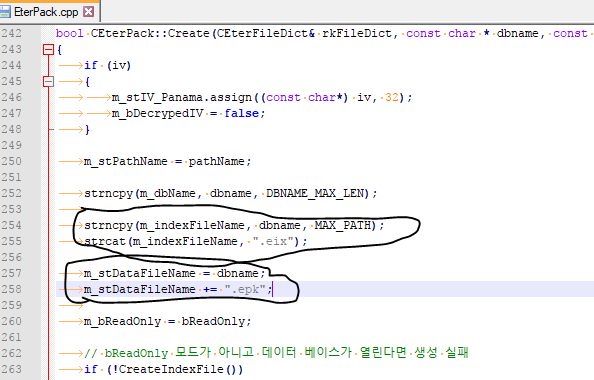
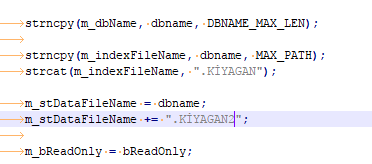
daha sonra packteki dosyaların uzantısını orada değiştirdiğiniz gibi değiştirin
İYİ FORUMLAR.
PACK Uzantısını Değiştirme Rehberi
Metin2 özel sunucularında paketlenmiş dosyalar genellikle .pack uzantısıyla gelir. Bu dosyalar, oyun içeriğinin güvenliğini ve organize tutulmasını sağlar. Ancak bazı özel sunucu geliştiricileri, daha fazla güvenlik veya marka kimliği oluşturmak adına .pack uzantısını değiştirmek isteyebilir. Bu işlem, oyun dosyalarına erişimi engellemek veya sunucuya özgü bir yapı oluşturmak açısından önemlidir.
PACK Dosyası Nedir?
PACK dosyaları, Metin2 oyununda görseller, ses dosyaları, efektler ve diğer kaynakların sıkıştırılarak saklandığı dosya türleridir. Bu dosyalar, client tarafından okunabilir ve sistematik olarak yönetilebilir. Varsayılan olarak .pack uzantısına sahiptir. Ancak bazı geliştiriciler, bu uzantıyı farklı bir isimle değiştirerek, dosyaya dışarıdan erişimi zorlaştırabilir.
Neden PACK Uzantısı Değiştirilmeli?
PACK uzantısının değiştirilmesinin birkaç nedeni vardır:
- Güvenlik: Dışarıdan dosya okuma veya modifikasyon girişimlerini azaltır.
- Marka Kimliği: Sunucuya özgü bir yapı kurulabilir.
- Geliştirici Kontrolü: Kaynak yönetiminde daha fazla esneklik sağlar.
PACK Uzantısını Değiştirme Adımları[/COORD]
1. Client tarafında PACK dosyasını açan fonksiyonu bulmak gerekir. Genellikle bu işlem C++ ile yazılmıştır.
2. Fonksiyon içinde .pack uzantısı aranır ve başka bir uzantıyla değiştirilir. Örneğin .mt2pack veya .metinpack gibi.
3. Client üzerindeki tüm referanslar yeni uzantıya göre güncellenmelidir.
4. Server-side (auth/game) tarafında da gerekirse bu yeni uzantı desteklenmelidir.
Python veya Py Root ile Entegrasyon
Bazı sunucular, Python tabanlı GUI (py gui) veya scriptlerle PACK dosyalarını işler. Bu durumda, Python scriptlerindeki dosya uzantısı kontrolü de yeni uzantıya göre düzenlenmelidir. Örneğin, 'if file.endswith('.pack'):' satırı, 'if file.endswith('.mt2pack'):' şeklinde değiştirilmelidir.
Dikkat Edilmesi Gerekenler
- PACK uzantısı değiştirildikten sonra client doğru şekilde derlenmelidir.
- Oyun içindeki tüm dosya yolları yeni uzantıya göre ayarlanmalıdır.
- Hatalı uzantı kullanımı client çökmesine neden olabilir.
Sonuç
PACK uzantısını değiştirmek, Metin2 özel sunucu geliştirme sürecinde önemli bir güvenlik ve markalaşma adımı olabilir. Bu işlem, C++ tabanlı client düzenlemeleri ve gerekirse Python script güncellemeleriyle birlikte yapılmalıdır. Bu sayede hem güvenlik artırılır hem de sunucuya özgü bir yapı kurulmuş olur.
How to Change PACK Extension
In Metin2 private servers, packaged files usually come with the .pack extension. These files ensure security and organization of game content. However, some private server developers may want to change the .pack extension for additional security or branding purposes. This process can help prevent access to game files or create a unique structure for the server.
What is a PACK File?
PACK files are file types in Metin2 where images, sounds, effects, and other resources are compressed and stored. These files are readable by the client and can be managed systematically. By default, they have the .pack extension. However, some developers can change this extension to another name to make external access to the file more difficult.
Why Should You Change the PACK Extension?
There are several reasons to change the PACK extension:
- Security: Reduces attempts to read or modify files from outside sources.
- Brand Identity: A server-specific structure can be created.
- Developer Control: Offers more flexibility in resource management.
Steps to Change PACK Extension
1. Find the function in the client that opens the PACK file. Usually, this is written in C++.
2. Look for the .pack extension in the function and replace it with another extension, such as .mt2pack or .metinpack.
3. All references in the client must be updated according to the new extension.
4. If necessary, the new extension must also be supported on the server-side (auth/game).
Integration with Python or Py Root
Some servers process PACK files using Python-based GUI (py gui) or scripts. In this case, the file extension check in Python scripts should also be updated to reflect the new extension. For example, the line 'if file.endswith('.pack'):' should be changed to 'if file.endswith('.mt2pack'):' .
Important Considerations
- After changing the PACK extension, the client must be compiled correctly.
- All file paths within the game must be adjusted according to the new extension.
- Incorrect extension usage can cause client crashes.
Conclusion
Changing the PACK extension can be an important step in security and branding during Metin2 private server development. This process should be done together with C++ based client modifications and, if necessary, Python script updates. This way, both security is increased and a unique structure for the server is established.
/// CLİENT SOURCEYE GİRİYORUZ.
/// ETERPACK KLASÖRÜNE GİRİYORUZ.
/// ETERPACK.CPP Yİ AÇIN
/// ALTTAKİ KODU ARATIN:
Kod:
strcat(m_indexFileName, ".eix");VE ONDAN SONRA ALTTA RESİMDE OLDUĞU GİBİ KENDİNİZE GÖRE EDİTLEYİN.
daha sonra packteki dosyaların uzantısını orada değiştirdiğiniz gibi değiştirin
İYİ FORUMLAR.
PACK Uzantısını Değiştirme Rehberi
Metin2 özel sunucularında paketlenmiş dosyalar genellikle .pack uzantısıyla gelir. Bu dosyalar, oyun içeriğinin güvenliğini ve organize tutulmasını sağlar. Ancak bazı özel sunucu geliştiricileri, daha fazla güvenlik veya marka kimliği oluşturmak adına .pack uzantısını değiştirmek isteyebilir. Bu işlem, oyun dosyalarına erişimi engellemek veya sunucuya özgü bir yapı oluşturmak açısından önemlidir.
PACK Dosyası Nedir?
PACK dosyaları, Metin2 oyununda görseller, ses dosyaları, efektler ve diğer kaynakların sıkıştırılarak saklandığı dosya türleridir. Bu dosyalar, client tarafından okunabilir ve sistematik olarak yönetilebilir. Varsayılan olarak .pack uzantısına sahiptir. Ancak bazı geliştiriciler, bu uzantıyı farklı bir isimle değiştirerek, dosyaya dışarıdan erişimi zorlaştırabilir.
Neden PACK Uzantısı Değiştirilmeli?
PACK uzantısının değiştirilmesinin birkaç nedeni vardır:
- Güvenlik: Dışarıdan dosya okuma veya modifikasyon girişimlerini azaltır.
- Marka Kimliği: Sunucuya özgü bir yapı kurulabilir.
- Geliştirici Kontrolü: Kaynak yönetiminde daha fazla esneklik sağlar.
PACK Uzantısını Değiştirme Adımları[/COORD]
1. Client tarafında PACK dosyasını açan fonksiyonu bulmak gerekir. Genellikle bu işlem C++ ile yazılmıştır.
2. Fonksiyon içinde .pack uzantısı aranır ve başka bir uzantıyla değiştirilir. Örneğin .mt2pack veya .metinpack gibi.
3. Client üzerindeki tüm referanslar yeni uzantıya göre güncellenmelidir.
4. Server-side (auth/game) tarafında da gerekirse bu yeni uzantı desteklenmelidir.
Python veya Py Root ile Entegrasyon
Bazı sunucular, Python tabanlı GUI (py gui) veya scriptlerle PACK dosyalarını işler. Bu durumda, Python scriptlerindeki dosya uzantısı kontrolü de yeni uzantıya göre düzenlenmelidir. Örneğin, 'if file.endswith('.pack'):' satırı, 'if file.endswith('.mt2pack'):' şeklinde değiştirilmelidir.
Dikkat Edilmesi Gerekenler
- PACK uzantısı değiştirildikten sonra client doğru şekilde derlenmelidir.
- Oyun içindeki tüm dosya yolları yeni uzantıya göre ayarlanmalıdır.
- Hatalı uzantı kullanımı client çökmesine neden olabilir.
Sonuç
PACK uzantısını değiştirmek, Metin2 özel sunucu geliştirme sürecinde önemli bir güvenlik ve markalaşma adımı olabilir. Bu işlem, C++ tabanlı client düzenlemeleri ve gerekirse Python script güncellemeleriyle birlikte yapılmalıdır. Bu sayede hem güvenlik artırılır hem de sunucuya özgü bir yapı kurulmuş olur.
How to Change PACK Extension
In Metin2 private servers, packaged files usually come with the .pack extension. These files ensure security and organization of game content. However, some private server developers may want to change the .pack extension for additional security or branding purposes. This process can help prevent access to game files or create a unique structure for the server.
What is a PACK File?
PACK files are file types in Metin2 where images, sounds, effects, and other resources are compressed and stored. These files are readable by the client and can be managed systematically. By default, they have the .pack extension. However, some developers can change this extension to another name to make external access to the file more difficult.
Why Should You Change the PACK Extension?
There are several reasons to change the PACK extension:
- Security: Reduces attempts to read or modify files from outside sources.
- Brand Identity: A server-specific structure can be created.
- Developer Control: Offers more flexibility in resource management.
Steps to Change PACK Extension
1. Find the function in the client that opens the PACK file. Usually, this is written in C++.
2. Look for the .pack extension in the function and replace it with another extension, such as .mt2pack or .metinpack.
3. All references in the client must be updated according to the new extension.
4. If necessary, the new extension must also be supported on the server-side (auth/game).
Integration with Python or Py Root
Some servers process PACK files using Python-based GUI (py gui) or scripts. In this case, the file extension check in Python scripts should also be updated to reflect the new extension. For example, the line 'if file.endswith('.pack'):' should be changed to 'if file.endswith('.mt2pack'):' .
Important Considerations
- After changing the PACK extension, the client must be compiled correctly.
- All file paths within the game must be adjusted according to the new extension.
- Incorrect extension usage can cause client crashes.
Conclusion
Changing the PACK extension can be an important step in security and branding during Metin2 private server development. This process should be done together with C++ based client modifications and, if necessary, Python script updates. This way, both security is increased and a unique structure for the server is established.
