

Ziyaretçiler için gizlenmiş link,görmek için üye olmalısınız!
Giriş yap veya üye ol.
Ziyaretçiler için gizlenmiş link,görmek için üye olmalısınız!
Giriş yap veya üye ol.
Posta Kutusu Modeli Nedir?
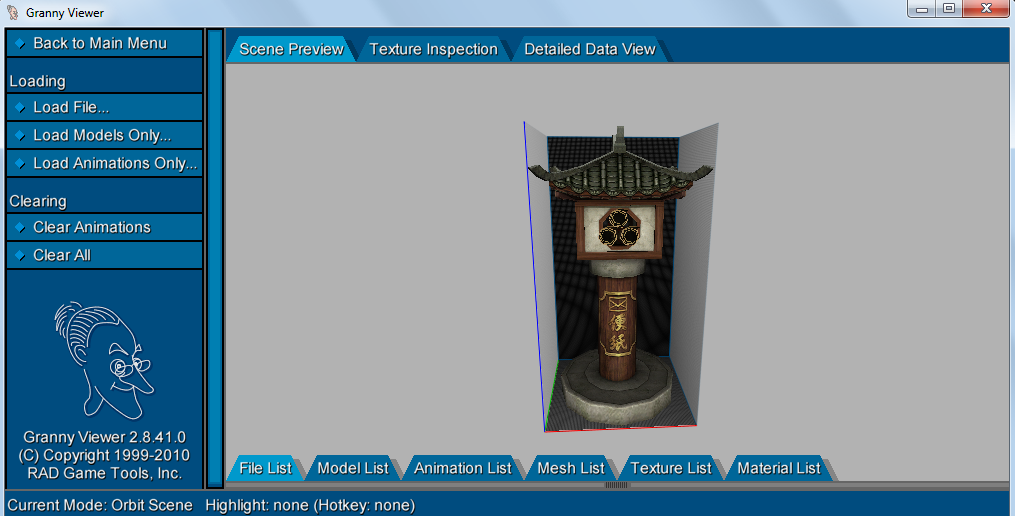
Metin2 oyununda özel veya geliştirici tarafından tasarlanmış nesnelerin oyun içi dünyaya entegrasyonu oldukça önemlidir. Bu bağlamda posta kutusu modeli, oyun içinde sunuculara özel mesajlaşma sistemlerinde ya da estetik amaçlı olarak kullanılan özelleştirilmiş 3D nesnelerdir. Genellikle harita üzerinde belirli bölgelere yerleştirilen bu modeller, hem görsel hem de işlevsel olarak dikkat çeker. Özellikle sunucu sahipleri, oyunculara özel duyuru yapabilmek veya özel etkinliklerde kullanabilmek için bu tür modelleri tercih ederler.
Metin2 3D Modelleme ve Posta Kutusu Tasarımı
Metin2 dünyasında bir posta kutusu modeli oluşturmak için öncelikle 3D modelleme programları kullanılır. Bunlar genellikle 3DS Max ya da Blender gibi yazılımlardır. Bu programlar sayesinde detaylı ve yüksek kaliteli nesneler üretilebilir. Oluşturulan model, Metin2’in desteklediği format olan GR2 ya da Granny3D formatına dönüştürülmelidir. Bu dönüşüm işlemi sırasında UV mapping, texturing, rigging gibi teknik adımlar dikkatle uygulanmalıdır.
Model Dosya Formatları ve Entegrasyon
Metin2’de özel modellerin doğru çalışabilmesi için dosya formatlarının uyumlu olması şarttır. GR2 formatı, oyun motorunca doğrudan desteklenir. Bu format, hem nesne hem de animasyon verilerini barındırabilir. Granny3D ise eski versiyonlar için geçerlidir. Posta kutusu gibi statik nesnelerde genellikle animasyon gerekmez, fakat bazı durumlarda kapak hareketi gibi efektler de eklenebilir. Bu tür küçük detaylar, modelin daha gerçekçi görünmesini sağlar.
Metin2 Posta Kutusu Modelinin Yerleştirilmesi
Oluşturulan posta kutusu modeli, sunucu haritasına yerleştirilmeden önce map editor aracılığıyla test edilmelidir. Harita objesi olarak tanımlandıktan sonra modelin konumu, döndürülmesi ve ölçeklendirilmesi gibi ayarlar yapılmalıdır. Ayrıca collision (çarpışma) ayarları yapılmazsa oyuncular modelin içinden geçebilir. Bu da görsel bozukluklara neden olur. Bu yüzden modelin fiziksel sınırları belirlenmelidir.
Geliştirici Araçları ve Kaynaklar
Metin2 modelleme sürecinde geliştiriciler için birçok araç mevcuttur. Metin2Dev, MartySama ve benzeri topluluklar, özelleştirme süreçlerinde büyük destek sağlar. Ayrıca EterPack gibi kaynaklar, mevcut modellerin yeniden kullanılmasını kolaylaştırır. Posta kutusu gibi basit objeler bile, doğru şekilde tasarlandığında sunucunuzun estetiğini ciddi anlamda artırabilir.
Sonuç
Posta kutusu modeli, Metin2 sunucularında hem estetik hem de fonksiyonel bir detaydır. Doğru 3D modelleme, format dönüşümleri ve harita entegrasyonu ile bu tür modeller sunucu deneyimini zenginleştirebilir. Metin2 lobisi kullanıcıları için bu tür özelleştirme imkanları, oyunun tekrar oynanabilirliğini artırır.
What is a Mailbox Model?
In the Metin2 game, the integration of custom or developer-designed objects into the in-game world is quite important. In this context, a mailbox model refers to customized 3D objects used for special messaging systems on servers or for aesthetic purposes. These models are usually placed in specific areas on maps and attract attention both visually and functionally. Server owners often prefer these types of models to make announcements to players or use them during special events.
Metin2 3D Modeling and Mailbox Design
To create a mailbox model in Metin2, 3D modeling software such as 3DS Max or Blender is typically used. These programs allow for detailed and high-quality objects to be created. The resulting model must be converted into a format supported by Metin2, such as GR2 or Granny3D. During this conversion process, technical steps like UV mapping, texturing, and rigging must be carefully applied.
Model File Formats and Integration
For custom models to work correctly in Metin2, file formats must be compatible. The GR2 format is directly supported by the game engine and can contain both object and animation data. Granny3D is valid for older versions. Static objects like a mailbox usually do not require animation, but in some cases effects like lid movement can also be added. Such small details make the model appear more realistic.
Installing a Metin2 Mailbox Model
Before placing the created mailbox model onto a server map, it should first be tested using a map editor. After being defined as a map object, settings such as position, rotation, and scaling of the model need to be adjusted. If collision settings are not properly configured, players might pass through the model, causing visual glitches. Therefore, the physical boundaries of the model must be set.
Developer Tools and Resources
There are many tools available for developers during the Metin2 modeling process. Communities like Metin2Dev and MartySama provide great support during customization processes. Additionally, resources like EterPack facilitate the reuse of existing models. Even simple objects like a mailbox can significantly enhance the aesthetics of your server if designed properly.
Conclusion
A mailbox model is both an aesthetic and functional detail in Metin2 servers. With proper 3D modeling, format conversions, and map integration, such models can enrich the server experience. For users of the Metin2 lobby, these kinds of customization options increase the game’s replayability.
