

Merhaba Türkmmo,
Pelerini fazlalık olarak görenler için,
Envanter yerine 'X' tuşuna taşıdık + Metin2 TR'deki gibi,
Effect Ekledik. Oyunumda Kullanmıyacağım ama,
ihtiyacı olanlar için paylaşıyorum.
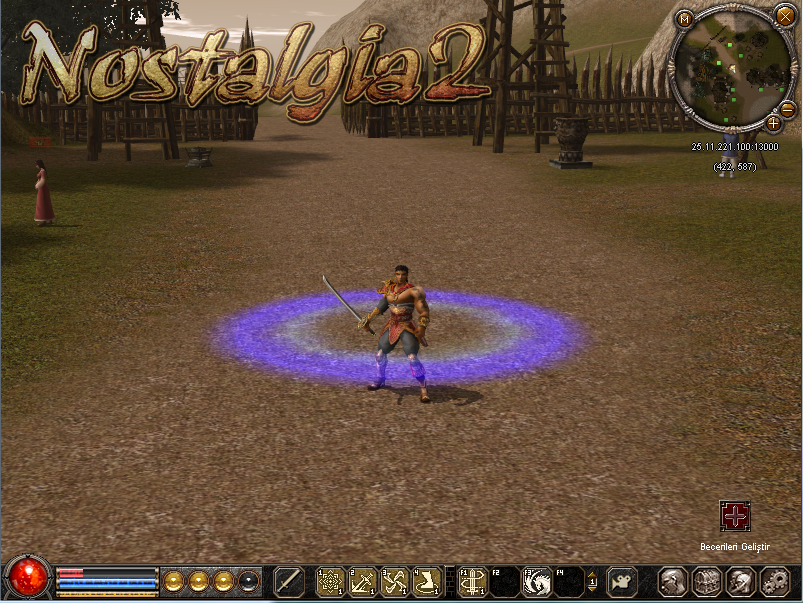
Pelerini fazlalık olarak görenler için,
Envanter yerine 'X' tuşuna taşıdık + Metin2 TR'deki gibi,
Effect Ekledik. Oyunumda Kullanmıyacağım ama,
ihtiyacı olanlar için paylaşıyorum.
ANLATIM:
root/game.py Açılır..
Kod:
onPressKeyDict[app.DIK_H] = lambda : self.interface.OpenHelpWindow()Aratılır, Altına Eklenir.
Kod:
onPressKeyDict[app.DIK_X] = self.__PressXKey
Kod:
def EnvironmentTest(self): background.RegisterEnvironmentData(0, "d:/ymir work/environment/moonlight04.msenv") background.SetEnvironmentData(0)Aratılır, Altına Eklenir.
Kod:
def __PressXKey(self): net.SendChatPacket("/agg") net.SendChatPacket("(pelerin)") snd.PlaySound('sound/ui/drop.wav')root/playersettingmodule.py Açılır..
Kod:
chrmgr.RegisterEffect(chrmgr.EFFECT_EMOTICON+1, "", "d:/ymir work/effect/etc/emoticon/fish.mse") net.RegisterEmoticonString("(fish)")Aratılır, Altına Eklenir.
Geriye Pack Dosyası Gerekli Dosyalar İçinde Mevcuttur.
Pack/index Dosyasına attığımız pack ismini ekleyip giriş yapınız.
"Tab" Sorunu yaşayanlar gerekli dosyalardaki,
anlatımdan ekleyebilir.
Gerekli Dosya:
VirüsTotal:
Not: (M2bob)v.s çekmeli bot hilelisi kullanan oyuncuları,
rahatlıkla avlayabilirsiniz.
Not2: Macro kullananlar içinde ard arda
hızla 'X' tuşuna basılırsa sürekli packet yolladığı için oyundan düşer binevi engel olunmuş olur.
SRC İŞLEMLERİ PLAYER' KOMUTU KULLANMASI İÇİN
[PY/MSE] 'X' Tuşu Pelerin, (Official Tarz Effect)
Metin2 özel sunucularında oyun deneyimini zenginleştirmek için geliştirilen sistemlerden birisi de 'X' Tuşu Pelerin sistemidir. Bu sistem, oyuncuların belirli bir tuşa basarak pelerin efektini değiştirebilmesine olanak tanır. Bu efektler genellikle oyuncunun yetenek seviyesini veya özelliklerini görsel olarak yansıtmak amacıyla tasarlanır. Bu yazıda, Python GUI ve C++ sistemleri ile nasıl bir official tarz efekt sistemi entegre edilebileceğini inceleyeceğiz.
Pelerin Sistemi Nedir?
Metin2'de pelerin, karakterin arkasında bulunan ve genellikle görsellik amaçlı kullanılan bir özelliktir. Ancak bazı özel sunucularda pelerinlerin özel efektleri ve hareketleri olabilir. 'X' Tuşu Pelerin sistemi, oyuncunun X tuşuna basmasıyla bu pelerinin efektini değiştiren bir mekanizmadır. Bu sayede oyuncular kendi karakterlerini özelleştirme imkanına sahip olur.
Sistem Nasıl Çalışır?
Python tarafında, uiscript dosyaları ile bir arayüz hazırlanır. Bu arayüz, kullanıcıya farklı pelerin efektleri arasında seçim yapma imkanı sunar. Seçim yapıldığında, py root üzerinden C++ tarafındaki game server ile haberleşme başlatılır. Game server ise, DB ile senkronize çalışarak karakterin pelerin efektini günceller.
Python GUI Geliştirme
Py GUI kullanarak oyuncuya bir menü sunulur. Bu menüde farklı pelerin efektleri listelenir. Oyuncu bir efekt seçip onayladığında, seçilen efekt server'a gönderilir. Bu işlem sırasında auth server ile bağlantı kurulabilir. Bu sayede güvenlik sağlanır ve yetkilendirme kontrolleri yapılabilir.
C++ Kaynak Kod Entegrasyonu
C++ sistem tarafında, server-side bir fonksiyon tanımlanır. Bu fonksiyon, gelen pelerin efekt bilgisini alır ve karakterin bu efekti kullanmasını sağlar. Compile işlemi sonrası, sistem aktif hale gelir. Source edit işlemleri ile mevcut client src üzerinde gerekli değişiklikler yapılabilir. Bu sayede client-side da pelerin efekti doğru şekilde görüntülenebilir.
Efekt Tasarımı ve Official Tarz Uyum
Bu sistemde efekt tasarımları, official Metin2 tarzında olacak şekilde hazırlanmalıdır. Görsel kalite ve performans dikkate alınarak efekt animasyonları optimize edilmelidir. Martysama gibi geliştirici toplulukları tarafından önerilen standartlar takip edilmelidir. Bu sayede Metin2 lobby kullanıcıları daha profesyonel bir deneyim yaşarlar.
Sistem Güvenliği ve DB Entegrasyonu
Oyuncu verileri DB üzerinde tutulur. Pelerin efekt bilgisi de bu veri tabanında saklanır. Auth ve game sunucuları arasında güvenli iletişim kurulur. Bu sayede kötü niyetli müdahaleler engellenir. Server src üzerinde güvenlik katmanları eklenmelidir. Core sistemlerde değişiklik yapılırken dikkatli olunmalıdır.
Sonuç
'X' Tuşu Pelerin sistemi, Metin2 özel sunucuları için görsellik ve özellik açısından ciddi bir artı sağlar. Python GUI, C++ sistem, DB ve client src uyumlu bir şekilde çalıştırıldığında, oyuncular için etkileyici ve özelleştirilebilir bir sistem elde edilir. Metin2 development süreçleri bu tür sistemlerle daha da zenginleşir.
[PY/MSE] 'X' Key Cape System (Official Style Effect)
To enhance the gameplay experience in Metin2 private servers, one of the developed systems is the 'X' Key Cape System. This system allows players to change their cape effect by pressing a specific key. These effects are generally designed to reflect the player's skill level or character features visually. In this article, we will examine how to integrate an official-style effect system using Python GUI and C++ systems.
What Is The Cape System?
In Metin2, cape is an item located behind the character, usually used for visual appeal. However, in some private servers, capes can have special effects and movements. The 'X' Key Cape System allows players to change their cape effect by pressing the X key. This way, players can customize their characters more freely.
How Does The System Work?
On the Python side, an interface is created with uiscript files. This interface allows the user to select from different cape effects. Once selected, communication with the C++ side game server is initiated through py root. The game server, synchronized with DB, updates the character's cape effect accordingly.
Developing Python GUI
Using Py GUI, a menu is presented to the player. Different cape effects are listed in this menu. When a player selects an effect and confirms it, the selected effect is sent to the server. During this process, connection with the auth server may be established to ensure security and perform authorization checks.
C++ Source Code Integration
On the C++ system side, a function is defined on the server-side. This function receives the incoming cape effect information and enables the character to use that effect. After the compile process, the system becomes active. By editing the existing client src with source edit operations, necessary changes can be made so that the cape effect displays correctly on the client-side.
Effect Design and Official Style Compatibility
The effect designs should be crafted to match the official Metin2 style. Visual quality and performance must be considered, and effect animations should be optimized. Standards suggested by developer communities like Martysama should be followed. This ensures Metin2 lobby users experience a more professional environment.
System Security and DB Integration
Player data is stored in the DB. Cape effect data is also saved in this database. Secure communication is established between the auth and game servers. This prevents malicious interventions. Security layers must be added to the server src. Caution should be exercised while making changes to the core systems.
Conclusion
The 'X' Key Cape System provides significant visual and feature enhancements for Metin2 private servers. When Python GUI, C++ system, DB, and client src work harmoniously, an impressive and customizable system emerges for players. Such systems enrich Metin2 development processes.
Kod:
chrmgr.RegisterEffect(chrmgr.EFFECT_EMOTICON+2, "", "d:/ymir work/effect/affect/kanekipelerineffect.mse") net.RegisterEmoticonString("(pelerin)") ## Pelerin Effect Kaneki ~Geriye Pack Dosyası Gerekli Dosyalar İçinde Mevcuttur.
Pack/index Dosyasına attığımız pack ismini ekleyip giriş yapınız.
"Tab" Sorunu yaşayanlar gerekli dosyalardaki,
anlatımdan ekleyebilir.
Gerekli Dosya:
Ziyaretçiler için gizlenmiş link,görmek için üye olmalısınız!
Giriş yap veya üye ol.
VirüsTotal:
Ziyaretçiler için gizlenmiş link,görmek için üye olmalısınız!
Giriş yap veya üye ol.
Not: (M2bob)v.s çekmeli bot hilelisi kullanan oyuncuları,
rahatlıkla avlayabilirsiniz.
Not2: Macro kullananlar içinde ard arda
hızla 'X' tuşuna basılırsa sürekli packet yolladığı için oyundan düşer binevi engel olunmuş olur.
SRC İŞLEMLERİ PLAYER' KOMUTU KULLANMASI İÇİN
[PY/MSE] 'X' Tuşu Pelerin, (Official Tarz Effect)
Metin2 özel sunucularında oyun deneyimini zenginleştirmek için geliştirilen sistemlerden birisi de 'X' Tuşu Pelerin sistemidir. Bu sistem, oyuncuların belirli bir tuşa basarak pelerin efektini değiştirebilmesine olanak tanır. Bu efektler genellikle oyuncunun yetenek seviyesini veya özelliklerini görsel olarak yansıtmak amacıyla tasarlanır. Bu yazıda, Python GUI ve C++ sistemleri ile nasıl bir official tarz efekt sistemi entegre edilebileceğini inceleyeceğiz.
Pelerin Sistemi Nedir?
Metin2'de pelerin, karakterin arkasında bulunan ve genellikle görsellik amaçlı kullanılan bir özelliktir. Ancak bazı özel sunucularda pelerinlerin özel efektleri ve hareketleri olabilir. 'X' Tuşu Pelerin sistemi, oyuncunun X tuşuna basmasıyla bu pelerinin efektini değiştiren bir mekanizmadır. Bu sayede oyuncular kendi karakterlerini özelleştirme imkanına sahip olur.
Sistem Nasıl Çalışır?
Python tarafında, uiscript dosyaları ile bir arayüz hazırlanır. Bu arayüz, kullanıcıya farklı pelerin efektleri arasında seçim yapma imkanı sunar. Seçim yapıldığında, py root üzerinden C++ tarafındaki game server ile haberleşme başlatılır. Game server ise, DB ile senkronize çalışarak karakterin pelerin efektini günceller.
Python GUI Geliştirme
Py GUI kullanarak oyuncuya bir menü sunulur. Bu menüde farklı pelerin efektleri listelenir. Oyuncu bir efekt seçip onayladığında, seçilen efekt server'a gönderilir. Bu işlem sırasında auth server ile bağlantı kurulabilir. Bu sayede güvenlik sağlanır ve yetkilendirme kontrolleri yapılabilir.
C++ Kaynak Kod Entegrasyonu
C++ sistem tarafında, server-side bir fonksiyon tanımlanır. Bu fonksiyon, gelen pelerin efekt bilgisini alır ve karakterin bu efekti kullanmasını sağlar. Compile işlemi sonrası, sistem aktif hale gelir. Source edit işlemleri ile mevcut client src üzerinde gerekli değişiklikler yapılabilir. Bu sayede client-side da pelerin efekti doğru şekilde görüntülenebilir.
Efekt Tasarımı ve Official Tarz Uyum
Bu sistemde efekt tasarımları, official Metin2 tarzında olacak şekilde hazırlanmalıdır. Görsel kalite ve performans dikkate alınarak efekt animasyonları optimize edilmelidir. Martysama gibi geliştirici toplulukları tarafından önerilen standartlar takip edilmelidir. Bu sayede Metin2 lobby kullanıcıları daha profesyonel bir deneyim yaşarlar.
Sistem Güvenliği ve DB Entegrasyonu
Oyuncu verileri DB üzerinde tutulur. Pelerin efekt bilgisi de bu veri tabanında saklanır. Auth ve game sunucuları arasında güvenli iletişim kurulur. Bu sayede kötü niyetli müdahaleler engellenir. Server src üzerinde güvenlik katmanları eklenmelidir. Core sistemlerde değişiklik yapılırken dikkatli olunmalıdır.
Sonuç
'X' Tuşu Pelerin sistemi, Metin2 özel sunucuları için görsellik ve özellik açısından ciddi bir artı sağlar. Python GUI, C++ sistem, DB ve client src uyumlu bir şekilde çalıştırıldığında, oyuncular için etkileyici ve özelleştirilebilir bir sistem elde edilir. Metin2 development süreçleri bu tür sistemlerle daha da zenginleşir.
[PY/MSE] 'X' Key Cape System (Official Style Effect)
To enhance the gameplay experience in Metin2 private servers, one of the developed systems is the 'X' Key Cape System. This system allows players to change their cape effect by pressing a specific key. These effects are generally designed to reflect the player's skill level or character features visually. In this article, we will examine how to integrate an official-style effect system using Python GUI and C++ systems.
What Is The Cape System?
In Metin2, cape is an item located behind the character, usually used for visual appeal. However, in some private servers, capes can have special effects and movements. The 'X' Key Cape System allows players to change their cape effect by pressing the X key. This way, players can customize their characters more freely.
How Does The System Work?
On the Python side, an interface is created with uiscript files. This interface allows the user to select from different cape effects. Once selected, communication with the C++ side game server is initiated through py root. The game server, synchronized with DB, updates the character's cape effect accordingly.
Developing Python GUI
Using Py GUI, a menu is presented to the player. Different cape effects are listed in this menu. When a player selects an effect and confirms it, the selected effect is sent to the server. During this process, connection with the auth server may be established to ensure security and perform authorization checks.
C++ Source Code Integration
On the C++ system side, a function is defined on the server-side. This function receives the incoming cape effect information and enables the character to use that effect. After the compile process, the system becomes active. By editing the existing client src with source edit operations, necessary changes can be made so that the cape effect displays correctly on the client-side.
Effect Design and Official Style Compatibility
The effect designs should be crafted to match the official Metin2 style. Visual quality and performance must be considered, and effect animations should be optimized. Standards suggested by developer communities like Martysama should be followed. This ensures Metin2 lobby users experience a more professional environment.
System Security and DB Integration
Player data is stored in the DB. Cape effect data is also saved in this database. Secure communication is established between the auth and game servers. This prevents malicious interventions. Security layers must be added to the server src. Caution should be exercised while making changes to the core systems.
Conclusion
The 'X' Key Cape System provides significant visual and feature enhancements for Metin2 private servers. When Python GUI, C++ system, DB, and client src work harmoniously, an impressive and customizable system emerges for players. Such systems enrich Metin2 development processes.