


F5 EKLEMERoot game.py aratılır
Kod:
onPressKeyDict[app.DIK_F4] = lambda : self.__PressQuickSlot(7)
Kod:
onPressKeyDict[app.DIK_F5] = lambda : self._VectorsHzl()Game.py sonuna eklenir
Kod:
def _VectorsHzl(self): import uiVectorsHzl self.VectorsHzl = uiVectorsHzl.VectorsKSK() self.VectorsHzl.Show()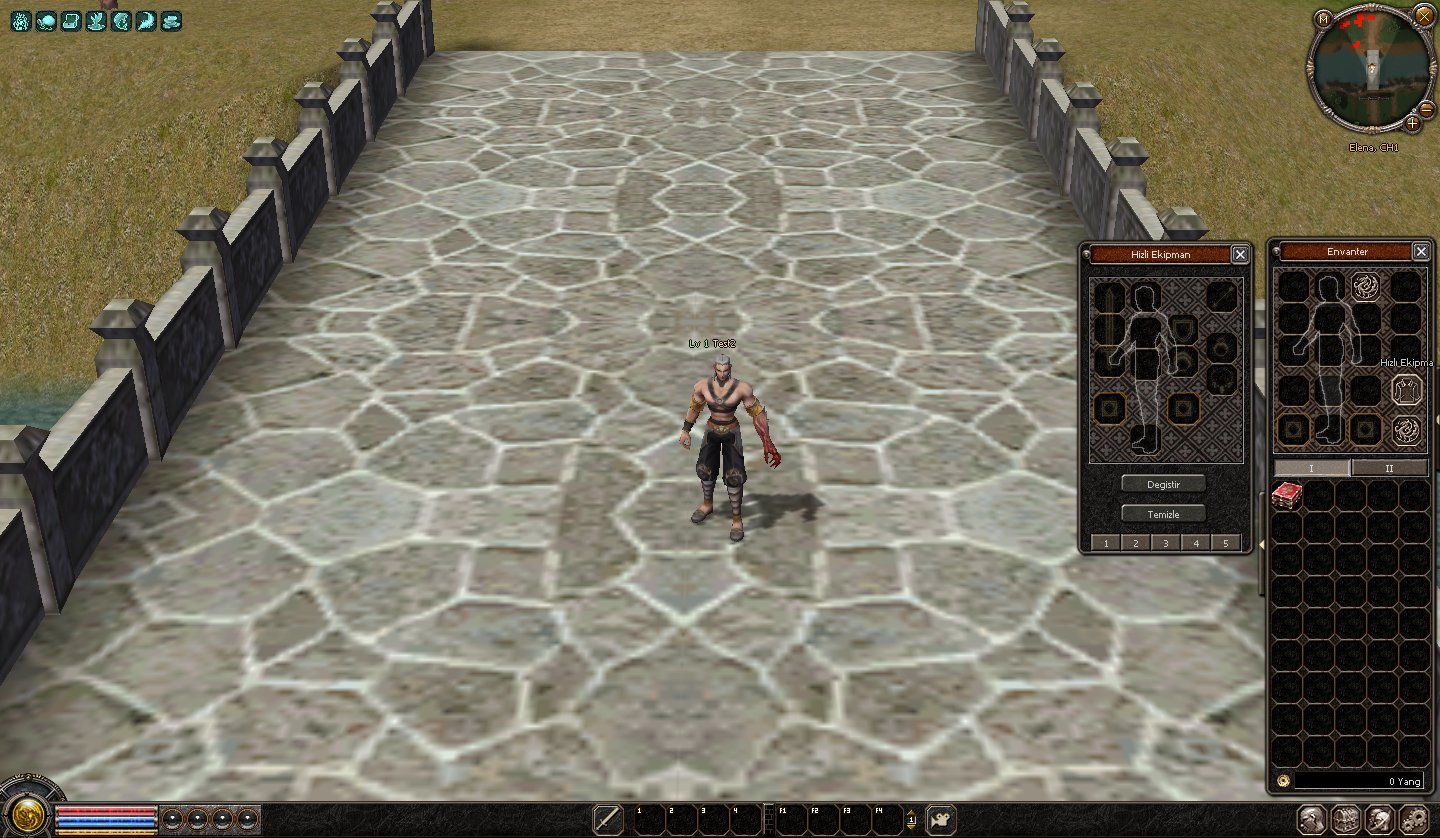
ENVANTER İÇİNE BUTON OLARAK EKLEMEroot uiinventory.py aratılır
Kod:
self.costumeButton = self.GetChild2("CostumeButton")
Kod:
self.VectorsHzl = self.GetChild2("VectorsHzl")
Kod:
# Costume Button if self.costumeButton: self.costumeButton.SetEvent(ui.__mem_func__(self.ClickCostumeButton)) self.wndCostume = None
Kod:
# Hzl Ekpmn if self.VectorsHzl: self.VectorsHzl.SetEvent(ui.__mem_func__(self._VectorsHzl)) self.wndCostume = None
Kod:
def ClickCostumeButton(self): print "Click Costume Button" if self.wndCostume: if self.wndCostume.IsShow(): self.wndCostume.Hide() else: self.wndCostume.Show() else: self.wndCostume = CostumeWindow(self) self.wndCostume.Show()
Kod:
def _VectorsHzl(self): import uiVectorsHzl self.VectorsHzl = uiVectorsHzl.VectorsKSK() self.VectorsHzl.Show()
Kod:
## CostumeButton { "name" : "CostumeButton", "type" : "button", "x" : 78, "y" : 5, "tooltip_text" : uiScriptLocale.COSTUME_TITLE, "default_image" : "d:/ymir work/ui/game/taskbar/costume_Button_01.tga", "over_image" : "d:/ymir work/ui/game/taskbar/costume_Button_02.tga", "down_image" : "d:/ymir work/ui/game/taskbar/costume_Button_03.tga", },
Kod:
{ "name" : "VectorsHzl", "type" : "button", "x" : 118, "y" : 107, "tooltip_text" : uiScriptLocale.HZL, "default_image" : "costume_01.tga", "over_image" : "costume_02.tga", "down_image" : "costume_03.tga", },locale_interface.txt açılır en alta eklenir
Kod:
HZL Hızlı Ekipman
TASKBARA BUTON OLARAK EKLEME
Root uitaskbar.py aratılır
Kod:
toggleButtonDict[TaskBar.BUTTON_CHAT]=self.GetChild("ChatButton")
Kod:
toggleButtonDict[TaskBar.BUTTON_HZL]=self.GetChild("VectorsHzl")
Kod:
BUTTON_CHAT = 4
Kod:
BUTTON_HZL = 5
Kod:
self.wndTaskBar.SetToggleButtonEvent(uiTaskBar.TaskBar.BUTTON_CHAT, ui.__mem_func__(self.ToggleChat))
Kod:
self.wndTaskBar.SetToggleButtonEvent(uiTaskBar.TaskBar.BUTTON_HZL, ui.__mem_func__(self.ToggleVectorsHzl))
Kod:
def ToggleChat(self):
Kod:
def ToggleVectorsHzl(self): import uiVectorsHzl self.VectorsHzl = uiVectorsHzl.VectorsKSK() self.VectorsHzl.Show()
Kod:
{ "name" : "MessengerButton", "type" : "button", "x" : SCREEN_WIDTH - 76, "y" : 3 + Y_ADD_POSITION, "tooltip_text" : uiScriptLocale.TASKBAR_MESSENGER, "default_image" : ROOT + "TaskBar/Community_Button_01.sub", "over_image" : ROOT + "TaskBar/Community_Button_02.sub", "down_image" : ROOT + "TaskBar/Community_Button_03.sub", },
Kod:
{ "name" : "VectorsHzl", "type" : "button", "x" : SCREEN_WIDTH - 178, "y" : 3 + Y_ADD_POSITION, "tooltip_text" : uiScriptLocale.HZL, "default_image" : "costume_01.tga", "over_image" : "costume_02.tga", "down_image" : "costume_03.tga", },locale_interface.txt açılır en alta eklenir
Kod:
HZL Hızlı EkipmanTaskbara ekleyenler
Ziyaretçiler için gizlenmiş link,görmek için üye olmalısınız!
Giriş yap veya üye ol.
siteden alt kısımdan kopyalasın yada down. edip eklesin.
Ziyaretçiler için gizlenmiş link,görmek için üye olmalısınız!
Giriş yap veya üye ol.
.Rar içerisinde ki dosyalar root içine atılır.Kodları .Rar içerisinden kopyalayın.
Ziyaretçiler için gizlenmiş link,görmek için üye olmalısınız!
Giriş yap veya üye ol.
Ziyaretçiler için gizlenmiş link,görmek için üye olmalısınız!
Giriş yap veya üye ol.
Python ile Metin2'de 5 Sekmeli Hızlı Ekipman Sistemi Geliştirme
Metin2 özel sunucularında PvP deneyimini zenginleştirmek adına geliştirilen sistemlerden biri de hızlı ekipman paylaşımıdır. Bu yazıda Python kullanarak 5 sekmeli hızlı ekipman paylaşım sistemi nasıl geliştirilir, detaylı olarak ele alacağız. Bu sistem, oyuncuların savaş sırasında farklı ekipman setlerini anında değiştirebilmesini sağlar ve PvP performansını ciddi anlamda artırır.
Neden 5 Sekmeli Bir Sistem?
Metin2'de oyuncular genellikle farklı durumlar için farklı ekipman kombinasyonları kullanırlar. Örneğin: saldırı seti, savunma seti, PvP seti, PvE seti, guild war seti gibi. 5 sekmeli bir sistemle bu setlerin her birine bir tuş ataması yapılarak, hızlıca geçiş yapılabilir. Bu sayede oyuncu, savaş esnasında ekipman değiştirmek için menüye girmek zorunda kalmaz ve zaman kazanır.
Python ile Uygulama Mimarisi
Python, Metin2 sistem geliştirme sürecinde genellikle GUI ve script işlemleri için kullanılır. Bu sistem için Py Root üzerinde bir arayüz tasarlanır. UI Script ile client tarafında ekipman geçişlerini yöneten bir panel oluşturulur. Python tarafında ise ekipman verileri DB ile senkronize edilerek, istenen sete göre game server ile haberleşilir.
Hızlı Ekipman Geçişi Nasıl Çalışır?
Sistem, her bir sekmede farklı bir ekipman seti barındırır. Oyuncu bir sekmeye bastığında, Python scripti devreye girer ve ilgili ekipman setini server'a gönderir. Server tarafından bu veri doğrulanır ve ekipman değişimi yapılır. Bu işlem saniyeler içinde gerçekleşir. Vectors olarak adlandırılan bu sistemlerde, her ekipman seti bir vektör gibi tanımlanır ve hızlıca yüklenir.
Geliştirme Adımları
1. UI Script dosyası ile 5 sekmeli bir panel tasarlanır.
2. Her sekmeye bir Python fonksiyonu bağlanır.
3. Fonksiyon, DB üzerinden ilgili ekipman setini çeker.
4. Game Server ile haberleşerek ekipman değişimi yapılır.
5. Client tarafında değişiklik anında yansıtılır.
Teknik Zorluklar ve Çözümler
Bu sistemde en büyük zorluklardan biri, client ile server arasında güvenli veri aktarımıdır. Python tarafında encryption ve validation süreçleri eklenmelidir. Ayrıca, server-side kontrol mekanizması ile sahte verilerin engellenmesi sağlanmalıdır.
SEO ve Topluluk Katkısı
Bu tarz sistemler, Metin2 özel sunucu geliştiricileri için değerli bir kaynaktır. Metin2 Lobby olarak, bu gibi open-source çözümleri paylaşarak topluluğun gelişmesine katkı sağlıyoruz. C++, Python, DB Core, Martysama gibi kaynaklarla daha güçlü sistemler inşa edilebilir.
Sonuç
5 sekmeli hızlı ekipman sistemi, Metin2 PvP deneyimini ciddi şekilde artıran yenilikçi bir özelliktir. Python kullanarak bu sistemi geliştirmek, hem client hem de server tarafında dikkatli planlama gerektirir. Ancak doğru uygulandığında, kullanıcı dostu ve yüksek performanslı bir sistem elde edilir.
Developing a 5-Tab Quick Equipment System with Python for Metin2
To enhance the PvP experience on Metin2 private servers, one of the developed systems is the quick equipment sharing feature. In this article, we will discuss in detail how to develop a 5-tab quick equipment sharing system using Python. This system allows players to instantly switch between different equipment sets during combat and significantly boosts PvP performance.
Why a 5-Tab System?
In Metin2, players usually use different equipment combinations for various scenarios such as attack sets, defense sets, PvP sets, PvE sets, guild war sets, etc. With a 5-tab system, each set can be assigned to a key, allowing instant switching. Thus, the player does not need to open the menu during battle to change equipment and saves valuable time.
Application Architecture with Python
Python is commonly used in Metin2 system development for GUI and script operations. For this system, a UI is designed over Py Root. A panel that manages equipment transitions on the client side is created using UI Script. On the Python side, equipment data is synchronized with the DB, and communication with the game server occurs based on the selected set.
How Does Quick Equipment Switch Work?
The system holds a different equipment set in each tab. When a player clicks on a tab, the Python script activates and sends the corresponding equipment set to the server. The server validates the data and performs the equipment change. This process happens within seconds. In these systems called Vectors, each equipment set is defined like a vector and loaded quickly.
Development Steps
1. A 5-tab panel is designed with a UI Script file.
2. Each tab is linked to a Python function.
3. The function retrieves the relevant equipment set from the DB.
4. Equipment change is performed by communicating with the Game Server.
5. Changes are instantly reflected on the Client side.
Technical Challenges and Solutions
One of the main challenges in this system is secure data transmission between the client and server. Encryption and validation processes must be added on the Python side. Additionally, fake data should be prevented by implementing server-side control mechanisms.
SEO and Community Contribution
Such systems are valuable resources for Metin2 private server developers. At Metin2 Lobby, we contribute to community growth by sharing such open-source solutions. Stronger systems can be built using resources such as C++, Python, DB Core, and Martysama.
Conclusion
The 5-tab quick equipment system is an innovative feature that significantly enhances the Metin2 PvP experience. Developing this system using Python requires careful planning on both the client and server sides. However, when properly implemented, a user-friendly and high-performance system can be achieved.
