

Herkese Öncelikle
Hayırlı Geceler Bügün Sizlere Oyunda ekli Olan bi Arkadasınız Oyuna Girdiginde Size Bildirim Gelmektedir
Hayırlı Kullanımlar ...
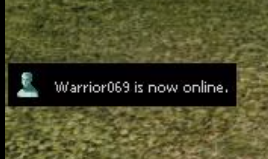
Hayırlı Geceler Bügün Sizlere Oyunda ekli Olan bi Arkadasınız Oyuna Girdiginde Size Bildirim Gelmektedir
Hayırlı Kullanımlar ...
<a href="
Ziyaretçiler için gizlenmiş link,görmek için üye olmalısınız!
Giriş yap veya üye ol.
" class="link link--external" target="_blank" rel="nofollow ugc noopener" data-proxy-href="/proxy.php?link=https%3A%2F%2Fi.gyazo.com%2Fb72a19cfa9cbb9ad7b52342662f94e41.mp4&hash=8c6ec305fa668943d5cf35bbaf80f2f5">
Ziyaretçiler için gizlenmiş link,görmek için üye olmalısınız!
Giriş yap veya üye ol.
</a>
Kod:
### 0.1 Root / uiMessenger.py: # 1. Search: def OnLogin(self, groupIndex ... # 1. After: member.Online() self.OnRefreshList() # 1. Add: if not name in constInfo.ALREADY_NOTIFY_LIST: self.onlinePopup = uiCommon.OnlinePopup() self.onlinePopup.SetUserName(name) self.onlinePopup.SetEvent(ui.__mem_func__(self.OpenWhisper), "MOUSE_LEFT_BUTTON_UP", name) self.onlinePopup.SlideIn() constInfo.ALREADY_NOTIFY_LIST.append(name) # 1.1 After: def OnLogin(... Add: def OpenWhisper(self, eventType, userName): self.whisperButtonEvent(userName) ### 0.2 Root / constInfo.py: # 2. Add: ALREADY_NOTIFY_LIST = [] ### 0.3 Root / ui.py # 3 Search: class Board(Window): (....) # 3 REPLACE this class with: class Board(Window): CORNER_WIDTH = 32 CORNER_HEIGHT = 32 LINE_WIDTH = 128 LINE_HEIGHT = 128 LT = 0 LB = 1 RT = 2 RB = 3 L = 0 R = 1 T = 2 B = 3 BASE_PATH = "d:/ymir work/ui/pattern" IMAGES = { 'CORNER' : { 0 : "Board_Corner_LeftTop", 1 : "Board_Corner_LeftBottom", 2 : "Board_Corner_RightTop", 3 : "Board_Corner_RightBottom" }, 'BAR' : { 0 : "Board_Line_Left", 1 : "Board_Line_Right", 2 : "Board_Line_Top", 3 : "Board_Line_Bottom" }, 'FILL' : "Board_Base" } def __init__(self, layer = "UI"): Window.__init__(self, layer) self.skipMaxCheck = False self.MakeBoard() def MakeBoard(self): CornerFileNames = [ ] LineFileNames = [ ] for imageDictKey in (['CORNER', 'BAR']): for x in xrange(len(self.IMAGES[imageDictKey])): if imageDictKey == "CORNER": CornerFileNames.append("%s/%s.tga" % (self.BASE_PATH, self.IMAGES[imageDictKey][x])) elif imageDictKey == "BAR": LineFileNames.append("%s/%s.tga" % (self.BASE_PATH, self.IMAGES[imageDictKey][x])) self.Corners = [] for fileName in CornerFileNames: Corner = ExpandedImageBox() Corner.AddFlag("not_pick") Corner.LoadImage(fileName) Corner.SetParent(self) Corner.SetPosition(0, 0) Corner.Show() self.Corners.append(Corner) self.Lines = [] for fileName in LineFileNames: Line = ExpandedImageBox() Line.AddFlag("not_pick") Line.LoadImage(fileName) Line.SetParent(self) Line.SetPosition(0, 0) Line.Show() self.Lines.append(Line) self.Lines[self.L].SetPosition(0, self.CORNER_HEIGHT) self.Lines[self.T].SetPosition(self.CORNER_WIDTH, 0) self.Base = ExpandedImageBox() self.Base.AddFlag("not_pick") self.Base.LoadImage("%s/%s.tga" % (self.BASE_PATH, self.IMAGES['FILL'])) self.Base.SetParent(self) self.Base.SetPosition(self.CORNER_WIDTH, self.CORNER_HEIGHT) self.Base.Show() def __del__(self): Window.__del__(self) def SetSize(self, width, height): if not self.skipMaxCheck: width = max(self.CORNER_WIDTH*2, width) height = max(self.CORNER_HEIGHT*2, height) Window.SetSize(self, width, height) self.Corners[self.LB].SetPosition(0, height - self.CORNER_HEIGHT) self.Corners[self.RT].SetPosition(width - self.CORNER_WIDTH, 0) self.Corners[self.RB].SetPosition(width - self.CORNER_WIDTH, height - self.CORNER_HEIGHT) self.Lines[self.R].SetPosition(width - self.CORNER_WIDTH, self.CORNER_HEIGHT) self.Lines[self.B].SetPosition(self.CORNER_HEIGHT, height - self.CORNER_HEIGHT) verticalShowingPercentage = float((height - self.CORNER_HEIGHT*2) - self.LINE_HEIGHT) / self.LINE_HEIGHT horizontalShowingPercentage = float((width - self.CORNER_WIDTH*2) - self.LINE_WIDTH) / self.LINE_WIDTH self.Lines[self.L].SetRenderingRect(0, 0, 0, verticalShowingPercentage) self.Lines[self.R].SetRenderingRect(0, 0, 0, verticalShowingPercentage) self.Lines[self.T].SetRenderingRect(0, 0, horizontalShowingPercentage, 0) self.Lines[self.B].SetRenderingRect(0, 0, horizontalShowingPercentage, 0) if self.Base: self.Base.SetRenderingRect(0, 0, horizontalShowingPercentage, verticalShowingPercentage) # 3 AFTER CLASS BOARD ADD THIS CLASS: class BorderB(Board): CORNER_WIDTH = 16 CORNER_HEIGHT = 16 LINE_WIDTH = 16 LINE_HEIGHT = 16 BASE_PATH = "d:/ymir work/ui/pattern" IMAGES = { 'CORNER' : { 0 : "border_b_left_top", 1 : "border_b_left_bottom", 2 : "border_b_right_top", 3 : "border_b_right_bottom" }, 'BAR' : { 0 : "border_b_left", 1 : "border_b_right", 2 : "border_b_top", 3 : "border_b_bottom" }, 'FILL' : "border_b_center" } def __init__(self): Board.__init__(self) self.eventFunc = { "MOUSE_LEFT_BUTTON_UP" : None, } self.eventArgs = { "MOUSE_LEFT_BUTTON_UP" : None, } def __del__(self): Board.__del__(self) self.eventFunc = None self.eventArgs = None def SetSize(self, width, height): Board.SetSize(self, width, height) def SetEvent(self, func, *args) : result = self.eventFunc.has_key(args[0]) if result : self.eventFunc[args[0]] = func self.eventArgs[args[0]] = args else : print "[ERROR] ui.py SetEvent, Can`t Find has_key : %s" % args[0] def OnMouseLeftButtonUp(self): if self.eventFunc["MOUSE_LEFT_BUTTON_UP"] : apply(self.eventFunc["MOUSE_LEFT_BUTTON_UP"], self.eventArgs["MOUSE_LEFT_BUTTON_UP"]) ### 0.4 Root / uiCommon.py # 4 Add this to the end of file: ### (Check if you have in this file import app ) class OnlinePopup(ui.BorderB): def __init__(self): ui.BorderB.__init__(self) self.isActiveSlide = False self.isActiveSlideOut = False self.endTime = 0 self.wndWidth = 0 self.textLine = ui.TextLine() self.textLine.SetParent(self) self.textLine.SetWindowHorizontalAlignCenter() self.textLine.SetWindowVerticalAlignCenter() self.textLine.SetHorizontalAlignCenter() self.textLine.SetVerticalAlignCenter() self.textLine.SetPosition(13, 0) self.textLine.Show() self.onlineImage = ui.ImageBox() self.onlineImage.SetParent(self) self.onlineImage.SetPosition(8, 8) self.onlineImage.LoadImage("d:/ymir work/ui/game/windows/messenger_list_online.sub") self.onlineImage.Show() def __del__(self): ui.BorderB.__del__(self) def SlideIn(self): self.SetTop() self.Show() self.isActiveSlide = True self.endTime = app.GetGlobalTimeStamp() + 5 def Close(self): self.Hide() def Destroy(self): self.Close() def SetUserName(self, name): self.textLine.SetText("Player %s is online." % str(name)) self.wndWidth = self.textLine.GetTextSize()[0] + 40 self.SetSize(self.wndWidth, 25) self.SetPosition(-self.wndWidth, wndMgr.GetScreenHeight() - 200) def OnUpdate(self): if self.isActiveSlide and self.isActiveSlide == True: x, y = self.GetLocalPosition() if x < 0: self.SetPosition(x + 4, y) if self.endTime - app.GetGlobalTimeStamp() <= 0 and self.isActiveSlideOut == False and self.isActiveSlide == True: self.isActiveSlide = False self.isActiveSlideOut = True if self.isActiveSlideOut and self.isActiveSlideOut == True: x, y = self.GetLocalPosition() if x > -(self.wndWidth): self.SetPosition(x - 4, y) if x <= -(self.wndWidth): self.isActiveSlideOut = False self.Close() ######## Please write in topic If i forgot something. ########
Ziyaretçiler için gizlenmiş link,görmek için üye olmalısınız!
Giriş yap veya üye ol.
Ziyaretçiler için gizlenmiş link,görmek için üye olmalısınız!
Giriş yap veya üye ol.
(PYTHON) - Arkadaş Girdi Online Sistem
Metin2 özel sunucularında kullanıcı deneyimini artırmak ve topluluk hissini güçlendirmek için birçok geliştirici, oyuncuların birbirleriyle etkileşimini artıran sistemler entegre eder. Bunlardan birisi de 'Arkadaş Girdi Online Sistem'dir. Bu sistem sayesinde oyuncular, arkadaş listesindeki bir kişinin online olup olmadığını anlayabilir. Bu özellik, sosyal yönü güçlü olan Metin2 oyununda büyük bir avantaj sağlar.
Arkadaş Girdi Online Sistemi Nedir?
Arkadaş Girdi Online Sistem, oyuncu arkadaş listenizde yer alan kullanıcıların o anda oyuna giriş yapıp yapmadığını gösteren bir özelliktir. Genellikle bir buton veya simge ile gösterilir ve oyuncunun durumu canlı olarak güncellenir. Bu sistem genellikle istemci tarafında (client-side) çalışır ve sunucu tarafından gönderilen verilerle güncellenir.
Python ile Nasıl Uygulanır?
Metin2 özel sunucularında Python, genellikle istemci tarafı geliştirmelerinde kullanılır. Özellikle Py ROOT olarak bilinen Python klasörü, istemcinin GUI sistemini barındırır. Bu yapı sayesinde arkadaş sistemi gibi özel modüller kolayca entegre edilebilir. Örneğin bir Python dosyası oluşturarak, oyuncunun arkadaş listeni kontrol eden ve sunucudan gelen verilere göre online durumunu güncelleyen bir yapı kurabilirsiniz.
Sistem Mimarisi ve Teknik Detaylar[/COORD]
Bu sistemin temel işleyişi şu şekildedir:
- Oyuncu istemcide bir arkadaş listesi açar.
- Sunucu, oyuncunun giriş yaptığı anda arkadaş listenin kimlerde olduğunu kontrol eder.
- Eğer listede biri online olursa, istemciye bu bilgi gönderilir.
- Python GUI arayüzü bu bilgiyi alarak, kullanıcıya online olduğunu gösteren bir görsel veya metin ile gösterir.
Sunucu Tarafı Entegrasyonu
Sunucu tarafında bu işlemi gerçekleştirmek için auth veya game sunucusuna özel paketler (packets) tanımlamak gerekir. Bu paketler, oyuncu giriş yaptığında arkadaş listesindeki kişilerin durumunu kontrol eder. C++ tabanlı sunucu sistemlerinde bu tür özel işlemler için genellikle 'packet.h', 'packet.cpp' gibi dosyalar düzenlenir. Bu yapı, istemciye gönderilmesi gereken bilgileri tanımlar.
Py GUI Kullanımı
Python GUI sistemleri, genellikle UIScript ile tanımlanır. Bu script dosyaları, oyuncunun gördüğü arayüzü kontrol eder. Arkadaş sistemi için bir pencere oluşturulur ve burada her arkadaşın adının yanında bir durum göstergesi (örneğin yeşil nokta) yer alır. Bu göstergeler, Python üzerinden sunucudan gelen verilere göre dinamik olarak güncellenir.
Avantajları
- Topluluk hissini artırır.
- Oyuncuların birlikte oynamasını teşvik eder.
- Oyuncu sadakatini yükseltir.
- Sosyal etkileşimi artırır.
Uygulama Önerileri
Bu sistemi uygularken dikkat edilmesi gereken bazı önemli konular vardır. İlk olarak, sunucu ve istemci arasındaki veri trafiğini optimize etmek önemlidir. Çok fazla sorgu gönderilmesi performans sorunlarına yol açabilir. Ayrıca, kullanıcı arayüzü sade ve anlaşılır olmalıdır. Her kullanıcı online durumunu kolayca görebilmelidir.
(PYTHON) - Friend Login Online System
To enhance the user experience and strengthen community feeling in Metin2 private servers, many developers integrate systems that increase player interaction. One of these is the 'Friend Login Online System'. With this system, players can see if someone on their friend list is currently online. This feature provides a great advantage in the socially-driven Metin2 game.
What is the Friend Login Online System?
The Friend Login Online System is a feature that shows whether users on your friend list are currently logged into the game. It is usually displayed with a button or icon and updates the player's status live. This system typically runs on the client-side and is updated with data sent from the server.
How Is It Implemented with Python?
In Metin2 private servers, Python is often used for client-side developments. The Py ROOT folder, which contains the client’s GUI system, allows special modules like a friend system to be easily integrated. For example, by creating a Python file, you can set up a structure that checks your friend list and updates their online status based on server data.
System Architecture and Technical Details
The basic workflow of this system works as follows:
- Player opens a friend list in the client.
- Server checks who is online among the player's friends upon login.
- If anyone on the list is online, this information is sent to the client.
- The Python GUI interface receives this data and displays a visual or text indicator showing the user is online.
Server-Side Integration
To implement this on the server side, special packets must be defined in the auth or game server. These packets check the status of people on the friend list when a player logs in. In C++ based server systems, files such as 'packet.h' and 'packet.cpp' are generally edited to define the information required to be sent to the client.
Usage of Py GUI
Python GUI systems are usually defined with UIScript. These script files control the interface seen by the player. A window is created for the friend system, where each friend's name has a status indicator (e.g., a green dot). These indicators dynamically update based on data received from the server via Python.
Benefits
- Increases community feeling.
- Encourages players to play together.
- Boosts player loyalty.
- Enhances social interaction.
Implementation Tips
There are some important points to consider when implementing this system. First, optimizing data traffic between the server and client is crucial. Sending too many queries can cause performance issues. Additionally, the user interface should be simple and clear. Each user should be able to easily see the online status.
