

Herkes Güle Güle Kullansın
Güzel Bi Sistem Benziyor.
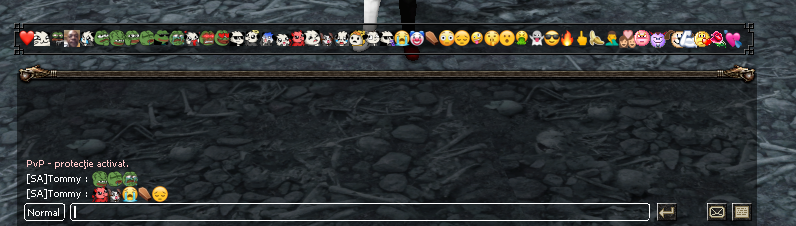
Güzel Bi Sistem Benziyor.


Ziyaretçiler için gizlenmiş link,görmek için üye olmalısınız!
Giriş yap veya üye ol.
Python ile Metin2 Sunucularında Chat Üstü Emoji Sistemi Geliştirme
Metin2 özel sunucularında oyun deneyimini artırmak için geliştirilen birçok sistem arasında chat üstü emoji sistemi, kullanıcıların sohbette daha fazla ifade gücü kazanmasını sağlar. Bu sistem genellikle Python dilinde yazılmış GUI tabanlı bir arayüzle entegre edilerek çalışır ve oyuncuların mesajlarına görsel ifadeler eklemesine olanak tanır. Bu makalede, Metin2 özel sunucularında chat üstü emoji sisteminin nasıl geliştirileceği, hangi tekniklerin kullanılacağı ve sistemin Python ile nasıl entegre edileceği hakkında detaylı bilgi vereceğiz.
Chat Üstü Emoji Sisteminin Amacı
Metin2 özel sunucularında oyuncuların sohbet etme biçimi, sunucu atmosferini doğrudan etkiler. Sohbette kullanılan ifadelerin görsel olarak desteklenmesi, kullanıcıların birbirleriyle olan etkileşimini artırır. Bu bağlamda chat üstü emoji sistemi, metin tabanlı sohbete görsel ifadeler ekleyerek daha eğlenceli bir deneyim sunar. Özellikle PvP sunucularında bu sistem, oyuncuların duygusal durumlarını yansıtmaları için önemli bir araçtır.
Python ve Metin2 Entegrasyonu
Metin2 sunucularında chat üstü emoji sistemi genellikle iki ana bileşenden oluşur: Client tarafı ve Server tarafı. Client tarafında, kullanıcı arayüzüne (UI) özel bir pencere eklenir ve buradan seçilen emojiler mesaja eklenir. Bu işlem genellikle Python dilinde yazılmış uiscript dosyalarıyla yapılır. Server tarafında ise bu emojilerin doğru şekilde işlenmesi ve diğer oyunculara gönderilmesi gerekir. Bu da genellikle C++ tabanlı server src üzerinde geliştirilir.
Python GUI ile Emoji Penceresi Oluşturma
Python kullanarak Metin2 istemcisine entegre edilecek bir emoji picker (emoji seçici) penceresi oluşturmak mümkündür. Bu pencere genellikle py gui kütüphaneleriyle geliştirilir. Aşağıda temel bir yapı örneği verilmiştir:
Kod:
[COLOR=#9365b8]import ui[COLOR=red][B]class EmojiPickerWindow(ui.ScriptWindow):[B][/B][/COLOR]Bu sınıf üzerinden bir arayüz tasarımı yapılabilir ve kullanıcının tıkladığı emojilerin sohbet kutusuna eklenmesi sağlanabilir. Burada dikkat edilmesi gereken nokta, seçilen emojilerin doğru şekilde sunucuya iletilmesidir. Bu da genellikle bir chat command üzerinden yapılır.
Emoji Gönderme ve Sunucuda İşleme
Seçilen emojiler, client tarafından belirli bir formatta sunucuya gönderilir. Sunucu tarafında bu emojilerin tanınması ve diğer oyunculara doğru şekilde aktarılması gerekir. Bu işlem genellikle game server kodları üzerinde C++ ile yapılır. Örneğin, gönderilen emoji kodları, özel bir paketleme sistemiyle diğer oyunculara gönderilir. Bu sistemde db tabanlı veri saklama da kullanılabilir. Örneğin, hangi oyuncunun hangi emojiyi kullandığı gibi veriler bir database üzerinden takip edilebilir.
Emoji Formatı ve Paketleme
Her bir emoji, belirli bir ID ile tanımlanır ve client tarafından bu ID'ye göre sunucuya gönderilir. Sunucu, bu ID'yi alıp uygun şekilde diğer oyunculara iletir. Bu süreçte chat packet yapısı değiştirilerek emojilerin doğru şekilde görüntülenmesi sağlanır. Bu sistemde hem auth hem de game sunucuları üzerinde değişiklikler yapılabilir. Özellikle source edit işlemleri sırasında bu yapı dikkatlice tasarlanmalıdır.
Güvenlik ve Performans Konuları
Emoji sistemi, doğru yapılandırılmadığında güvenlik açıklarına neden olabilir. Örneğin, herhangi bir kullanıcı rastgele emoji ID'leri göndererek sunucuyu manipüle etmeye çalışabilir. Bu nedenle, gelen emojilerin server-side kontrol edilmesi gerekir. Ayrıca, emoji sisteminin performansı da önemlidir. Çok sayıda kullanıcı aynı anda emoji gönderdiğinde sunucu yükü artabilir. Bu yüzden, core sistemde optimize edilmiş yapılar kullanılmalıdır.
Sonuç
Metin2 özel sunucularında chat üstü emoji sistemi, kullanıcı deneyimini ciddi anlamda artırır. Python ile geliştirilen arayüzler, C++ ile yazılmış sunucu kodlarıyla entegre edildiğinde güçlü ve esnek bir sistem oluşturulabilir. Bu sistem, PvP sunucularında özellikle etkili olabilir. Geliştiriciler, bu yapıyı kullanarak hem client src hem de server src üzerinde değişiklikler yapabilir ve sunucularına özgün özellikler ekleyebilir.
Developing a Chat Overhead Emoji System with Python for Metin2 Servers
Among the many systems developed to enhance the gaming experience on Metin2 private servers, the chat overhead emoji system allows users to gain more expressive power in chat. This system is typically integrated with a GUI-based interface written in Python and enables players to add visual expressions to their messages. In this article, we will provide detailed information about how to develop a chat overhead emoji system on Metin2 private servers, which techniques are used, and how the system integrates with Python.
Purpose of the Chat Overhead Emoji System
The way players communicate in chat on Metin2 private servers directly affects the server atmosphere. Supporting text-based expressions visually enhances the interaction between players. In this context, the chat overhead emoji system adds visual elements to text-based chat, creating a more entertaining experience. Especially on PvP servers, this system is an important tool for players to express their emotional states.
Integration of Python and Metin2
The chat overhead emoji system on Metin2 servers generally consists of two main components: client side and server side. On the client side, a special window is added to the user interface (UI), from which selected emojis are added to the message. This process is usually done with uiscript files written in Python. On the server side, these emojis need to be processed correctly and sent to other players. This is typically developed on C++-based server src.
Creating an Emoji Picker Window with Python GUI
It is possible to create an emoji picker window integrated into the Metin2 client using Python. This window is typically developed with py gui libraries. Below is a basic structure example:
Kod:
[COLOR=#9365b8]import ui[COLOR=red][B]class EmojiPickerWindow(ui.ScriptWindow):[B][/B][/COLOR]Through this class, a UI design can be created, and selected emojis can be added to the chat box by the user. The point to consider here is that the selected emojis must be transmitted to the server correctly. This is usually done through a chat command.
Sending Emojis and Processing Them on the Server
Selected emojis are sent to the server by the client in a specific format. On the server side, these emojis must be recognized and properly transmitted to other players. This process is usually done in C++ on the game server code. For example, the sent emoji codes are sent to other players via a special packaging system. Database-based data storage may also be used in this system; for instance, data such as which player used which emoji can be tracked via a database.
Emoji Format and Packaging
Each emoji is defined by a specific ID and sent to the server according to this ID by the client. The server receives this ID and transmits it appropriately to other players. In this process, the chat packet structure is modified to ensure emojis are displayed correctly. Changes may be made on both auth and game servers during this process. Especially during source edit operations, this structure must be carefully designed.
Security and Performance Considerations
If not configured correctly, the emoji system can cause security vulnerabilities. For example, any user might attempt to manipulate the server by sending random emoji IDs. Therefore, incoming emojis should be checked on the server-side. Additionally, the performance of the emoji system is also important. When many users send emojis simultaneously, the server load may increase. Thus, optimized structures should be used in the core system.
Conclusion
On Metin2 private servers, the chat overhead emoji system significantly enhances user experience. When interfaces developed with Python are integrated with server-side code written in C++, a powerful and flexible system can be created. This system can be especially effective on PvP servers. Developers can make changes to both client src and server src and add unique features to their servers using this structure.
