

Merhaba arkadaşlar, Login Ekranına Hesap Kaydetme & Silme konusunu paylaşıyorum.
Sadece tek bir hesap kaydedebilirsiniz ve silebilirsiniz. Oyun açıldığında ID ve Password kısmında
kaydettiğiniz ID ve Password yazıları yazılmış olur.
Fazla uzatmadan konuya başlayalım.
GÖRSELLER
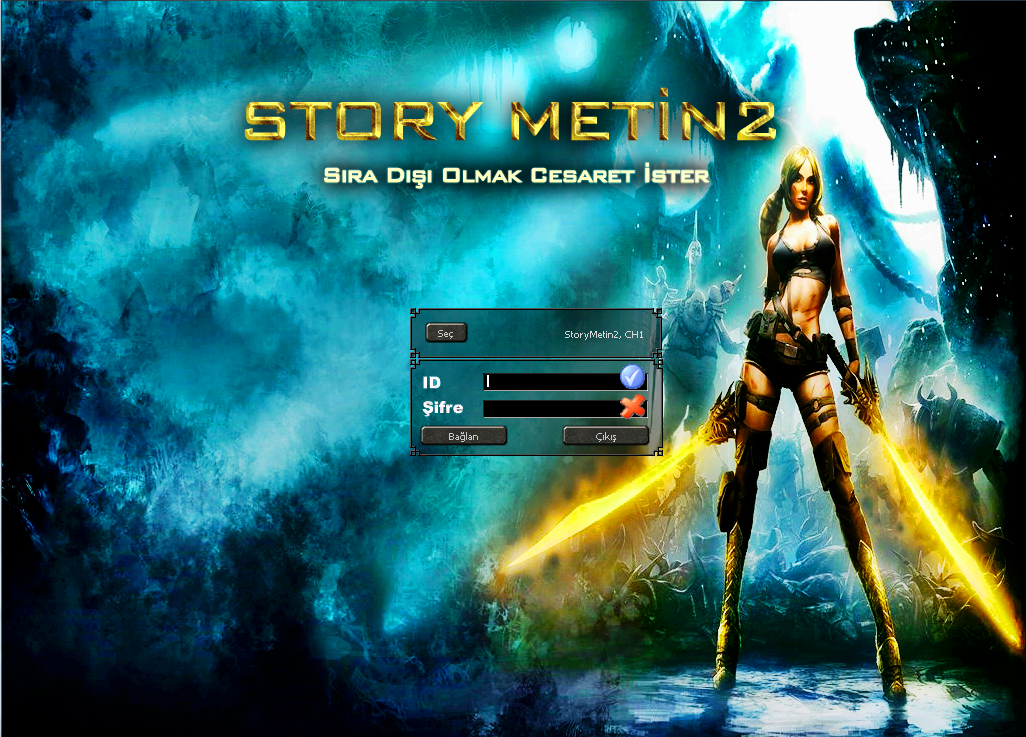
Sadece tek bir hesap kaydedebilirsiniz ve silebilirsiniz. Oyun açıldığında ID ve Password kısmında
kaydettiğiniz ID ve Password yazıları yazılmış olur.
Fazla uzatmadan konuya başlayalım.
GÖRSELLER

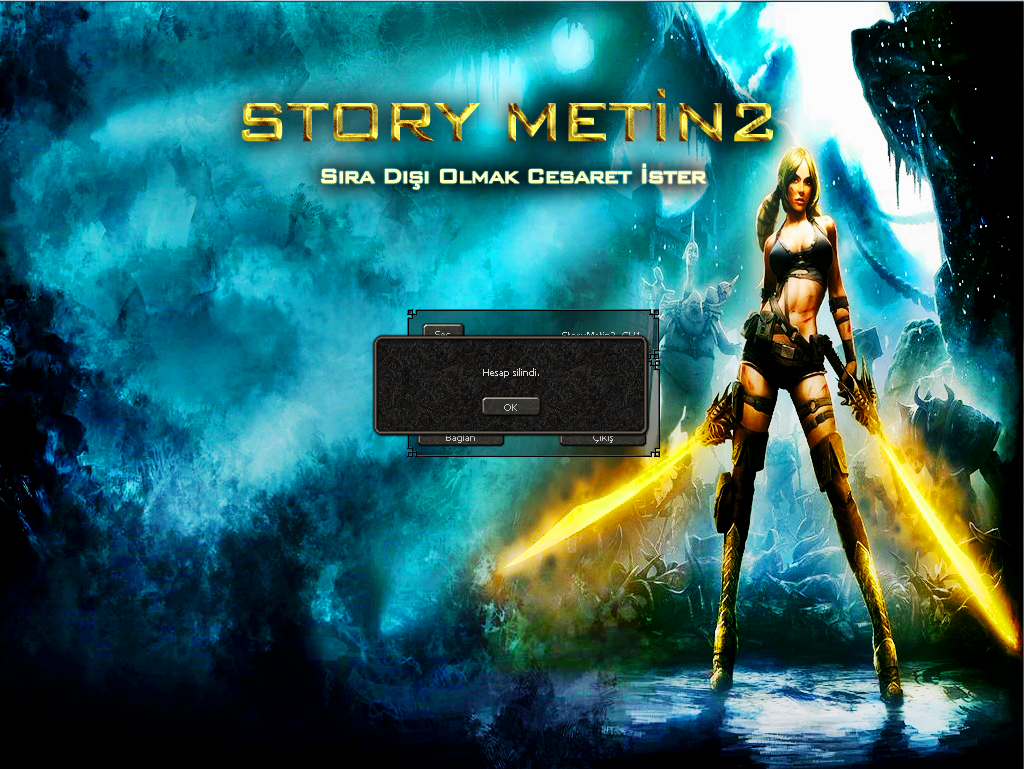
Root / intrologin.py dosyasını açın.
Aşağıda ki kodu aratın.
Kod:
self.loginExitButton = GetObject("LoginExitButton")Arattıktan sonra altına aşağıda ki kodu ekleyin.
Kod:
### DeadlyEscape Hesap Kayıt Sistemi ### self.DEscapeIdKayit = GetObject("DEscapeIdKayit") self.DEscapeIdSil = GetObject("DEscapeIdSil") ### DeadlyEscape Hesap Kayıt Sistemi Finish ###Aşağıda ki kodu aratın.
Kod:
self.pwdEditLine.SetTabEvent(ui.__mem_func__(self.idEditLine.SetFocus))Aşağıda ki kodu ekleyin.
Kod:
### DeadlyEscape Hesap Kayıt Sistemi ### self.DEscapeIdKayit.SetEvent(ui.__mem_func__(self.__OnClickDEscapeIdKayit)) self.DEscapeIdSil.SetEvent(ui.__mem_func__(self.__OnClickDEscapeIdSil)) ### DeadlyEscape Hesap Kayıt Sistemi Finish ###Aşağıda ki kodu aratın.
Kod:
global SKIP_LOGIN_PHASE if SKIP_LOGIN_PHASE: if not self.loginInfo: self.connectBoard.Hide()Aşağıda ki kodu ekleyin.
Kod:
### DeadlyEscape Hesap Kayıt Sistemi ### import linecache login = linecache.getline("save.cfg", 1) password = linecache.getline("save.cfg", 2) self.idEditLine.SetText(login) self.pwdEditLine.SetText(password) id = self.idEditLine.GetText() id = id.replace('\n', '') self.idEditLine.SetText(id) def __OnClickDEscapeIdKayit(self): id = self.idEditLine.GetText() sifre = self.pwdEditLine.GetText() kaydet = open("save.cfg", "w") kaydet.write (id +"\n") kaydet.write (sifre) kaydet.close() self.PopupNotifyMessage("Hesap başarıyla kaydedildi.") def __OnClickDEscapeIdSil(self): sil = open("save.cfg", "w") sil.write ("") sil.write ("") sil.close() self.PopupNotifyMessage("Hesap silindi.") ### DeadlyEscape Hesap Kayıt Sistemi Finish ###locale_de & locale_tr / loginwindow.py açın.
Aşağıda ki kodu aratın.
Kod:
## ConnectBoard { "name" : "ConnectBoard", "type" : "thinboard", "x" : (SCREEN_WIDTH - 208) / 2, "y" : (SCREEN_HEIGHT - 410 - 54), "width" : 208, "height" : 50, "children" : ( { "name" : "ConnectName", "type" : "text", "x" : 15, "y" : 0, "vertical_align" : "center", "text_vertical_align" : "center", "text" : uiScriptLocale.LOGIN_DEFAULT_SERVERADDR, }, { "name" : "SelectConnectButton", "type" : "button", "x" : 150, "y" : 0, "vertical_align" : "center", "default_image" : "d:/ymir work/ui/public/small_button_01.sub", "over_image" : "d:/ymir work/ui/public/small_button_02.sub", "down_image" : "d:/ymir work/ui/public/small_button_03.sub", "text" : uiScriptLocale.LOGIN_SELECT_BUTTON, }, ), }, ## LoginBoard { "name" : "LoginBoard", "type" : "image", "x" : (SCREEN_WIDTH - 208) / 2, "y" : (SCREEN_HEIGHT - 410), "image" : LOCALE_PATH + "loginwindow.sub", "children" : ( { "name" : "ID_EditLine", "type" : "editline", "x" : 77, "y" : 16, "width" : 120, "height" : 18, "input_limit" : 16, "enable_codepage" : 0, "r" : 1.0, "g" : 1.0, "b" : 1.0, "a" : 1.0, }, { "name" : "Password_EditLine", "type" : "editline", "x" : 77, "y" : 43, "width" : 120, "height" : 18, "input_limit" : 16, "secret_flag" : 1, "enable_codepage" : 0, "r" : 1.0, "g" : 1.0, "b" : 1.0, "a" : 1.0, }, { "name" : "LoginButton", "type" : "button", "x" : 15, "y" : 65, "default_image" : "d:/ymir work/ui/public/large_button_01.sub", "over_image" : "d:/ymir work/ui/public/large_button_02.sub", "down_image" : "d:/ymir work/ui/public/large_button_03.sub", "text" : uiScriptLocale.LOGIN_CONNECT, }, { "name" : "LoginExitButton", "type" : "button", "x" : 105, "y" : 65, "default_image" : "d:/ymir work/ui/public/large_button_01.sub", "over_image" : "d:/ymir work/ui/public/large_button_02.sub", "down_image" : "d:/ymir work/ui/public/large_button_03.sub", "text" : uiScriptLocale.LOGIN_EXIT, }, ), },Yukarıda ki kodun tümünü seçin ve aşağıda ki kod ile değiştirin.
Kod:
## ConnectBoard { "name" : "ConnectBoard", "type" : "thinboard", "x" : (SCREEN_WIDTH - 208) / 2, "y" : (SCREEN_HEIGHT - 407 - 54), "width" : 252, "height" : 50, "children" : ( { "name" : "ConnectName", "type" : "text", "x" : 155, "y" : 0, "vertical_align" : "center", "text_vertical_align" : "center", "text" : uiScriptLocale.LOGIN_DEFAULT_SERVERADDR, }, { "name" : "SelectConnectButton", "type" : "button", "x" : 15, "y" : 0, "vertical_align" : "center", "default_image" : "d:/ymir work/ui/public/small_button_01.sub", "over_image" : "d:/ymir work/ui/public/small_button_02.sub", "down_image" : "d:/ymir work/ui/public/small_button_03.sub", "text" : uiScriptLocale.LOGIN_SELECT_BUTTON, }, ), }, ## LoginBoard { "name" : "LoginBoard", "type" : "image", "x" : (SCREEN_WIDTH - 208) / 2, "y" : (SCREEN_HEIGHT - 410), "image" : LOCALE_PATH + "loginwindow.sub", "children" : ( { "name" : "ID_EditLine", "type" : "editline", "x" : 77, "y" : 16, "width" : 120, "height" : 18, "input_limit" : 16, "enable_codepage" : 0, "r" : 1.0, "g" : 1.0, "b" : 1.0, "a" : 1.0, }, { "name" : "Password_EditLine", "type" : "editline", "x" : 77, "y" : 43, "width" : 120, "height" : 18, "input_limit" : 16, "secret_flag" : 1, "enable_codepage" : 0, "r" : 1.0, "g" : 1.0, "b" : 1.0, "a" : 1.0, }, { "name" : "LoginButton", "type" : "button", "x" : 10, "y" : 66, "default_image" : "d:/ymir work/ui/public/large_button_01.sub", "over_image" : "d:/ymir work/ui/public/large_button_02.sub", "down_image" : "d:/ymir work/ui/public/large_button_03.sub", "text" : uiScriptLocale.LOGIN_CONNECT, }, { "name" : "LoginExitButton", "type" : "button", "x" : 152, "y" : 66, "default_image" : "d:/ymir work/ui/public/large_button_01.sub", "over_image" : "d:/ymir work/ui/public/large_button_02.sub", "down_image" : "d:/ymir work/ui/public/large_button_03.sub", "text" : uiScriptLocale.LOGIN_EXIT, }, ### DeadlyEscape Hesap Kayıt Sistemi ### { "name" : "DEscapeIdKayit", "type" : "button", "x" : 210, "y" : 5, "default_image" : "locale/login/kaydet1.tga", "over_image" : "locale/login/kaydet2.tga", "down_image" : "locale/login/kaydet3.tga", "text" : "", }, { "name" : "DEscapeIdSil", "type" : "button", "x" : 210, "y" : 35, "default_image" : "locale/login/sil1.tga", "over_image" : "locale/login/sil2.tga", "down_image" : "locale/login/sil3.tga", "text" : "", }, ### DeadlyEscape Hesap Kayıt Sistemi Finish ### ), },İndiriceğiniz Dosyanın İçeriği
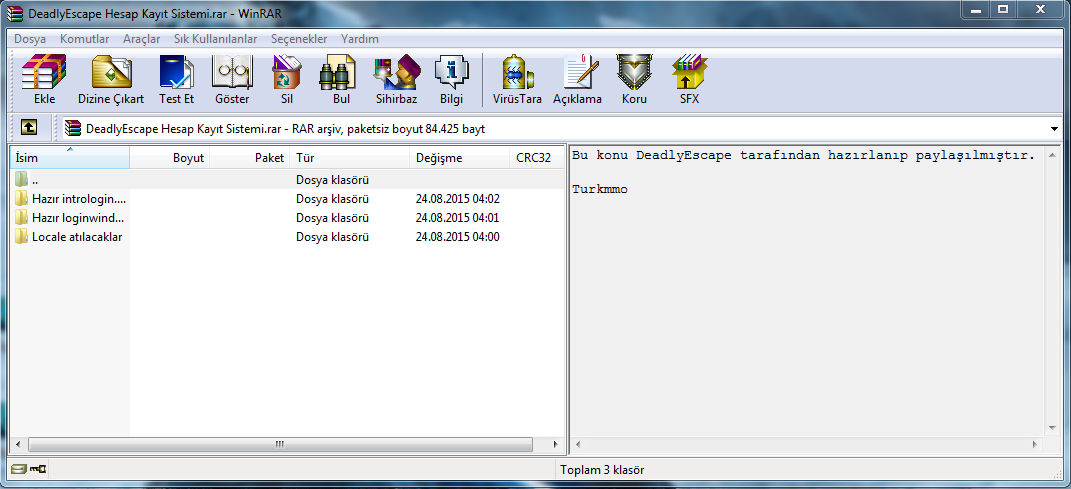
İndirdiğiniz dosyanın içerisinde ki " Locale atılacaklar " dosyasını açın.
" ui " klasörünü
ymir work/locale/tr veya de bölümü içerisine atınız.
İndirdiğiniz dosyanın içerisinde ki " Locale atılacaklar " dosyasını açın.
" login " klasörünü
ymir work/locale bölümü içerisine atınız.
NOT: Eminim ki çoğu arkadaşlarımız bu konu üzerinden paylaşılan kodları kendi py dosyalarına eklerken sıkıntı yaşayacaklardır. Sıkıntısız ve TAB ayarı sorunu yaşamadan kodları eklemeniz için
" Hazır intrologin.py "
" Hazır loginwindow.py "
indireceğiniz dosyanın içerisinde mevcut. Kodları oradan alıp kendi py dosyanıza kopyalayın, hata alma şansınız kalmayacaktır.
Ziyaretçiler için gizlenmiş link,görmek için üye olmalısınız!
Giriş yap veya üye ol.
Ziyaretçiler için gizlenmiş link,görmek için üye olmalısınız!
Giriş yap veya üye ol.
Python ile Metin2 Login Ekranına Hesap Kaydetme ve Silme İşlemi
Metin2 özel sunucularında kullanıcı deneyimini artırmak için login ekranında hesap kaydetme ve silme işlemleri oldukça önemlidir. Bu işlemler sayesinde oyuncular tekrar giriş yaparken kullanıcı adlarını ve şifrelerini yeniden yazmak zorunda kalmazlar. Bu makalede Python dili kullanarak Uiscript tabanlı bir GUI arayüzünde nasıl hesap kaydedileceğini ve silineceğini detaylı olarak ele alacağız.
Hesap Kaydetme Sistemi Nedir?
Hesap kaydetme sistemi, oyuncunun kullanıcı adını ve şifresini bir dosyada veya veritabanında saklayarak, bir sonraki girişte otomatik olarak doldurulmasını sağlar. Bu işlem genellikle kullanıcı rızasıyla yapılır ve güvenlik açısından şifrelerin şifrelenerek saklanması gerekir.
Güvenlik Uyarısı: Şifreler asla düz metin olarak saklanmamalıdır. Ancak bu örnekte basitlik açısından salt bir dosya üzerinde duracağız. Gerçek projelerde PBKDF2, bcrypt gibi güçlü şifreleme yöntemleri kullanılmalıdır.
Python GUI Arayüzü ile Uygulama
Python dilinde tkinter kütüphanesi kullanarak basit bir GUI arayüzü oluşturabiliriz. Bu arayüzde kullanıcı adı ve şifre alanları, 'Hesabı Kaydet', 'Sil' ve 'Giriş Yap' butonları bulunur.
Kod:
import json[BR][/BR][BR][/BR]def save_account(username, password):[BR][/BR] accounts = load_accounts()[BR][/BR] accounts[username] = password[BR][/BR] with open('accounts.json', 'w') as f:[BR][/BR] json.dump(accounts, f)[BR][/BR][BR][/BR]def load_accounts():[BR][/BR] try:[BR][/BR] with open('accounts.json', 'r') as f:[BR][/BR] return json.load(f)[BR][/BR] except FileNotFoundError:[BR][/BR] return {}[BR][/BR][BR][/BR]def delete_account(username):[BR][/BR] accounts = load_accounts()[BR][/BR] if username in accounts:[BR][/BR] del accounts[username][BR][/BR] with open('accounts.json', 'w') as f:[BR][/BR] json.dump(accounts, f)[BR][/BR]Yukarıdaki kod parçasında, hesapların JSON formatında bir dosyada tutulduğu görülür. Kullanıcı adı anahtar, şifre ise değer olarak saklanır.
Hesap Silme İşlemi
Hesap silme işlemi, daha önce kaydedilmiş bir hesabı listeden kaldırmak için kullanılır. Bu işlem genellikle kullanıcı arayüzünde bir 'Sil' butonuyla tetiklenir. Kullanıcı listeden bir hesap seçer ve sil butonuna tıklarsa, sistem bu hesabı JSON dosyasından kaldırır.
Uygulama Entegrasyonu
Bu sistem doğrudan Metin2 client tarafında Python GUI (py root) ile entegre edilebilir. Örneğin, UIScript ile oluşturulmuş bir login penceresine bu fonksiyonlar bağlanarak kullanıcı dostu bir arayüz sağlanabilir. Bu sayede özel sunucuların kullanıcı memnuniyeti artar.
Sonuç
Python ile geliştirilen bu sistem, Metin2 özel sunucularında kullanıcı deneyimini ciddi anlamda artırabilir. Hesap kaydetme ve silme işlemleri kullanıcıların tekrarlayan işlemlerden kurtulmasını sağlar. Ancak güvenlik önlemleri eksiksiz alınmalıdır.
Saving and Deleting Accounts on Metin2 Login Screen with Python
In Metin2 private servers, saving and deleting accounts on the login screen is very important to enhance user experience. This allows players to avoid re-entering their usernames and passwords each time they log in. In this article, we will explain in detail how to save and delete accounts using a Python-based GUI interface built on Uiscript.
What is Account Saving System?
The account saving system stores the player's username and password in a file or database so that the information can be automatically filled in on the next login attempt. This process usually occurs with user consent, and for security reasons, passwords must be stored encrypted.
Security Warning: Passwords should never be stored as plain text. However, for simplicity in this example, we will focus on basic file storage. In real projects, strong encryption methods like PBKDF2 or bcrypt should be used.
Implementing Application with Python GUI
Using the tkinter library in Python, we can create a simple GUI interface. The interface includes fields for username and password, along with buttons such as 'Save Account', 'Delete', and 'Login'.
Kod:
import json[BR][/BR][BR][/BR]def save_account(username, password):[BR][/BR] accounts = load_accounts()[BR][/BR] accounts[username] = password[BR][/BR] with open('accounts.json', 'w') as f:[BR][/BR] json.dump(accounts, f)[BR][/BR][BR][/BR]def load_accounts():[BR][/BR] try:[BR][/BR] with open('accounts.json', 'r') as f:[BR][/BR] return json.load(f)[BR][/BR] except FileNotFoundError:[BR][/BR] return {}[BR][/BR][BR][/BR]def delete_account(username):[BR][/BR] accounts = load_accounts()[BR][/BR] if username in accounts:[BR][/BR] del accounts[username][BR][/BR] with open('accounts.json', 'w') as f:[BR][/BR] json.dump(accounts, f)[BR][/BR]In the above code snippet, accounts are stored in JSON format within a file. Usernames act as keys, while passwords are stored as values.
Deleting an Account
Account deletion removes a previously saved account from the list. This action is typically triggered by a 'Delete' button in the user interface. When a user selects an account from the list and clicks the delete button, the system removes that account from the JSON file.
Application Integration
This system can be integrated directly into the Metin2 client using Python GUI (py root). For example, these functions can be linked to a login window created with UIScript to provide a user-friendly interface. This significantly increases user satisfaction in private servers.
Conclusion
This system developed with Python can significantly enhance user experience in Metin2 private servers. Saving and deleting accounts helps users avoid repetitive tasks. However, security measures must be fully implemented.
