

Minimap haritasının altında bu sistemin daha kullanışlı ve pratik olacağını düşündüm.
Dilediğiniz zaman tuşları gizleyip tekrardan gösterebilirsiniz.
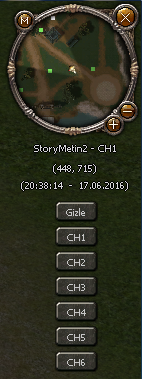
Dilediğiniz zaman tuşları gizleyip tekrardan gösterebilirsiniz.
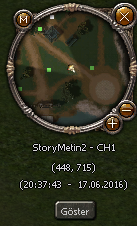
Konu anlatımı indireceğiniz dosya içerisinde mevcuttur.
Konu güncellendi.
- Aynı kanala geçiş yapamazsınız.
- Kanal değiştirirken küçük harita ve hızlı kanal tuşları kapatılır.
Ziyaretçiler için gizlenmiş link,görmek için üye olmalısınız!
Giriş yap veya üye ol.
Ziyaretçiler için gizlenmiş link,görmek için üye olmalısınız!
Giriş yap veya üye ol.
[Python]Minimap Hızlı Kanal Sistemi
Metin2 özel sunucu geliştirme sürecinde, oyuncuların farklı kanallar arasında hızlıca geçiş yapabilmesi oldukça önemli bir özelliktir. Bu bağlamda, Minimap Hızlı Kanal Sistemi, kullanıcı deneyimini artırmak için geliştirilmiş pratik bir Python tabanlı çözümdür. Bu yazıda, Minimap üzerinde yer alan kanal geçiş butonlarının nasıl entegre edileceği ve bu sistemin temel çalışma prensibi ele alınacaktır.
Sistem Nedir?
Minimap üzerinden doğrudan kanal değiştirme işlemi yapılmasını sağlayan bu sistem, Python GUI dosyalarında yapılan küçük değişikliklerle hayata geçirilir. Oyuncular artık kanal listesini açmak zorunda kalmadan, sadece minimap üzerinden bir butona basarak farklı kanallara geçebilirler. Bu, hem kolaylık sağlar hem de PvP oyun deneyimi açısından oldukça faydalıdır.
Kurulum Adımları
Öncelikle, uiscript klasörü altında yer alan minimap.py dosyası düzenlenmelidir. Burada yeni bir buton nesnesi tanımlanır ve bu butonun tıklanma fonksiyonuna kanal geçiş komutları atanır. Butonun pozisyonu, boyutu ve görünümü özelleştirilebilir. Py Root kısmında bulunan game.py veya benzeri dosyalarda kanal geçiş fonksiyonu tanımlanmalıdır. Bu fonksiyon sunucuya gönderilecek olan kanal değiştirme isteğini içerir.
Python Kod Yapısı
Python tarafında minimap[/BR] penceresine eklenecek olan buton, ui.Button sınıfı ile oluşturulur. Örnek olarak:
channelButton = ui.Button()
channelButton.SetPosition(100, 200)
channelButton.SetEvent(self.OnChannelChange)
self.OnChannelChange fonksiyonu içinde ise net.SendChatPacket veya benzeri bir fonksiyonla kanal değiştirme isteği gönderilir. Bu sayede sunucu tarafında gerekli işlemler başlatılır.
Sunucu Tarafı Entegrasyonu[/BR]Sunucu tarafında, yani C++ tabanlı Game Server kaynak kodlarında bu komutu karşılayan bir handler bulunmalıdır. Bu handler, oyuncunun bulunduğu kanalı günceller ve onu yeni kanala yönlendirir. Bu işlem sırasında Auth ve Game sunucuları arasındaki senkronizasyonun doğru çalışması gerekir.
Avantajlar
• Hızlı ve kolay kanal geçişi
• Kullanıcı dostu arayüz
• PvP odaklı oyun deneyimi için ideal
• Sunucu tarafında az kodlama gerektirir
Sonuç[/BR]Bu sistem, Metin2 özel sunucularında kullanıcıların kanallar arasında geçiş yapmasını kolaylaştıran etkili bir yöntemdir. Python ve C++ dilleri ile geliştirilen bu çözüm, hem client hem de server tarafında küçük değişikliklerle entegre edilebilir. Daha fazla bilgi ve örnek sistemler için Metin2Lobby sitesini ziyaret edebilirsiniz.
[Python]Minimap Fast Channel System
Metin2 private server development process, allowing players to quickly switch between different channels is a very important feature. In this context, the Minimap Fast Channel System is a practical Python-based solution designed to enhance user experience. This article will explain how channel switching buttons can be integrated into the Minimap and the basic working principle of this system.
What is the System?
This system allows direct channel switching through the Minimap, implemented with minor changes in Python GUI files. Players no longer need to open the channel list; they can simply click a button on the minimap to switch to different channels. This provides convenience and is highly beneficial for PvP gameplay experience.
Installation Steps[/BR]Firstly, the minimap.py file located in the uiscript folder must be edited. A new button object is defined here, and the click function of the button is assigned to channel-switch commands. The position, size, and appearance of the button can be customized. In the Py Root section, the channel switching function should be defined in files such as game.py. This function includes the request sent to the server to change the channel.
Python Code Structure
The button added to the minimap[/BR] window on the Python side is created with the ui.Button class. For example:
channelButton = ui.Button()
channelButton.SetPosition(100, 200)
channelButton.SetEvent(self.OnChannelChange)
Inside the self.OnChannelChange function, a channel change request is sent via net.SendChatPacket or a similar function. This triggers the necessary processes on the server side.
Server-Side Integration[/BR]On the server side, i.e., within the C++-based Game Server source code, there must be a handler to respond to this command. This handler updates the player's current channel and redirects them to the new one. During this process, synchronization between the Auth and Game servers must work correctly.
Advantages[/BR]• Quick and easy channel switching
• User-friendly interface
• Ideal for PvP-focused gameplay
• Requires minimal coding on the server side
Conclusion[/BR]This system is an effective method that facilitates channel switching among users in Metin2 private servers. This solution developed with Python and C++ languages can be integrated with minor changes on both client and server sides. For more information and sample systems, visit Metin2Lobby.
