

Merhabalar arkadaşlar.
Bir teşekkürü çok görmeyelim
Not: Bu sistem uzaktan npc sistemi alt yapısı ile çalışmaktadır dosyaların içerisinde bulunan "SourceGame" Eklentileri sizde mevcutsa eklemenize gerek yoktur arkadalar.
Not2: Kod bloklarının eklenecek yerleri belirtirken içerisine görsellerde sağladım hata alanlar görsele bakabilir genede çözüm bulamaz ise yorum olarak belirtirse yardımcı olacağım.
Kanıt
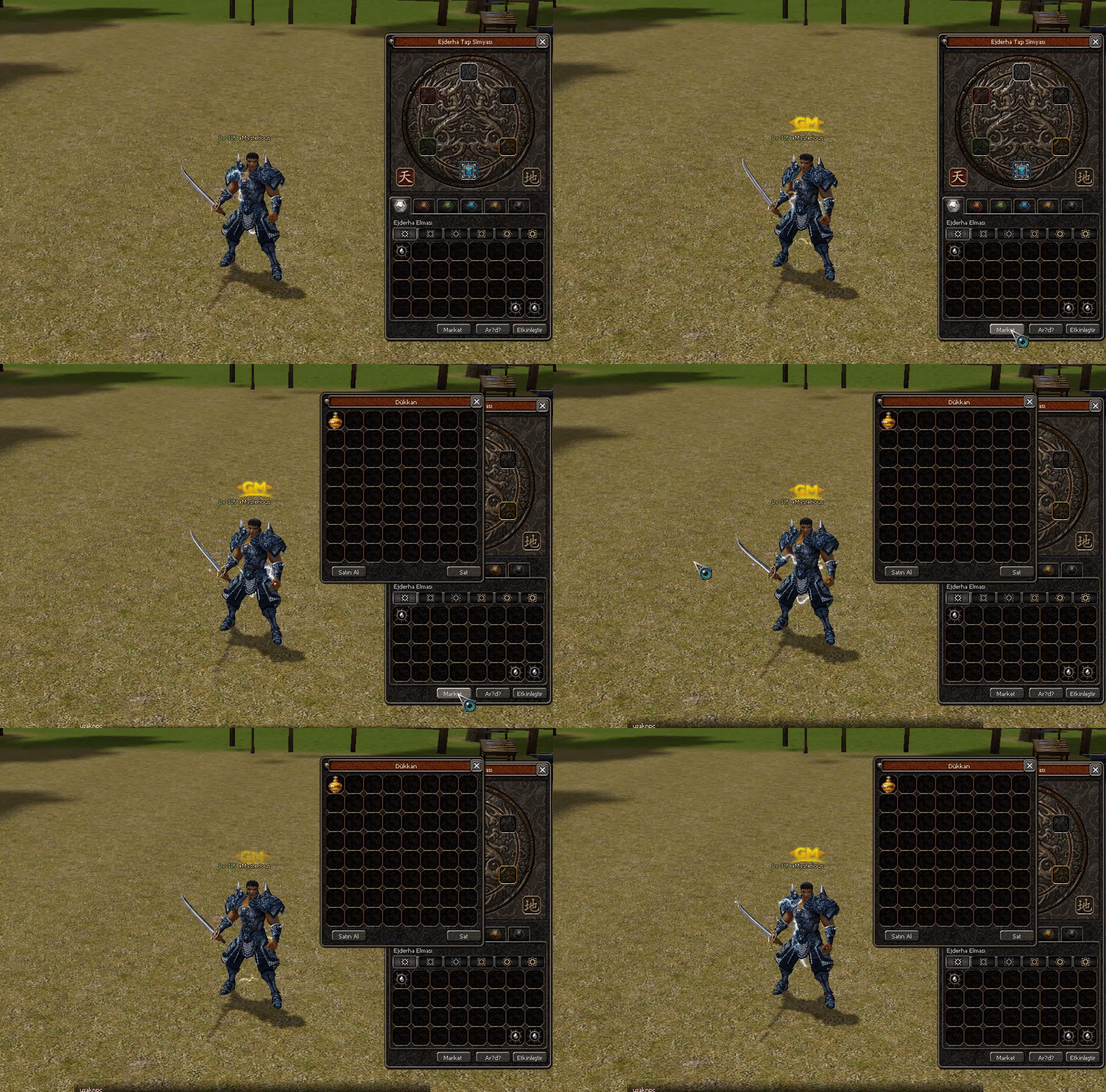
Bir teşekkürü çok görmeyelim
Not: Bu sistem uzaktan npc sistemi alt yapısı ile çalışmaktadır dosyaların içerisinde bulunan "SourceGame" Eklentileri sizde mevcutsa eklemenize gerek yoktur arkadalar.
Not2: Kod bloklarının eklenecek yerleri belirtirken içerisine görsellerde sağladım hata alanlar görsele bakabilir genede çözüm bulamaz ise yorum olarak belirtirse yardımcı olacağım.
Kanıt
Ziyaretçiler için gizlenmiş link,görmek için üye olmalısınız!
Giriş yap veya üye ol.
Ziyaretçiler için gizlenmiş link,görmek için üye olmalısınız!
Giriş yap veya üye ol.
Ekleyen arkadaşlar kanıt atarsa
Python ile Metin2 Simya Penceresine Market Butonu Ekleme
Metin2 özel sunucularında kullanıcı deneyimini artırmak, oyuncuların daha kolay ve hızlı bir şekilde ihtiyaçlarını karşılamasını sağlamak büyük önem taşır. Bu bağlamda, simya penceresine bir market butonu eklemek, oyuncuların hızlıca item satın alma veya özel içeriklere erişim sağlama imkanı sunar. Bu yazıda, Python dilini kullanarak Uiscript tabanlı bir arayüze nasıl market butonu ekleyebileceğimizi adım adım inceleyeceğiz.
Simya Penceresi Nedir?
Simya penceresi, Metin2 oyununda oyuncuların belirli itemları dönüştürme, upgrade etme veya özel efektler kazandırma gibi işlemleri gerçekleştirdiği bir arayüzdür. Bu pencere genellikle Uiscript dosyasında tanımlanır ve Python tabanlı GUI sistemleri üzerinden çalışır. Bu nedenle, bu yapıya yeni butonlar eklemek oldukça kolaydır.
Python GUI ve Uiscript Kullanımı
Metin2 özel sunucularında GUI (grafiksel kullanıcı arayüzü), genellikle Python dili ile Uiscript dosyaları üzerinden yönetilir. Bu sistem, hem görsel hem de işlevsel açıdan esneklik sağlar. Python ile yazılmış GUI sistemleri, oyunculara dinamik menüler, butonlar, slotlar gibi öğeler sunabilir. Simya penceresine market butonu eklemek için de bu yapının avantajlarından yararlanılır.
Market Butonu Nasıl Eklenir?
İlk olarak, simya penceresinin tanımlandığı Uiscript dosyasını açmalısınız. Genellikle bu dosya 'smeltwindow.py' veya benzeri bir addadır. Bu dosyanın içinde, pencerenin yapılandırıldığı sınıfı bulmanız gerekir. Örneğin:
class SmeltWindow(ui.ScriptWindow):
def __init__(self):
ui.ScriptWindow.__init__(self)
Bu sınıfa, bir buton ekleme işlemi şu şekilde yapılır:
self.marketButton = ui.Button()
self.marketButton.SetParent(self)
self.marketButton.SetPosition(100, 200) # Buton konumu
self.marketButton.SetText('Market')
self.marketButton.SetEvent(ui.__mem_func__(self.OpenMarket))
self.marketButton.Show()
Not: Burada OpenMarket fonksiyonu, butona tıklandığında açılacak olan market penceresidir. Bu fonksiyonun da aynı sınıfta tanımlanması gerekir. Örnek:
def OpenMarket(self):
import shop # Market modülü
shop.OpenShopWindow()
Görsel ve Fonksiyonel Tasarım
Butonun simya penceresinde uyumlu görünmesi için tasarımı önemlidir. Renk, konum, yazı tipi gibi detaylara dikkat edilmelidir. Ayrıca butonun tıklanabilir olması ve tıklama sonrası doğru fonksiyonun çalıştırılması da kritik noktalardır. Python GUI sistemleri sayesinde bu tür ayarlamalar oldukça kolaydır.
Sonuç
Python kullanarak Metin2 simya penceresine market butonu eklemek, kullanıcı dostu bir arayüz sunmanın ve oyuncu memnuniyetini artırmak için etkili bir yöntemdir. Bu tür küçük geliştirmeler, sunucunuzun rekabet gücünü artırmada büyük rol oynar. Bu yapıyı öğrenmek ve uygulamak, Metin2 özel sunucu geliştiricileri için önemli bir beceridir.
Adding a Market Button to the Alchemy Window with Python in Metin2
In private Metin2 servers, enhancing the user experience and enabling players to quickly meet their needs is highly important. In this context, adding a market button to the alchemy window allows players to rapidly purchase items or access special content. This article will guide you step-by-step on how to add a market button to the interface using Python-based Uiscript.
What Is the Alchemy Window?
The alchemy window is an interface in Metin2 where players can transform certain items, upgrade them, or apply special effects. This window is typically defined in a Uiscript file and operates via Python-based GUI systems. Therefore, adding new buttons to this structure is quite straightforward.
Using Python GUI and Uiscript
In Metin2 private servers, the GUI (graphical user interface) is usually managed through Python and Uiscript files. This system offers flexibility both visually and functionally. Python-based GUIs can provide dynamic menus, buttons, slots, and more to players. Adding a market button to the alchemy window utilizes the advantages of this structure.
How to Add a Market Button?
Firstly, open the Uiscript file that defines the alchemy window, usually named something like 'smeltwindow.py'. Within this file, locate the class that configures the window. For example:
class SmeltWindow(ui.ScriptWindow):
def __init__(self):
ui.ScriptWindow.__init__(self)
To add a button within this class, use the following code:
self.marketButton = ui.Button()
self.marketButton.SetParent(self)
self.marketButton.SetPosition(100, 200) # Button position
self.marketButton.SetText('Market')
self.marketButton.SetEvent(ui.__mem_func__(self.OpenMarket))
self.marketButton.Show()
Note: Here, the OpenMarket function refers to the window that opens when the button is clicked. This function must also be defined within the same class. Example:
def OpenMarket(self):
import shop # Market module
shop.OpenShopWindow()
Visual and Functional Design
To ensure the button blends well with the alchemy window, attention must be paid to design elements such as color, position, and font. Moreover, ensuring the button is clickable and triggers the correct function upon clicking are critical points. Thanks to Python GUI systems, adjustments like these are quite easy.
Conclusion
Adding a market button to the Metin2 alchemy window using Python is an effective way to offer a user-friendly interface and enhance player satisfaction. Such minor improvements play a significant role in increasing your server's competitiveness. Learning and applying this structure is an important skill for Metin2 private server developers.
