

root uitaskbar.py açılır.
toggleButtonDict[TaskBar.BUTTON_CHAT]=self.GetChild("ChatButton") aratılır altına:
eklenir.

toggleButtonDict[TaskBar.BUTTON_CHAT]=self.GetChild("ChatButton") aratılır altına:
Kod:
toggleButtonDict[TaskBar.BUTTON_HORSEQUICK]=self.GetChild("button_horse")eklenir.
BUTTON_CHAT = 4 aratılır altına:
Kod:
BUTTON_HORSEQUICK = 5eklenir.

root interfacemodule.py açılır.
self.wndTaskBar.SetToggleButtonEvent(uiTaskBar.TaskBar.BUTTON_CHAT, ui.__mem_func__(self.ToggleChat)) aratılır altına:
Kod:
self.wndTaskBar.SetToggleButtonEvent(uiTaskBar.TaskBar.BUTTON_HORSEQUICK, ui.__mem_func__(self.horse_button))eklenir.

def __IsChatOpen(self):
return TRUE
aratılır altına:
Kod:
def horse_button(self): import constInfo qid = constInfo.LOAD_QUEST_HORSE_BUTTON event.QuestButtonClick(qid)eklenir.

root constInfo.py açılır
PVPMODE_PROTECTED_LEVEL = aratılır altına:
Kod:
LOAD_QUEST_HORSE_BUTTON = 0eklenir.

root game.py açılır
"mall" : self.__InGameShop_Show, aratılır altına:
Kod:
"horse_button" : self.__Horse_button,eklenir.

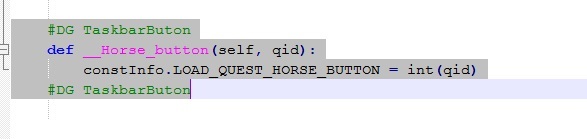
game.py en altına :
Kod:
#DG TaskbarButon def __Horse_button(self, qid): constInfo.LOAD_QUEST_HORSE_BUTTON = int(qid) #DG TaskbarButoneklenir.
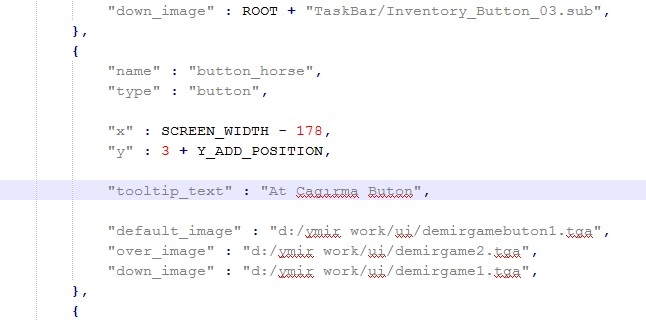
locale de yada tr taskbar.py açılır
"down_image" : ROOT + "TaskBar/Inventory_Button_03.sub",
},
aratılır altına:
Kod:
{ "name" : "button_horse", "type" : "button", "x" : SCREEN_WIDTH - 178, "y" : 3 + Y_ADD_POSITION, "tooltip_text" : "At Cagirma", "default_image" : "d:/ymir work/ui/demirgamebuton1.tga", "over_image" : "d:/ymir work/ui/demirgamebuton2.tga", "down_image" : "d:/ymir work/ui/demirgamebuton1.tga", },eklenir.
ymir work klasörünüde rootun içine ataılım ve questi okutalım reboot atalım.
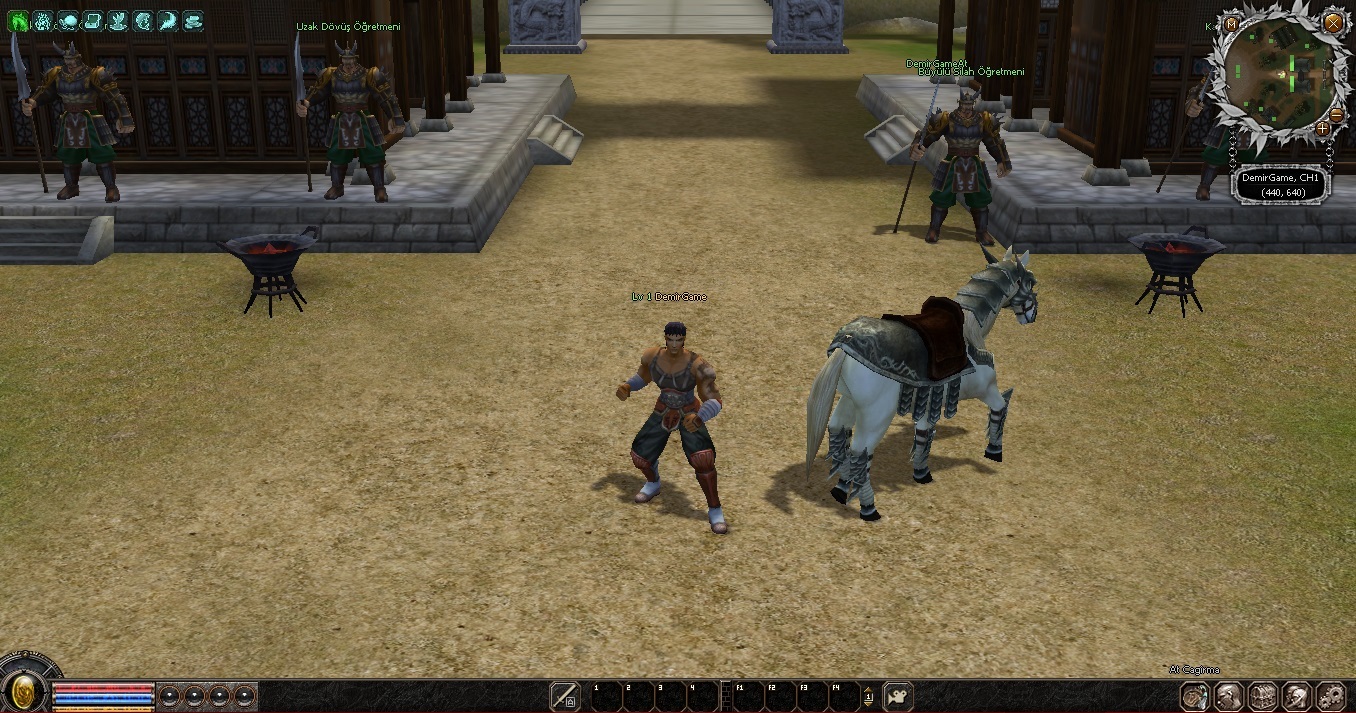
Oyun İçinden Görüntü:
Ziyaretçiler için gizlenmiş link,görmek için üye olmalısınız!
Giriş yap veya üye ol.

Ziyaretçiler için gizlenmiş link,görmek için üye olmalısınız!
Giriş yap veya üye ol.
[Python] TaskBar At Çağırma Butonu
Metin2 özel sunucularında geliştirme yaparken, kullanıcı arayüzü (UI) üzerinde dinamik ve etkileşimli butonlar oluşturmak oldukça önemlidir. Bu bağlamda, TaskBar At çağırma butonu gibi bir özellik, oyuncuların karakter ekipmanları, envanteri veya diğer arayüz öğelerine kolay erişim sağlamasını sağlar. Bu yazıda, Python dilini kullanarak TaskBar At komutunu tetikleyen bir buton nasıl oluşturulur, detaylı olarak ele alacağız.
Metin2 Sunucularında TaskBar Nedir?
TaskBar, Metin2 oyununda genellikle altta bulunan ve oyuncunun hızlı erişim butonlarını içerir. Oyuncu bu çubuk üzerinden envanter, beceri listesi, sosyal menü gibi önemli arayüz öğelerine hızlıca ulaşabilir. Ancak özel sunucularda geliştiriciler, bu çubuğu özelleştirip kendi sistemlerini entegre edebilirler.
Python GUI ile TaskBar Butonu Oluşturma
Metin2 özel sunucularında UI sistemleri genellikle uiscript dosyaları üzerinden yönetilir. Ancak arka planda çalışan Python scriptlerinde, butonlara özel fonksiyonlar tanımlanabilir. Örneğin bir butona tıklandığında taskbar.Show() gibi bir komut çalıştırılabilir.
Örnek Python Kod Parçası
root dizinindeki uiscript dosyasında bir buton tanımlanır ve bu butonun tıklama fonksiyonuna taskbar çağrısı eklenir. Bu işlem sırasında py root klasöründe yer alan Python scriptleri ile UI ve backend arasında iletişim sağlanır.
TaskBar Gösterme Fonksiyonunun Tanımlanması
Python tarafında bir fonksiyon tanımlanarak buton tıklaması sonucu taskbar penceresi açılır. Örnek:
Kod:
def open_task_bar():[BR][/BR] taskbar_window = uiTaskBar.TaskBarWindow()[BR][/BR] taskbar_window.Show()TaskBar Butonuna Tıklama Etkinliği
Buton tanımlandığında, onButtonClick gibi bir event ile bu fonksiyon tetiklenebilir. Bu sayede butona basıldığında doğrudan TaskBar penceresi açılır.
Geliştiriciye Özel TaskBar Sistemleri
Metin2 özel sunucularında geliştiriciler genellikle kendi sistemlerini entegre eder. Bu sistemlerde özel görev butonları, PvP sistemleri, mağaza kısayolları gibi öğeler TaskBar üzerine yerleştirilebilir. Bu da oyuncu deneyimini artırır.
TaskBar ve Python Script Entegrasyonu
Python ile yazılmış GUI yapıları (PyGUI) sayesinde, hem görsel hem de fonksiyonel olarak TaskBar sistemleri daha etkili hale getirilebilir. Özellikle martysama tarzı gelişmiş sistemlerde, bu entegrasyon daha da derinleşir.
TaskBar At Komutunun Kullanımı
TaskBar At komutu genellikle bir UI penceresini açmak için kullanılır. Python üzerinden bu komutu çağırmak için uiModule veya benzeri bir modül kullanılmalıdır. Bu modül ile UI sınıfları çağrılır ve ekrana TaskBar yerleştirilir.
Sunucu Tarafında TaskBar ile Etkileşim
TaskBar üzerinden bazı işlemleri sunucuya bildirmek gerekebilir. Bu durumda, butona tıklama sonucu bir pack mesajı gönderilerek sunucuda belirli işlemler başlatılabilir. Bu tür işlemler genellikle PvP sistemleri veya envanter güncellemeleri için kullanılır.
TaskBar At ile Oyuncu Deneyimi
TaskBar At komutunun doğru kullanılması, oyuncuların daha hızlı ve etkili bir şekilde UI ile etkileşim kurmasını sağlar. Özellikle PvP sistemlerinde hızlı aksiyon alınabilmesi açısından bu büyük avantaj sağlar.
Sonuç
TaskBar At çağırma butonu, Metin2 özel sunucularında kullanıcı dostu bir arayüz oluşturmak için oldukça faydalıdır. Python ve UI scriptleri ile entegre bir yapı kurulduğunda, hem geliştiriciler hem de oyuncular için esnek ve hızlı çözümler üretmek mümkündür. Bu tür sistemlerin geliştirilmesi, Metin2 lobby gibi platformlarda paylaşılan kaynaklarla daha da kolaylaşmaktadır.
[Python] TaskBar At Call Button
When developing private Metin2 servers, creating dynamic and interactive buttons on the user interface (UI) is crucial. In this context, a feature like the TaskBar At call button allows players easy access to their character equipment, inventory, or other UI elements. In this article, we will examine in detail how to create a button that triggers the TaskBar At command using the Python language.
What is TaskBar in Metin2 Servers?
TaskBar in Metin2 usually refers to the bottom bar that contains quick-access buttons for players. Players can quickly access important UI elements such as inventory, skill lists, and social menus through this bar. However, in private servers, developers can customize this bar and integrate their own systems into it.
Creating a TaskBar Button with Python GUI
In Metin2 private servers, UI systems are typically managed via uiscript files. However, custom functions can be defined in Python scripts running in the background. For example, a command like taskbar.Show() can be executed when a button is clicked.
Sample Python Code Snippet
In the uiscript file located in the root directory, a button is defined, and a taskbar call is added to its click function. During this process, communication between the UI and the backend is achieved through Python scripts located in the py root folder.
Defining the TaskBar Display Function
By defining a function in Python, the taskbar window opens when the button is clicked. Example:
Kod:
def open_task_bar():[BR][/BR] taskbar_window = uiTaskBar.TaskBarWindow()[BR][/BR] taskbar_window.Show()Button Click Event for TaskBar
When the button is defined, an event like onButtonClick can trigger this function. Thus, clicking the button directly opens the TaskBar window.
Custom TaskBar Systems for Developers
Developers of Metin2 private servers often integrate their own systems. In these systems, special quest buttons, PvP systems, shop shortcuts, etc., can be placed onto the TaskBar, enhancing the player experience.
TaskBar and Python Script Integration
With GUI structures written in Python (PyGUI), TaskBar systems can become more effective both visually and functionally. Especially in advanced systems like martysama, this integration becomes even deeper.
Using the TaskBar At Command
The TaskBar At command is generally used to open a UI window. To call this command from Python, modules like uiModule should be used. With this module, UI classes are called and the TaskBar is displayed on screen.
Interaction with TaskBar on Server Side
It may be necessary to inform the server about certain operations triggered through the TaskBar. In such cases, clicking the button can send a pack message to the server, initiating specific processes. Such operations are often used for PvP systems or inventory updates.
Player Experience with TaskBar At
Proper use of the TaskBar At command enables players to interact with the UI faster and more effectively. This provides significant advantages, especially in PvP systems where quick actions are needed.
Conclusion
The TaskBar At call button is highly beneficial for creating a user-friendly interface in Metin2 private servers. When integrated structures are built using Python and UI scripts, it becomes possible to develop flexible and fast solutions for both developers and players. The development of such systems is made easier by resources shared on platforms like Metin2 lobby.
