

Merhaba arkadaşlar;
Arşivde bir şeyler ararken karşıma çıktı ve forumda paylaşma gereği duydum.
Uzatmadan anlatıma geçmek istiyorum.
Çalıştığına dair kanıt;
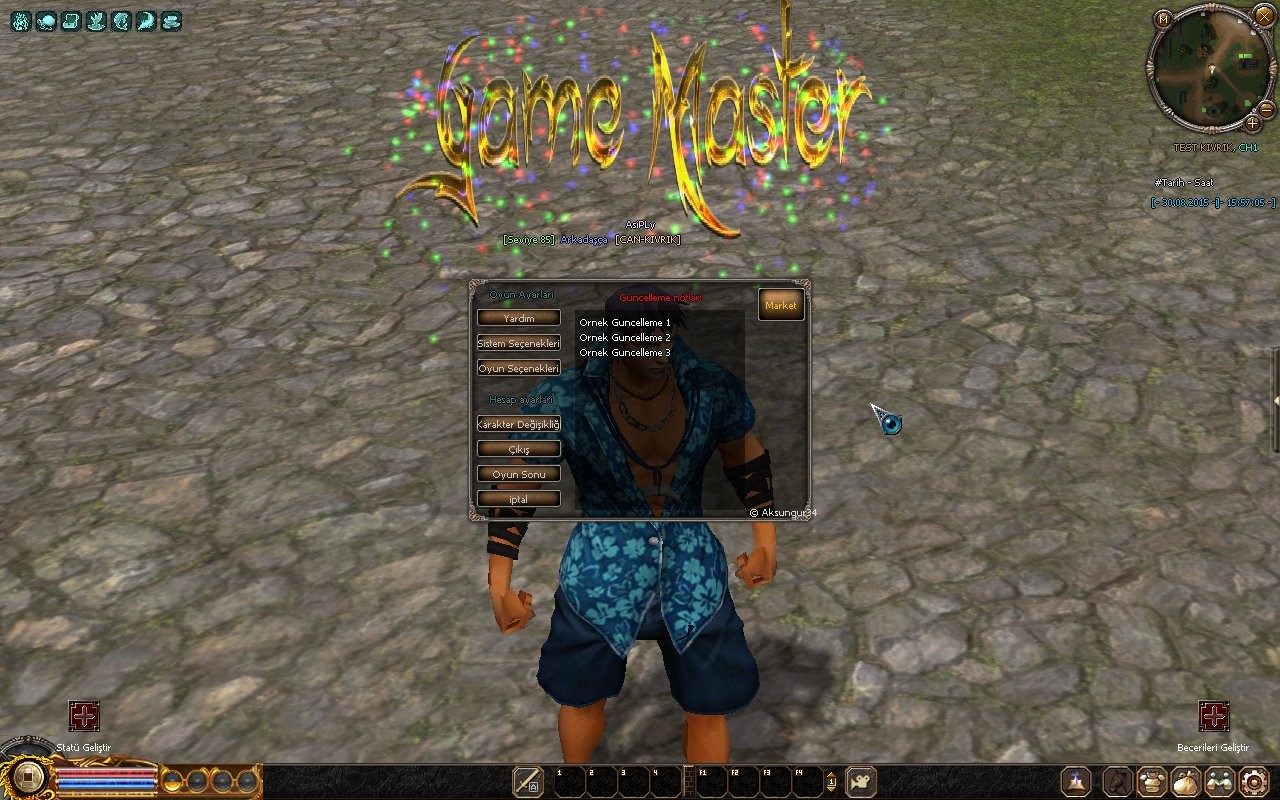
Arşivde bir şeyler ararken karşıma çıktı ve forumda paylaşma gereği duydum.
Uzatmadan anlatıma geçmek istiyorum.
Çalıştığına dair kanıt;
Aşağıdaki linkten dosyayı indirip, dosyanın içindeki anlatımı okuyunuz ve yazılanları yapınız.
Ziyaretçiler için gizlenmiş link,görmek için üye olmalısınız!
Giriş yap veya üye ol.
Ziyaretçiler için gizlenmiş link,görmek için üye olmalısınız!
Giriş yap veya üye ol.
Paylaşımların devamı gelecektir.
:l04:
Python ile Metin2 ESC Arayüz Tasarımı: Yeni ESC Görünümü
Metin2 özel sunucularında kullanıcı deneyimini artırmak için GUI sistemlerinde yapılan geliştirmelerden birisi de ESC menüsüdür. Bu menü, oyuncuların oyun içi ayarlara, karakter bilgilerine, envanterine ve diğer temel menülere erişimini sağlar. Bu yazıda, Python dilini kullanarak özgün bir ESC görünümü tasarlamayı ele alacağız. Özellikle py GUI araçlarını ve uiscript yapısını kullanarak özelleştirilebilir bir arayüz geliştireceğiz.
ESC Menüsünün Önemi
ESC menüsü, oyuncuların oyunu duraklatıp temel işlemleri gerçekleştirmesini sağlayan merkezi bir arayüzdür. Standart uiscript yapısı baz alınarak, Python tabanlı GUI sistemleri ile daha estetik ve işlevsel menüler oluşturulabilir. Bu menü sayesinde oyuncular;
- Ayarlar menüsüne ulaşabilir,
- Karakter istatistiklerini kontrol edebilir,
- Sunucuya özel sistemlere erişebilir,
- Oyunu kapatabilir veya ana menüye dönebilir.
Python GUI ile ESC Menüsü Geliştirme Adımları
Py Root dosyalarında yer alan arayüz betikleri ile ESC menüsü özelleştirilebilir. Öncelikle, mevcut uiscript dosyasının yapısı incelenmeli ve üzerine eklentiler yapılmalıdır. Bu süreçte Python dilinde yazılmış GUI fonksiyonları devreye girer.
Örnek ESC Menü Yapısı
ESC menüsünü oluşturan temel yapı, bir Window sınıfıdır. Bu sınıf, butonlar, metin alanları ve grafiksel öğeler barındırır. Aşağıda basit bir örnek verilmiştir:
class ESCWindow(ui.ScriptWindow):
def __init__(self):
ui.ScriptWindow.__init__(self)
self.__CreateDialog()
def __CreateDialog(self):
self.Board = ui.ThinBoard()
self.Board.SetSize(300, 400)
self.Board.SetPosition(50, 50)
self.Board.Show()
ESC Menüsünde Kullanılabilecek Butonlar
ESC menüsüne ekleyebileceğiniz bazı butonlar şunlardır:
- Ayarlar: Oyun sesi, grafik ayarları gibi seçenekler.
- Envanter: Oyuncu envanteri hızlıca açılır.
- Yetenek Ağacı: Karakterin gelişimini gösterir.
- Sunucu Sistemleri: PvP sistemleri, özel görevler gibi.
- Çıkış: Oyundan çıkış veya ana menüye dönüş.
Otomatik ESC Menüsü Açılımı
ESC tuşuna basıldığında menünün açılması için Python tarafında bir event handler tanımlanmalıdır. Bu işlem genellikle game.py dosyasında yapılır. ESC_KEY algılandığında, ESC menüsü açılır veya kapanır. Bu işlem, kullanıcı dostu bir deneyim sunar.
Görsel Efektler ve Stil
ESC menüsünü daha şık hale getirmek için görsel efektler eklenebilir. Python tabanlı GUI sistemleri, resim yükleme, renk geçişleri ve animasyonlar gibi özelliklerle zenginleştirilebilir. IMG etiketi ile arka plan resimleri eklenebilir. Ayrıca, COLOR etiketleriyle buton ve yazı renkleri özelleştirilir.
ESC Menüsünü Pack ile Dağıtmak
ESC menüsü tamamlandıktan sonra pack dosyası içine dahil edilmelidir. Bu sayede sunucudan gelen oyuncular da yeni arayüzü görebilir. Py Root ve Client Src yapıları uyumlu olacak şekilde düzenlenmelidir.
Sonuç
ESC menüsü, Metin2 özel sunucularında kullanıcı dostu arayüzler oluşturmanın önemli parçalarındandır. Python tabanlı GUI sistemleri ile özelleştirilmiş ESC menüleri, hem estetik hem de işlevsel olarak oyunculara değer katacaktır. Py GUI, uiscript, py root gibi yapılar kullanılarak özgün sistemler geliştirilebilir. Bu sistemlerle birlikte Metin2 Lobby tarzı gelişmiş sunucular, daha profesyonel bir görünüm elde edebilir.
Python-based Metin2 ESC Interface Design: New ESC Appearance
To enhance the user experience on Metin2 private servers, one of the improvements made in GUI systems is the ESC menu. This menu allows players to access in-game settings, character information, inventory, and other basic menus. In this article, we will discuss how to design a custom ESC appearance using the Python language. Particularly, we'll develop a customizable interface by utilizing py GUI tools and uiscript structures.
The Importance of the ESC Menu
The ESC menu is a central interface that allows players to pause the game and perform essential operations. By building upon the standard uiscript structure, more aesthetic and functional menus can be created with Python-based GUI systems. Through this menu, players can:
- Access the settings menu,
- Check character stats,
- Access server-specific systems,
- Close the game or return to the main menu.
Steps for Developing an ESC Menu with Python GUI
The ESC menu can be customized using scripts located in Py Root files. First, the structure of the current uiscript file must be examined and extensions added. During this process, GUI functions written in Python come into play.
Sample ESC Menu Structure
The basic structure forming the ESC menu is a Window class. This class contains buttons, text fields, and graphical elements. Below is a simple example:
class ESCWindow(ui.ScriptWindow):
def __init__(self):
ui.ScriptWindow.__init__(self)
self.__CreateDialog()
def __CreateDialog(self):
self.Board = ui.ThinBoard()
self.Board.SetSize(300, 400)
self.Board.SetPosition(50, 50)
self.Board.Show()
Buttons That Can Be Added to the ESC Menu
Some of the buttons you can add to the ESC menu are:
- Settings: Game sounds, graphics settings, etc.
- Inventory: Opens player inventory quickly.
- Skill Tree: Shows character progression.
- Server Systems: PvP systems, special quests, etc.
- Exit: Exits the game or returns to the main menu.
Automatic ESC Menu Opening
An event handler must be defined in Python so that the menu opens when the ESC key is pressed. This process typically occurs in the game.py file. When ESC_KEY is detected, the ESC menu opens or closes, providing a user-friendly experience.
Visual Effects and Styling
Visual effects can be added to make the ESC menu more stylish. Python-based GUI systems can be enhanced with features like image loading, color transitions, and animations. Background images can be added using the IMG tag. Additionally, button and text colors can be customized using COLOR tags.
Distributing the ESC Menu via Pack
Once completed, the ESC menu should be included in the pack file so that players connecting from the server can see the new interface. The Py Root and Client Src structures should be arranged accordingly to maintain compatibility.
Conclusion
The ESC menu is one of the important components for creating user-friendly interfaces in Metin2 private servers. Customized ESC menus built with Python-based GUI systems will provide both aesthetic and functional value to players. Original systems can be developed using structures such as Py GUI, uiscript, and py root. With these systems, advanced servers like Metin2 Lobby can achieve a more professional look.
