

Ziyaretçiler için gizlenmiş link,görmek için üye olmalısınız!
Giriş yap veya üye ol.
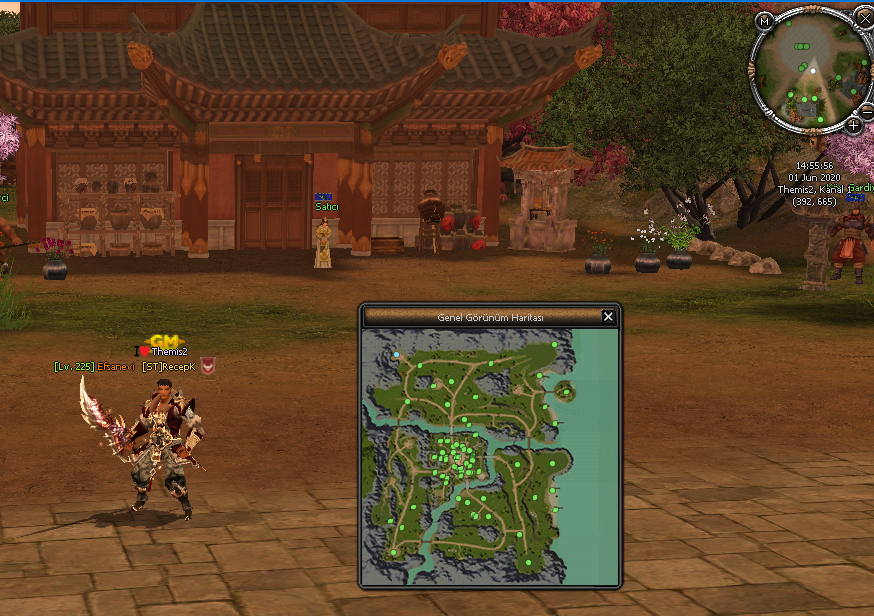
Metin2 Özel Sunucularında Rubinum Tarzı Minimap Sistemi Oluşturmak
Metin2 özel sunucu geliştirme sürecinde kullanıcı deneyimini artırmak adına birçok görsel ve fonksiyonel sistem eklenmektedir. Bu sistemlerden biri olan Rubinum tarzı minimap, oyuncuların haritadaki konumlarını, diğer oyuncuları, NPC'leri ve önemli noktaları daha net takip edebilmelerini sağlar. Bu yazıda, Metin2 özel sunucularında Rubinum tarzı bir minimap sisteminin nasıl kurulacağını ve hangi teknik adımların gerekli olduğunu detaylıca ele alacağız.
Minimap Nedir ve Ne İşe Yarar?
Minimap, oyuncuların oyun içindeki mevcut konumlarını ve çevresindeki unsurları küçük bir harita üzerinde görebilmelerini sağlayan bir arayüz elemanıdır. Özellikle PvP odaklı sunucularda, düşmanların ve mavi karakterlerin konumlarını takip etmek büyük avantaj sağlar. Rubinum tarzı minimap ise bu konsepti daha estetik ve işlevsel bir yapıyla sunar.
C++ ve Python ile Minimap Geliştirme
Metin2 özel sunucularında bir minimap sistemi oluşturmak, hem client hem de server tarafında bazı değişiklikler yapılmasını gerektirir. Geliştirme sürecinde C++ tabanlı sunucu tarafı ve Python tabanlı istemci arayüzü (UI Script) birlikte çalışır. Minimap sisteminin temel bileşenleri şunlardır:
- UIScript dosyaları ile arayüz tasarımı
- Py Root dosyalarında minimap verilerinin işlenmesi
- Game Server tarafında konum verilerinin gönderilmesi
- Auth Server entegrasyonu (varsa)
Rubinum Tarzı Minimap İçin Gerekli Dosyalar
Rubinum tarzı bir minimap sistemi oluşturmak için aşağıdaki dosyaların hazırlanması gerekir:
- Minimap arayüz dosyası (Python GUI)
- Minimap veri gönderme modülü (C++ tarafında)
- Harita koordinatları ve simgelerin tanımlandığı yapılar
- Pack dosyalarında gerekli arayüz resimleri
Kurulum Adımları
1. Py Root klasörüne minimap arayüz dosyasını ekle.
2. UIScript dosyasında minimap penceresini tanımla ve UI elementlerini ekle (konum, simgeler, ölçek).
3. Client tarafında konum verilerini sunucudan alacak sistemleri oluştur.
4. Server tarafında oyuncuların konumlarını paketleyip gönderen sistemleri ekle.
5. Compile işlemi yaparak sistemi aktif et.
Metin2lobby.com olarak, bu gibi gelişmiş sistemlerin kurulumunda destek sağlıyoruz. Martysama gibi tanınmış geliştiricilerin katkılarıyla Metin2 özel sunucuları için source edit işlemleri ve game core geliştirmeleri konusunda uzmanlaşmış bir platformuz.
Sonuç
Metin2 özel sunucularında Rubinum tarzı bir minimap sistemi, hem oyun içi deneyimi artırır hem de oyuncuların PvP mücadelelerini daha stratejik hale getirir. Bu gibi sistemlerin doğru şekilde kurulması ve entegre edilmesi, Metin2 özel sunucu geliştiricileri için kritik öneme sahiptir. DB Core, Game Server Programming ve Client SRC gibi alanlarda derinleşerek bu sistemleri daha da geliştirebilirsiniz.
Creating a Rubinum Style Minimap in Metin2 Private Servers
Metin2 private server development includes adding various visual and functional systems to enhance the user experience. One such system is the Rubinum style minimap, which allows players to track their locations, other players, NPCs, and important points on the map more clearly. In this article, we will examine in detail how to set up a Rubinum style minimap system in Metin2 private servers and what technical steps are required.
What is a Minimap and What Does It Do?
A minimap is an interface element that allows players to see their current location and surrounding elements within the game on a small map. Especially in PvP oriented servers, tracking enemy and blue character locations can provide a significant advantage. The Rubinum style minimap offers this concept with a more aesthetic and functional design.
Developing Minimap with C++ and Python
Creating a minimap system in Metin2 private servers requires modifications on both the client and server sides. During the development process, C++ based server-side and Python based client interface (UI Script) work together. The main components of the minimap system are:
- Interface design via UIScript files
- Processing minimap data in Py Root files
- Sending location data from the Game Server
- Auth Server integration (if applicable)
Required Files for Rubinum Style Minimap
To create a Rubinum style minimap system, the following files must be prepared:
- Minimap interface file (Python GUI)
- Minimap data sending module (on the C++ side)
- Structures defining map coordinates and icons
- Necessary interface images in pack files
Installation Steps
1. Add the minimap interface file to the Py Root folder.
2. Define the minimap window in the UIScript file and add UI elements (location, icons, scale).
3. Create systems on the Client side to receive location data from the server.
4. Add systems to package and send player locations on the Server side.
5. Perform a compile operation to activate the system.
Metin2lobby.com provides support in installing such advanced systems. As a platform specialized in Metin2 private server development, we offer expertise in source edit operations and game core development with contributions from renowned developers like Martysama.
Conclusion
In Metin2 private servers, a Rubinum style minimap system enhances the in-game experience and makes PvP battles more strategic for players. Correctly setting up and integrating such systems is critical for Metin2 private server developers. By delving deeper into areas such as DB Core, Game Server Programming, and Client SRC, you can further improve these systems.
