

Ziyaretçiler için gizlenmiş link,görmek için üye olmalısınız!
Giriş yap veya üye ol.
Ziyaretçiler için gizlenmiş link,görmek için üye olmalısınız!
Giriş yap veya üye ol.
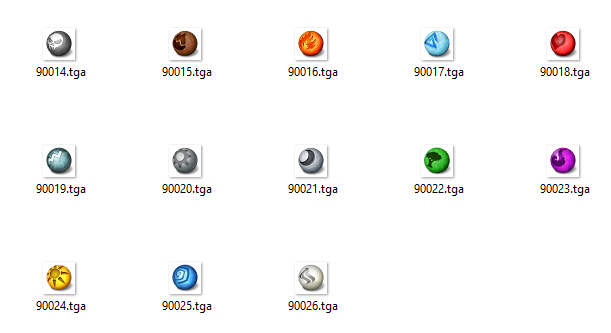
Rün Sisteminin İconları Arayıp Bulamanlara Müjde !
Metin2 oyuncuları arasında en çok merak edilen ve en çok aranan özelliklerden biri, 'rün sistemi' iconlarının nasıl bulunacağı ve kullanılacağıdır.
Bu makalede, Rün Sisteminin İconları konusunda size adım adım rehberlik edeceğiz ve bu eşsiz görsel unsurları kendi Metin2 client veya Metin2 pack projelerinize nasıl entegre edeceğinizi anlatacağız.
Rün Sistemi Nedir ve Neden Önemlidir?
Metin2'nin derinlikli ekipman ve geliştirme sistemlerinden biri olan rün sistemi, oyunculara eşyalarınına güç kazandırmak için eşsiz fırsatlar sunar.
Bu sistemde kullanılan iconlar, oyuncuların rünleri hızlıca tanımasını, eşleştirmesini ve stratejilerini belirlemesini sağlar.
Dolayısıyla, bu iconların net, anlaşılır ve estetik olması, oyuncu deneyimini büyük ölçüde etkiler.
Eğer siz de bir Metin2 client paylaşım sitesi işletiyorsanız veya kendi Metin2 özel client projenizi geliştiriyorsanız, bu iconların kalitesi ve erişilebilirliği doğrudan oyuncu memnuniyetinizi etkiler.
Rün İconlarını Nasıl Bulabilirsiniz?
Artık arayıp bulmanın zamanı geldi!
Eskiye göre çok daha kolay hale gelen bu süreçte, Metin2 Lobby adresi sizin için büyük bir kurtarıcı olabilir.
Sitemiz, Metin2 client indir, Metin2 pack indir ve Metin2 client download gibi aramalarınızda ilk sıralarda yer alacak şekilde optimize edilmiştir.
Burada, farklı Metin2 pvp client ve Metin2 custom client paketleriyle birlikte rün sistemi iconlarını da içeren kaynaklar bulacaksınız.
Bu iconlar genellikle metin2 pack dosyaları içinde yer alır ve metin2 pack aç işlemiyle veya metin2 pack extract araçları kullanılarak erişilebilir hale gelir.
Ayrıca, Metin2 client edit veya Metin2 pack edit yaparken bu iconları kolayca değiştirebilir veya güncelleyebilirsiniz.
Rün İconlarını Kullanmanın Avantajları
1. Oyuncu Deneyimini Artırır: Net ve net iconlar, oyuncuların rünleri anında tanımasını sağlar.
Bu da oyun içi karar verme süreçlerini hızlandırır ve oyuncu bağlılığını artırır.
2. Client/Pack'inizi Profesyonelleştirir: Özellikle Metin2 eter pack veya eterpack gibi özel paketlerde, kaliteli iconlar tüm sistemin görsel tutarlılığını yükseltir.
3. Hata Ayıklamayı Kolaylaştırır:[/BR][/BR] Eğer Metin2 client hata ile karşılaşırsanız veya Metin2 client fix işlemi yapmanız gerekirse, doğru iconların yerleştirilmesi görsel hataları ayırt etmenize yardımcı olur.
4. Güncellemelerde Kolaylık Sağlar: Metin2 client güncelleme veya Metin2 client update sırasında, iconların standartlara uygun olması yama (metin2 client yama) veya patch (metin2 client patch) süreçlerini sorunsuz hale getirir.
Rün İconlarını Nasıl Entegre Edersiniz?
İconları bulduktan sonraki adım, bunları Metin2 client dosyaları içine doğru şekilde yerleştirmektir.
Genellikle bu dosyalar metin2 client texture veya metin2 client skin klasörlerinde bulunur.
Dikkatli olmanız gereken nokta, iconların boyutlarının ve formatlarının (metin2 client effect ile uyumlu) oyun motorunun beklediği standartlara uygun olmasıdır.
Aksi takdirde, Metin2 client dosyaları arasında çakışma yaşanabilir ve görsel bozulmalar meydana gelebilir.
Bu nedenle, Metin2dev client veya martysama client gibi gelişmiş platformlarda çalışırken, iconların her birini test etmek oldukça önemlidir.
Sonuç ve Teşvik
Artık Rün Sisteminin İconları konusunda tüm sorularınızın cevabını biliyorsunuz demektir!
Metin2 Lobby üzerinden hem Metin2 pvp client paylaşım hem de geniş kapsamlı Metin2 pack paylaşım hizmetlerimizle, bu iconları kolayca edinebilir ve projelerinizi bir üst seviyeye taşıyabilirsiniz.
Unutmayın, iyi bir Metin2 client kurulum sadece kodlarla değil, aynı zamanda doğru görsellerle de başarılı olur.
Hadi, siz de bu müjdenin bir parçası olun ve Metin2 dünyasında fark yaratın!
XenForo ile Video ve Fotoğraf Ekleme!
XenForo forumlarında içeriğinizi zenginleştirmek için video ve fotoğraf eklemek oldukça kolaydır.
Bu sayede, Metin2 client veya Metin2 pack ile ilgili anlatımınızı daha etkili hale getirebilirsiniz.
Örneğin, rün iconlarının nasıl göründüğünü gösteren bir ekran görüntüsü veya kurulum adımlarını anlatan kısa bir video, okuyucularınızın anlayışını kolaylaştırır.
Bu tür medya dosyalarını XenForo'da Yükle butonu ile ekleyebilir veya doğrudan URL ile bağlantı verebilirsiniz.
Bu özellik, özellikle Metin2 client edit veya Metin2 pack edit gibi teknik konularda büyük kolaylık sağlar.
Bu sayede, Metin2 client veya Metin2 pack ile ilgili anlatımınızı daha etkili hale getirebilirsiniz.
Örneğin, rün iconlarının nasıl göründüğünü gösteren bir ekran görüntüsü veya kurulum adımlarını anlatan kısa bir video, okuyucularınızın anlayışını kolaylaştırır.
Bu tür medya dosyalarını XenForo'da Yükle butonu ile ekleyebilir veya doğrudan URL ile bağlantı verebilirsiniz.
Bu özellik, özellikle Metin2 client edit veya Metin2 pack edit gibi teknik konularda büyük kolaylık sağlar.
Good news for those searching for the icons of the Rune System!
One of the most frequently asked and searched features among Metin2 players is how to find and use the 'rune system' icons.
In this article, we will guide you step-by-step on the topic of Icons of the Rune System and explain how you can integrate these unique visual elements into your own Metin2 client or Metin2 pack projects.
What is the Rune System and Why is it Important?
The rune system, one of the deep equipment and enhancement systems of Metin2, offers players unique opportunities to empower their items.
The icons used in this system allow players to quickly identify, match, and determine their strategies for runes.
Therefore, having clear, understandable, and aesthetic icons significantly impacts the player experience.
If you operate a Metin2 client sharing website or are developing your own Metin2 custom client project, the quality and accessibility of these icons directly affect player satisfaction.
How Can You Find the Rune Icons?
Now is the time for searching and finding!
The process, which has become much easier compared to the past, can have a major savior for you at Metin2 Lobby.
Our website is optimized to appear at the top of searches for Metin2 client download, Metin2 pack download, and Metin2 client download.
Here, you will find resources that include the rune system icons along with various Metin2 pvp client and Metin2 custom client packages.
These icons are usually located within Metin2 pack files and become accessible through opening Metin2 packs or using Metin2 pack extraction tools.
Additionally, you can easily modify or update these icons while performing Metin2 client editing or Metin2 pack editing.
Advantages of Using Rune Icons
1. Enhances Player Experience: Clear and distinct icons allow players to instantly recognize runes.
This speeds up in-game decision-making processes and increases player engagement.
2. Professionalizes Your Client/Pack: Especially in special packages like Metin2 eter pack or eterpack, high-quality icons elevate the visual consistency of the entire system.
3. Simplifies Debugging: If you encounter Metin2 client errors or need to perform Metin2 client fixes, having the correct icons in place helps you distinguish visual errors.
4. Facilitates Updates: During Metin2 client updates or Metin2 client updates, having icons that conform to standards ensures that patching (Metin2 client patch) or hotfixing (Metin2 client yama) processes run smoothly.
How Do You Integrate Rune Icons?
The next step after finding the icons is to place them correctly within the Metin2 client files.
These files are typically located in Metin2 client texture or Metin2 client skin folders.
The critical point to pay attention to is that the icons' sizes and formats must be compatible with the standards expected by the game engine (compatible with Metin2 client effects).
Otherwise, conflicts may occur among the Metin2 client files, leading to visual distortions.
Therefore, when working on advanced platforms like Metin2dev client or martysama client, it is crucial to test each icon individually.
Conclusion and Encouragement
Now you know the answer to all your questions about Icons of the Rune System!
Through Metin2 Lobby, with our Metin2 pvp client sharing and comprehensive Metin2 pack sharing services, you can easily acquire these icons and take your projects to the next level.
Remember, a successful Metin2 client installation is achieved not only through code but also with the right visuals.
Come, be a part of this good news and make a difference in the Metin2 world!
Adding Videos and Photos with XenForo!
Adding videos and photos to XenForo forums is quite easy to enrich your content.
This way, you can make your explanations about Metin2 client or Metin2 pack more effective.
For example, a screenshot showing how the rune icons look or a short video explaining the installation steps can greatly facilitate your readers' understanding.
You can add such media files in XenForo using the Upload button or by providing a direct URL link. This feature provides significant convenience, especially in technical topics like Metin2 client editing or Metin2 pack editing.
This way, you can make your explanations about Metin2 client or Metin2 pack more effective.
For example, a screenshot showing how the rune icons look or a short video explaining the installation steps can greatly facilitate your readers' understanding.
You can add such media files in XenForo using the Upload button or by providing a direct URL link. This feature provides significant convenience, especially in technical topics like Metin2 client editing or Metin2 pack editing.
