

DOSYA:
Ziyaretçiler için gizlenmiş link,görmek için üye olmalısınız!
Giriş yap veya üye ol.
TOTAL:
Ziyaretçiler için gizlenmiş link,görmek için üye olmalısınız!
Giriş yap veya üye ol.
BİNEK KODUNU VE İSMİNİ KENDİNİZE GÖRE EDİTLEYİN
---------------------------------------------
BUNU ROOTTAKİ NPCLİST DOSYASINA EKLEYİN
Kod:
20118 ridack_mount3[/FONT]BUNU NAVİCATTAN PLAYER BÖLÜMÜNE OKUTTURUN
Kod:
INSERT INTO mob_proto VALUES ('20118', 'lion2', 0x593F72743F633F2041736C616E, '5', '1', '0', '1', '', '', '0', '', 'STUN,SLOW,CURSE,TERROR', '0', '', '2', '0', '0', '0', '0', '0', '0', '120', '3', '1', '0', '0', '60', '4', '100', '100', '0', '2000', '150', '0', '0', '0', '0', '0', '0', '0', '0', '0', '0', '0', '0', '0', '0', '0', '0', '0', '0', '0', '0', '0', '0', null, '0', '0', '0', '0', '0', '0', '0', '0', '0', '0', '0', '0', '0', '0', '0', '0');PACKI İNDİRİP İNDEXE Patch449 EKLEYİN
SaltanatMT2 Vahşi Binek: Metin2 3D Modelleme ve Karakter Geliştirme Rehberi
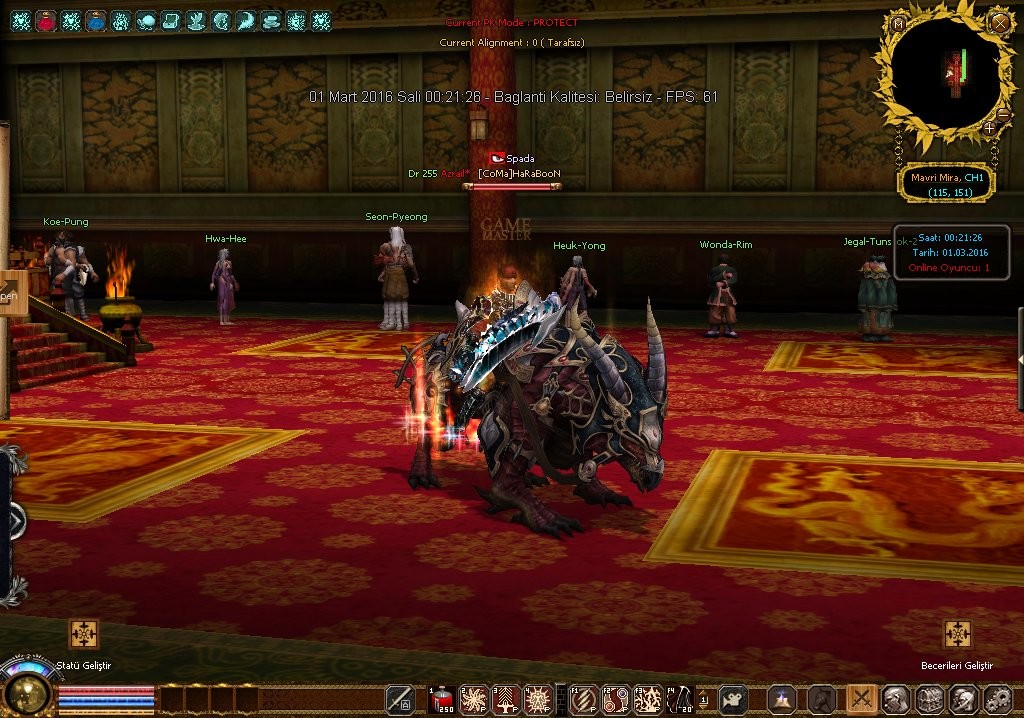
Metin2 Lobby olarak, oyuncuların ve geliştiricilerin Metin2 dünyasında özgün içerikler yaratmasını desteklemeyi amaçlıyoruz. Bu bağlamda, SaltanatMT2 sunucusunda bulunan Vahşi Binek gibi özel karakterlerin 3D modelleme süreçleri, hem estetik hem de teknik açıdan oldukça önemli konulardır. Bu makalede, SaltanatMT2 Vahşi Binek karakterinin modelleme sürecine odaklanarak, Metin2 için 3D model geliştirme adımlarını, kullanılan araçları ve dikkat edilmesi gereken teknik detayları ele alacağız.
Vahşi Binek Nedir?
SaltanatMT2 sunucusu, Metin2 oyun deneyimini geliştirmek amacıyla birçok özgün içeriğe sahiptir. Bunlardan biri olan Vahşi Binek, oyuncular için özel bir ulaşım aracıdır. Hem estetik hem de işlevsel yönüyle dikkat çeken bu binek, 3D modelleme dünyasında da ilham kaynağı olmaktadır. Oyuncuların gözdesi olan bu karakterin modeli, Metin2 NPC model, Metin2 monster model veya Metin2 character model kategorilerinde değerlendirilebilir.
3D Modelleme Süreci ve Araçlar
Metin2 için 3D modelleme yaparken genellikle 3ds Max veya Blender gibi yazılımlar tercih edilir. Bu platformlar sayesinde, Metin2 mesh, Metin2 UV map, Metin2 texture, Metin2 bone gibi temel yapılar kolayca oluşturulabilir. Vahşi Binek modeli gibi karakterlerde özellikle Metin2 rigging işlemi önemlidir. Doğru bir iskelet yapısı sayesinde modelin animasyonu daha doğal ve akıcı hale gelir.
Metin2 Formatlarına Uyumlu Çıktı Almak
Oluşturulan 3D modeller, Metin2 oyun motoruna aktarılmadan önce doğru formata dönüştürülmelidir. Bu noktada GR2 (Granny 2) formatı devreye girer. Metin2 GR2 dosyaları, modelin oyun içine entegrasyonunu sağlar. GR2 import ve GR2 export işlemleri, Blender veya 3ds Max üzerinden uygun eklentilerle yapılabilir. Bu işlemlerde dikkat edilmesi gereken en önemli konu, Metin2 model export sırasında ortaya çıkabilecek hataları önlemektir.
Texture ve UV Mapping
Vahşi Binek gibi detaylı modellerde, Metin2 texture ve UV mapping işlemleri görsel kaliteyi doğrudan etkiler. Her parçanın doğru şekilde dokulandırılması, modelin oyun içinde daha gerçekçi ve estetik görünmesini sağlar. Metin2 skin veya Metin2 visual mod geliştirmeleri sırasında bu adımlar büyük önem taşır.
Model Değişikliği ve Özelleştirme
Metin2 model replace veya custom model geliştirme işlemleri, mevcut karakterlerin veya nesnelerin değiştirilmesini sağlar. Vahşi Binek modeli için yapılan özelleştirmeler, sunucuya özgü farklılıklar kazandırabilir. Bu süreçte Metin2 model edit araçları ve eterpack gibi sistemler kullanılabilir. Metin2 eter sistemleri, mod paketlerinin doğru şekilde dağıtılmasını sağlar.
Sonuç
SaltanatMT2 Vahşi Binek gibi karakterlerin 3D modelleme süreçleri, hem sanatsal hem de teknik beceriler gerektirir. Metin2lobby.com olarak, bu tür özgün içeriklerin geliştirilmesine destek vermeye devam ediyoruz. 3D modelleme, animasyon, dokulama ve oyun içi entegrasyon gibi adımlar bir araya geldiğinde, Metin2 dünyasına değer katacak kaliteli içerikler üretmek mümkündür. Bu alanda yetkinleşmek isteyenler için sabır, deneyim ve doğru araçlar anahtardır.
SaltanatMT2 Wild Mount: Metin2 3D Modeling and Character Development Guide
Metin2 Lobby, players and developers to create original content within the Metin2 world. In this context, special characters like Wild Mount on the SaltanatMT2 server are highly important both aesthetically and technically. This article will focus on the 3D modeling process of the Wild Mount character, discussing the steps involved in creating 3D models for Metin2, the tools used, and the technical details to consider.
What is the Wild Mount?
The SaltanatMT2 server includes many unique contents aimed at enhancing the Metin2 gaming experience. One such feature is the Wild Mount, which serves as a special means of transportation for players. With its aesthetic and functional aspects, this mount is also an inspiration in the field of 3D modeling. The model of this popular character can be categorized under Metin2 NPC model, Metin2 monster model, or Metin2 character model.
3D Modeling Process and Tools
When creating 3D models for Metin2, software like 3ds Max or Blender is commonly used. These platforms allow the creation of fundamental structures such as Metin2 mesh, Metin2 UV map, Metin2 texture, and Metin2 bone. Rigging is especially crucial for character models like the Wild Mount; proper skeletal structure ensures more natural and fluid animations.
Producing Output Compatible with Metin2 Formats
Before importing 3D models into the Metin2 game engine, they must be converted into the correct format. This is where the GR2 (Granny 2) format comes into play. Metin2 GR2 files enable the integration of models into the game. GR2 import and GR2 export operations can be performed via appropriate add-ons in Blender or 3ds Max. An important consideration during these processes is avoiding errors that might occur during Metin2 model export.
Texture and UV Mapping
In detailed models like the Wild Mount, Metin2 texture and UV mapping directly impact visual quality. Properly applying textures to each part ensures the model appears more realistic and aesthetic in-game. These steps are critical when developing Metin2 skin or Metin2 visual mod enhancements.
Model Modification and Customization
Metin2 model replace or custom model development allows for altering existing characters or objects. Customizations made to the Wild Mount model can provide unique features specific to the server. During this process, Metin2 model edit tools and systems like eterpack can be used. Metin2 eter systems ensure mod packages are correctly distributed.
Conclusion
The 3D modeling processes of characters like the SaltanatMT2 Wild Mount require both artistic and technical skills. As Metin2lobby.com, we continue to support the development of such original content. When steps like 3D modeling, animation, texturing, and in-game integration come together, it becomes possible to produce high-quality content that adds value to the Metin2 universe. Patience, experience, and the right tools are key for those aiming to excel in this area.
