

Evet şimdi işleme başlıyalım öncelikle ;
root.eix , root.epk dosyalarını açmamız için bir pack açıcıya ihtiyacımız var un epk indirmeniz yeterli olucaktır
Öncelikle root.eix i açtık..
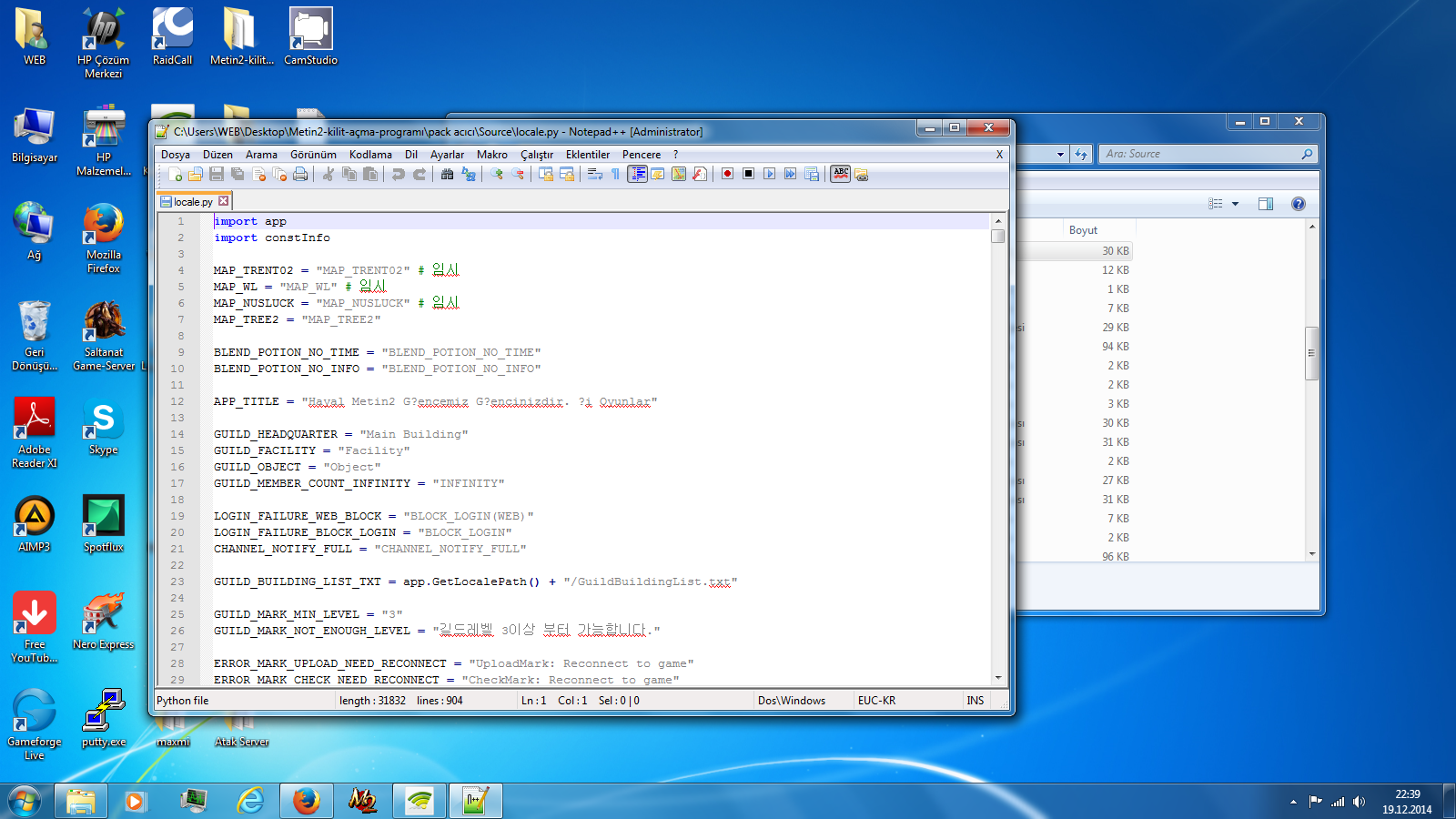
locale.py dosyasını notepad vb herhangi bir programla açalım..
Ve alttaki resim size herşeyi anlatır.
Metin2 oyununu özelleştirerek kendi sunucunuzu kurmak isteyenler için en sık karşılaşılan ihtiyaçlardan biri, istemci (client) dosyasının çalıştırılabilir (.exe) dosyasındaki başlığın değiştirilmesidir. Bu başlık, oyun penceresinin üst kısmında görünür ve genellikle 'Metin2', 'Metin II' veya 'Shanda' gibi varsayılan metinler yer alır. Sunucunuzun kimliğini oluşturmak ve oyunculara profesyonel bir deneyim sunmak için bu başlığı kendi sunucu adınız veya markanızla değiştirmek oldukça önemlidir.
Neden Başlık Değiştirilmeli?
Oyuncular, aynı anda birden fazla Metin2 sunucusuna bağlanabileceklerinden, her sunucunun kendi başlığını taşıması gerekir. Aksi halde karışıklıklar yaşanabilir veya oyuncular sunucunuzu ayırt edemeyebilir. Ayrıca, özelleştirilmiş bir başlık, sunucunuzun profesyonelliğini artırır ve markalaşma sürecine katkı sağlar. Özellikle Metin2 Lobby gibi platformlarda paylaşacağınız client paketlerinde bu detay, kullanıcı deneyimini büyük ölçüde etkiler.
Teknik Açıklama ve Yöntemler
Başlığı değiştirmek için iki temel yöntem vardır: hex editor ile doğrudan düzenleme veya resource editor kullanımı. Hex editor yöntemi, .exe dosyasının içeriğini onaltılık (hexadecimal) formatta görüntüler ve değiştirir. Bu yöntemde dikkat edilmesi gereken en önemli nokta, yeni başlığın orijinal başlıkla aynı uzunlukta veya daha kısa olmasıdır. Eğer daha uzun olursa, dosya bozulabilir veya çalışmaz hale gelebilir. Bu nedenle, orijinal başlığı bulduktan sonra, yeni başlığı aynı uzunlukta yazmalı ve gerekiyorsa boşluklarla veya null karakterlerle (0x00) doldurmalısınız.
Resource editor ise daha kullanıcı dostu bir alternatif sunar. Bu araçlar, .exe dosyasının içindeki kaynakları (resources) düzenlemenizi sağlar. Genellikle string table veya version info bölümlerinde başlık bilgisi bulunur. Bu bölümleri düzenleyerek başlığı kolayca değiştirebilirsiniz. Bu yöntem, dosyanın yapısını korur ve hata riskini azaltır. Özellikle Metin2 pvp client veya Metin2 özel client gibi özelleştirilmiş paketlerde bu yöntem oldukça etkilidir.
Uyarı ve Dikkat Edilmesi Gerekenler
Başlığı değiştirmeden önce mutlaka orijinal .exe dosyasının bir yedeğini alın. Herhangi bir hata durumunda dosyayı geri yükleyebilmek için bu yedek hayati önem taşır. Ayrıca, değişiklik yaptıktan sonra .exe dosyasını çalıştırarak test etmeyi unutmayın. Oyunun normal şekilde açılıp açılmadığını ve başlığın doğru görünüp görünmediğini kontrol edin. Eğer oyun açılmazsa, yedeği geri yükleyip işlemi tekrar gözden geçirin.
Video ve Fotoğraf Ekleme (XenForo Uyumlu):
Aşağıda, başlık değiştirme işlemini adım adım gösteren bir video ve örnek ekran görüntüsü bulabilirsiniz. Bu içerikler, Metin2 Lobby ekibinin hazırladığı rehberlerden alınmıştır.
Başlık Değiştirme Örnek Ekran Görüntüsü
Sonuç ve Tavsiyeler
Serverinizin exe dosyasındaki başlığı değiştirmek, Metin2 sunucu kurulumunda basit ama etkili bir özelleştirme adımıdır. Hem oyunculara net bir kimlik sunar hem de sunucunuzun profesyonelliğini artırır. Hex editor veya resource editor kullanarak bu işlemi kolayca gerçekleştirebilirsiniz. Unutmayın ki her değişiklikten önce yedek almak ve sonrasında test etmek, sorunsuz bir süreç için kritik öneme sahiptir. Metin2 Lobby üzerinden paylaştığımız Metin2 client pack, Metin2 pvp pack ve diğer özel client dosyaları ile bu süreci daha kolay hale getirebilirsiniz.
One of the most common needs for those who want to customize the Metin2 game and set up their own server is changing the title in the client's executable (.exe) file. This title appears at the top of the game window and usually contains default texts like 'Metin2', 'Metin II', or 'Shanda'. Changing this title to your server name or brand is crucial for establishing your server's identity and providing players with a professional experience.
Why Should You Change the Title?
Since players can connect to multiple Metin2 servers simultaneously, each server should have its own unique title. Otherwise, confusion may occur, or players might not be able to distinguish your server. Additionally, a customized title enhances your server's professionalism and contributes to branding. Especially when sharing client packages on platforms like Metin2 Lobby, this detail significantly impacts user experience.
Technical Explanation and Methods
There are two main methods to change the title: direct editing using a hex editor or using a resource editor. The hex editor method displays and modifies the contents of the .exe file in hexadecimal format. The most important point to note here is that the new title must be the same length as or shorter than the original title. If it's longer, the file may become corrupted or fail to run. Therefore, after locating the original title, you should write the new title with the same length, padding with spaces or null characters (0x00) if necessary.
A resource editor offers a more user-friendly alternative. These tools allow you to edit the resources within the .exe file. The title information is usually found in the string table or version info sections. By editing these sections, you can easily change the title. This method preserves the file structure and reduces the risk of errors. It is particularly effective for customized packages like Metin2 pvp client or Metin2 custom client.
Warning and Precautions
Always make a backup of the original .exe file before changing the title. This backup is vital for restoring the file in case of any errors. Also, after making changes, be sure to test the .exe file by running it. Check whether the game opens normally and whether the title appears correctly. If the game fails to launch, restore the backup and review the process again.
Adding Video and Image (XenForo Compatible):
Below you can find a step-by-step video and example screenshot demonstrating how to change the title. These contents are taken from guides prepared by the Metin2 Lobby team.
Example Screenshot of Title Change
Conclusion and Recommendations
Changing the title in your server's exe file is a simple yet effective customization step in Metin2 server setup. It provides players with a clear identity and enhances your server's professionalism. You can easily accomplish this task using a hex editor or resource editor. Remember that backing up before any change and testing afterward are critical for a smooth process. With the Metin2 client pack, Metin2 pvp pack, and other custom client files shared via Metin2 Lobby, you can simplify this process even further.
root.eix , root.epk dosyalarını açmamız için bir pack açıcıya ihtiyacımız var un epk indirmeniz yeterli olucaktır
Öncelikle root.eix i açtık..
locale.py dosyasını notepad vb herhangi bir programla açalım..
Ve alttaki resim size herşeyi anlatır.
Serverinizin Exe Dosyasındaki Başlığı Değiştirme
Metin2 oyununu özelleştirerek kendi sunucunuzu kurmak isteyenler için en sık karşılaşılan ihtiyaçlardan biri, istemci (client) dosyasının çalıştırılabilir (.exe) dosyasındaki başlığın değiştirilmesidir. Bu başlık, oyun penceresinin üst kısmında görünür ve genellikle 'Metin2', 'Metin II' veya 'Shanda' gibi varsayılan metinler yer alır. Sunucunuzun kimliğini oluşturmak ve oyunculara profesyonel bir deneyim sunmak için bu başlığı kendi sunucu adınız veya markanızla değiştirmek oldukça önemlidir.
Neden Başlık Değiştirilmeli?
Oyuncular, aynı anda birden fazla Metin2 sunucusuna bağlanabileceklerinden, her sunucunun kendi başlığını taşıması gerekir. Aksi halde karışıklıklar yaşanabilir veya oyuncular sunucunuzu ayırt edemeyebilir. Ayrıca, özelleştirilmiş bir başlık, sunucunuzun profesyonelliğini artırır ve markalaşma sürecine katkı sağlar. Özellikle Metin2 Lobby gibi platformlarda paylaşacağınız client paketlerinde bu detay, kullanıcı deneyimini büyük ölçüde etkiler.
Teknik Açıklama ve Yöntemler
Başlığı değiştirmek için iki temel yöntem vardır: hex editor ile doğrudan düzenleme veya resource editor kullanımı. Hex editor yöntemi, .exe dosyasının içeriğini onaltılık (hexadecimal) formatta görüntüler ve değiştirir. Bu yöntemde dikkat edilmesi gereken en önemli nokta, yeni başlığın orijinal başlıkla aynı uzunlukta veya daha kısa olmasıdır. Eğer daha uzun olursa, dosya bozulabilir veya çalışmaz hale gelebilir. Bu nedenle, orijinal başlığı bulduktan sonra, yeni başlığı aynı uzunlukta yazmalı ve gerekiyorsa boşluklarla veya null karakterlerle (0x00) doldurmalısınız.
Resource editor ise daha kullanıcı dostu bir alternatif sunar. Bu araçlar, .exe dosyasının içindeki kaynakları (resources) düzenlemenizi sağlar. Genellikle string table veya version info bölümlerinde başlık bilgisi bulunur. Bu bölümleri düzenleyerek başlığı kolayca değiştirebilirsiniz. Bu yöntem, dosyanın yapısını korur ve hata riskini azaltır. Özellikle Metin2 pvp client veya Metin2 özel client gibi özelleştirilmiş paketlerde bu yöntem oldukça etkilidir.
Uyarı ve Dikkat Edilmesi Gerekenler
Başlığı değiştirmeden önce mutlaka orijinal .exe dosyasının bir yedeğini alın. Herhangi bir hata durumunda dosyayı geri yükleyebilmek için bu yedek hayati önem taşır. Ayrıca, değişiklik yaptıktan sonra .exe dosyasını çalıştırarak test etmeyi unutmayın. Oyunun normal şekilde açılıp açılmadığını ve başlığın doğru görünüp görünmediğini kontrol edin. Eğer oyun açılmazsa, yedeği geri yükleyip işlemi tekrar gözden geçirin.
Video ve Fotoğraf Ekleme (XenForo Uyumlu):
Aşağıda, başlık değiştirme işlemini adım adım gösteren bir video ve örnek ekran görüntüsü bulabilirsiniz. Bu içerikler, Metin2 Lobby ekibinin hazırladığı rehberlerden alınmıştır.
Ziyaretçiler için gizlenmiş link,görmek için üye olmalısınız!
Giriş yap veya üye ol.
Başlık Değiştirme Örnek Ekran Görüntüsü
Sonuç ve Tavsiyeler
Serverinizin exe dosyasındaki başlığı değiştirmek, Metin2 sunucu kurulumunda basit ama etkili bir özelleştirme adımıdır. Hem oyunculara net bir kimlik sunar hem de sunucunuzun profesyonelliğini artırır. Hex editor veya resource editor kullanarak bu işlemi kolayca gerçekleştirebilirsiniz. Unutmayın ki her değişiklikten önce yedek almak ve sonrasında test etmek, sorunsuz bir süreç için kritik öneme sahiptir. Metin2 Lobby üzerinden paylaştığımız Metin2 client pack, Metin2 pvp pack ve diğer özel client dosyaları ile bu süreci daha kolay hale getirebilirsiniz.
How to Change the Title in Your Server's Exe File
One of the most common needs for those who want to customize the Metin2 game and set up their own server is changing the title in the client's executable (.exe) file. This title appears at the top of the game window and usually contains default texts like 'Metin2', 'Metin II', or 'Shanda'. Changing this title to your server name or brand is crucial for establishing your server's identity and providing players with a professional experience.
Why Should You Change the Title?
Since players can connect to multiple Metin2 servers simultaneously, each server should have its own unique title. Otherwise, confusion may occur, or players might not be able to distinguish your server. Additionally, a customized title enhances your server's professionalism and contributes to branding. Especially when sharing client packages on platforms like Metin2 Lobby, this detail significantly impacts user experience.
Technical Explanation and Methods
There are two main methods to change the title: direct editing using a hex editor or using a resource editor. The hex editor method displays and modifies the contents of the .exe file in hexadecimal format. The most important point to note here is that the new title must be the same length as or shorter than the original title. If it's longer, the file may become corrupted or fail to run. Therefore, after locating the original title, you should write the new title with the same length, padding with spaces or null characters (0x00) if necessary.
A resource editor offers a more user-friendly alternative. These tools allow you to edit the resources within the .exe file. The title information is usually found in the string table or version info sections. By editing these sections, you can easily change the title. This method preserves the file structure and reduces the risk of errors. It is particularly effective for customized packages like Metin2 pvp client or Metin2 custom client.
Warning and Precautions
Always make a backup of the original .exe file before changing the title. This backup is vital for restoring the file in case of any errors. Also, after making changes, be sure to test the .exe file by running it. Check whether the game opens normally and whether the title appears correctly. If the game fails to launch, restore the backup and review the process again.
Adding Video and Image (XenForo Compatible):
Below you can find a step-by-step video and example screenshot demonstrating how to change the title. These contents are taken from guides prepared by the Metin2 Lobby team.
Ziyaretçiler için gizlenmiş link,görmek için üye olmalısınız!
Giriş yap veya üye ol.
Example Screenshot of Title Change
Conclusion and Recommendations
Changing the title in your server's exe file is a simple yet effective customization step in Metin2 server setup. It provides players with a clear identity and enhances your server's professionalism. You can easily accomplish this task using a hex editor or resource editor. Remember that backing up before any change and testing afterward are critical for a smooth process. With the Metin2 client pack, Metin2 pvp pack, and other custom client files shared via Metin2 Lobby, you can simplify this process even further.
