

root > uioption.py açılır
Aratılır ;
ve altına eklenir ;
Aratılır ;
ve altına eklenir ;
Aratılır ;
ve altına eklenir ;
root > uisystemoption.py açılır
Aratılır ;
ve altına eklenir ;
Aratılır ;
ve altına eklenir ;
Aratılır ;
ve altına eklenir ;
root > constinfo.py açılır
aratılır ;
ve altına eklenir ;
hemen altında ;
şu şekilde değiştirilir ;
locale > locale_interface.txt açılır
aratılır ;
ve şu şekilde değiştirilir ;
uiscript > systemoptiondialog.py açılır
aratılır ;
kod dizini altına eklenir ;
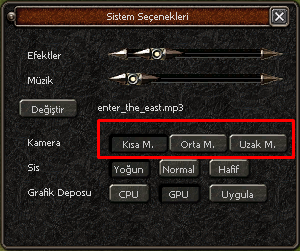
Son hali şu şekilde olacak;
kordinatlarıda düzenlemeniz gerekmektedir.
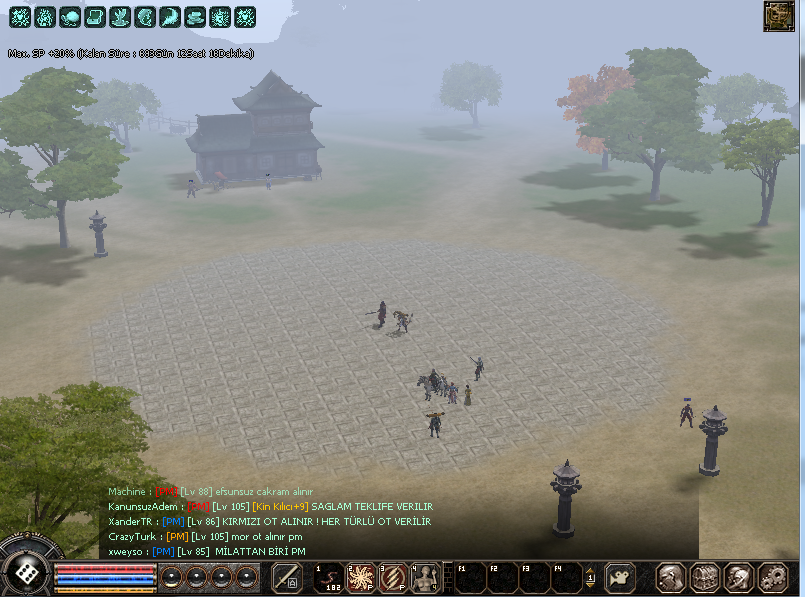
Sisleri kaldırmak için ;
root > constinfo.py açılır
aratılır ;
şu şekilde değiştirilir ;
Metin2 Sunucularında Sistem Seçeneklerine Kamera Modu Ekleme (Python)
Metin2 özel sunucularında kullanıcı deneyimini artırmak için birçok yapılandırma yapılabilir. Bunlardan birisi de oyuncuların kamera ayarlarını özelleştirebilmesidir. Bu yazıda, Python tabanlı GUI sistemlerinde Sistem Ayarları bölümüne Kamera Modu ekleme sürecini ele alacağız. Bu işlem, genellikle uiscript ve py root dosyalarında değişiklik yapılarak gerçekleştirilir.
Kamera Modu Nedir?
Kamera modu, oyuncuların oyun içi kamerasının davranışını değiştirmelerine olanak tanır. Örneğin, bazı oyuncular kameranın karakteri takip ederken daha sabit ya da daha akıcı hareket etmesini tercih edebilir. Bu modlar genellikle PvP oynayan oyuncular tarafından tercih edilir çünkü kamera kontrolü, savaş sırasında önemli bir avantaj sağlayabilir.
Python ve Uiscript ile Entegrasyon
Metin2 özel sunucularında genellikle arayüz (GUI) işlemleri Python dili ile yapılır. Bu süreçte kullanılan temel dosyalar şunlardır:
- uiscript: Arayüz tasarımlarının bulunduğu XML benzeri yapıdır.
- py root: Python betiklerinin bulunduğu dizindir. Burada butonlara, ayarlara ve işlevlere dair kodlar bulunur.
Adım 1: Uiscript Dosyasında Yeni Buton Oluşturma
Öncelikle sistem ayarları penceresini açtığımız system_option.py dosyasına benzer şekilde yeni bir kamera modu seçeneği eklememiz gerekir. Bu işlem için uiscript klasöründe bulunan systemoptionwindow.py dosyasını açıyoruz ve yeni bir buton tanımlaması yapıyoruz.
Örnek yapı şu şekildedir:
Bu buton, oyuncuya iki veya daha fazla kamera modu arasında seçim yapma imkanı sunar. Seçilen mod, oyun içi kamera davranışını değiştirir.
Adım 2: Py Root Dosyasında Mantık Oluşturma
Python tarafında, butona tıklanınca çalışacak fonksiyonu yazmamız gerekir. Bu fonksiyon, mevcut kamera modunu alır, bir sonraki moda geçer ve bu ayarı kalıcı hale getirir. Bu işlem genellikle game core ile entegre çalışarak oyun içi kamerayı günceller.
Kalıcı Ayarlar: Ayarların her oturumda hatırlanması için, veriler genellikle db core veya yerel dosyalarda saklanır. Örneğin, setting.txt dosyasına kamera modu ayarı yazılabilir.
Adım 3: Oyun İçinde Kamera Davranışını Değiştirme
Kamera moduna göre farklı davranışlar göstermek için, client src kısmında kamera sınıfı üzerinde değişiklikler yapılabilir. Bu, genellikle C++ tabanlı sistemlerde yapılır. Ancak Python üzerinden bu ayar aktif edildiğinde, C++ tarafında ilgili değişkenin okunup kamera davranışının değiştirilmesi sağlanır.
Dikkat Edilmesi Gerekenler
- Python ve C++ arasındaki iletişim doğru sağlanmalıdır.
- Her kamera modunun performans etkisi göz önünde bulundurulmalıdır.
- Hile potansiyeli taşıyan modlar dikkatle uygulanmalıdır.
Sonuç
Metin2 özel sunucularında kullanıcı dostu sistem ayarları oluşturmak, hem oyuncu memnuniyetini artırır hem de sunucunuzun diğerlerinden fark yaratmasını sağlar. Kamera modu gibi küçük ama etkili özellikler, özellikle PvP odaklı sunucularda büyük önem taşır. Bu tür geliştirmeler, source edit ve martysama tarzı kaynaklar yardımıyla kolayca yapılabilir.
Kaynaklar
Metin2Lobby - Metin2 Private Server Geliştirme
Adding Camera Mode to System Options [PYTHON] in Metin2
In Metin2 private servers, many configurations can be made to enhance the user experience. One of these is allowing players to customize camera settings. In this article, we will cover how to add a Camera Mode option to the System Settings window using Python-based GUI systems. This process typically involves modifications in uiscript and py root files.
What is Camera Mode?
Camera mode allows players to adjust the behavior of the in-game camera. For example, some players may prefer a more stable or fluid camera movement while tracking their character. These modes are often preferred by PvP players since camera control can provide a significant advantage during combat.
Integration with Python and Uiscript
In Metin2 private servers, UI operations are generally handled using Python. The main files used in this process are:
- uiscript: Contains XML-like structures for UI designs.
- py root: Directory where Python scripts reside, containing code related to buttons, settings, and functionality.
Step 1: Creating a New Button in Uiscript File
Firstly, we need to add a new camera mode option similar to the system_option.py file. We open the systemoptionwindow.py file located in the uiscript folder and define a new button.
An example structure would be:
This button allows players to choose between two or more camera modes, changing the in-game camera behavior accordingly.
Step 2: Implementing Logic in Py Root Files
On the Python side, we must write the function that executes when the button is clicked. This function retrieves the current camera mode, switches to the next one, and saves this setting. This operation usually integrates with the game core to update the in-game camera.
Persistent Settings: To ensure that settings are remembered across sessions, data is typically stored in db core or local files such as setting.txt.
Step 3: Changing Camera Behavior In-Game
To apply different behaviors based on the selected camera mode, modifications can be made in the client src section, usually involving C++. However, once the mode is activated via Python, the corresponding variable should be read on the C++ side to modify the camera's behavior accordingly.
Important Considerations
- Communication between Python and C++ must be properly established.
- Performance impact of each camera mode must be considered.
- Modes with potential exploit risk should be implemented carefully.
Conclusion
Creating user-friendly system options in Metin2 private servers increases player satisfaction and helps distinguish your server from others. Features like camera mode, though small, play a crucial role especially in PvP-focused servers. Such improvements can be easily implemented using resources like source edit and martysama.
Resources
Metin2Lobby - Metin2 Private Server Development
Aratılır ;
Kod:
self.cameraModeButtonList.append(GetObject("camera_long"))ve altına eklenir ;
Kod:
self.cameraModeButtonList.append(GetObject("camera_uzak"))Aratılır ;
Kod:
self.cameraModeButtonList[1].SAFE_SetEvent(self.__OnClickCameraModeLongButton)ve altına eklenir ;
Kod:
self.cameraModeButtonList[2].SAFE_SetEvent(self.__OnClickCameraModeUzakButton)Aratılır ;
Kod:
def __OnClickCameraModeLongButton(self): self.__SetCameraMode(1)ve altına eklenir ;
Ziyaretçiler için gizlenmiş link,görmek için üye olmalısınız!
Giriş yap veya üye ol.
Kod:
def __OnClickCameraModeUzakButton(self): self.__SetCameraMode(2)root > uisystemoption.py açılır
Aratılır ;
Kod:
self.cameraModeButtonList.append(GetObject("camera_long"))ve altına eklenir ;
Kod:
self.cameraModeButtonList.append(GetObject("camera_uzak"))Aratılır ;
Kod:
self.cameraModeButtonList[1].SAFE_SetEvent(self.__OnClickCameraModeLongButton)ve altına eklenir ;
Kod:
self.cameraModeButtonList[2].SAFE_SetEvent(self.__OnClickCameraModeUzakButton)Aratılır ;
Kod:
def __OnClickCameraModeLongButton(self): self.__SetCameraMode(1)ve altına eklenir ;
Ziyaretçiler için gizlenmiş link,görmek için üye olmalısınız!
Giriş yap veya üye ol.
Kod:
def __OnClickCameraModeUzakButton(self): self.__SetCameraMode(2)root > constinfo.py açılır
aratılır ;
Kod:
CAMERA_MAX_DISTANCE_LONG = 3500.0ve altına eklenir ;
Kod:
CAMERA_MAX_DISTANCE_UZAK = 10000.0hemen altında ;
Kod:
CAMERA_MAX_DISTANCE_LIST=[CAMERA_MAX_DISTANCE_SHORT, CAMERA_MAX_DISTANCE_LONG]şu şekilde değiştirilir ;
Ziyaretçiler için gizlenmiş link,görmek için üye olmalısınız!
Giriş yap veya üye ol.
Kod:
CAMERA_MAX_DISTANCE_LIST=[CAMERA_MAX_DISTANCE_SHORT, CAMERA_MAX_DISTANCE_LONG, CAMERA_MAX_DISTANCE_UZAK]locale > locale_interface.txt açılır
aratılır ;
Kod:
OPTION_CAMERA_DISTANCE_LONG Uzak Mesafe OPTION_CAMERA_DISTANCE_SHORT Kısa Mesafeve şu şekilde değiştirilir ;
Ziyaretçiler için gizlenmiş link,görmek için üye olmalısınız!
Giriş yap veya üye ol.
Kod:
OPTION_CAMERA_DISTANCE_SHORT Kısa M. OPTION_CAMERA_DISTANCE_LONG Orta M. OPTION_CAMERA_DISTANCE_UZAK Uzak M.uiscript > systemoptiondialog.py açılır
aratılır ;
Kod:
camera_longkod dizini altına eklenir ;
Kod:
{[/CENTER] "name" : "camera_uzak", "type" : "radio_button", "x" : 110+120, "y" : 135, "text" : uiScriptLocale.OPTION_CAMERA_DISTANCE_UZAK, "default_image" : ROOT_PATH + "Middle_Button_01.sub", "over_image" : ROOT_PATH + "Middle_Button_02.sub", "down_image" : ROOT_PATH + "Middle_Button_03.sub", [CENTER] },[/CENTER]Son hali şu şekilde olacak;
Kod:
{[/CENTER] "name" : "camera_short", "type" : "radio_button", "x" : 110, "y" : 135, "text" : uiScriptLocale.OPTION_CAMERA_DISTANCE_SHORT, "default_image" : ROOT_PATH + "Middle_Button_01.sub", "over_image" : ROOT_PATH + "Middle_Button_02.sub", "down_image" : ROOT_PATH + "Middle_Button_03.sub", }, { "name" : "camera_long", "type" : "radio_button", "x" : 110+60, "y" : 135, "text" : uiScriptLocale.OPTION_CAMERA_DISTANCE_LONG, "default_image" : ROOT_PATH + "Middle_Button_01.sub", "over_image" : ROOT_PATH + "Middle_Button_02.sub", "down_image" : ROOT_PATH + "Middle_Button_03.sub", }, { "name" : "camera_uzak", "type" : "radio_button", "x" : 110+120, "y" : 135, "text" : uiScriptLocale.OPTION_CAMERA_DISTANCE_UZAK, "default_image" : ROOT_PATH + "Middle_Button_01.sub", "over_image" : ROOT_PATH + "Middle_Button_02.sub", "down_image" : ROOT_PATH + "Middle_Button_03.sub", [CENTER] },[/CENTER]kordinatlarıda düzenlemeniz gerekmektedir.
Sisleri kaldırmak için ;
root > constinfo.py açılır
aratılır ;
Kod:
FOG_LEVEL0şu şekilde değiştirilir ;
Kod:
FOG_LEVEL0 = 999999.0 FOG_LEVEL1 = 999999.0 FOG_LEVEL2 = 999999.0Metin2 Sunucularında Sistem Seçeneklerine Kamera Modu Ekleme (Python)
Metin2 özel sunucularında kullanıcı deneyimini artırmak için birçok yapılandırma yapılabilir. Bunlardan birisi de oyuncuların kamera ayarlarını özelleştirebilmesidir. Bu yazıda, Python tabanlı GUI sistemlerinde Sistem Ayarları bölümüne Kamera Modu ekleme sürecini ele alacağız. Bu işlem, genellikle uiscript ve py root dosyalarında değişiklik yapılarak gerçekleştirilir.
Kamera Modu Nedir?
Kamera modu, oyuncuların oyun içi kamerasının davranışını değiştirmelerine olanak tanır. Örneğin, bazı oyuncular kameranın karakteri takip ederken daha sabit ya da daha akıcı hareket etmesini tercih edebilir. Bu modlar genellikle PvP oynayan oyuncular tarafından tercih edilir çünkü kamera kontrolü, savaş sırasında önemli bir avantaj sağlayabilir.
Python ve Uiscript ile Entegrasyon
Metin2 özel sunucularında genellikle arayüz (GUI) işlemleri Python dili ile yapılır. Bu süreçte kullanılan temel dosyalar şunlardır:
- uiscript: Arayüz tasarımlarının bulunduğu XML benzeri yapıdır.
- py root: Python betiklerinin bulunduğu dizindir. Burada butonlara, ayarlara ve işlevlere dair kodlar bulunur.
Adım 1: Uiscript Dosyasında Yeni Buton Oluşturma
Öncelikle sistem ayarları penceresini açtığımız system_option.py dosyasına benzer şekilde yeni bir kamera modu seçeneği eklememiz gerekir. Bu işlem için uiscript klasöründe bulunan systemoptionwindow.py dosyasını açıyoruz ve yeni bir buton tanımlaması yapıyoruz.
Örnek yapı şu şekildedir:
Kod:
[COLOR=orange]Kamera Modu[/COLOR]Bu buton, oyuncuya iki veya daha fazla kamera modu arasında seçim yapma imkanı sunar. Seçilen mod, oyun içi kamera davranışını değiştirir.
Adım 2: Py Root Dosyasında Mantık Oluşturma
Python tarafında, butona tıklanınca çalışacak fonksiyonu yazmamız gerekir. Bu fonksiyon, mevcut kamera modunu alır, bir sonraki moda geçer ve bu ayarı kalıcı hale getirir. Bu işlem genellikle game core ile entegre çalışarak oyun içi kamerayı günceller.
Kalıcı Ayarlar: Ayarların her oturumda hatırlanması için, veriler genellikle db core veya yerel dosyalarda saklanır. Örneğin, setting.txt dosyasına kamera modu ayarı yazılabilir.
Adım 3: Oyun İçinde Kamera Davranışını Değiştirme
Kamera moduna göre farklı davranışlar göstermek için, client src kısmında kamera sınıfı üzerinde değişiklikler yapılabilir. Bu, genellikle C++ tabanlı sistemlerde yapılır. Ancak Python üzerinden bu ayar aktif edildiğinde, C++ tarafında ilgili değişkenin okunup kamera davranışının değiştirilmesi sağlanır.
Dikkat Edilmesi Gerekenler
- Python ve C++ arasındaki iletişim doğru sağlanmalıdır.
- Her kamera modunun performans etkisi göz önünde bulundurulmalıdır.
- Hile potansiyeli taşıyan modlar dikkatle uygulanmalıdır.
Sonuç
Metin2 özel sunucularında kullanıcı dostu sistem ayarları oluşturmak, hem oyuncu memnuniyetini artırır hem de sunucunuzun diğerlerinden fark yaratmasını sağlar. Kamera modu gibi küçük ama etkili özellikler, özellikle PvP odaklı sunucularda büyük önem taşır. Bu tür geliştirmeler, source edit ve martysama tarzı kaynaklar yardımıyla kolayca yapılabilir.
Kaynaklar
Metin2Lobby - Metin2 Private Server Geliştirme
Adding Camera Mode to System Options [PYTHON] in Metin2
In Metin2 private servers, many configurations can be made to enhance the user experience. One of these is allowing players to customize camera settings. In this article, we will cover how to add a Camera Mode option to the System Settings window using Python-based GUI systems. This process typically involves modifications in uiscript and py root files.
What is Camera Mode?
Camera mode allows players to adjust the behavior of the in-game camera. For example, some players may prefer a more stable or fluid camera movement while tracking their character. These modes are often preferred by PvP players since camera control can provide a significant advantage during combat.
Integration with Python and Uiscript
In Metin2 private servers, UI operations are generally handled using Python. The main files used in this process are:
- uiscript: Contains XML-like structures for UI designs.
- py root: Directory where Python scripts reside, containing code related to buttons, settings, and functionality.
Step 1: Creating a New Button in Uiscript File
Firstly, we need to add a new camera mode option similar to the system_option.py file. We open the systemoptionwindow.py file located in the uiscript folder and define a new button.
An example structure would be:
Kod:
[COLOR=orange]Camera Mode[/COLOR]This button allows players to choose between two or more camera modes, changing the in-game camera behavior accordingly.
Step 2: Implementing Logic in Py Root Files
On the Python side, we must write the function that executes when the button is clicked. This function retrieves the current camera mode, switches to the next one, and saves this setting. This operation usually integrates with the game core to update the in-game camera.
Persistent Settings: To ensure that settings are remembered across sessions, data is typically stored in db core or local files such as setting.txt.
Step 3: Changing Camera Behavior In-Game
To apply different behaviors based on the selected camera mode, modifications can be made in the client src section, usually involving C++. However, once the mode is activated via Python, the corresponding variable should be read on the C++ side to modify the camera's behavior accordingly.
Important Considerations
- Communication between Python and C++ must be properly established.
- Performance impact of each camera mode must be considered.
- Modes with potential exploit risk should be implemented carefully.
Conclusion
Creating user-friendly system options in Metin2 private servers increases player satisfaction and helps distinguish your server from others. Features like camera mode, though small, play a crucial role especially in PvP-focused servers. Such improvements can be easily implemented using resources like source edit and martysama.
Resources
Metin2Lobby - Metin2 Private Server Development
