

Mob Olarak Kullanılarbilir .
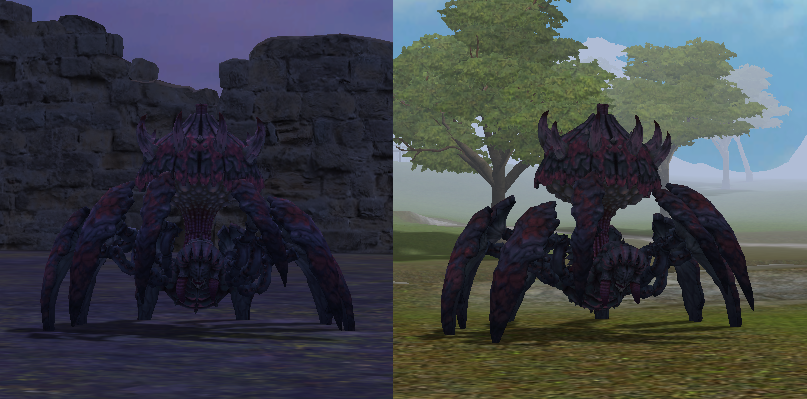
Metin2 Oyununda 'Spider Mob' Modelleme Rehberi
Metin2, 3D modelleme ve görsel modlama konusunda geniş bir topluluk tarafından desteklenen popüler bir MMORPG oyunudur. Bu yazıda, Metin2 içinde özel olarak tasarlanmış 'Spider Mob' yani örümcek canavar modeli oluşturma sürecinden bahsedeceğiz. Bu süreçte 3DS Max, Blender gibi yazılımların kullanımı, GR2 dosya formatı, UV mapping, dokuların (texture) uygulanması, kemik sistemi (rigging), animasyon ve diğer birçok teknik detay ele alınacaktır.
Özel Canavar Modelleri Oluşturmak
Spider Mob, Metin2 oyununda özel NPC veya dungeon boss olarak kullanılabilen güçlü görsel etki yaratan bir modeldir. Bu tip modellerin oluşturulmasında dikkat edilmesi gereken en önemli nokta, oyun motorunun desteklediği teknik sınırlamalardır. Örnek vermek gerekirse, modelin çok yüksek poligonlara sahip olmaması, doğru UV haritasına sahip olması ve oyun içi performansı etkilememesi gerekir.
Modelleme Süreci
Öncelikle 3D modelleme programı olan Blender ya da 3DS Max kullanarak temel örümcek formunu oluşturmalısınız. Gövde, bacaklar, gözler ve diğer detaylar titizlikle modellenmelidir. Blender üzerinde çalışırken Metin2 formatı olan GR2 dosyalarını dışa aktarmak için özel eklentiler gerekebilir. Bu tür eklentiler genellikle Metin2 Development toplulukları tarafından sağlanmaktadır.
UV Mapping ve Dokular
Modelin yüzeyine uygulanacak dokular (texture) çok önemlidir. UV haritalama işlemi sayesinde 2 boyutlu resimler 3 boyutlu modele doğru şekilde uygulanabilir. UV Mapping, modelin detaylı ve görsel olarak zengin görünmesini sağlar. Bu aşamada, örümcek temasına uygun karanlık, puslu ya da organik dokular tercih edilmelidir.
Kemik Sistemi ve Animasyon
Rigging, yani kemik sistemi oluşturma işlemi, modelin hareket edebilmesi için şarttır. Her bacak için ayrı kemikler tanımlanmalı ve bu kemikler modele bağlanmalıdır. Blender’da bu işlem Armature sistemi ile yapılır. Ardından, örümceğin yürüyüşü, saldırısı, saldırıyı atlama gibi animasyonları tanımlanır. Bu animasyonlar, GR2 formatında dışa aktarıldığında Metin2 oyunu tarafından doğru şekilde okunabilir.
Modelin Oyuna Entegrasyonu
Oluşturduğunuz Spider Mob modeli, doğru GR2 formatında dışa aktarıldıktan sonra Metin2 oyun dosyalarına entegre edilebilir. Bu işlem sırasında granny3d formatı da dikkate alınmalıdır. Modelin doğru çalışması için oyun motorunun beklentilerine uygun olarak paketlenmesi gerekir. EterPack gibi sistemler bu işlemde yardımcı olabilir.
Sonuç
Spider Mob gibi özel modeller, Metin2 sunucularında benzersiz deneyimler sunar. Bu modellerin doğru şekilde hazırlanması hem estetik hem de teknik açıdan dikkat gerektirir. Bu alanda uzmanlaşmak isteyenler için Metin2Lobby forumları, model editörleri ve geliştirici kaynakları oldukça faydalıdır. 3D modelleme, dokulama, kemik sistemi, animasyon ve oyun içi entegrasyon gibi tüm adımlar titizlikle uygulanmalıdır ki sonuç oyuncular tarafından takdir edilebilsin.
Guide to Creating a 'Spider Mob' Model in Metin2
Metin2 is a popular MMORPG supported by a large community of 3D modelers and visual modders. In this article, we'll discuss how to create a custom 'Spider Mob' model for use in Metin2. The process involves using software such as 3DS Max and Blender, working with GR2 file formats, UV mapping, applying textures, rigging, animations, and more technical aspects.
Creating Custom Monster Models
Spider Mob is a visually striking model that can serve as a special NPC or dungeon boss within Metin2. When creating models like these, it’s crucial to consider the technical limitations supported by the game engine. For example, the model should not have too many polygons, must have proper UV mapping, and should not affect in-game performance negatively.
The Modeling Process
Begin by creating the basic spider shape using a 3D modeling program like Blender or 3DS Max. The body, legs, eyes, and other details must be modeled carefully. When using Blender, special plugins are required to export files in the GR2 format used by Metin2. These plugins are usually provided by Metin2 Development communities.
UV Mapping and Textures
Textures applied to the surface of the model are extremely important. Through UV mapping, 2D images can be accurately mapped onto the 3D model. This step ensures that the model appears detailed and visually rich. Dark, organic, or atmospheric textures that match the spider theme should be preferred at this stage.
Skeleton and Animation
Rigging is essential for enabling the model to move. Each leg must have its own bones defined and attached to the model. In Blender, this is done using the Armature system. Afterwards, animations such as walking, attacking, and dodging are created. Once exported in GR2 format, these animations can be correctly read by the Metin2 game engine.
Integrating the Model into the Game
After properly exporting your Spider Mob model in GR2 format, it can be integrated into the Metin2 game files. During this process, the granny3d format must also be considered. To ensure correct functionality, the model must be packaged according to the expectations of the game engine. Systems like EterPack can assist in this process.
Conclusion
Custom models like Spider Mob provide unique experiences on Metin2 servers. Properly preparing these models requires attention to both aesthetic and technical aspects. For those looking to specialize in this area, forums like Metin2Lobby, along with model editors and developer resources, can be highly beneficial. All steps including 3D modeling, texturing, rigging, animation, and in-game integration must be executed with precision so that the final result is appreciated by players.
Ziyaretçiler için gizlenmiş link,görmek için üye olmalısınız!
Giriş yap veya üye ol.
Ziyaretçiler için gizlenmiş link,görmek için üye olmalısınız!
Giriş yap veya üye ol.
Metin2 Oyununda 'Spider Mob' Modelleme Rehberi
Metin2, 3D modelleme ve görsel modlama konusunda geniş bir topluluk tarafından desteklenen popüler bir MMORPG oyunudur. Bu yazıda, Metin2 içinde özel olarak tasarlanmış 'Spider Mob' yani örümcek canavar modeli oluşturma sürecinden bahsedeceğiz. Bu süreçte 3DS Max, Blender gibi yazılımların kullanımı, GR2 dosya formatı, UV mapping, dokuların (texture) uygulanması, kemik sistemi (rigging), animasyon ve diğer birçok teknik detay ele alınacaktır.
Özel Canavar Modelleri Oluşturmak
Spider Mob, Metin2 oyununda özel NPC veya dungeon boss olarak kullanılabilen güçlü görsel etki yaratan bir modeldir. Bu tip modellerin oluşturulmasında dikkat edilmesi gereken en önemli nokta, oyun motorunun desteklediği teknik sınırlamalardır. Örnek vermek gerekirse, modelin çok yüksek poligonlara sahip olmaması, doğru UV haritasına sahip olması ve oyun içi performansı etkilememesi gerekir.
Modelleme Süreci
Öncelikle 3D modelleme programı olan Blender ya da 3DS Max kullanarak temel örümcek formunu oluşturmalısınız. Gövde, bacaklar, gözler ve diğer detaylar titizlikle modellenmelidir. Blender üzerinde çalışırken Metin2 formatı olan GR2 dosyalarını dışa aktarmak için özel eklentiler gerekebilir. Bu tür eklentiler genellikle Metin2 Development toplulukları tarafından sağlanmaktadır.
UV Mapping ve Dokular
Modelin yüzeyine uygulanacak dokular (texture) çok önemlidir. UV haritalama işlemi sayesinde 2 boyutlu resimler 3 boyutlu modele doğru şekilde uygulanabilir. UV Mapping, modelin detaylı ve görsel olarak zengin görünmesini sağlar. Bu aşamada, örümcek temasına uygun karanlık, puslu ya da organik dokular tercih edilmelidir.
Kemik Sistemi ve Animasyon
Rigging, yani kemik sistemi oluşturma işlemi, modelin hareket edebilmesi için şarttır. Her bacak için ayrı kemikler tanımlanmalı ve bu kemikler modele bağlanmalıdır. Blender’da bu işlem Armature sistemi ile yapılır. Ardından, örümceğin yürüyüşü, saldırısı, saldırıyı atlama gibi animasyonları tanımlanır. Bu animasyonlar, GR2 formatında dışa aktarıldığında Metin2 oyunu tarafından doğru şekilde okunabilir.
Modelin Oyuna Entegrasyonu
Oluşturduğunuz Spider Mob modeli, doğru GR2 formatında dışa aktarıldıktan sonra Metin2 oyun dosyalarına entegre edilebilir. Bu işlem sırasında granny3d formatı da dikkate alınmalıdır. Modelin doğru çalışması için oyun motorunun beklentilerine uygun olarak paketlenmesi gerekir. EterPack gibi sistemler bu işlemde yardımcı olabilir.
Sonuç
Spider Mob gibi özel modeller, Metin2 sunucularında benzersiz deneyimler sunar. Bu modellerin doğru şekilde hazırlanması hem estetik hem de teknik açıdan dikkat gerektirir. Bu alanda uzmanlaşmak isteyenler için Metin2Lobby forumları, model editörleri ve geliştirici kaynakları oldukça faydalıdır. 3D modelleme, dokulama, kemik sistemi, animasyon ve oyun içi entegrasyon gibi tüm adımlar titizlikle uygulanmalıdır ki sonuç oyuncular tarafından takdir edilebilsin.
Guide to Creating a 'Spider Mob' Model in Metin2
Metin2 is a popular MMORPG supported by a large community of 3D modelers and visual modders. In this article, we'll discuss how to create a custom 'Spider Mob' model for use in Metin2. The process involves using software such as 3DS Max and Blender, working with GR2 file formats, UV mapping, applying textures, rigging, animations, and more technical aspects.
Creating Custom Monster Models
Spider Mob is a visually striking model that can serve as a special NPC or dungeon boss within Metin2. When creating models like these, it’s crucial to consider the technical limitations supported by the game engine. For example, the model should not have too many polygons, must have proper UV mapping, and should not affect in-game performance negatively.
The Modeling Process
Begin by creating the basic spider shape using a 3D modeling program like Blender or 3DS Max. The body, legs, eyes, and other details must be modeled carefully. When using Blender, special plugins are required to export files in the GR2 format used by Metin2. These plugins are usually provided by Metin2 Development communities.
UV Mapping and Textures
Textures applied to the surface of the model are extremely important. Through UV mapping, 2D images can be accurately mapped onto the 3D model. This step ensures that the model appears detailed and visually rich. Dark, organic, or atmospheric textures that match the spider theme should be preferred at this stage.
Skeleton and Animation
Rigging is essential for enabling the model to move. Each leg must have its own bones defined and attached to the model. In Blender, this is done using the Armature system. Afterwards, animations such as walking, attacking, and dodging are created. Once exported in GR2 format, these animations can be correctly read by the Metin2 game engine.
Integrating the Model into the Game
After properly exporting your Spider Mob model in GR2 format, it can be integrated into the Metin2 game files. During this process, the granny3d format must also be considered. To ensure correct functionality, the model must be packaged according to the expectations of the game engine. Systems like EterPack can assist in this process.
Conclusion
Custom models like Spider Mob provide unique experiences on Metin2 servers. Properly preparing these models requires attention to both aesthetic and technical aspects. For those looking to specialize in this area, forums like Metin2Lobby, along with model editors and developer resources, can be highly beneficial. All steps including 3D modeling, texturing, rigging, animation, and in-game integration must be executed with precision so that the final result is appreciated by players.
