

Maliden alıntıdır.[/LEFT]
Önizleme
İhtiyacınız olan:
Kullanıcı Kimliği Alın (
Sunucudan Discord Mesajı Gönderme Sistemi
Discord, oyun sunucularının oyuncularıyla anında iletişim kurmasının ve gelişmeleri duyurmasının en etkili yollarından biridir. Özellikle Metin2 özel sunucu yöneticileri için, sunucuda yaşanan olayları veya duyuruları anlık olarak oyunculara bildirmek büyük önem taşır. Bu yazıda, sunucudan Discord'a mesaj gönderme işlemini nasıl yapacağınızı, hangi teknolojileri kullanmanız gerektiğini ve bu sistemin Metin2 özel sunucu yönetimine nasıl katkı sağladığını detaylıca ele alacağız.
Discord Webhook Nedir?
Discord webhook, bir uygulamanın belirli bir Discord kanalına mesaj gönderebilmesini sağlayan bir özelliktir. Bu sayede sunucu tarafında meydana gelen bir olay, örneğin bir oyuncunun seviye atlaması, bir turnuvanın başlaması gibi durumlar anında Discord kanalında duyurulabilir. Webhook URL'si alınarak HTTP istekleri ile mesaj gönderilir.
Python Kullanarak Discord'a Mesaj Göndermek
Python, hızlı ve esnek yapısıyla Discord webhook ile entegrasyon için ideal bir seçimdir. Py GUI arayüzlerle birleştirildiğinde, daha kullanıcı dostu yönetim panelleri oluşturulabilir. Aşağıda basit bir Python örneği verilmiştir:
C++ ile Entegrasyon
C++ tabanlı Metin2 server src üzerinde çalışan sistemlerde Discord entegrasyonu, HTTP kütüphaneleriyle sağlanabilir. Örneğin libcurl gibi bir kütüphane kullanarak sunucu içindeki olayları yakalayıp Discord'a yönlendirebilirsiniz. Bu işlem, özellikle PvP sistemleri ve turnuva süreçlerinde oldukça faydalıdır.
Otomatik Duyuru Sistemleri
Otomatik duyuru sistemleri, oyuncuların aktif olduğu anlarda özel sunucunuzdaki gelişmeleri anında takip edebilmelerini sağlar. Örneğin, bir oyuncu level atlarsa ya da bir eşya düşerse, bunu Discord kanalınızda anlık olarak paylaşabilirsiniz. Bu sayede oyuncu etkileşimi artar ve topluluk daha canlı bir yapı kazanır.
Database (DB) Entegrasyonu
Game DB üzerinden alınan verilerle Discord'a gönderilen mesajlar kişiselleştirilebilir. Örneğin, bir oyuncunun adı, seviyesi, elde ettiği eşya gibi bilgiler doğrudan mesaja dahil edilebilir. Bu sayede duyurular daha etkileyici ve bilgilendirici olur.
Metin2 Lobby
Metin2Lobby, Metin2 özel sunucu geliştirme konusunda birçok kaynağı ve rehberi ücretsiz sunmaktadır. Sunucudan Discord mesaj gönderme gibi sistemlerin geliştirilmesinde size yardımcı olacak kaynaklara sitemizden ulaşabilirsiniz.
Sonuç
Sunucudan Discord mesaj gönderme sistemi, hem oyun içi hem de topluluk yönetimi açısından oldukça faydalıdır. Python, C++, DB entegrasyonları ve doğru planlama ile bu sistemi kolayca entegre edebilirsiniz.
Sending Discord Messages from Server
Discord is one of the most effective ways for game servers to communicate instantly with players and announce updates. For Metin2 private server administrators, instantly notifying players about events happening on the server or announcements is crucial. In this article, we will explain how to send messages from your server to Discord, which technologies you should use, and how this system contributes to Metin2 private server management in detail.
What is Discord Webhook?
A Discord webhook allows an application to send messages to a specific Discord channel. With this feature, events occurring on the server—such as a player leveling up or a tournament starting—can be announced immediately in the Discord channel. By obtaining the webhook URL, messages can be sent via HTTP requests.
Sending Messages to Discord Using Python
Python is an ideal choice for integrating with Discord webhooks due to its fast and flexible structure. When combined with Py GUI interfaces, more user-friendly control panels can be created. Below is a simple Python example:
Integration with C++
In Metin2 server src based on C++, Discord integration can be achieved using HTTP libraries. For example, using a library like libcurl, you can capture events within the server and forward them to Discord. This process is particularly useful during PvP systems and tournament periods.
Automatic Announcement Systems
Automatic announcement systems allow players to instantly follow developments on your private server while they are active. For instance, whenever a player levels up or an item drops, these events can be shared in your Discord channel in real-time. This increases player engagement and brings more liveliness to the community.
Database (DB) Integration
Messages sent to Discord through the Game DB can be personalized. For example, a player’s name, level, and items obtained can be directly included in the message. This makes announcements more engaging and informative.
Metin2 Lobby
Metin2Lobby provides many resources and guides related to Metin2 private server development for free. You can access helpful resources on developing systems such as sending Discord messages from the server through our website.
Conclusion
Sending Discord messages from the server is highly beneficial for both in-game and community management. With Python, C++, DB integration, and proper planning, you can easily implement this system.
Önizleme
İhtiyacınız olan:
Ziyaretçiler için gizlenmiş link,görmek için üye olmalısınız!
Giriş yap veya üye ol.
Kanal Kimliği(arrChannels) alın:
- <li data-xf-list-type="ol">Discord/settings/advanced/ Geliştirici Modunu Etkinleştir. <li data-xf-list-type="ol">Bir kanala sağ tıklayın ve Kimliği Kopyala 'yı seçin.
Kullanıcı Kimliği Alın (
Ziyaretçiler için gizlenmiş link,görmek için üye olmalısınız!
Giriş yap veya üye ol.
gibi kullanıcıyı etiketlemek için):
- <li data-xf-list-type="ol">Discord/settings/advanced/ Geliştirici Modunu Etkinleştir. <li data-xf-list-type="ol">Kullanıcıya sağ tıklayın ve Kimliği Kopyala 'yı seçin.
Belirteç Al(arrTokens):
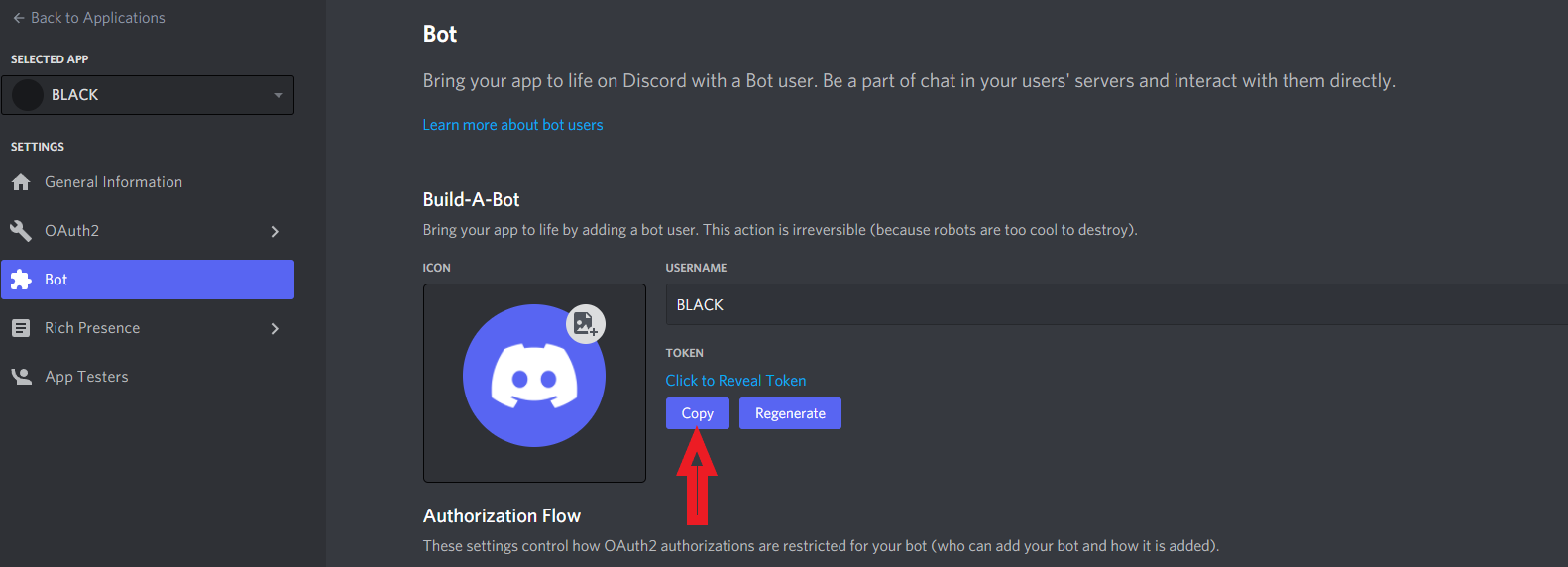
Bot Belirteci için:- <li data-xf-list-type="ol">Yoksa, bir uygulama oluşturun(Ziyaretçiler için gizlenmiş link,görmek için üye olmalısınız! Giriş yap veya üye ol.) <li data-xf-list-type="ol">Uygulamanızı seçin / Bot'u seçin(menüde). Ardından Bot Ekle'yi tıklatın. <li data-xf-list-type="ol">Ardından Belirteci kopyalayın. <li data-xf-list-type="ol">Belirtecin başına "Bot" ekleyin.
Ziyaretçiler için gizlenmiş link,görmek için üye olmalısınız!
Giriş yap veya üye ol.
-
Ziyaretçiler için gizlenmiş link,görmek için üye olmalısınız!
Giriş yap veya üye ol.
Sunucudan Discord Mesajı Gönderme Sistemi
Discord, oyun sunucularının oyuncularıyla anında iletişim kurmasının ve gelişmeleri duyurmasının en etkili yollarından biridir. Özellikle Metin2 özel sunucu yöneticileri için, sunucuda yaşanan olayları veya duyuruları anlık olarak oyunculara bildirmek büyük önem taşır. Bu yazıda, sunucudan Discord'a mesaj gönderme işlemini nasıl yapacağınızı, hangi teknolojileri kullanmanız gerektiğini ve bu sistemin Metin2 özel sunucu yönetimine nasıl katkı sağladığını detaylıca ele alacağız.
Discord Webhook Nedir?
Discord webhook, bir uygulamanın belirli bir Discord kanalına mesaj gönderebilmesini sağlayan bir özelliktir. Bu sayede sunucu tarafında meydana gelen bir olay, örneğin bir oyuncunun seviye atlaması, bir turnuvanın başlaması gibi durumlar anında Discord kanalında duyurulabilir. Webhook URL'si alınarak HTTP istekleri ile mesaj gönderilir.
Python Kullanarak Discord'a Mesaj Göndermek
Python, hızlı ve esnek yapısıyla Discord webhook ile entegrasyon için ideal bir seçimdir. Py GUI arayüzlerle birleştirildiğinde, daha kullanıcı dostu yönetim panelleri oluşturulabilir. Aşağıda basit bir Python örneği verilmiştir:
Kod:
[B]import requests[BR][/BR][BR][/BR]def send_discord_message(webhook_url, message):[BR][/BR] data = {"content": message}[BR][/BR] response = requests.post(webhook_url, json=data)[BR][/BR] if response.status_code == 204:[BR][/BR] print("Mesaj başarıyla gönderildi!")[BR][/BR] else:[/B][BR][/BR] print(f"Hata oluştu: {response.status_code}")[BR][/BR]C++ ile Entegrasyon
C++ tabanlı Metin2 server src üzerinde çalışan sistemlerde Discord entegrasyonu, HTTP kütüphaneleriyle sağlanabilir. Örneğin libcurl gibi bir kütüphane kullanarak sunucu içindeki olayları yakalayıp Discord'a yönlendirebilirsiniz. Bu işlem, özellikle PvP sistemleri ve turnuva süreçlerinde oldukça faydalıdır.
Otomatik Duyuru Sistemleri
Otomatik duyuru sistemleri, oyuncuların aktif olduğu anlarda özel sunucunuzdaki gelişmeleri anında takip edebilmelerini sağlar. Örneğin, bir oyuncu level atlarsa ya da bir eşya düşerse, bunu Discord kanalınızda anlık olarak paylaşabilirsiniz. Bu sayede oyuncu etkileşimi artar ve topluluk daha canlı bir yapı kazanır.
Database (DB) Entegrasyonu
Game DB üzerinden alınan verilerle Discord'a gönderilen mesajlar kişiselleştirilebilir. Örneğin, bir oyuncunun adı, seviyesi, elde ettiği eşya gibi bilgiler doğrudan mesaja dahil edilebilir. Bu sayede duyurular daha etkileyici ve bilgilendirici olur.
Metin2 Lobby
Metin2Lobby, Metin2 özel sunucu geliştirme konusunda birçok kaynağı ve rehberi ücretsiz sunmaktadır. Sunucudan Discord mesaj gönderme gibi sistemlerin geliştirilmesinde size yardımcı olacak kaynaklara sitemizden ulaşabilirsiniz.
Sonuç
Sunucudan Discord mesaj gönderme sistemi, hem oyun içi hem de topluluk yönetimi açısından oldukça faydalıdır. Python, C++, DB entegrasyonları ve doğru planlama ile bu sistemi kolayca entegre edebilirsiniz.
Sending Discord Messages from Server
Discord is one of the most effective ways for game servers to communicate instantly with players and announce updates. For Metin2 private server administrators, instantly notifying players about events happening on the server or announcements is crucial. In this article, we will explain how to send messages from your server to Discord, which technologies you should use, and how this system contributes to Metin2 private server management in detail.
What is Discord Webhook?
A Discord webhook allows an application to send messages to a specific Discord channel. With this feature, events occurring on the server—such as a player leveling up or a tournament starting—can be announced immediately in the Discord channel. By obtaining the webhook URL, messages can be sent via HTTP requests.
Sending Messages to Discord Using Python
Python is an ideal choice for integrating with Discord webhooks due to its fast and flexible structure. When combined with Py GUI interfaces, more user-friendly control panels can be created. Below is a simple Python example:
Kod:
[B]import requests[BR][/BR][BR][/BR]def send_discord_message(webhook_url, message):[BR][/BR] data = {"content": message}[BR][/BR] response = requests.post(webhook_url, json=data)[BR][/BR] if response.status_code == 204:[BR][/BR] print("Message sent successfully!")[BR][/BR] else:[/B][BR][/BR] print(f"Error occurred: {response.status_code}")[BR][/BR]Integration with C++
In Metin2 server src based on C++, Discord integration can be achieved using HTTP libraries. For example, using a library like libcurl, you can capture events within the server and forward them to Discord. This process is particularly useful during PvP systems and tournament periods.
Automatic Announcement Systems
Automatic announcement systems allow players to instantly follow developments on your private server while they are active. For instance, whenever a player levels up or an item drops, these events can be shared in your Discord channel in real-time. This increases player engagement and brings more liveliness to the community.
Database (DB) Integration
Messages sent to Discord through the Game DB can be personalized. For example, a player’s name, level, and items obtained can be directly included in the message. This makes announcements more engaging and informative.
Metin2 Lobby
Metin2Lobby provides many resources and guides related to Metin2 private server development for free. You can access helpful resources on developing systems such as sending Discord messages from the server through our website.
Conclusion
Sending Discord messages from the server is highly beneficial for both in-game and community management. With Python, C++, DB integration, and proper planning, you can easily implement this system.
