

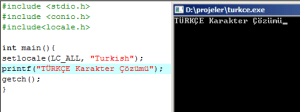
İlk olarak C dilinde:
#include <iostream>
#include<locale.h>
using namespace std;
int main()
{
setlocale(LC_ALL, “Turkish”);
cout << “TÜRKÇE”;
system(“Pause”);
return 0;
}
Ve C++
#include <iostream>
#include<locale.h>
using namespace std;
int main()
{
setlocale(LC_ALL, “Turkish”);
cout << “TÜRKÇE”;
system(“Pause”);
return 0;
}
#include<locale.h>
Ve Main içine girmeniz gereken kod:
setlocale(LC_ALL, “Turkish”);
Not : İnternetten Buldum
Metin2 Private Server Geliştirme Serisi: uiinventory.py Envanter For Döngüsü
Metin2 özel sunucularında oyun içi envanter sistemleri, oyuncu deneyimini doğrudan etkileyen kritik yapı taşlarından biridir. Bu sistemlerde en temel bileşenlerden biri olan envanter yönetimi, genellikle Python tabanlı GUI dosyaları ile yapılır. Bunlardan biri olan uiinventory.py dosyası, oyuncunun envanterindeki öğeleri listeleme, filtreleme ve işlem yapma imkanı sağlar. Bu yazıda özellikle envanter for döngüsü konusuna odaklanarak, nasıl çalıştığını ve neden önemli olduğunu detaylıca inceleyeceğiz.
uiinventory.py Nedir?
uiinventory.py, Metin2 özel sunucularında kullanılan bir Python dosyasıdır. Oyun içi arayüzdeki envanter ekranını kontrol eder. Bu dosya, envanterdeki öğelerin ekranda nasıl gösterileceğini, hangi butonlara tıklanıldığında ne yapılacağını ve envanterdeki öğelerle nasıl etkileşim kurulacağını tanımlar. Özellikle envanterdeki öğeler üzerinde gezinmek için kullanılan for döngüleri bu yapı içinde kritik rol oynar.
Envanter For Döngüsü Nedir?
uiinventory.py içinde bulunan for döngüsü, envanterdeki öğeleri sırayla gezer ve her bir öğe için belirli işlemleri gerçekleştirir. Örneğin, oyuncunun envanterinde 45 adet eşya varsa, bu döngü her bir eşya için bir buton oluşturabilir veya belirli bir koşula göre filtreleme yapabilir. Bu döngü sayesinde kullanıcı arayüzü dinamik olarak güncellenir ve performanslı bir envanter sistemi elde edilir.
Python GUI ve Uiscript ile Entegrasyon
uiinventory.py dosyası, genellikle uiscript ve py root klasörlerinde yer alır. Bu dosyalar, Metin2 istemci tarafında Python GUI sistemleri ile entegre çalışır. For döngüsü, bu yapıda envanter verilerini arayüze aktarırken kullanılır. Örneğin, for item in inventory_list: gibi bir yapı ile her bir öğe için buton oluşturulabilir ve tıklanma olayları tanımlanabilir. Bu yapı, hem C++ sistem ile senkronizedir hem de Python GUI ile uyumlu çalışır.
Hata Ayıklama ve Performans Optimizasyonu
uiinventory.py içindeki for döngüsü, yanlış kullanıldığında performans sorunlarına yol açabilir. Özellikle büyük envanterlerde çok fazla öğe üzerinde döngü çalıştırmak, FPS düşüşlerine sebep olabilir. Bu yüzden döngü içindeki işlemler minimuma indirilmeli, gerekirse filtreleme veya sayfalama mantığı eklenmelidir. Ayrıca, debug çıktıları ile döngünün doğru çalışıp çalışmadığı test edilmelidir.
Özel Eklentilerde Kullanımı
Gelişmiş Metin2 özel sunucularında, envanterde özel eklentiler (örneğin: envanterde filtreleme, arama kutusu, özel slotlar vs.) için uiinventory.py dosyasında yapılan for döngüsü değişiklikleri önemlidir. Bu değişiklikler, client src ile uyumlu olacak şekilde yapılandırılmalıdır. Örneğin, bazı sunucular envanterde stack sayısını görsel olarak göstermek ister. Bu durumda, döngü içinde bu değerler güncellenmeli ve butonlara aktarılmalıdır.
Sonuç
uiinventory.py dosyasındaki envanter for döngüsü, Metin2 özel sunucu geliştirme sürecinde önemli bir yere sahiptir. Doğru yapılandırıldığında, kullanıcı dostu ve hızlı çalışan bir envanter arayüzü sağlanabilir. Bu döngü, hem Python GUI hem de C++ sistem ile uyumlu çalışarak, oyun içindeki kullanıcı deneyimini doğrudan etkiler. Metin2 lobby olarak, bu tür teknik detayları paylaşarak topluluğun gelişmesini hedefliyoruz.
Metin2 Private Server Development Series: uiinventory.py Inventory For Loop
In Metin2 private servers, inventory systems are one of the key components directly affecting the player experience. One of the fundamental elements of such systems is inventory management, which is usually handled via Python-based GUI files. One of these is the uiinventory.py file, which allows listing, filtering, and interacting with items in the player's inventory. In this article, we will specifically focus on the inventory for loop, explaining how it works and why it is important.
What is uiinventory.py?
uiinventory.py is a Python file used in Metin2 private servers. It controls the inventory screen within the game interface. This file defines how items in the inventory are displayed on screen, what happens when specific buttons are clicked, and how interactions occur with inventory items. Particularly, the for loops that traverse the items in the inventory play a critical role in this structure.
What is the Inventory For Loop?
The for loop inside uiinventory.py traverses the items in the inventory sequentially and performs certain operations for each item. For example, if there are 45 items in a player’s inventory, this loop can create a button for each item or filter based on specific conditions. Thanks to this loop, the user interface updates dynamically, resulting in a high-performance inventory system.
Integration with Python GUI and Uiscript
uiinventory.py is generally located in the uiscript and py root folders. These files integrate with Python GUI systems on the Metin2 client side. The for loop is used here to transfer inventory data to the UI. For instance, a structure like for item in inventory_list: can be used to create buttons for each item and define click events. This structure remains synchronized with C++ systems while also being compatible with Python GUI.
Debugging and Performance Optimization
If used incorrectly, the for loop inside uiinventory.py can cause performance issues. Especially when looping through large inventories with many items, FPS drops may occur. Therefore, operations inside the loop should be minimized, and if necessary, filtering or pagination logic should be added. Additionally, debug outputs should be used to verify whether the loop is functioning correctly.
Usage in Custom Add-ons
In advanced Metin2 private servers, custom add-ons (such as filtering, search box, special slots, etc.) in the inventory require modifications to the for loop in uiinventory.py. Such modifications must be configured to remain compatible with client src. For example, some servers wish to visually display stack counts in the inventory. In such cases, these values must be updated within the loop and passed to the buttons accordingly.
Conclusion
The inventory for loop inside the uiinventory.py file holds significant importance in the process of developing Metin2 private servers. When properly configured, it enables a user-friendly and fast-running inventory interface. This loop interacts seamlessly with both Python GUI and C++ systems, directly impacting the in-game user experience. As Metin2 lobby, we aim to support community growth by sharing such technical details.
#include <iostream>
#include<locale.h>
using namespace std;
int main()
{
setlocale(LC_ALL, “Turkish”);
cout << “TÜRKÇE”;
system(“Pause”);
return 0;
}
Ve C++
#include <iostream>
#include<locale.h>
using namespace std;
int main()
{
setlocale(LC_ALL, “Turkish”);
cout << “TÜRKÇE”;
system(“Pause”);
return 0;
}
#include<locale.h>
Ve Main içine girmeniz gereken kod:
setlocale(LC_ALL, “Turkish”);
Not : İnternetten Buldum
Metin2 Private Server Geliştirme Serisi: uiinventory.py Envanter For Döngüsü
Metin2 özel sunucularında oyun içi envanter sistemleri, oyuncu deneyimini doğrudan etkileyen kritik yapı taşlarından biridir. Bu sistemlerde en temel bileşenlerden biri olan envanter yönetimi, genellikle Python tabanlı GUI dosyaları ile yapılır. Bunlardan biri olan uiinventory.py dosyası, oyuncunun envanterindeki öğeleri listeleme, filtreleme ve işlem yapma imkanı sağlar. Bu yazıda özellikle envanter for döngüsü konusuna odaklanarak, nasıl çalıştığını ve neden önemli olduğunu detaylıca inceleyeceğiz.
uiinventory.py Nedir?
uiinventory.py, Metin2 özel sunucularında kullanılan bir Python dosyasıdır. Oyun içi arayüzdeki envanter ekranını kontrol eder. Bu dosya, envanterdeki öğelerin ekranda nasıl gösterileceğini, hangi butonlara tıklanıldığında ne yapılacağını ve envanterdeki öğelerle nasıl etkileşim kurulacağını tanımlar. Özellikle envanterdeki öğeler üzerinde gezinmek için kullanılan for döngüleri bu yapı içinde kritik rol oynar.
Envanter For Döngüsü Nedir?
uiinventory.py içinde bulunan for döngüsü, envanterdeki öğeleri sırayla gezer ve her bir öğe için belirli işlemleri gerçekleştirir. Örneğin, oyuncunun envanterinde 45 adet eşya varsa, bu döngü her bir eşya için bir buton oluşturabilir veya belirli bir koşula göre filtreleme yapabilir. Bu döngü sayesinde kullanıcı arayüzü dinamik olarak güncellenir ve performanslı bir envanter sistemi elde edilir.
Python GUI ve Uiscript ile Entegrasyon
uiinventory.py dosyası, genellikle uiscript ve py root klasörlerinde yer alır. Bu dosyalar, Metin2 istemci tarafında Python GUI sistemleri ile entegre çalışır. For döngüsü, bu yapıda envanter verilerini arayüze aktarırken kullanılır. Örneğin, for item in inventory_list: gibi bir yapı ile her bir öğe için buton oluşturulabilir ve tıklanma olayları tanımlanabilir. Bu yapı, hem C++ sistem ile senkronizedir hem de Python GUI ile uyumlu çalışır.
Hata Ayıklama ve Performans Optimizasyonu
uiinventory.py içindeki for döngüsü, yanlış kullanıldığında performans sorunlarına yol açabilir. Özellikle büyük envanterlerde çok fazla öğe üzerinde döngü çalıştırmak, FPS düşüşlerine sebep olabilir. Bu yüzden döngü içindeki işlemler minimuma indirilmeli, gerekirse filtreleme veya sayfalama mantığı eklenmelidir. Ayrıca, debug çıktıları ile döngünün doğru çalışıp çalışmadığı test edilmelidir.
Özel Eklentilerde Kullanımı
Gelişmiş Metin2 özel sunucularında, envanterde özel eklentiler (örneğin: envanterde filtreleme, arama kutusu, özel slotlar vs.) için uiinventory.py dosyasında yapılan for döngüsü değişiklikleri önemlidir. Bu değişiklikler, client src ile uyumlu olacak şekilde yapılandırılmalıdır. Örneğin, bazı sunucular envanterde stack sayısını görsel olarak göstermek ister. Bu durumda, döngü içinde bu değerler güncellenmeli ve butonlara aktarılmalıdır.
Sonuç
uiinventory.py dosyasındaki envanter for döngüsü, Metin2 özel sunucu geliştirme sürecinde önemli bir yere sahiptir. Doğru yapılandırıldığında, kullanıcı dostu ve hızlı çalışan bir envanter arayüzü sağlanabilir. Bu döngü, hem Python GUI hem de C++ sistem ile uyumlu çalışarak, oyun içindeki kullanıcı deneyimini doğrudan etkiler. Metin2 lobby olarak, bu tür teknik detayları paylaşarak topluluğun gelişmesini hedefliyoruz.
Metin2 Private Server Development Series: uiinventory.py Inventory For Loop
In Metin2 private servers, inventory systems are one of the key components directly affecting the player experience. One of the fundamental elements of such systems is inventory management, which is usually handled via Python-based GUI files. One of these is the uiinventory.py file, which allows listing, filtering, and interacting with items in the player's inventory. In this article, we will specifically focus on the inventory for loop, explaining how it works and why it is important.
What is uiinventory.py?
uiinventory.py is a Python file used in Metin2 private servers. It controls the inventory screen within the game interface. This file defines how items in the inventory are displayed on screen, what happens when specific buttons are clicked, and how interactions occur with inventory items. Particularly, the for loops that traverse the items in the inventory play a critical role in this structure.
What is the Inventory For Loop?
The for loop inside uiinventory.py traverses the items in the inventory sequentially and performs certain operations for each item. For example, if there are 45 items in a player’s inventory, this loop can create a button for each item or filter based on specific conditions. Thanks to this loop, the user interface updates dynamically, resulting in a high-performance inventory system.
Integration with Python GUI and Uiscript
uiinventory.py is generally located in the uiscript and py root folders. These files integrate with Python GUI systems on the Metin2 client side. The for loop is used here to transfer inventory data to the UI. For instance, a structure like for item in inventory_list: can be used to create buttons for each item and define click events. This structure remains synchronized with C++ systems while also being compatible with Python GUI.
Debugging and Performance Optimization
If used incorrectly, the for loop inside uiinventory.py can cause performance issues. Especially when looping through large inventories with many items, FPS drops may occur. Therefore, operations inside the loop should be minimized, and if necessary, filtering or pagination logic should be added. Additionally, debug outputs should be used to verify whether the loop is functioning correctly.
Usage in Custom Add-ons
In advanced Metin2 private servers, custom add-ons (such as filtering, search box, special slots, etc.) in the inventory require modifications to the for loop in uiinventory.py. Such modifications must be configured to remain compatible with client src. For example, some servers wish to visually display stack counts in the inventory. In such cases, these values must be updated within the loop and passed to the buttons accordingly.
Conclusion
The inventory for loop inside the uiinventory.py file holds significant importance in the process of developing Metin2 private servers. When properly configured, it enables a user-friendly and fast-running inventory interface. This loop interacts seamlessly with both Python GUI and C++ systems, directly impacting the in-game user experience. As Metin2 lobby, we aim to support community growth by sharing such technical details.
