

İndirme Linkleri
Ziyaretçiler için gizlenmiş link,görmek için üye olmalısınız!
Giriş yap veya üye ol.
Ziyaretçiler için gizlenmiş link,görmek için üye olmalısınız!
Giriş yap veya üye ol.
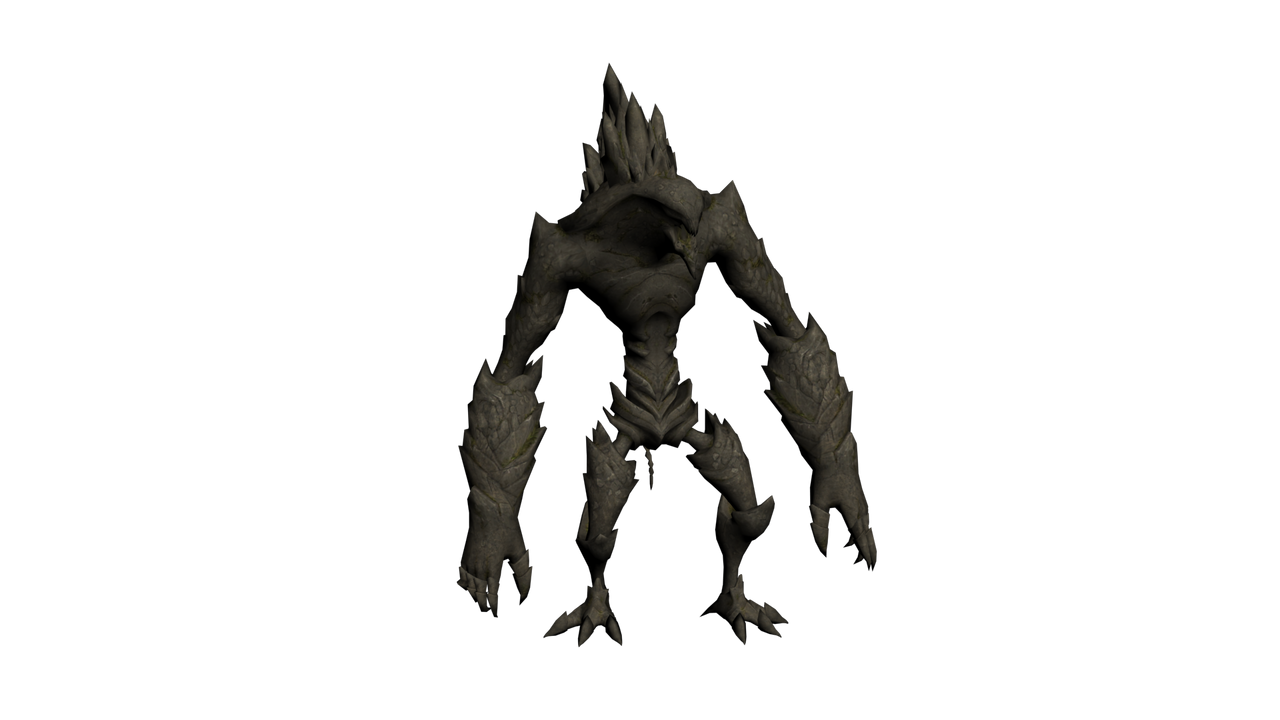
Xunter Boss: Metin2 Oyununda Özel NPC ve Monster Modelleme Rehberi
Metin2 özel model dünyasında merhaba!
Metin2, 3D modelleme ve görsel düzenlemeler konusunda oldukça esnek bir yapıya sahiptir. Özellikle Xunter Boss gibi benzersiz NPC ve monster modelleri ile sunucularınızın dikkat çeken unsurlarını oluşturabilirsiniz. Bu yazıda, Xunter Boss karakterinin nasıl modellendiğini, hangi araçlarla düzenlendiğini ve Metin2 dünyasında nasıl kullanıldığını detaylıca ele alacağız.
Xunter Boss Kimdir?
Xunter Boss, Metin2 oyunlarında özel etkinliklerde veya dungeon sistemlerinde görülebilecek güçlü bir düşman karakteridir. Genellikle yüksek hasar ve can değerlerine sahip olup, görsel olarak da dikkat çekici bir tasarıma sahiptir. Bu tür özel NPC'lerin model tasarımı, oyun deneyimini ciddi anlamda artırır.
Metin2 3D Modelleme Araçları
Metin2 özel modelleri oluşturmak için genellikle Blender ve 3DS Max gibi yazılımlar kullanılır. Bu programlar sayesinde GR2 ve Granny3D formatlarında modelleme işlemleri yapılır. Xunter Boss gibi karakterlerin oluşturulması sırasında özellikle mesh, bone ve animation gibi temel bileşenler üzerinde çalışılır. Ayrıca UV mapping, texture ve skin atamaları ile modelin görsel kalitesi artırılır.
Xunter Boss Modelinin Hazırlanması
Xunter Boss modelini hazırlamak için öncelikle karakterin fiziksel yapısı belirlenmelidir. Gövdesi, kafası, silahı, efekt objeleri gibi parçalar ayrı ayrı modellenir. Daha sonra bu parçalar birleştirilerek tek bir mesh haline getirilir. Bu işlem sırasında rigging işlemi ile karakterin hareket edebilmesi için kemik yapısı (bone) tanımlanmalıdır. Animation ile de Xunter Boss’un saldırı, savunma ve özel hareketleri ayarlanır.
Modelin Metin2'e Entegrasyonu
Model tamamlandıktan sonra GR2 formatında dışa aktarılır. Bu dosya, Metin2 sunucusuna entegre edilmeden önce texture ve effect dosyalarıyla birlikte test edilmelidir. Model replace işlemleri ile Xunter Boss, oyun içinde mevcut NPC'lerin yerine getirilebilir. Alternatif olarak custom model olarak tanımlanabilir ve etkinliklerde özel olarak kullanılabilir.
Neden Xunter Boss?
Oyuncuların dikkatini çekecek güçlü ve estetik bir boss karakteri oluşturmak, sunucu popülerliğini artırır. Xunter Boss gibi özel NPC’ler, hem oyun içi zorluğu artırır hem de görsel açıdan sunucunuzun markalaşmasına yardımcı olur. Metin2 3D model dünyasında yaratıcı olmak, oyun deneyimini sonsuz boyutlara taşıyabilir.
Sonuç
Xunter Boss gibi özel NPC’lerin modellenmesi, Metin2 sunucularında görsel ve oynanış kalitesini artırmak için harika bir yöntemdir. Blender, 3DS Max gibi yazılımlarla yapılan modellemeler, GR2 formatına dönüştürüldükten sonra doğrudan oyun içine entegre edilebilir. Yaratıcılığınızı kullanarak hem oyun içi deneyimi hem de estetiği artırabilirsiniz.
Xunter Boss: Guide to Custom NPC and Monster Modeling in Metin2
Welcome to the world of Metin2 custom models!
Metin2 has a very flexible structure when it comes to 3D modeling and visual modifications. You can create eye-catching elements for your server by using unique NPC and monster models such as Xunter Boss. In this article, we will detail how the Xunter Boss character is modeled, which tools are used for editing, and how it is implemented in the Metin2 world.
Who is Xunter Boss?
Xunter Boss is a powerful enemy character that can appear in special events or dungeon systems within Metin2 games. Usually having high damage and health values, it also features a visually striking design. The modeling of such special NPCs significantly enhances the gaming experience.
Metin2 3D Modeling Tools
To create custom Metin2 models, software like Blender and 3DS Max are commonly used. These programs allow modeling in GR2 and Granny3D formats. When creating characters like Xunter Boss, key components such as mesh, bone, and animation are worked on. Additionally, visual quality is enhanced with UV mapping, texture, and skin assignments.
Preparing the Xunter Boss Model
To prepare the Xunter Boss model, first the physical structure of the character must be defined. Parts such as its body, head, weapon, and effect objects are modeled separately. These parts are then combined into a single mesh. During this process, the rigging step defines the bone structure needed for movement. With animation, attack, defense, and special movements of Xunter Boss are set.
Integrating the Model into Metin2
After the model is completed, it is exported in GR2 format. Before integrating it into the Metin2 server, the file should be tested alongside texture and effect files. Through model replace operations, Xunter Boss can replace existing NPCs in the game. Alternatively, it can be defined as a custom model and used specially during events.
Why Xunter Boss?
Creating a strong and aesthetic boss character that captures players' attention increases server popularity. Special NPCs like Xunter Boss not only raise in-game difficulty but also help brand your server visually. Being creative in Metin2 3D modeling can take the gaming experience to limitless dimensions.
Conclusion
Modeling special NPCs like Xunter Boss is an excellent way to enhance both visual and gameplay quality in Metin2 servers. Models created with software like Blender and 3DS Max can be converted to GR2 format and directly integrated into the game. By using your creativity, you can improve both the in-game experience and aesthetics.

