

//
Metin2'de Yeni Binek Modeli Oluşturmak: 3D Modelleme ve Geliştirme Rehberi
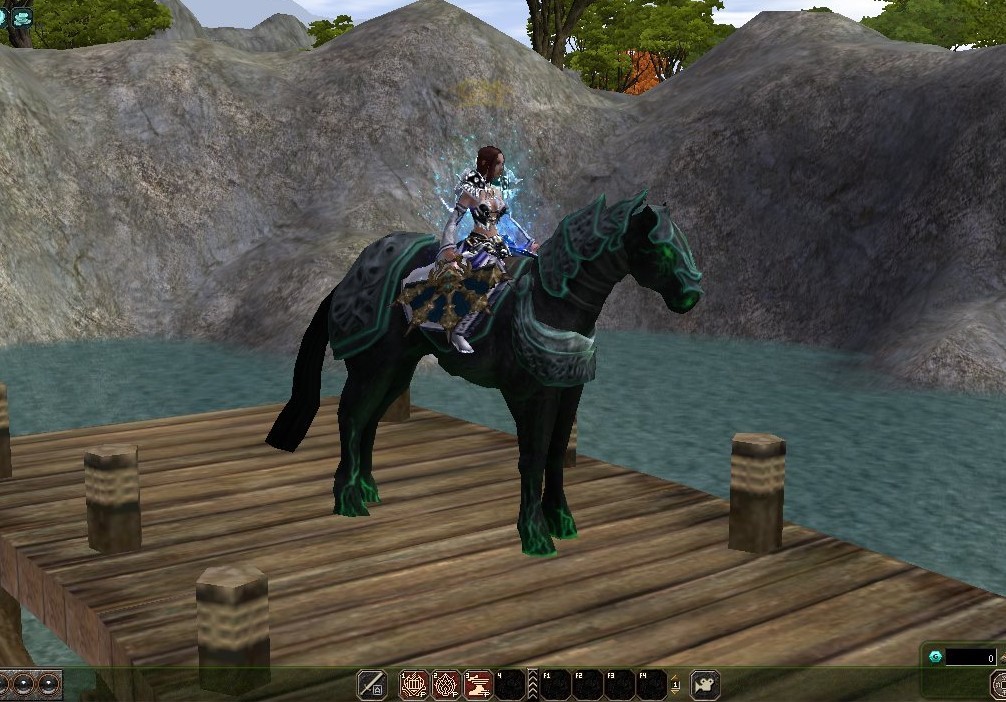
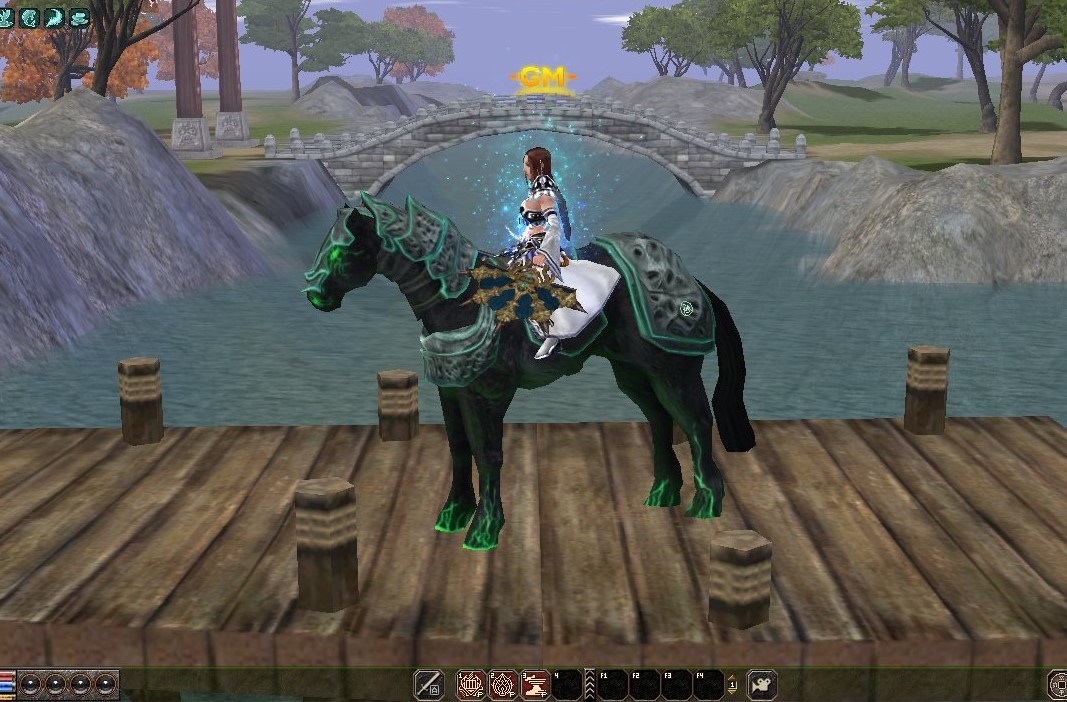
Metin2 oyununda binek sistemleri, oyuncuların karakterlerini daha özelleştirilebilir ve estetik açıdan zengin hale getirmelerini sağlar. Bu sistemle birlikte, Metin2 binek modelleri üzerinde çalışmak isteyen geliştiriciler, hem teknik bilgi hem de yaratıcı tasarım becerisiyle öne çıkar. Bu rehberde, yeni binek modeli oluşturma sürecinde dikkat edilmesi gereken adımları, kullanılan araçları ve yaygın formatları ele alacağız.
Metin2 3D Modelleme süreci, genellikle 3DS Max veya Blender gibi yazılımlarla başlar. Bu programlar sayesinde, binek karakterlerinin 3D modeli tasarlanabilir, dokuları (texture), UV haritaları ve kemik yapısı (rigging) ayarlanabilir. Metin2 model formatı olarak bilinen GR2 ve Granny3D formatları, oyun içi modelleme için kilit rol oynar. Bu formatlara dönüştürme işlemi sırasında GR2 Export ve Import araçları kullanılır.
Yeni binek modeli oluştururken dikkat edilmesi gereken en önemli konulardan biri, modelin Metin2 motoruna uyum sağlamasıdır. Bu nedenle, mesh yapısı doğru tanımlanmalı, bone (iskelet) sistemi uygun şekilde ayarlanmalıdır. Ayrıca, animation (animasyon) uyumu da ihmal edilmemelidir. Bineklerin koşma, yürüme, saldırma gibi hareketlerini doğru şekilde göstermesi, kullanıcı deneyimini artırır.
Metin2 oyununda custom binek model (özel binek modeli) kullanmak isteyen sunucu sahipleri, model replace işlemleri ile mevcut dosyaları yeni modellerle değiştirebilir. Bu süreçte texture ve skin dosyalarının doğru şekilde entegre edilmesi, görsel bütünlüğü korumada kritik öneme sahiptir. UV mapping işlemi, doku uyumu için temel oluşturur.
Geliştiriciler genellikle Metin2 Development ortamında, Metin2Dev veya MartySama gibi araçları kullanarak model testleri yapar. Bu tür platformlar, modelin oyun içi performansını kontrol etmeyi ve gerekli düzenlemeleri hızlıca yapmayı sağlar. EterPack ve benzeri paket sistemleri ile modeller kolayca sunucuya entegre edilebilir.
Sonuç olarak, Metin2 dünyasında yeni binek tasarımı yapmak, sadece estetik değil aynı zamanda teknik detaylara da hakim olmayı gerektiren bir sanattır. 3D modelleme, animasyon ve oyun motoru uyumu gibi konular, bu süreci zenginleştirir. Yaratıcılığınızı sergileyebileceğiniz bu alanda, teknik bilgiyle hayallerinizi bir araya getirebilirsiniz.
Creating a New Mount Model in Metin2: A Guide to 3D Modeling and Development
Metin2 game mount systems allow players to make their characters more customizable and visually appealing. This system allows developers working on Metin2 mount models to stand out with both technical knowledge and creative design skills. In this guide, we will cover the steps to take when creating a new mount model, tools used, and common formats.
Metin2 3D modeling process usually starts with software such as 3DS Max or Blender. With these programs, 3D models of mount characters can be designed, textures, UV maps, and bone structure (rigging) adjusted. The GR2 and Granny3D formats known as Metin2 model format play a key role for in-game modeling. During the conversion to these formats, GR2 Export and Import tools are used.
One of the most important things to consider when creating a new mount model is ensuring compatibility with the Metin2 engine. Therefore, the mesh structure should be defined correctly and the bone system should be set up properly. In addition, animation compatibility should not be neglected. Correctly displaying movements like running, walking, and attacking of mounts increases user experience.
Server owners who want to use custom mount models in Metin2 can replace existing files with new models through model replace operations. In this process, integrating texture and skin files correctly is critical for maintaining visual integrity. The UV mapping process forms the basis for texture compatibility.
Developers often use tools like Metin2Dev or MartySama within the Metin2 Development environment to test models. Such platforms allow checking the in-game performance of the model and making necessary adjustments quickly. Models can easily be integrated into servers via package systems like EterPack.
In conclusion, designing a new mount in the Metin2 world is an art that requires not only aesthetics but also expertise in technical details. Topics like 3D modeling, animation, and game engine compatibility enrich this process. In this field where you can showcase your creativity, you can combine technical knowledge with your imagination.
Metin2'de Yeni Binek Modeli Oluşturmak: 3D Modelleme ve Geliştirme Rehberi
Metin2 oyununda binek sistemleri, oyuncuların karakterlerini daha özelleştirilebilir ve estetik açıdan zengin hale getirmelerini sağlar. Bu sistemle birlikte, Metin2 binek modelleri üzerinde çalışmak isteyen geliştiriciler, hem teknik bilgi hem de yaratıcı tasarım becerisiyle öne çıkar. Bu rehberde, yeni binek modeli oluşturma sürecinde dikkat edilmesi gereken adımları, kullanılan araçları ve yaygın formatları ele alacağız.
Metin2 3D Modelleme süreci, genellikle 3DS Max veya Blender gibi yazılımlarla başlar. Bu programlar sayesinde, binek karakterlerinin 3D modeli tasarlanabilir, dokuları (texture), UV haritaları ve kemik yapısı (rigging) ayarlanabilir. Metin2 model formatı olarak bilinen GR2 ve Granny3D formatları, oyun içi modelleme için kilit rol oynar. Bu formatlara dönüştürme işlemi sırasında GR2 Export ve Import araçları kullanılır.
Yeni binek modeli oluştururken dikkat edilmesi gereken en önemli konulardan biri, modelin Metin2 motoruna uyum sağlamasıdır. Bu nedenle, mesh yapısı doğru tanımlanmalı, bone (iskelet) sistemi uygun şekilde ayarlanmalıdır. Ayrıca, animation (animasyon) uyumu da ihmal edilmemelidir. Bineklerin koşma, yürüme, saldırma gibi hareketlerini doğru şekilde göstermesi, kullanıcı deneyimini artırır.
Metin2 oyununda custom binek model (özel binek modeli) kullanmak isteyen sunucu sahipleri, model replace işlemleri ile mevcut dosyaları yeni modellerle değiştirebilir. Bu süreçte texture ve skin dosyalarının doğru şekilde entegre edilmesi, görsel bütünlüğü korumada kritik öneme sahiptir. UV mapping işlemi, doku uyumu için temel oluşturur.
Geliştiriciler genellikle Metin2 Development ortamında, Metin2Dev veya MartySama gibi araçları kullanarak model testleri yapar. Bu tür platformlar, modelin oyun içi performansını kontrol etmeyi ve gerekli düzenlemeleri hızlıca yapmayı sağlar. EterPack ve benzeri paket sistemleri ile modeller kolayca sunucuya entegre edilebilir.
Sonuç olarak, Metin2 dünyasında yeni binek tasarımı yapmak, sadece estetik değil aynı zamanda teknik detaylara da hakim olmayı gerektiren bir sanattır. 3D modelleme, animasyon ve oyun motoru uyumu gibi konular, bu süreci zenginleştirir. Yaratıcılığınızı sergileyebileceğiniz bu alanda, teknik bilgiyle hayallerinizi bir araya getirebilirsiniz.
Creating a New Mount Model in Metin2: A Guide to 3D Modeling and Development
Metin2 game mount systems allow players to make their characters more customizable and visually appealing. This system allows developers working on Metin2 mount models to stand out with both technical knowledge and creative design skills. In this guide, we will cover the steps to take when creating a new mount model, tools used, and common formats.
Metin2 3D modeling process usually starts with software such as 3DS Max or Blender. With these programs, 3D models of mount characters can be designed, textures, UV maps, and bone structure (rigging) adjusted. The GR2 and Granny3D formats known as Metin2 model format play a key role for in-game modeling. During the conversion to these formats, GR2 Export and Import tools are used.
One of the most important things to consider when creating a new mount model is ensuring compatibility with the Metin2 engine. Therefore, the mesh structure should be defined correctly and the bone system should be set up properly. In addition, animation compatibility should not be neglected. Correctly displaying movements like running, walking, and attacking of mounts increases user experience.
Server owners who want to use custom mount models in Metin2 can replace existing files with new models through model replace operations. In this process, integrating texture and skin files correctly is critical for maintaining visual integrity. The UV mapping process forms the basis for texture compatibility.
Developers often use tools like Metin2Dev or MartySama within the Metin2 Development environment to test models. Such platforms allow checking the in-game performance of the model and making necessary adjustments quickly. Models can easily be integrated into servers via package systems like EterPack.
In conclusion, designing a new mount in the Metin2 world is an art that requires not only aesthetics but also expertise in technical details. Topics like 3D modeling, animation, and game engine compatibility enrich this process. In this field where you can showcase your creativity, you can combine technical knowledge with your imagination.
