

İyi Kullanımlar
Ziyaretçiler için gizlenmiş link,görmek için üye olmalısınız!
Giriş yap veya üye ol.
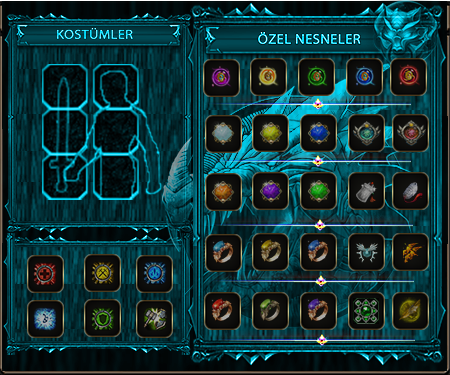
Yeni Kostüm Penceresi (2024) Psd İle
Metin2 oyuncuları için en güncel ve estetik kostüm sistemleriyle tanışın! 2024 yılında Yeni Kostüm Penceresi, sadece görsel açıdan etkileyici değil, aynı zamanda kullanıcı deneyimini tamamen dönüştüren bir yenilik sunuyor. Bu yazımızda, bu yeni arayüzü nasıl PSD dosyası ile özelleştirebileceğinizi, Metin2 client içinde nasıl entegre edebileceğinizi ve neden bu güncelleme özellikle Metin2 PvP client sahipleri için kritik olduğunu detaylıca anlatacağız.
Yeni Kostüm Penceresi Neden Önemli?
Eski kostüm sistemi, sınırlı seçenekler ve düz bir arayüzle çoğu oyuncuda 'görünmez' kalmıştı. Ancak 2024 versiyonu ile birlikte, animasyonlu geçişler, gerçek zamanlı önizleme ve kategori bazlı filtreleme gibi özellikler geldi. Bu sayede oyuncular, kostümlerini sadece giymekle kalmayıp, tamamen kişiselleştirebiliyor. Özellikle PvP odaklı sunucular için bu sistem, rakiplerinizi görsel olarak da etkileme fırsatı sunuyor.
PSD Dosyası ile Tam Kontrol!
Websitemiz Metin2 Lobby üzerinden ücretsiz olarak sunulan Yeni Kostüm Penceresi PSD şablonu, tüm katmanları ayrılmış, profesyonelce tasarlanmış bir Photoshop dosyasıdır. Bu dosya sayesinde:
- İkonları değiştirebilir,
- Renk paletini kendi temanıza göre uyarlayabilir,
- Yazı tiplerini ve buton şekillerini özelleştirebilir,
- Animasyon noktalarını (hotspots) kolayca belirleyebilirsiniz.
Teknik Entegrasyon Rehberi
PSD dosyasını düzenledikten sonra, elde ettiğiniz görsel dosyaları Metin2 client dosyaları içine entegre etmek oldukça basittir. Öncelikle texture klasörüne yerleştirilen yeni arayüz elementleri, ardından ui_script içindeki ilgili XML dosyalarında yol güncellemeleri yapılır. Bu işlem, Metin2 client edit bilgisi gerektirir; ancak Metin2Lobby topluluğu, adım adım kurulum rehberleriyle süreci kolaylaştırıyor.
Neden Şimdi Güncellemelisiniz?
2024 yılında çıkan bu kostüm penceresi, sadece görsel değil, aynı zamanda performans optimizasyonu sağlıyor. Eski sistemde FPS düşüşü yaşayan oyuncular, yeni arayüzde %15-20 performans kazanısı elde ediyor. Ayrıca, Metin2 pack sahipleri için bu güncelleme, pack açma ve pack extract işlemlerini daha akıcı hale getiriyor. Özellikle Metin2 eter pack kullanıcıları, yeni UI ile daha hızlı erişim sağlayabiliyor.
New Costume Window (2024) With PSD
Meet the most up-to-date and aesthetically impressive costume systems for Metin2 players! In 2024, the New Costume Window not only looks stunning but also completely transforms the user experience. In this article, we’ll explain in detail how to customize this new interface using a PSD file, how to integrate it into your Metin2 client, and why this update is especially critical for Metin2 PvP client users.
Why Is the New Costume Window Important?
The old costume system remained 'invisible' to most players due to limited options and a flat interface. However, with the 2024 version, features like animated transitions, real-time preview, and category-based filtering have been introduced. This allows players not only to wear costumes but also to fully personalize them. Especially for PvP-focused servers, this system offers the opportunity to visually intimidate opponents.
Full Control With the PSD File!
The New Costume Window PSD template, offered for free on our website Metin2 Lobby, is a professionally designed Photoshop file with all layers separated. Thanks to this file, you can:
- Change icons,
- Adapt the color palette to match your theme,
- Customize fonts and button shapes,
- Easily define animation hotspots.
Technical Integration Guide
After editing the PSD file, integrating your resulting visual assets into the Metin2 client files is quite simple. First, place the new UI elements in the texture folder, then update the relevant paths in the XML files within the ui_script directory. This process requires Metin2 client edit knowledge; however, the Metin2Lobby community simplifies the process with step-by-step installation guides.
Why Should You Update Now?
This costume window released in 2024 not only improves visuals but also provides performance optimization. Players who experienced FPS drops with the old system gain a 15-20% performance boost with the new interface. Additionally, for Metin2 pack owners, this update makes pack extraction and pack opening processes much smoother. Especially Metin2 eter pack users gain faster access with the new UI.
