

Statü:
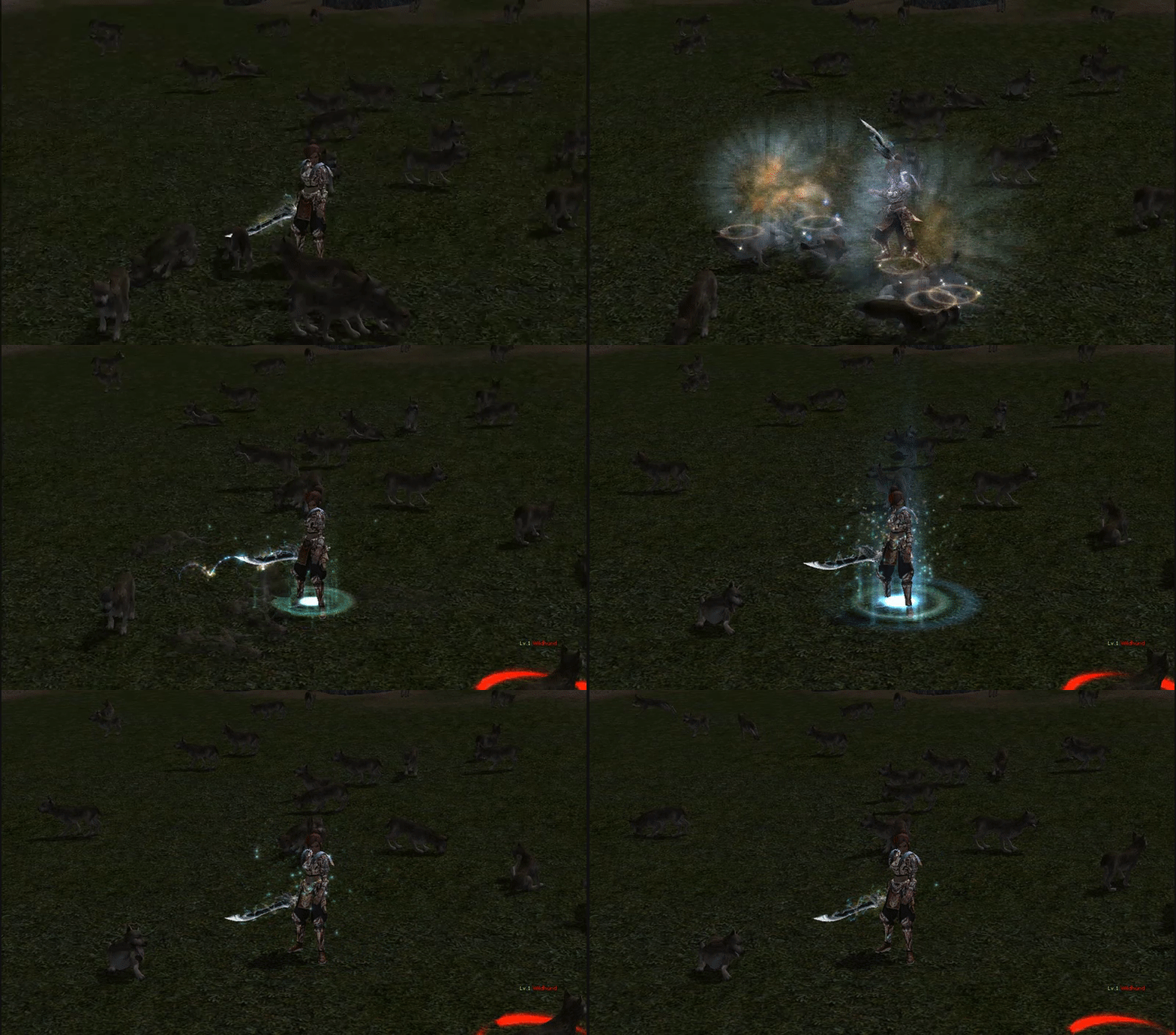
Level Up:

Ziyaretçiler için gizlenmiş link,görmek için üye olmalısınız!
Giriş yap veya üye ol.
Ziyaretçiler için gizlenmiş link,görmek için üye olmalısınız!
Giriş yap veya üye ol.
Yeni Statü&Level Up Efekti - TronTR
Metin2 topluluğu için sürekli yenilik sunan metin2lobby.com, bu kez göz alıcı bir güncelleme ile karşınızda! TronTR adlı özel efekt paketiyle birlikte gelen Yeni Statü ve Level Up Efekti, oyuncuların karakterlerini daha etkileyici ve görsel olarak zengin hale getirmesine olanak tanıyor. Bu güncelleme, sadece estetik bir değişiklik değil; aynı zamanda oyun deneyimini derinleştiren, profesyonel düzeyde tasarlanmış bir içerik sunuyor.
TronTR Efekt Paketi Nedir?
TronTR, Metin2 client dosyalarına entegre edilebilen, neon tarzında ışıklı ve dinamik görsel efektler barındıran bir pakettir. Özellikle level up (seviye atlama) anında karakterin etrafında oluşan ışın efekti, oyuncuların başarılarını kutlamasına yardımcı olurken aynı zamanda görsel açıdan oldukça etkileyicidir. Ayrıca, karakterin statü penceresinde (ALT tuşu ile açılan ekran) görünen yeni arayüz elemanları, oyuncuya daha net ve şık bir bilgi sunar.
Neden TronTR Efekt Paketi?
Mevcut birçok Metin2 pack sadece temel grafik değişiklikleriyle yetiniyor. Ancak TronTR, Metin2 client edit sürecinde özenle hazırlanmış, optimize edilmiş ve uyumluluk testlerinden geçmiş bir çözüm sunar. Hem Metin2 PvP client kullananlar hem de normal oyun modunu sevenler için idealdir. Paket, Metin2 client dosyalarına zarar vermeden kolayca entegre edilebilir ve istenildiğinde geri alınabilir.
Dikkat: Uyumsuzluk Riski!
TronTR paketi, bazı eski Metin2 client yama dosyalarıyla uyumsuz olabilir. Bu nedenle kurulum öncesi Metin2 client patch durumunuzu kontrol etmeniz önerilir. Sorun yaşamanız durumunda metin2lobby.com destek ekibinden yardım alabilirsiniz.
Nasıl Kurulur?
1. Metin2 client indir işlemi yaptıysanız veya mevcut client’ınızı kullanıyorsanız, öncelikle yedeğini alın.
2. TronTR Efekt Paketi sayfasından en son sürümü indirin.
3. Paketi Metin2 pack extract aracıyla veya WinRAR gibi bir programla çıkarın.
4. Çıkarılan dosyaları Metin2 client kurulum klasörünüze (genellikle 'effect' ve 'texture' alt klasörlerine) kopyalayın.
5. Oyunu başlatın ve level up anınızı yaşayın!
Ekstra Özellikler
• Neon mavi ve mor tonlarında dinamik ışık efektleri
• Statü penceresinde kişiselleştirilmiş ikonlar
• Metin2 custom client kullanıcıları için ek konfigürasyon desteği
• Düşük sistem kaynak tüketimi
TronTR, sadece bir efekt paketi değil; Metin2 client skin ve Metin2 client texture dünyasında yeni bir standartı başlatıyor. Hem görsel kalite hem de kullanım kolaylığı açısından Metin2dev client ve Martysama client gibi popüler versiyonlarla tam uyumludur.
'Görünüş, bazen performans kadar önemlidir.'
New Status & Level Up Effect - TronTR
Continuously bringing innovations to the Metin2 community, metin2lobby.com is now here with a stunning update! The TronTR special effect pack introduces a New Status and Level Up Effect that allows players to make their characters more impressive and visually rich. This update is not just an aesthetic change—it offers professionally designed content that deepens the gaming experience.
What Is the TronTR Effect Pack?
TronTR is a pack containing neon-style glowing and dynamic visual effects that can be integrated into Metin2 client files. Especially during the level up moment, the ray effect surrounding the character allows players to celebrate their achievements while being visually striking. Additionally, the new interface elements displayed in the character status window (opened with the ALT key) provide clearer and more stylish information to the player.
Why Choose the TronTR Effect Pack?
Many existing Metin2 packs only offer basic graphic changes. However, TronTR is a carefully crafted, optimized, and compatibility-tested solution developed during the Metin2 client edit process. It is ideal for both Metin2 PvP client users and those who enjoy the standard game mode. The pack can be easily integrated into Metin2 client files without causing damage and can be reverted if desired.
Warning: Compatibility Risk!
The TronTR pack may be incompatible with some older Metin2 client patch files. Therefore, it is recommended to check your Metin2 client patch status before installation. If you encounter issues, you can get support from the metin2lobby.com support team.
How to Install?
1. If you have performed a Metin2 client download or are using your existing client, first create a backup.
2. Download the latest version from the TronTR Effect Pack page.
3. Extract the pack using a Metin2 pack extract tool or programs like WinRAR.
4. Copy the extracted files into your Metin2 client installation folder (usually into 'effect' and 'texture' subfolders).
5. Launch the game and experience your level up moment!
Additional Features
• Dynamic light effects in neon blue and purple tones
• Personalized icons in the status window
• Extra configuration support for Metin2 custom client users
• Low system resource consumption
TronTR is not just an effect pack—it is setting a new standard in the world of Metin2 client skin and Metin2 client texture. It is fully compatible with popular versions such as Metin2dev client and Martysama client, both in terms of visual quality and ease of use.
'Appearance can sometimes be as important as performance.'
