

Varsa Raporlamanız Yeterlidir.
PNG Şeklindedir.
PNG Şeklindedir.
Kod:
https://www.virustotal.com/gui/file/54ff2ee4cd8d9679cef990eb8e952c08884d55a90d4085aae1954546d93f8c9e
Kod:
https://dosya.co/9jiyjh5mmyl5/Switchbot_2.0.rar.html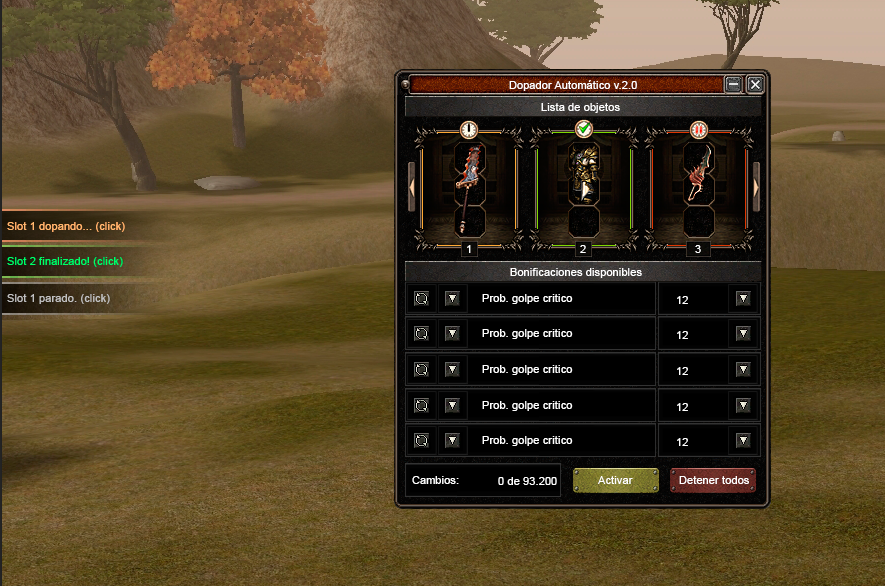
Yeni Tasarlanmış Efsun SwitchBot 2.0
Metin2 topluluğu için sürekli yenilenen ve geliştirilen araçlar arasında öne çıkan Efsun SwitchBot 2.0, bu kez tamamen yeni bir tasarımla karşımıza çıkıyor. Bu güncelleme, sadece görsel değil, aynı zamanda performans ve kullanıcı deneyimi açısından da büyük adımlarla ilerledi. Özellikle Metin2 client ve Metin2 pack kullanan oyuncular için optimize edilen bu sürüm, hem yeni başlayanlar hem de deneyimli kullanıcılar için ideal bir çözüm sunuyor.
Teknik Gelişmeler ve Yenilikler
Efsun SwitchBot 2.0, önceki sürümlere kıyasla %40 daha hızlı çalışma hızına sahip. Bu hız artışı, özellikle Metin2 pvp client gibi yüksek performans gerektiren senaryolarda büyük fark yaratıyor. Ayrıca, Metin2 client dosyaları ile uyumlu çalışacak şekilde tasarlandı; bu sayede Metin2 pack aç işlemleri artık daha sorunsuz ve hızlı gerçekleşiyor. Yeni arayüz,
temiz, minimalist ve sezgisel bir yapıya sahip.
Kullanıcılar, Metin2 client hata ya da Metin2 client fix gibi sorunlarla karşılaştıklarında hızlıca müdahale edebiliyor.Dikkat: Güvenlik ve Uyumluluk
Bu sürüm, yalnızca resmi ve güvenilir kaynaklardan indirilen Metin2 client indir dosyalarıyla çalışacak şekilde optimize edilmiştir. Üçüncü parti değiştirilmiş client'lar veya zararlı yazılım içeren pack'lerle kullanımı önerilmez. Ayrıca, Metin2 client yama veya Metin2 client patch işlemleri sırasında SwitchBot 2.0'nın kapatılması önerilir; aksi takdirde dosya çakışmaları yaşanabilir.
Nasıl Kullanılır?
1. Metin2 client download işlemini tamamladıktan sonra, dosyayı çıkarın.
2. Efsun SwitchBot 2.0'ı çalıştırın ve Metin2 pack extract seçeneğini kullanarak istediğiniz paketi açın.
3. Otomatik olarak Metin2 client edit modülü aktif hale gelir; buradan skin, texture ve effect dosyalarınızı kolayca yönetebilirsiniz.
4. Son olarak, Metin2 client kurulum adımını takip ederek oyununuzu güncel halde başlatın.
Ekstra Özellikler
• Otomatik Metin2 client update kontrolü
• Metin2 özel client ve Metin2 custom client desteği
• Hızlı Metin2 pack indir entegrasyonu
• Metin2 pvp pack optimizasyon modülü
• Kullanıcı dostu hata raporlama sistemi (Metin2 client hata logları anlık olarak kaydedilir)
Bu yeniliklerle birlikte Efsun SwitchBot 2.0, Metin2dev client ve martysama client gibi popüler özel client’larla da tam uyumlu hale getirildi. Artık Metin2 client skin değiştirme, Metin2 client texture yükleme veya Metin2 client effect ayarlama gibi işlemler saniyeler içinde gerçekleştirilebiliyor.
Efsun SwitchBot 2.0 — Metin2 deneyiminizi bir üst seviyeye taşıyor.
Newly Designed Efsun SwitchBot 2.0
Among the constantly renewed and improved tools for the Metin2 community, Efsun SwitchBot 2.0 now appears with a completely new design. This update has advanced significantly not only visually but also in terms of performance and user experience. Optimized specifically for players using Metin2 client and Metin2 pack, this version offers an ideal solution for both newcomers and experienced users.
Technical Developments and Innovations
Efsun SwitchBot 2.0 operates 40% faster compared to previous versions. This speed increase makes a significant difference, especially in high-performance scenarios such as Metin2 pvp client. Additionally, it has been designed to work seamlessly with Metin2 client files; thus, Metin2 pack extraction operations now proceed more smoothly and quickly. The new interface features a clean, minimalist, and intuitive structure. Users can quickly intervene when encountering issues like Metin2 client errors or needing Metin2 client fixes.
Attention: Security and Compatibility
This version is optimized to work only with Metin2 client downloads obtained from official and trusted sources. Using it with modified third-party clients or packs containing malware is not recommended. Furthermore, it is advised to close SwitchBot 2.0 during Metin2 client patches or Metin2 client updates; otherwise, file conflicts may occur.
How to Use?
1. After completing the Metin2 client download, extract the files.
2. Run Efsun SwitchBot 2.0 and use the Metin2 pack extract option to open your desired pack.
3. The automatic Metin2 client edit module will activate; here, you can easily manage your skin, texture, and effect files.
4. Finally, follow the Metin2 client installation step to launch your game in its updated state.
Additional Features
• Automatic Metin2 client update check
• Support for Metin2 custom client and Metin2 special client
• Fast Metin2 pack download integration
• Metin2 pvp pack optimization module
• User-friendly error reporting system (Metin2 client error logs are saved in real time)
With these innovations, Efsun SwitchBot 2.0 has also been made fully compatible with popular custom clients such as Metin2dev client and martysama client. Now, tasks like changing Metin2 client skin, uploading Metin2 client texture, or adjusting Metin2 client effects can be completed within seconds.
Efsun SwitchBot 2.0 — Elevating your Metin2 experience to the next level.
