

Ziyaretçiler için gizlenmiş link,görmek için üye olmalısınız!
Giriş yap veya üye ol.
Ziyaretçiler için gizlenmiş link,görmek için üye olmalısınız!
Giriş yap veya üye ol.
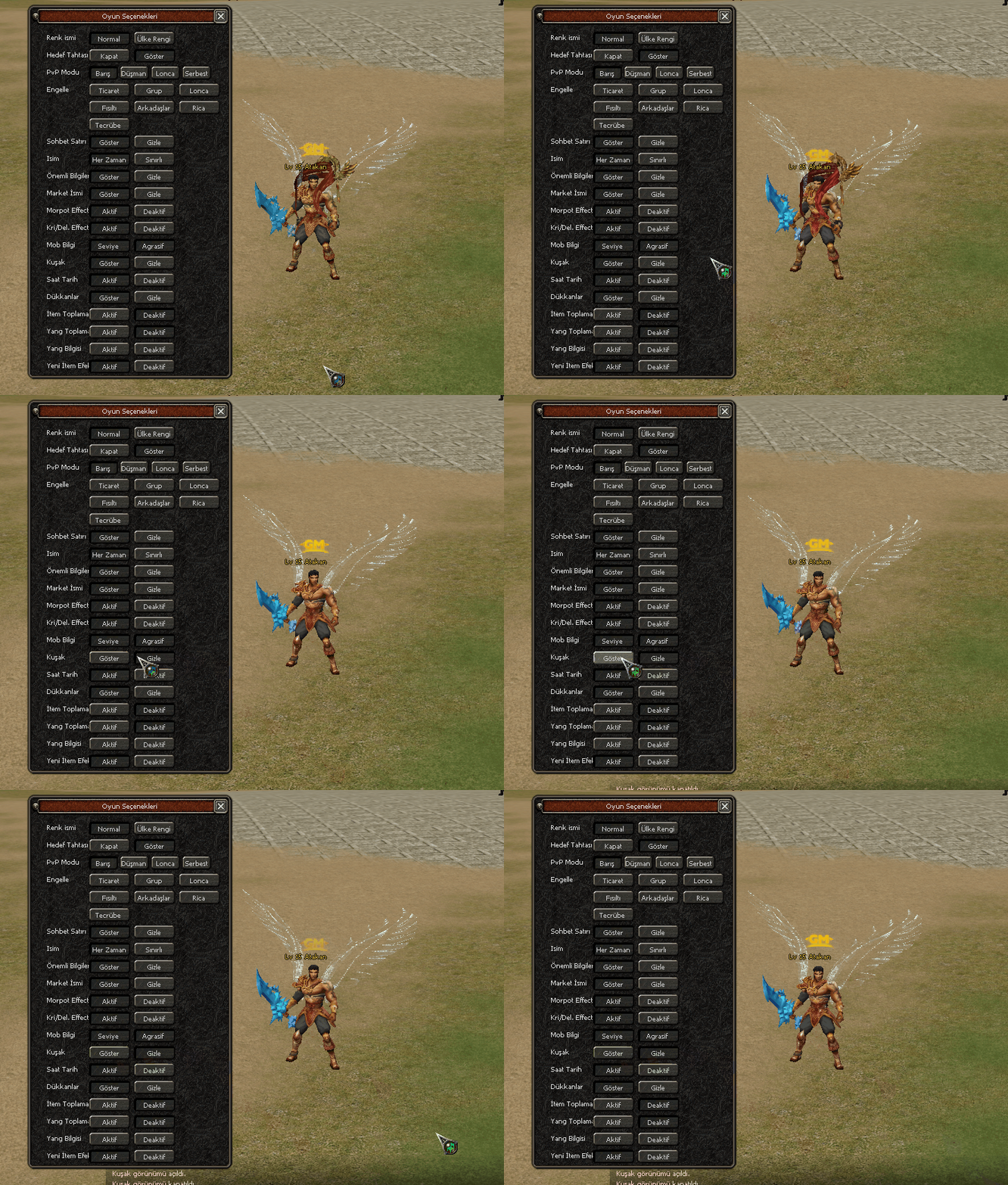
Metin2 Lobby'de Kuşak (Görünüm) Aktif/Deaktif Sistemi
Metin2 özel sunucularında kullanıcı deneyimini artırmak ve oyun içi özelleştirilebilirliği geliştirmek adına geliştirilen Kuşak (Görünüm) Aktif/Deaktif Sistemi, oyuncuların kuşaklarını görünürlük açısından kontrol edebilmelerini sağlar. Bu sistem özellikle PvP odaklı sunucularda büyük bir rol oynar. Kuşaklar, oyuncuların savaş yeteneklerini artıran ve statik bonuslar sunan önemli ögelerdir. Ancak bazen bazı oyuncular kuşaklarını görünür bırakmak istemeyebilir. İşte tam bu noktada C++ ve Python tabanlı bir görünüm kontrol sistemi devreye girer.
Sistem Hakkında Genel Bilgi
Bu sistem, oyuncu seçimine göre kuşağın görünür ya da gizli kalmasını sağlar. C++ tarafında oyun sunucusu üzerinde bir komut veya event tanımlanarak kuşak verisi gönderilirken, Python (Py Root) tarafında ise arayüz üzerinden oyuncuya bir buton sunulur. Bu buton sayesinde oyuncu kuşağının görünüm durumunu anlık olarak değiştirebilir. Sistem aynı zamanda Oyun Seçenekleri menüsüne entegre edilerek kolayca erişilebilir hale getirilir.
Sistem Nasıl Çalışır?
Öncelikle C++ tarafında, kuşak verisi gönderen fonksiyonlara bir kontrol mekanizması eklenir. Bu kontrol, oyuncunun kuşak görünümünün aktif mi yoksa pasif mi olduğunu belirler. Eğer görünüm pasifse, kuşak render edilmez. Bu işlem genellikle game core kısmında yapılır. Aynı zamanda DB Core üzerinden bu ayar oyuncunun karakterine kaydedilir. Böylece sunucu yeniden başlatıldığında dahi ayar korunur.
Python tarafında ise UIScript veya PyGUI kullanılarak bir buton eklenir. Bu butonun işlevi, oyuncunun kuşak görünümünü açıp kapatmaktır. Tıklama anında bir paket gönderilir ve C++ tarafında bu bilgi işlenir. Butonun konumu genellikle Oyun Seçenekleri (Options) menüsünde yer alır. Bu sayede oyuncu sisteme kolayca ulaşabilir.
Neden Bu Sistem Gereklidir?
Metin2 özel sunucularında estetik ve strateji arasında bir denge kurmak önemlidir. Kuşaklar, hem güçlü bonuslar sunar hem de görsel açıdan karakteri farklılaştırır. Ancak bazı oyuncular kuşaklarının rakipleri tarafından görülmesini istemez. Özellikle PvP savaşları sırasında kuşak bonusları hakkında bilgi sahibi olunması, stratejik bir avantaj sağlayabilir. Bu nedenle görünüm kontrolü, oyuncuların tercihine bırakılan bir özelliktir.
Teknik Entegrasyon Adımları
1. Game Core dosyalarında kuşak verisi gönderen fonksiyonlar düzenlenir.
2. Oyuncu veritabanında kuşak görünüm durumu için bir alan oluşturulur.
3. Python GUI tarafında buton tanımlanır ve tıklama olayı C++ tarafına veri gönderir.
4. Sunucu tarafında bu veri işlenir ve kuşak görünümü güncellenir.
Sonuç
Kuşak görünüm kontrol sistemi, Metin2 özel sunucularında kullanıcı dostu bir sistemdir. Hem C++ hem de Python bilgisi gerektiren bu yapı, geliştiricilere genişletilebilir bir altyapı sunar. Oyuncuların kişiselleştirme ihtiyaçlarını karşılayan bu sistem, sunucu popülerliğini artırabilir.
Generation (Visual) Activate/Deactivate System at Metin2 Lobby
In order to enhance the user experience and improve in-game customization in Metin2 private servers, the Generation (Visual) Activate/Deactivate System allows players to control the visibility of their generations. This system plays a significant role especially on PvP-oriented servers. Generations are important elements that provide static bonuses and increase player combat abilities. However, some players may prefer not to display their generations at certain times. At this point, a visual control system based on C++ and Python comes into play.
General Information About the System
This system enables the generation to be visible or hidden according to the player's choice. On the C++ side, by defining a command or event on the game server, the generation data is sent; whereas, on the Python (Py Root) side, a button is presented to the player through the interface. With this button, the player can instantly change the visibility status of their generation. Additionally, the system is integrated into the Game Options menu for easy access.
How Does the System Work?
Firstly, on the C++ side, a control mechanism is added to functions that send generation data. This control determines whether the generation visibility is active or inactive. If the visibility is off, the generation is not rendered. This process usually occurs within the game core. Meanwhile, via the DB Core, this setting is saved to the player’s character so that it remains intact even after the server restarts.
On the Python side, a button is added using UIScript or PyGUI. The function of this button is to toggle the generation visibility on/off. Upon clicking, a packet is sent and processed on the C++ side. The button is typically placed in the Game Options menu, allowing the player to easily access the system.
Why Is This System Necessary?
In Metin2 private servers, balancing aesthetics and strategy is crucial. Generations offer both strong bonuses and visual differentiation for characters. However, some players do not want their generations to be seen by opponents. Especially during PvP battles, knowing about the generation bonuses can provide strategic advantages. Therefore, visual control is left as a feature for the player's preference.
Technical Integration Steps
1. Adjust the functions in Game Core files that send generation data.
2. Create a field in the player database to store the generation visibility status.
3. Define a button in the Python GUI and make its click event send data to the C++ side.
4. Process this data on the server side and update the generation visibility accordingly.
Conclusion
The generation visibility control system is a user-friendly feature in Metin2 private servers. Requiring both C++ and Python knowledge, this structure provides developers with an extensible framework. Meeting the personalization needs of players, this system can also boost the popularity of the server.
