

Öncelikle Bu Konu Daha Önce Paylaşılmışmı Bilmiyorum Fakat Son Zamanlarda Herkesin Bunu Aradağını Bulamadığını Ve Yapamadığını Farkettim. Ve Turkmmo Halkına Faydalı Olabileceğini Düşünerek Bu Konuyu Açma Gereğini Duydum. Arşiv'imde Renkli Yazı Ve + CH Değiştirme Sistemi Vardı. Sizlere Bugün CH İsimlerini Renklendirmeyi Göstereceğim Arkadaşlar. Fazla Uzatmadan Konuya Geçiyorum.
İlk Olarak Kanıt Olarak Fotoğraf 1 :

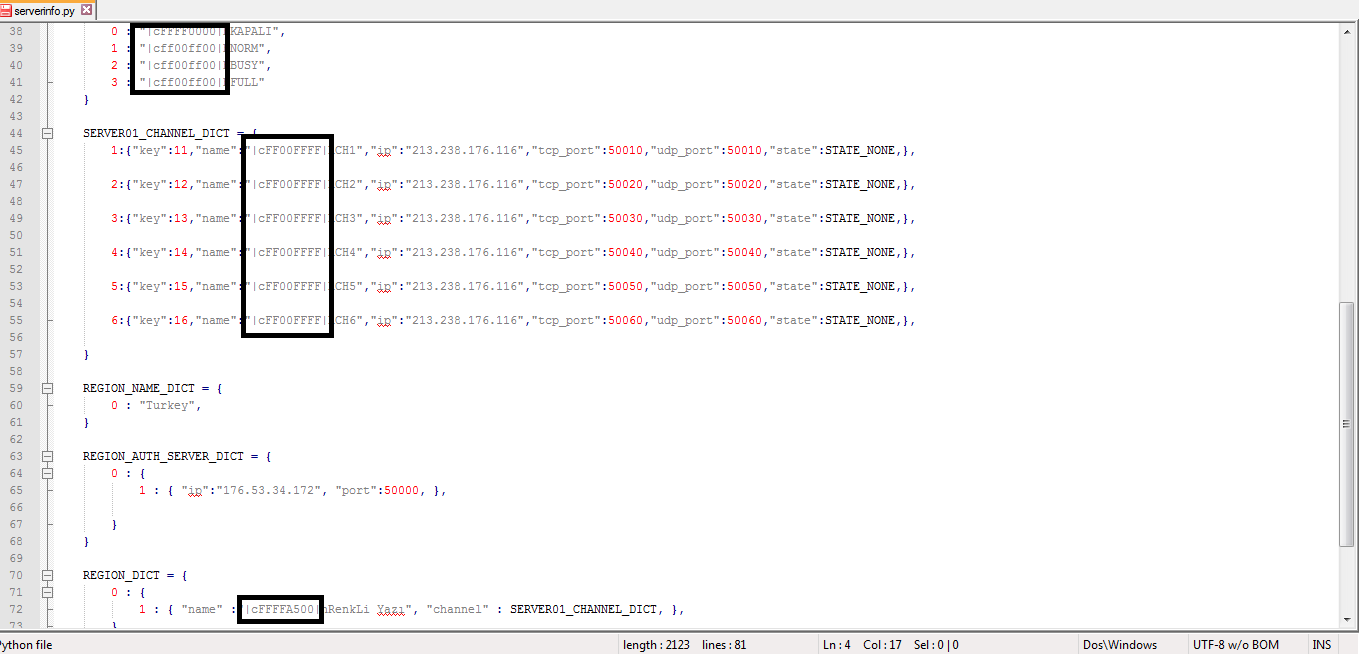
Arkadaşlar Tek Yapmanız Gereken Birazdan Vereceğim Link'deki Serverinfo.py'deki İp Yerlerini Kendinize Göre Doldurun.
PHP- Kodu:
import appimport locale
import debugInfo
CHINA_PORT = 50000
def BuildServerList(orderList):
retMarkAddrDict = {}
retAuthAddrDict = {}
retRegion0 = {}
ridx = 1
for region, auth, mark, channels in orderList:
cidx = 1
channelDict = {}
for channel in channels:
key = ridx * 10 + cidx
channel["key"] = key
channelDict[cidx] = channel
cidx += 1
region["channel"] = channelDict
retRegion0[ridx] = region
retAuthAddrDict[ridx] = auth
retMarkAddrDict[ridx*10] = mark
ridx += 1
return retRegion0, retAuthAddrDict, retMarkAddrDict
app.ServerName = None
if (locale.IsEUROPE() and app.GetLocalePath() == "locale/de"):
STATE_NONE = "|cFFFF0000|hKAPALI"
STATE_DICT = {
0 : "|cFFFF0000|hKAPALI",
1 : "|cff00ff00|hNORM",
2 : "|cff00ff00|hBUSY",
3 : "|cff00ff00|hFULL"
}
SERVER01_CHANNEL_DICT = {
1:{"key":11,"name":"|cFF00FFFF|hCH1","ip":"213.238.176.116","tcp_port":50010,"udp_port":50010,"state":STATE_NONE,},
2:{"key":12,"name":"|cFF00FFFF|hCH2","ip":"213.238.176.116","tcp_port":50020,"udp_port":50020,"state":STATE_NONE,},
3:{"key":13,"name":"|cFF00FFFF|hCH3","ip":"213.238.176.116","tcp_port":50030,"udp_port":50030,"state":STATE_NONE,},
4:{"key":14,"name":"|cFF00FFFF|hCH4","ip":"213.238.176.116","tcp_port":50040,"udp_port":50040,"state":STATE_NONE,},
5:{"key":15,"name":"|cFF00FFFF|hCH5","ip":"213.238.176.116","tcp_port":50050,"udp_port":50050,"state":STATE_NONE,},
6:{"key":16,"name":"|cFF00FFFF|hCH6","ip":"213.238.176.116","tcp_port":50060,"udp_port":50060,"state":STATE_NONE,},
}
REGION_NAME_DICT = {
0 : "Turkey",
}
REGION_AUTH_SERVER_DICT = {
0 : {
1 : { "ip":"176.53.34.172", "port":50000, },
}
}
REGION_DICT = {
0 : {
1 : { "name" :"|cFFFFA500|hRenkLi Yazı", "channel" : SERVER01_CHANNEL_DICT, },
},
}
MARKADDR_DICT = {
10 : { "ip" : "176.53.34.172", "tcp_port" : 50010, "mark" : "10.tga", "symbol_path" : "10", },
}
TESTADDR = { "ip" : "176.53.34.172", "tcp_port" : 50000, "udp_port" : 50000, }
​Skype: SunucuDostum.Batuhan
Virüs Total :
Yorumlarınızı Bekliyorum Arkadaşlar İyi Forumlar
Metin2 Lobby'de Renkli CH İsimleri ve Oyun İsimleri Nasıl Yazılır?
CH İsimleri ve Oyun İsimleri gibi özel metinler Metin2 sunucularında farklı ve dikkat çekici görünmek isteyen oyuncular için önemli bir özelliktir. Özellikle özel client veya pack kullanan oyuncular, bu isimleri renkli ve stilli yazarak hem estetik hem de sosyal avantaj sağlarlar. Bu yazıda Metin2Lobby üzerinden nasıl renkli CH isimleri ve oyun isimleri oluşturulacağını detaylıca ele alacağız.
Renkli Yazı Nedir?
BBCode sistemine dayalı renkli yazı, oyuncuların karakter isimleri, guild isimleri veya diğer metinlerde belirli renkleri ve stilleri kullanabilmesini sağlar. Bu özellik genellikle custom client ve pack editörleri tarafından desteklenir. Metin2 oyununda bu özelliği aktif edebilmek için bazı ayarlar yapılması gerekir.
CH İsimleri Renkli Yazma Adımları[/BR]
1. Client dosyanızın renkli yazı özelliğini desteklediğinden emin olun. Bu özellikle Metin2Dev Client ve Martysama Client gibi editlenmiş clientlerde bulunur.
2. Karakter ismi seçerken ya da guild kurarken BBCode benzeri sistemlerle renk tanımlamaları yapılır.
3. Örnek: Renkli İsim
Oyun İsimlerinde Renk Kullanımı
Metin2'de oyun isimleri, guild isimleri, chat mesajları gibi alanlarda da renk kullanımı mümkündür. Bunun için client tarafında uygun font ve sistem desteği gereklidir. Bazı pack dosyalarında bu sistem zaten hazır olarak gelir.
Renkli Yazı İçin Gerekli Ayarlar
- Metin2 Client dosyalarında 'locale' klasörüne girilir.
- 'game' klasöründe bulunan 'string.txt' veya 'name_attribute.txt' gibi dosyalarda renk kodlamaları tanımlanır.
- Bazı pack editörleri bu işlemleri otomatikleştirir.
Popüler Renk Kodları
- Kırmızı: örnek
- Mavi: örnek
- Yeşil: örnek
- Turuncu: örnek
- Mor: örnek
- Sarı: örnek
Metin2lobby.com'da Desteklenen Client ve Pack Türleri
Sitemizde sunulan Metin2 Client ve Pack dosyalarının çoğu renkli isim özelliğini desteklemektedir. Özellikle PVP Client, Eter Pack, Custom Client ve Dev Client sürümlerinde bu özellik aktiftir.
Hatalar ve Çözümler
Renkli yazı sistemi bazı client sürümlerinde sorun çıkarabilir. Bu durumda client patch veya fix işlemleri gerekebilir. Sitemizde Metin2 Client Fix ve Update konularında da destek sağlanmaktadır.
Sonuç
Metin2 Lobby üzerinden renkli CH isimleri ve oyun isimleri oluşturmak artık daha kolay. Uygun client ve pack kullanarak karakterinize özel dokunuşlar ekleyebilirsiniz. Daha fazla bilgi ve paylaşımlar için sitemizi takip etmeye devam edin.
Metin2 Lobby: How to Write Colored CH Names and Game Names?
CH Names and Game Names are important features for players who want to stand out with unique and eye-catching appearances in Metin2 servers. Especially players using custom client or pack benefit from colorful and stylish names both aesthetically and socially. In this article, we will explain in detail how to create colored CH names and game names via Metin2Lobby.
What Is Colored Text?
BBCode-based colored text allows players to use specific colors and styles in character names, guild names, or other texts. This feature is typically supported by custom client and pack editors. To enable this feature in Metin2, certain configurations must be made.
Steps to Write Colored CH Names
1. Ensure your client file supports colored text. This feature is commonly found in modified clients like Metin2Dev Client and Martysama Client.
2. While choosing a character name or creating a guild, use systems similar to BBCode to define color settings.
3. Example: Colorf Name
Using Colors in Game Names
Colors can also be used in game names, guild names, chat messages, etc. within Metin2. For this, appropriate font and system support must be available on the client side. Some pack files come with this system pre-configured.
Required Settings for Colored Text
- Enter the 'locale' folder in your Metin2 Client files.
- Define color codes in files such as 'string.txt' or 'name_attribute.txt' located in the 'game' folder.
- Some pack editors automate these processes.
Popular Color Codes
- Red: example
- Blue: example
- Green: example
- Orange: example
- Purple: example
- Yellow: example
Supported Client and Pack Types on Metin2lobby.com
Most Metin2 Client and Pack files offered on our site support colored names. Particularly, PVP Client, Eter Pack, Custom Client, and Dev Client versions have this feature active.
Errors and Solutions
The colored text system may cause issues in some client versions. In such cases, client patch or fix operations may be required. Our site also provides support regarding Metin2 Client Fix and Update.
Conclusion
Creating colored CH names and game names via Metin2 Lobby is now easier. You can add personalized touches to your character by using suitable client and pack. Continue following our site for more information and sharing.
İlk Olarak Kanıt Olarak Fotoğraf 1 :
Arkadaşlar Tek Yapmanız Gereken Birazdan Vereceğim Link'deki Serverinfo.py'deki İp Yerlerini Kendinize Göre Doldurun.
PHP- Kodu:
import appimport locale
import debugInfo
CHINA_PORT = 50000
def BuildServerList(orderList):
retMarkAddrDict = {}
retAuthAddrDict = {}
retRegion0 = {}
ridx = 1
for region, auth, mark, channels in orderList:
cidx = 1
channelDict = {}
for channel in channels:
key = ridx * 10 + cidx
channel["key"] = key
channelDict[cidx] = channel
cidx += 1
region["channel"] = channelDict
retRegion0[ridx] = region
retAuthAddrDict[ridx] = auth
retMarkAddrDict[ridx*10] = mark
ridx += 1
return retRegion0, retAuthAddrDict, retMarkAddrDict
app.ServerName = None
if (locale.IsEUROPE() and app.GetLocalePath() == "locale/de"):
STATE_NONE = "|cFFFF0000|hKAPALI"
STATE_DICT = {
0 : "|cFFFF0000|hKAPALI",
1 : "|cff00ff00|hNORM",
2 : "|cff00ff00|hBUSY",
3 : "|cff00ff00|hFULL"
}
SERVER01_CHANNEL_DICT = {
1:{"key":11,"name":"|cFF00FFFF|hCH1","ip":"213.238.176.116","tcp_port":50010,"udp_port":50010,"state":STATE_NONE,},
2:{"key":12,"name":"|cFF00FFFF|hCH2","ip":"213.238.176.116","tcp_port":50020,"udp_port":50020,"state":STATE_NONE,},
3:{"key":13,"name":"|cFF00FFFF|hCH3","ip":"213.238.176.116","tcp_port":50030,"udp_port":50030,"state":STATE_NONE,},
4:{"key":14,"name":"|cFF00FFFF|hCH4","ip":"213.238.176.116","tcp_port":50040,"udp_port":50040,"state":STATE_NONE,},
5:{"key":15,"name":"|cFF00FFFF|hCH5","ip":"213.238.176.116","tcp_port":50050,"udp_port":50050,"state":STATE_NONE,},
6:{"key":16,"name":"|cFF00FFFF|hCH6","ip":"213.238.176.116","tcp_port":50060,"udp_port":50060,"state":STATE_NONE,},
}
REGION_NAME_DICT = {
0 : "Turkey",
}
REGION_AUTH_SERVER_DICT = {
0 : {
1 : { "ip":"176.53.34.172", "port":50000, },
}
}
REGION_DICT = {
0 : {
1 : { "name" :"|cFFFFA500|hRenkLi Yazı", "channel" : SERVER01_CHANNEL_DICT, },
},
}
MARKADDR_DICT = {
10 : { "ip" : "176.53.34.172", "tcp_port" : 50010, "mark" : "10.tga", "symbol_path" : "10", },
}
TESTADDR = { "ip" : "176.53.34.172", "tcp_port" : 50000, "udp_port" : 50000, }
​Skype: SunucuDostum.Batuhan
Virüs Total :
Ziyaretçiler için gizlenmiş link,görmek için üye olmalısınız!
Giriş yap veya üye ol.
Yorumlarınızı Bekliyorum Arkadaşlar İyi Forumlar
Metin2 Lobby'de Renkli CH İsimleri ve Oyun İsimleri Nasıl Yazılır?
CH İsimleri ve Oyun İsimleri gibi özel metinler Metin2 sunucularında farklı ve dikkat çekici görünmek isteyen oyuncular için önemli bir özelliktir. Özellikle özel client veya pack kullanan oyuncular, bu isimleri renkli ve stilli yazarak hem estetik hem de sosyal avantaj sağlarlar. Bu yazıda Metin2Lobby üzerinden nasıl renkli CH isimleri ve oyun isimleri oluşturulacağını detaylıca ele alacağız.
Renkli Yazı Nedir?
BBCode sistemine dayalı renkli yazı, oyuncuların karakter isimleri, guild isimleri veya diğer metinlerde belirli renkleri ve stilleri kullanabilmesini sağlar. Bu özellik genellikle custom client ve pack editörleri tarafından desteklenir. Metin2 oyununda bu özelliği aktif edebilmek için bazı ayarlar yapılması gerekir.
CH İsimleri Renkli Yazma Adımları[/BR]
1. Client dosyanızın renkli yazı özelliğini desteklediğinden emin olun. Bu özellikle Metin2Dev Client ve Martysama Client gibi editlenmiş clientlerde bulunur.
2. Karakter ismi seçerken ya da guild kurarken BBCode benzeri sistemlerle renk tanımlamaları yapılır.
3. Örnek: Renkli İsim
Oyun İsimlerinde Renk Kullanımı
Metin2'de oyun isimleri, guild isimleri, chat mesajları gibi alanlarda da renk kullanımı mümkündür. Bunun için client tarafında uygun font ve sistem desteği gereklidir. Bazı pack dosyalarında bu sistem zaten hazır olarak gelir.
Renkli Yazı İçin Gerekli Ayarlar
- Metin2 Client dosyalarında 'locale' klasörüne girilir.
- 'game' klasöründe bulunan 'string.txt' veya 'name_attribute.txt' gibi dosyalarda renk kodlamaları tanımlanır.
- Bazı pack editörleri bu işlemleri otomatikleştirir.
Popüler Renk Kodları
- Kırmızı: örnek
- Mavi: örnek
- Yeşil: örnek
- Turuncu: örnek
- Mor: örnek
- Sarı: örnek
Metin2lobby.com'da Desteklenen Client ve Pack Türleri
Sitemizde sunulan Metin2 Client ve Pack dosyalarının çoğu renkli isim özelliğini desteklemektedir. Özellikle PVP Client, Eter Pack, Custom Client ve Dev Client sürümlerinde bu özellik aktiftir.
Hatalar ve Çözümler
Renkli yazı sistemi bazı client sürümlerinde sorun çıkarabilir. Bu durumda client patch veya fix işlemleri gerekebilir. Sitemizde Metin2 Client Fix ve Update konularında da destek sağlanmaktadır.
Sonuç
Metin2 Lobby üzerinden renkli CH isimleri ve oyun isimleri oluşturmak artık daha kolay. Uygun client ve pack kullanarak karakterinize özel dokunuşlar ekleyebilirsiniz. Daha fazla bilgi ve paylaşımlar için sitemizi takip etmeye devam edin.
Metin2 Lobby: How to Write Colored CH Names and Game Names?
CH Names and Game Names are important features for players who want to stand out with unique and eye-catching appearances in Metin2 servers. Especially players using custom client or pack benefit from colorful and stylish names both aesthetically and socially. In this article, we will explain in detail how to create colored CH names and game names via Metin2Lobby.
What Is Colored Text?
BBCode-based colored text allows players to use specific colors and styles in character names, guild names, or other texts. This feature is typically supported by custom client and pack editors. To enable this feature in Metin2, certain configurations must be made.
Steps to Write Colored CH Names
1. Ensure your client file supports colored text. This feature is commonly found in modified clients like Metin2Dev Client and Martysama Client.
2. While choosing a character name or creating a guild, use systems similar to BBCode to define color settings.
3. Example: Colorf Name
Using Colors in Game Names
Colors can also be used in game names, guild names, chat messages, etc. within Metin2. For this, appropriate font and system support must be available on the client side. Some pack files come with this system pre-configured.
Required Settings for Colored Text
- Enter the 'locale' folder in your Metin2 Client files.
- Define color codes in files such as 'string.txt' or 'name_attribute.txt' located in the 'game' folder.
- Some pack editors automate these processes.
Popular Color Codes
- Red: example
- Blue: example
- Green: example
- Orange: example
- Purple: example
- Yellow: example
Supported Client and Pack Types on Metin2lobby.com
Most Metin2 Client and Pack files offered on our site support colored names. Particularly, PVP Client, Eter Pack, Custom Client, and Dev Client versions have this feature active.
Errors and Solutions
The colored text system may cause issues in some client versions. In such cases, client patch or fix operations may be required. Our site also provides support regarding Metin2 Client Fix and Update.
Conclusion
Creating colored CH names and game names via Metin2 Lobby is now easier. You can add personalized touches to your character by using suitable client and pack. Continue following our site for more information and sharing.


