

Calliope2'den Alıntı..
Test etmedim eksik olursa konu altından bildirin lütfen.
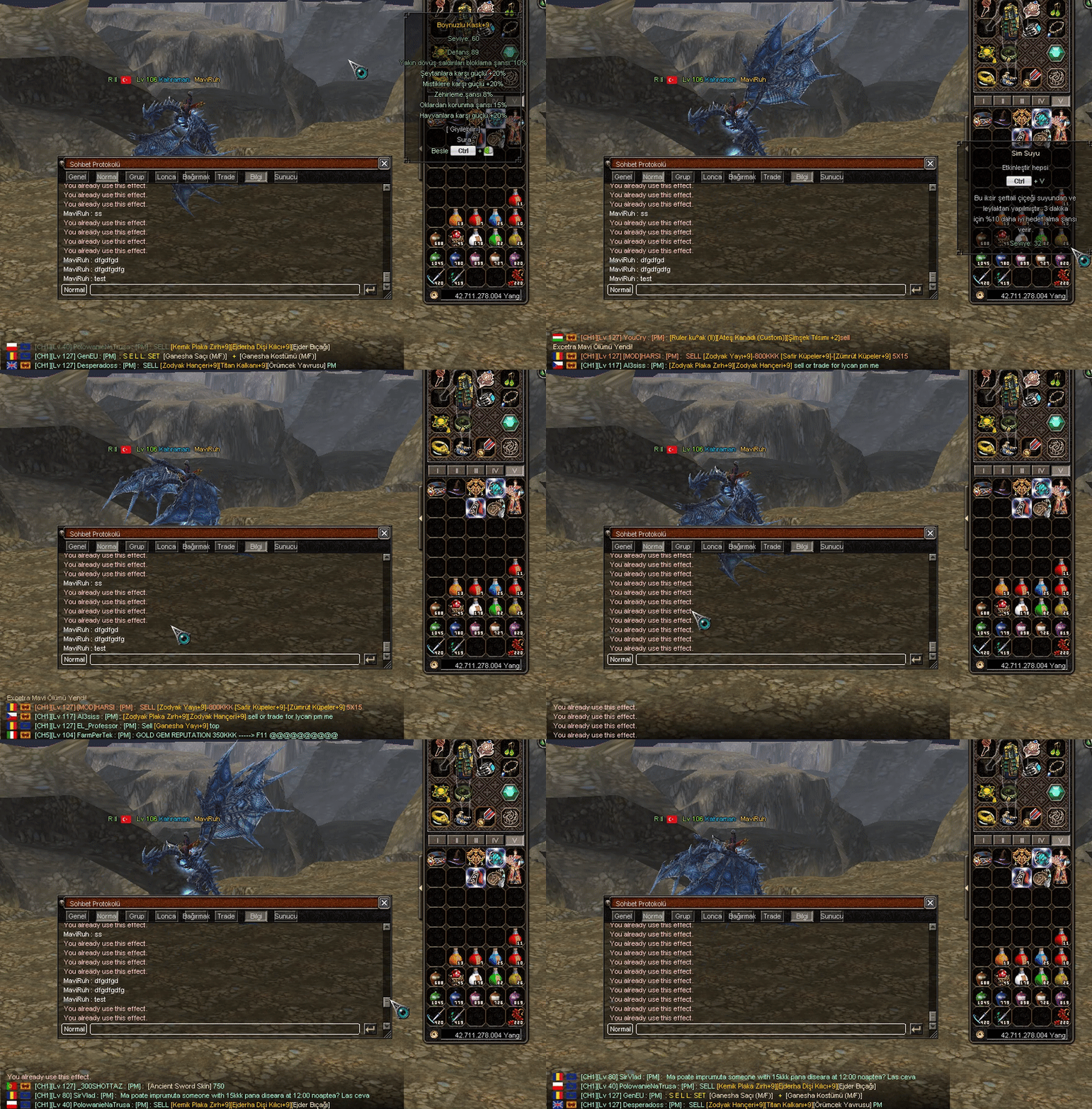
Test etmedim eksik olursa konu altından bildirin lütfen.
<blockquote data-attributes="" data-quote="" data-source="" class="bbCodeBlock bbCodeBlock--expandable bbCodeBlock--quote js-expandWatch">
Kod:
# EKLE WAIT_TASTE Yavaş ol.
Kod:
# ARAT onPressKeyDict[app.DIK_V] = lambda state = "SKILL": self.interface.ToggleCharacterWindow(state) # DEĞİŞTİR onPressKeyDict[app.DIK_V] = lambda : self.__PressVKey() # ARAT self.lastPKModeSendedTime = 0 # ALTINA EKLE self.utilizareTaste = app.GetTime() + 1 # ARAT def __PressJKey(self): # ÜSTÜNE EKLE def __PressVKey(self): if app.GetTime() <= self.utilizareTaste: chat.AppendChat(chat.CHAT_TYPE_INFO, uiScriptLocale.WAIT_TASTE) return if app.IsPressed(app.DIK_LCONTROL) or app.IsPressed(app.DIK_RCONTROL): for i in xrange(player.INVENTORY_PAGE_SIZE * 5): # Sayfa if player.GetItemIndex(i) in (71027, 71028, 71029, 71030, 50802,51002,50092,71044,71045,50813,50814,50815,50816,50817,50818,50819,50820,50821,50822,50823,50824,50825,50826): net.SendItemUsePacket(i) if player.GetItemIndex(i) == 50093: if app.GetTime() > self.utilizareSushi: net.SendItemUsePacket(i) self.utilizareSushi = app.GetTime() + 600 if player.GetItemIndex(i) == 50094: if app.GetTime() > self.utilizareCatFish: net.SendItemUsePacket(i) self.utilizareCatFish = app.GetTime() + 600 if player.GetItemIndex(i) == 27102: if app.GetTime() > self.utilizareVerde: net.SendItemUsePacket(i) self.utilizareVerde = app.GetTime() + 600 if player.GetItemIndex(i) == 27105: if app.GetTime() > self.utilizareMov: net.SendItemUsePacket(i) self.utilizareMov = app.GetTime() + 600 if player.GetItemIndex(i) == 27870: if app.GetTime() > self.utilizareGrilledEel: net.SendItemUsePacket(i) self.utilizareGrilledEel = app.GetTime() + 600 if player.GetItemIndex(i) == 27873: if app.GetTime() > self.utilizareGrilledRudd: net.SendItemUsePacket(i) self.utilizareGrilledRudd = app.GetTime() + 600 self.utilizareTaste = app.GetTime() + 1 else: state = "SKILL" self.interface.ToggleCharacterWindow(state)
Kod:
# add WAIT_TASTE You can not push that fast.
Kod:
# search onPressKeyDict[app.DIK_V] = lambda state = "SKILL": self.interface.ToggleCharacterWindow(state) # change onPressKeyDict[app.DIK_V] = lambda : self.__PressVKey() # search self.lastPKModeSendedTime = 0 # add below self.utilizareTaste = app.GetTime() + 1 # search def __PressJKey(self): # add above def __PressVKey(self): if app.GetTime() <= self.utilizareTaste: chat.AppendChat(chat.CHAT_TYPE_INFO, uiScriptLocale.WAIT_TASTE) return if app.IsPressed(app.DIK_LCONTROL) or app.IsPressed(app.DIK_RCONTROL): for i in xrange(player.INVENTORY_PAGE_SIZE * 5): # Sayfa if player.GetItemIndex(i) in (71027, 71028, 71029, 71030, 50802,51002,50092,71044,71045,50813,50814,50815,50816,50817,50818,50819,50820,50821,50822,50823,50824,50825,50826): net.SendItemUsePacket(i) if player.GetItemIndex(i) == 50093: if app.GetTime() > self.utilizareSushi: net.SendItemUsePacket(i) self.utilizareSushi = app.GetTime() + 600 if player.GetItemIndex(i) == 50094: if app.GetTime() > self.utilizareCatFish: net.SendItemUsePacket(i) self.utilizareCatFish = app.GetTime() + 600 if player.GetItemIndex(i) == 27102: if app.GetTime() > self.utilizareVerde: net.SendItemUsePacket(i) self.utilizareVerde = app.GetTime() + 600 if player.GetItemIndex(i) == 27105: if app.GetTime() > self.utilizareMov: net.SendItemUsePacket(i) self.utilizareMov = app.GetTime() + 600 if player.GetItemIndex(i) == 27870: if app.GetTime() > self.utilizareGrilledEel: net.SendItemUsePacket(i) self.utilizareGrilledEel = app.GetTime() + 600 if player.GetItemIndex(i) == 27873: if app.GetTime() > self.utilizareGrilledRudd: net.SendItemUsePacket(i) self.utilizareGrilledRudd = app.GetTime() + 600 self.utilizareTaste = app.GetTime() + 1 else: state = "SKILL" self.interface.ToggleCharacterWindow(state)Effective Button / TUŞA BAS ETKİLER YÜKLENSİN [ PYTHON ]
Metin2 özel sunucu geliştirme sürecinde, kullanıcı arayüzü (UI) üzerinde etkileşimli öğeler oluşturmak büyük önem taşır. Özellikle oyuncuların doğrudan etkileşimde bulunduğu butonlar, efektler ve animasyonlar, deneyimi zenginleştirir. Bu yazıda, Python tabanlı UI sistemlerinde butonlara tıklanma anında etki yüklemek üzerine odaklanacağız. Bu yöntem, uiscript, py root[/COORD], ve diğer Python GUI yapıları ile kolayca entegre edilebilir.
Python ile UI Buton Etkileşimleri
Metin2 özel sunucularında genellikle uiscript dosyaları aracılığıyla kullanıcı arayüzü tasarlanır. Ancak bazı durumlarda, butonlara tıklanma anında özel ses efekti, ekran efekti veya animasyon yüklemek isteyebilirsiniz. Bu tarz geliştirmeler, oyuncu deneyimini artırır ve daha profesyonel bir sistem sunmanızı sağlar. Python ile yazılmış GUI sistemlerinde bu etkileri buton tıklaması esnasında tetiklemek mümkündür.
Butona Tıklanma Etkisi Nasıl Eklenir?
Öncelikle, buton nesnesini tanımlarken bir 'click handler' fonksiyonu atamalısınız. Bu fonksiyon, butona tıklandığında çalışacak olan komutları içerir. Örneğin:
def on_button_click():
load_effect('path/to/effect_file.eft')
play_sound('path/to/sound.wav')
Button.add_event('MOUSE_LEFT_CLICK', on_button_click)
Etki Dosyası Yükleme
Yukarıdaki örnekte, load_effect() fonksiyonu özel bir efekt dosyasının yüklenmesini sağlar. Bu dosya genellikle .eft uzantılıdır ve Metin2 sistemlerinde özel animasyon veya efekt tanımlarını içerir. Aynı zamanda, play_sound() fonksiyonu ile butona basıldığında ses efekti çalabilirsiniz. Bu sayede hem görsel hem de işitsel olarak kullanıcıya geri bildirim verebilirsiniz.
Python GUI ve Uiscript Entegrasyonu
Metin2 özel sunucularında uiscript dosyaları ile Python GUI sistemleri bir arada kullanılabilir. Özellikle py root klasör yapısı, bu entegrasyonu oldukça kolaylaştırır. Python üzerinden oluşturulan butonlara özel etkiler eklemek için, hem game server hem de client tarafında değişiklik yapılması gerekebilir. Bu işlem, C++ system bilgisi gerektirebilir ancak Python seviyesinde de basit etkileşimler tanımlanabilir.
Efekt Sistemi Geliştirme
Oyuncu butona bastığında yüklenen efektin, sadece görsel olmasının ötesinde animasyonlu, zamanlanmış veya dinamik bir yapıda olması da mümkündür. Bunun için özel efekt motorları veya script sistemleri kullanılabilir. Bu tarz gelişmiş efektler, Martysama gibi sistemlerle birlikte kullanıldığında daha da güçlü sonuçlar elde edilir.
Sonuç
Metin2 özel sunucu geliştirme sürecinde, butonlara tıklanma anında efekt yüklemek, kullanıcı deneyimini ciddi anlamda artırır. Python GUI sistemleri ile birlikte kullanıldığında, hem basit hem de gelişmiş etkileşimli butonlar oluşturulabilir. Bu sayede, hem server-side hem de client-side kontrol sağlanabilir. Metin2Lobby.com olarak, bu tür gelişmiş sistemlerin geliştirilmesine yardımcı olmaya devam ediyoruz.
Effective Button / LOAD EFFECTS ON PRESS [ PYTHON ]
In the process of developing Metin2 private servers, creating interactive elements within the user interface (UI) is of great importance. Particularly, buttons, effects, and animations that players directly interact with enhance the gaming experience. In this article, we will focus on how to load effects instantly when a button is clicked in Python-based UI systems. This method can easily be integrated with uiscript, py root, and other Python GUI structures.
Button Interactions in Python
In Metin2 private servers, UIs are typically designed using uiscript files. However, there may be times when you want to load special sound effects, screen effects, or animations upon clicking a button. Such enhancements improve player experience and provide a more professional system. It is possible to trigger these effects during a button click in Python-based GUI systems.
How to Add Click Effects to Buttons?
Firstly, while defining the button object, you must assign a 'click handler' function. This function contains the commands to execute when the button is clicked. For example:
def on_button_click():
load_effect('path/to/effect_file.eft')
play_sound('path/to/sound.wav')
Button.add_event('MOUSE_LEFT_CLICK', on_button_click)
Loading Effect Files
In the above example, the load_effect() function loads a custom effect file. These files usually have the .eft extension and contain custom animation or effect definitions in Metin2 systems. Additionally, you can play a sound effect when the button is pressed using the play_sound() function. This allows you to provide both visual and auditory feedback to the user.
Integration of Python GUI and Uiscript
In Metin2 private servers, uiscript files and Python GUI systems can be used together. The py root folder structure particularly simplifies this integration. To add custom effects to buttons created via Python, modifications may be required on both the game server and client side. This process may require knowledge of C++ system, but simple interactions can also be defined at the Python level.
Developing Effect Systems
The effect loaded when the player clicks a button can go beyond being merely visual; it can also be animated, timed, or dynamic. For this purpose, custom effect engines or script systems can be used. When combined with systems like Martysama, such advanced effects yield even stronger results.
Conclusion
In the process of Metin2 private server development, loading effects upon button press significantly enhances user experience. When used alongside Python GUI systems, both simple and advanced interactive buttons can be created. This enables control over both server-side and client-side operations. At Metin2Lobby.com, we continue to assist in the development of such advanced systems.
