

Forumda Paylaşıldımı Görmedim Eğer Paylaşıldıysa Raporlayınız.
İyi Kullanımlar
İyi Forumlar...
İyi Kullanımlar
İyi Forumlar...
Ziyaretçiler için gizlenmiş link,görmek için üye olmalısınız!
Giriş yap veya üye ol.
Ziyaretçiler için gizlenmiş link,görmek için üye olmalısınız!
Giriş yap veya üye ol.
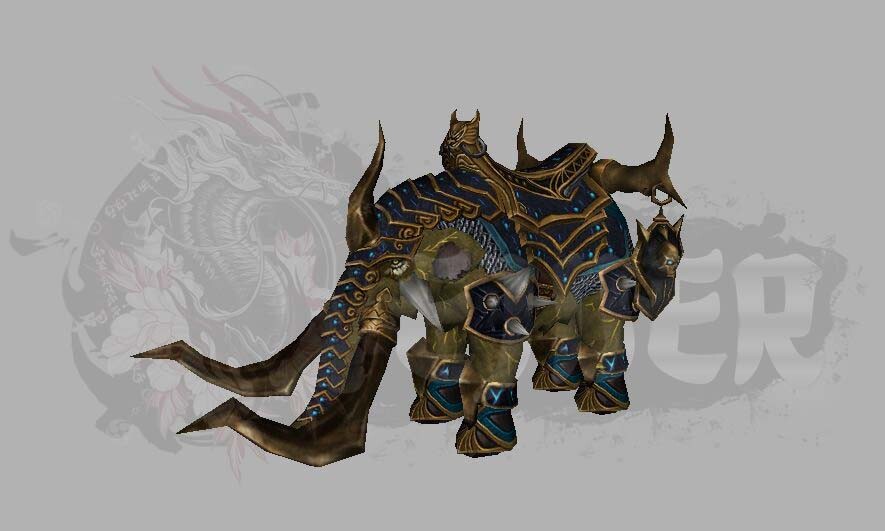
EJDER-Binek [14] Metin2 3D Model ve Görsel Geliştirme Rehberi
Metin2 oyununda EJDER-Binek [14] özel bir deneyim sunar. Bu binek, hem estetik hem de fonksiyonel açıdan oyuncuların dikkatini çeker. Ancak bazı geliştiriciler bu bineği özelleştirmek veya görsel olarak geliştirmek isteyebilir. Bu bağlamda, 3D modelleme araçları ve Metin2 model edit teknikleri büyük önem taşır.
EJDER-Binek [14] Nedir?
EJDER-Binek [14], Metin2 oyunundaki en prestijli bineklerden biridir. Özellikle yüksek seviye oyuncular tarafından tercih edilir. Bu bineğin görsel etkisi oldukça büyüktür. Ancak bazı oyuncular bu bineği kendi sunucularında özelleştirmek ister. Bu da Metin2 3D modelleme becerileri gerektirir.
Metin2 3D Modelleme ve Binek Geliştirmeleri
Metin2’de binek modelleri genellikle GR2 veya Granny formatında saklanır. Bu formatlar, 3ds Max veya Blender gibi programlarla açılabilir. Metin2 GR2 import ve export işlemleri, modelin oyun içine doğru şekilde entegre edilmesini sağlar. Bu sayede EJDER-Binek [14] gibi modeller üzerinde değişiklikler yapılabilir.
Blender ve 3ds Max Kullanımı
Blender ve 3ds Max, Metin2 model edit işlemlerinde sıkça kullanılan programlardır. Bu programlar sayesinde binek modelinin mesh yapısı, UV mapping, doku ve animasyonları düzenlenebilir. Bu tür düzenlemeler, bineğin görsel kalitesini artırır ve daha gerçekçi bir oyun deneyimi sunar.
Model Edit ve Animasyon Uyumluğu
EJDER-Binek [14] gibi modeller üzerinde çalışılırken, animasyon ve bone uyumu çok önemlidir. Yanlış yapılandırılmış bir model, oyun içinde bozuk görüntülenebilir veya çalışmayabilir. Bu nedenle, Metin2 bone yapısı dikkatlice incelenmeli ve modelin animasyonları test edilmelidir.
Metin2 NPC ve Monster Modelleriyle Entegrasyon
Bazı sunucu geliştiricileri, binek modelini NPC veya monster modelleriyle uyumlu hale getirmek ister. Bu durumda Metin2 NPC model ve monster model formatları göz önünde bulundurulmalıdır. Aynı dosya yapısı ve boyut sınırlamaları dikkate alınarak model uyumu sağlanabilir.
Metin2 Texture ve Skin Düzenlemeleri
Binek modelinin görsel etkisini artırmak için texture ve skin düzenlemeleri yapılabilir. Renk değişiklikleri, parlama efektleri veya desen ekleme gibi işlemlerle binek özelleştirilebilir. Bu tür düzenlemeler, UV mapping ve doku atama teknikleri ile yapılır.
Görsel Mod ve Eterpack Kullanımı
Eterpack ve benzeri görsel modlar, EJDER-Binek [14] gibi modellerin daha estetik görünmesini sağlar. Bu paketler, genellikle texture ve model değişiklikleri içerir. Sunuculara entegre edilerek bineklerin farklı görünümler kazanması sağlanabilir.
Sonuç
EJDER-Binek [14], Metin2 oyununda önemli bir yere sahiptir. 3D modelleme becerileri ile bu binek özelleştirilerek görsel olarak zenginleştirilebilir. Blender, 3ds Max, GR2 formatları ve texture düzenleme gibi teknikler, bu süreci kolaylaştırır. Metin2lobby.com olarak, bu konuda destekleyici içerikler sunarak topluluğu bilgilendirmeye devam ediyoruz.
Dragon-Mount [14] Metin2 3D Modeling and Visual Enhancement Guide
The Dragon-Mount [14] in Metin2 offers a special experience. This mount attracts players both visually and functionally. However, some developers may wish to customize or enhance its appearance, which requires 3D modeling tools and Metin2 model editing techniques.
What is Dragon-Mount [14]?
Dragon-Mount [14] is one of the most prestigious mounts in Metin2, preferred by high-level players. It has a significant visual impact. Some players want to customize this mount on their own servers, requiring Metin2 3D modeling skills.
Metin2 3D Modeling and Mount Enhancements
Mount models in Metin2 are usually stored in GR2 or Granny formats. These can be opened with programs like 3ds Max or Blender. Metin2 GR2 import and export processes ensure that models integrate correctly into the game. Thus, modifications can be made to models such as Dragon-Mount [14].
Using Blender and 3ds Max
Blender and 3ds Max are frequently used for Metin2 model editing. These programs allow adjustments to the mesh structure, UV mapping, textures, and animations of mount models. Such edits enhance the visual quality and provide a more realistic gaming experience.
Model Editing and Animation Compatibility
When working on models like Dragon-Mount [14], animation and bone compatibility is crucial. Incorrectly configured models may appear broken or not function within the game. Therefore, the Metin2 bone structure must be carefully reviewed and animations tested.
Integration with Metin2 NPC and Monster Models
Some server developers aim to make mount models compatible with NPC or monster models. In such cases, Metin2 NPC model and monster model formats must be considered. Model compatibility can be achieved by adhering to the same file structures and size limitations.
Metin2 Texture and Skin Modifications
To enhance the visual impact of mount models, texture and skin modifications can be applied. Adjustments such as color changes, glow effects, or adding patterns can customize the mount. Such edits are done using UV mapping and texture assignment techniques.
Visual Mods and Eterpack Usage
Eterpack and similar visual mods enhance the aesthetic appeal of mounts like Dragon-Mount [14]. These packages typically include texture and model changes. They can be integrated into servers to give mounts different appearances.
Conclusion
Dragon-Mount [14] holds an important place in Metin2. With 3D modeling skills, this mount can be customized and visually enriched. Techniques such as Blender, 3ds Max, GR2 formats, and texture editing simplify this process. At Metin2lobby.com, we continue to provide supportive content to inform the community.
